URL(s) where the issue occurs
https://mobile.twitter.com/gorhill
Describe the issue
"Get the most out of Twitter" annoyance on mobile devices. The Adguard lists cannot block it: https://github.com/AdguardTeam/AdguardFilters/issues/30008 .
Screenshot(s)
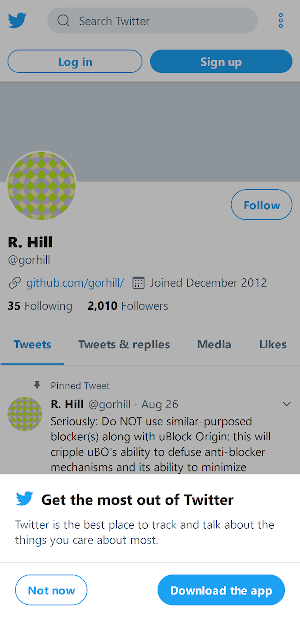
Versions
uBlock Origin 1.18.4
Firefox 65 for Android
Settings
+Adguard lists, uBlock Annoyances
 adranger
All 21 comments
test
mobile.twitter.com##span:has-text(/get the most/i):xpath(../../../../../..)
 mapx-
on 22 Feb 2019
mapx-
on 22 Feb 2019
It hides that element, but locks the scrolling both on my tablet and on the desktop version of Firefox with the "Responsive Design Mode" set to use Galaxy S9 as its user-agent. I have these enabled:
Adguard Base + Mobile Ads filter + Annoyances + Portuguese + Russian + Social + Spyware
All of the uBlock Origin lists except the experimental one
adranger
on 22 Feb 2019
add also
mobile.twitter.com##body:style(overflow: auto !important;)
mapx-
on 22 Feb 2019
@mapx- your combo works.
adranger
on 22 Feb 2019
No breakage this now mobile twitter?
 krystian3w
on 16 Jul 2019
krystian3w
on 16 Jul 2019
@krystian3w I'm getting "Don’t miss what’s happening" overlays again with this user agent: Mozilla/5.0 (Android 7.1.2; Tablet; rv:67.0) Gecko/67.0 Firefox/67.0. Open some Twitter profile and keep scrolling up and down to see if you get it too.

adranger
on 17 Jul 2019
OK.
This is new text in span.
bug "breaking" found yesterday:
!mobile.twitter.com#?##react-root > div > div > div > main > div > div > div:-abp-contains(cookie)
cut too match elements so disabled.
krystian3w
on 17 Jul 2019
Latest :nth-ancestor(6) = :xpath(../../../../../..)?
krystian3w
on 17 Jul 2019
@adranger & @krystian3w can you test mobile.twitter.com##div[tabindex="0"]:has-text(Don’t miss what’s happening) ?
This kills the overlay for me and only shows as 1 matching element when I use it when the overlay signup wall is visible but I don't use twitter enough to know if the site is fully functional after adding.
 yourduskquibbles
on 18 Jul 2019
yourduskquibbles
on 18 Jul 2019
@yourduskquibbles
Now instead of an overlay, it shows me the same bar as in the original post. Most people use Twitter in their own languages, so a filter based on a text string wouldn't cover everyone. Anyway, I don't use the site either.
adranger
on 26 Jul 2019
Most people use Twitter in their own languages, so a filter based on a text string wouldn't cover everyone.
@adranger Good point, makes that not a great solution.
New filter to test:
mobile.twitter.com##div[tabindex="0"]:matches-css(position:fixed)
This filter works for me and only targets 1 element and doesn't depend on the text string but the fact the overlay is using the position:fixed CSS attribute. Does this kill the bar from the original post for you? I can't recreate that bar only the full overlay so if it doesn't work, are you able to provide a screenshot of the Dev Tools inspector with the elements expanded?
yourduskquibbles
on 26 Jul 2019
New filter to test:
mobile.twitter.com##div[tabindex="0"]:matches-css(position:fixed)
This works,
Maybe with PC user-agent we can detect maybe blue ✖️ by:
##div[tabindex="0"]:has(div[style="margin-left: calc(0.75em - 15.5px);"]):matches-css(position:fixed)
if margin-left is stable.
But real mobile no have ✖️ (tested with emulate Samsung Galaxy / iPad) :
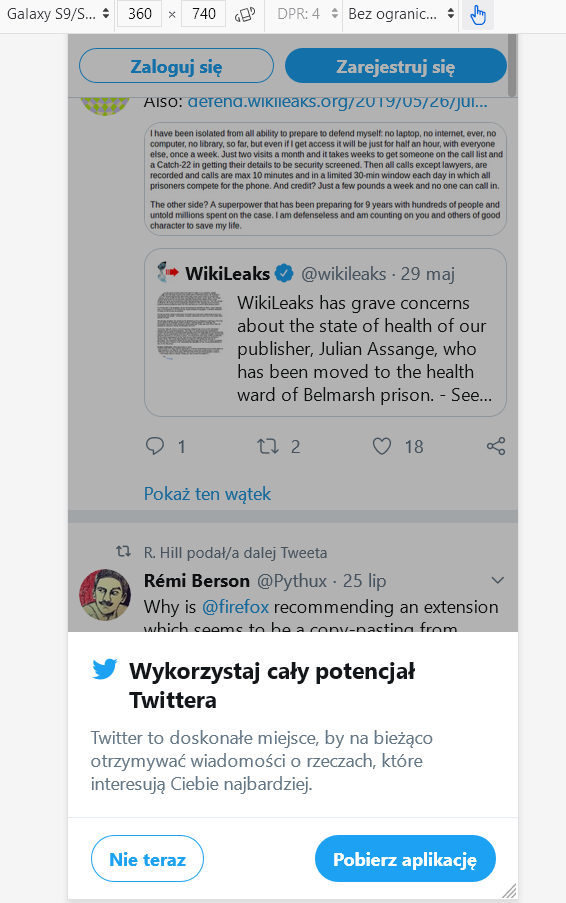 |
|
--- |
krystian3w
on 26 Jul 2019
@krystian3w Are you able to test filter
mobile.twitter.com##div[tabindex="0"]:matches-css(position:fixed):has([href="/signup"])
This filter should remove the signup modal on page scroll down and not break the image expand from issue #6025. Expand image functionality should be testable using https://mobile.twitter.com/KateAronoff/status/1156564030900834306
I believe the addition of :has([href="/signup"]) to the filter should work for users from all languages/regions since URL "/signup" should always be in English even if user language is not English. Since I think your language default is not English would be good if you were able to confirm this is true.
@llacb47 are you also able to test that this filter doesn't break any obvious mobile.twitter.com site function for you?
yourduskquibbles
on 31 Jul 2019
On real android popup promote app from iOS (no support avanced procedural cosmetic filtering in any AdBlocker) / Google Play Store:
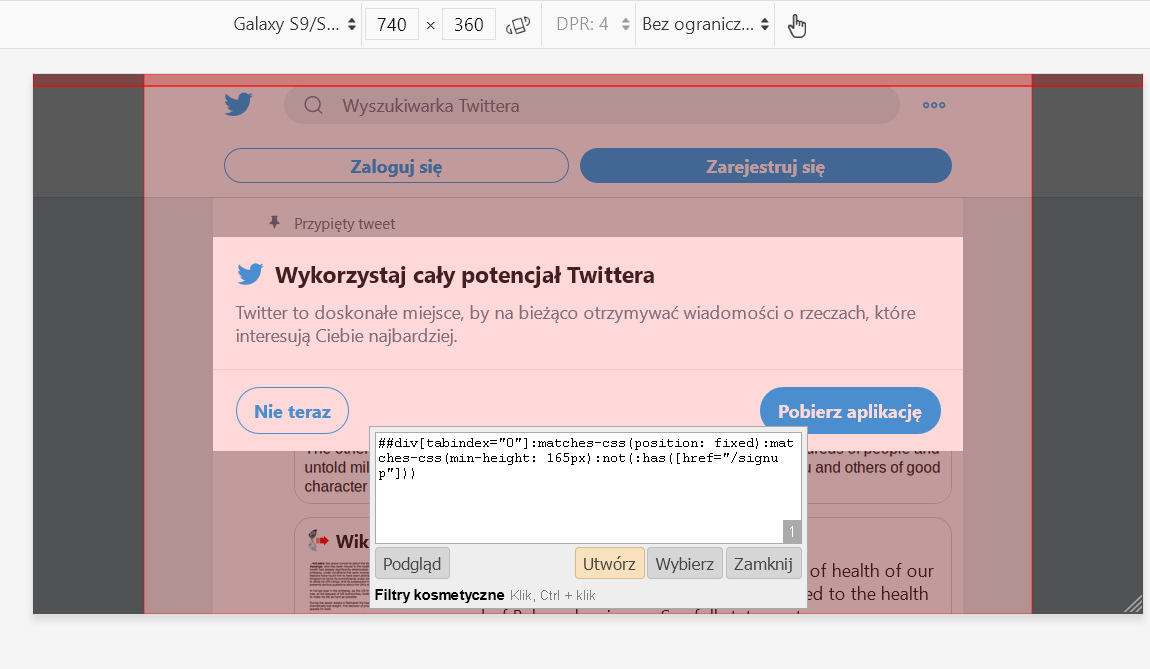 |
|
--- |
##div[tabindex="0"]:matches-css(position: fixed):matches-css(min-height: 165px):not(:has([href="/signup"]))
Also have popup without definied min-width: 165px.
krystian3w
on 6 Aug 2019
This prevent messages to load on scroll:
mobile.twitter.com##body:style(overflow: auto !important; margin: 0 !important;)
@yourduskquibbles what it was doing?
 gwarser
on 18 Dec 2020
gwarser
on 18 Dec 2020
gwarser
on 18 Dec 2020
gwarser
on 18 Dec 2020
These is for recover scrolling home page feeds.
@Yuki2718 / @gwarser / @yourduskquibbles / @DandelionSprout test these options:
overflow: visible !important
overflow: scroll !important
overflow: unset !important
overflow: revert !important
overflow: initial !important
overflow: inherit !important
if all break, maybe guilty is margin: 0 !important; or we should use :remove() in procedural filters:
 bug-rules
on 19 Dec 2020
bug-rules
on 19 Dec 2020
Removing margin: 0 !important; from filter does not help.
Tested on https://mobile.twitter.com/gorhill
gwarser
on 19 Dec 2020
So needed test other options to recover scroll when is locked for pop-ups "sing up" / "app promotion".
bug-rules
on 19 Dec 2020
App and cookie dialogs, small on bottom, are hidden and everything seems working.
gwarser
on 19 Dec 2020
App and cookie dialogs, small on bottom, are hidden and everything seems working.
Tested and seems working for me on both twitter.com and mobile.twitter.com after @gwarser removing the bad filter mobile.twitter.com##body:style(overflow: auto !important; margin: 0 !important;) with just default uBO lists + uBlock filters – Annoyances ONLY.
It might have been a filter to bring back scrolling on an old mobile twitter site design as also isn't a filter I have in Web Annoyances Ultralist either. Sorry was away not able to respond 4 days ago.
yourduskquibbles
on 22 Dec 2020
Related issues
 Htin
·
4Comments
Htin
·
4Comments
 BurungHantu1605
·
3Comments
BurungHantu1605
·
3Comments
 JulianNorton
·
3Comments
JulianNorton
·
3Comments
 KiLL4FuNK
·
4Comments
KiLL4FuNK
·
4Comments
 patrickdrd
·
3Comments
patrickdrd
·
3Comments