Uassets: Ads on google.com visible in mobile Firefox/Android
URL(s) where the issue occurs
google.com
Describe the issue
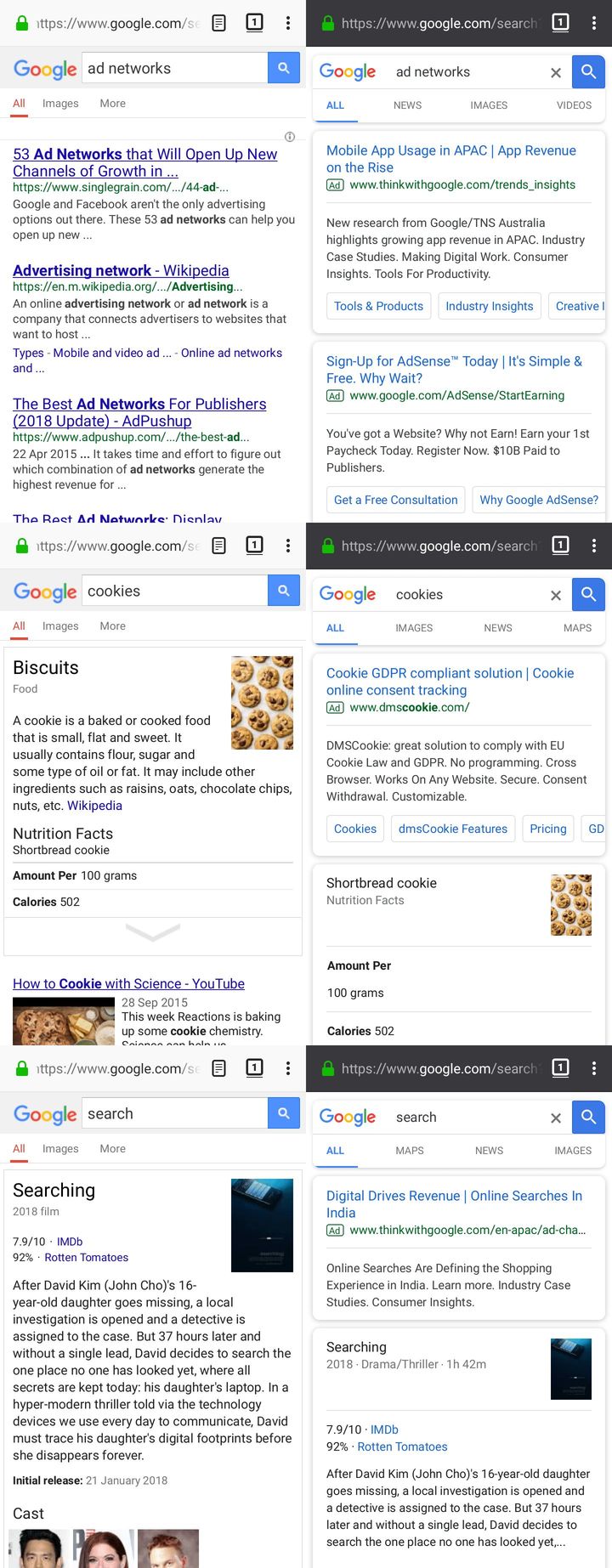
Ads are visible in the search results page but only in private browsing mode of Firefox for Android. No such issue in the regular (non-private) mode.
Screenshot(s)
In the screenshot below, left hand column shows regular mode and right hand column shows private browsing mode of Firefox for Android.
Versions
- Browser/version: Firefox for Android 62.0
- uBlock Origin version: 1.16.20
Settings
Default
Notes
Google is serving different layouts in regular and private browsing mode of Firefox/Android. Changing the user agent to Chrome/Android fetches another different but uniform layout in both modes where the ads remain blocked.
 in4u
in4u
All 49 comments
private browsing mode is buggy, see https://bugzilla.mozilla.org/show_bug.cgi?id=1313401
 uBlock-user
on 16 Sep 2018
uBlock-user
on 16 Sep 2018
Nothing to do with private browsing. You see two different pages. Google served old page to Firefox on Android for long time. Now Firefox is sending different user agent to Google search page to get new Chrome-like ("bubbles") interface and wee don't have cosmetic filters for this new interface yet.
 gwarser
on 16 Sep 2018
gwarser
on 16 Sep 2018
Go to uBO Settings -> Filter lists, and remove selection from "Ignore generic cosmetic filters" checkbox. Edit: helped at first, but not for long.
uBO on Android ignores Generic cosmetic filters for performance reasons, and because of this generic cosmetic filters for Google are made specific and moved to "uBlock filters" manually - these filters must be updated.
gwarser
on 16 Sep 2018
I cannot "pick" good filter on Android - nth of type + random classes only :(
gwarser
on 16 Sep 2018
@uBlock-user I believe @gwarser is on the right track. My limited research tells me that Google notoriously serves inferior user experience on Firefox for Android. Recently there's been some change where either Firefox is spoofing new user agent in private browsing mode to bypass Google's game or perhaps Google is rolling out new layout or both IDK.
@gwarser Enabling or disabling "Ignore generic cosmetic filters" option doesn't seem to make any noticeable difference in my case, ads remain unblocked regardless of this setting. As of now, my only resolution is to keep Chrome/Android as UA for Google. Hoping for new ad filters to come up and be incorporated in uBO soon!
in4u
on 16 Sep 2018
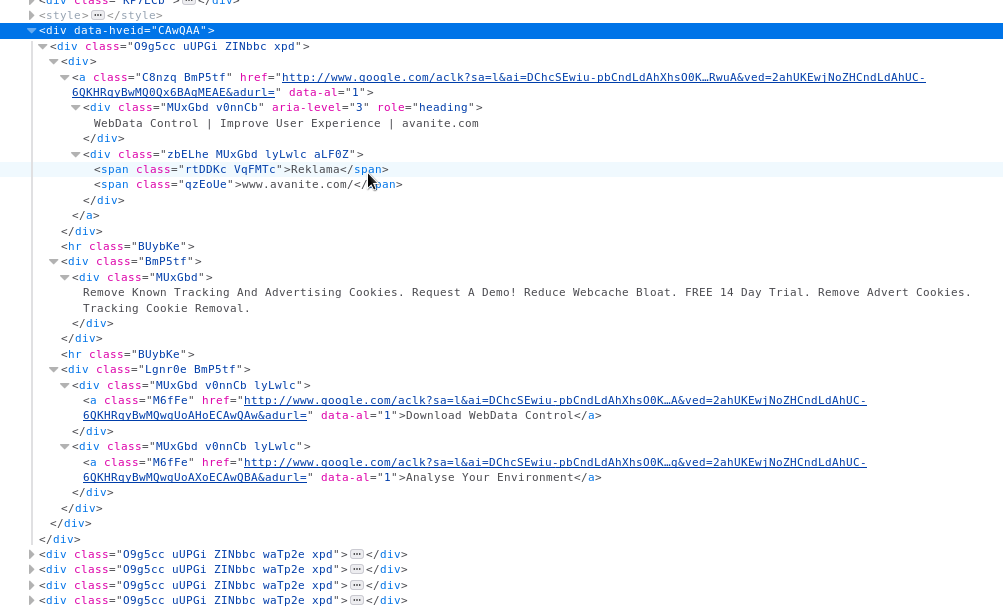
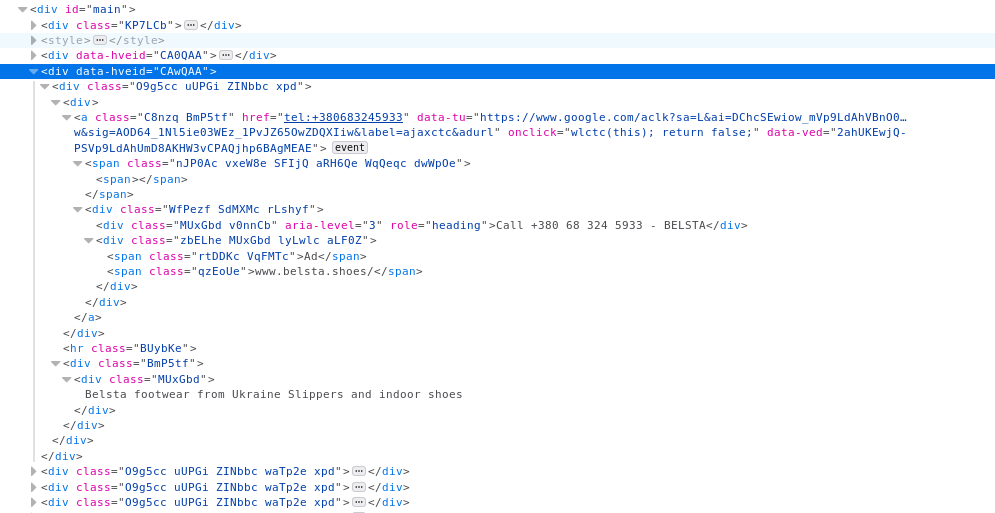
Advert:
<div data-hveid="CAwQAA"><div class="O9g5cc uUPGi ZINbbc xpd"><div><a class="C8nzq BmP5tf" href="http://www.google.com/aclk?sa=l&ai=DChcSEwiu-pbCndLdAhXhsO0KHSjiBP8YABAAGgJkZw&sig=AOD64_2dG7qvBvMfxpArHT4gaJRUEwRwuA&ved=2ahUKEwjNoZHCndLdAhUC-6QKHRqyBwMQ0Qx6BAgMEAE&adurl=" data-al="1"><div aria-level="3" role="heading" class="MUxGbd v0nnCb">WebData Control | Improve User Experience | avanite.com</div><div class="zbELhe MUxGbd lyLwlc aLF0Z"><span class="rtDDKc VqFMTc">Reklama</span><span class="qzEoUe">www.avanite.com/</span></div></a></div><hr class="BUybKe"><div class="BmP5tf"><div class="MUxGbd">Remove Known Tracking And Advertising Cookies. Request A Demo! Reduce Webcache Bloat. FREE 14 Day Trial. Remove Advert Cookies. Tracking Cookie Removal.</div></div><hr class="BUybKe"><div class="Lgnr0e BmP5tf"><div class="MUxGbd v0nnCb lyLwlc"><a class="M6fFe" href="http://www.google.com/aclk?sa=l&ai=DChcSEwiu-pbCndLdAhXhsO0KHSjiBP8YABABGgJkZw&sig=AOD64_1z9Q4COfmcz2TinIlOVS9q3Ve2lA&ved=2ahUKEwjNoZHCndLdAhUC-6QKHRqyBwMQwgUoAHoECAwQAw&adurl=" data-al="1">Download WebData Control</a></div><div class="MUxGbd v0nnCb lyLwlc"><a class="M6fFe" href="http://www.google.com/aclk?sa=l&ai=DChcSEwiu-pbCndLdAhXhsO0KHSjiBP8YABACGgJkZw&sig=AOD64_1sG3b8rcirGb2aJPbYsNeySyBaMg&ved=2ahUKEwjNoZHCndLdAhUC-6QKHRqyBwMQwgUoAXoECAwQBA&adurl=" data-al="1">Analyse Your Environment</a></div></div></div></div>

Normal link:
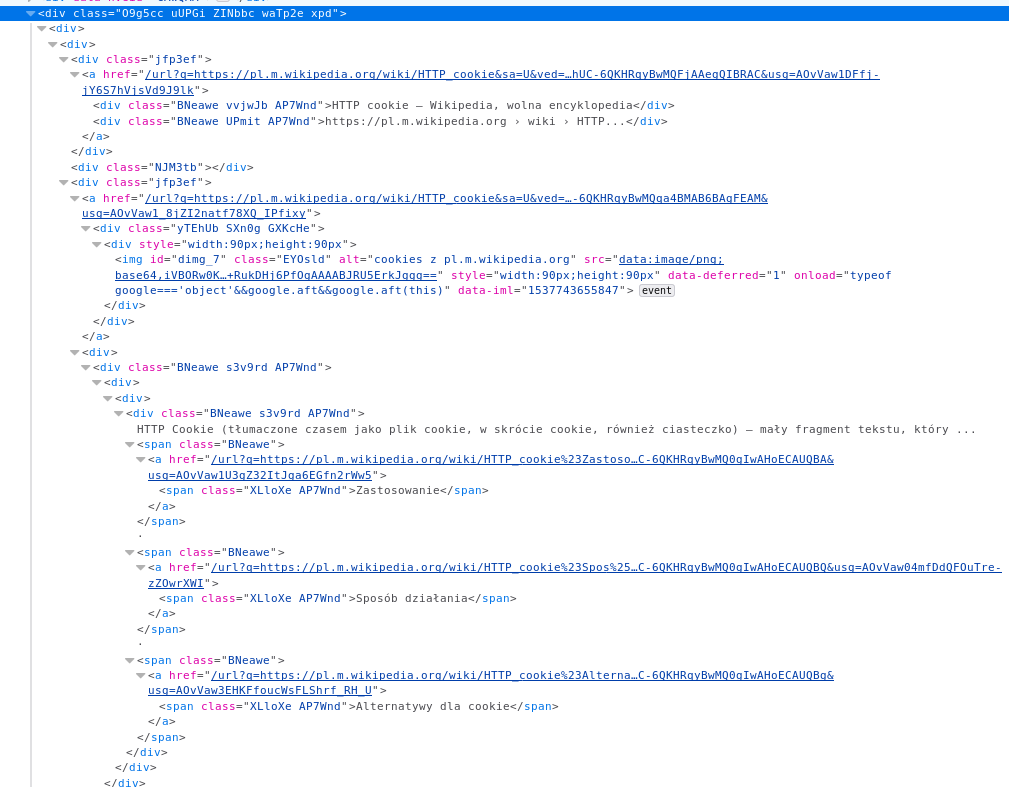
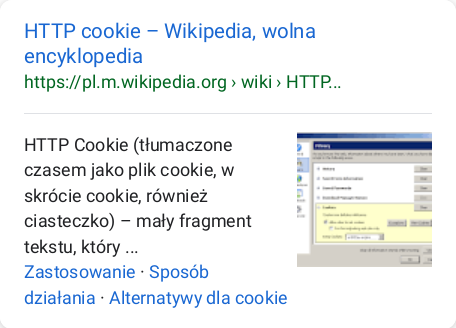
<div class="O9g5cc uUPGi ZINbbc waTp2e xpd"><div><div><div class="jfp3ef"><a href="/url?q=https://pl.m.wikipedia.org/wiki/HTTP_cookie&sa=U&ved=2ahUKEwjNoZHCndLdAhUC-6QKHRqyBwMQFjAAegQIBRAC&usg=AOvVaw1DFfj-jY6S7hVjsVd9J9lk"><div class="BNeawe vvjwJb AP7Wnd">HTTP cookie – Wikipedia, wolna encyklopedia</div><div class="BNeawe UPmit AP7Wnd">https://pl.m.wikipedia.org › wiki › HTTP...</div></a></div><div class="NJM3tb"></div><div class="jfp3ef"><a href="/url?q=https://pl.m.wikipedia.org/wiki/HTTP_cookie&sa=U&ved=2ahUKEwjNoZHCndLdAhUC-6QKHRqyBwMQqa4BMAB6BAgFEAM&usg=AOvVaw1_8jZI2natf78XQ_IPfixy"><div class="yTEhUb SXn0g GXKcHe"><div style="width:90px;height:90px"><img class="EYOsld" alt="cookies z pl.m.wikipedia.org" src="data:image/png;base64,iVBORw0KGgoAAAANSUhEUgAAAFoAAABaCAMAAAAPdrEwAAABL1BMVEX//////8zU0Mj//84AH2kKJGrX08q6urpCSWxCSHTc3NDp5+Pf29K0sazX1M3U1K729sX29vjY2MHf37PR0dGopZ/o5ta2t7zKysrg39/i49v08/H//tm9urS7vsPLx8DEx8zB0u6txOq3tp9JZ6A1Uo+EqthXdqw9X52mpoWdmpZNcKotSYgdQodri71ff7MAFWp3m80QNn6xsY68vJawv9eOjImYtOTJyaF/f4HMz9re4ux7e2KQkHOnqKycnaSnq7z09Nd1dHHJyLVtcZVYYI2Ji6gAAF1poOeZnbW3usqRo8MwPHckLGxPjuJjofqXwf0AhP1qjs6asb6n3gB+vNyWxms6fKdqoaPL5cjD3rJKSkqCrvtiYWKaqubE3uHEu4WZyqDU9nkUabuBiZku+BEeAAAGjklEQVRYhbWZCWObNhTHZWjQWiIMxUoghNCkR2pt6zE7FDsZrZs2V9N1V7ut6+59/8+w9yTA8tEmdrS/sZAU/EM8PT0khUSXVGdRxeQR6JrUyleVvqx0V+o+6g7qc9Du7i58H0o9UHpc616tJ6CdHaKxvpC62+jOWLuVHurQx5ruaVLkHYJtXkFNNVm1+n6lqs2y1fIOD6ZvMMsm65/S1jytb93ShDW35opklSzHtEjtAZ7DPjMrsp8QKddij46PH1W6ZkDk5GS/Rh8fHR2dvniJnxUDIifbJw369MWzo7PTs7MXZ8cm0Ntvvglqg5wfn78+X7l+/vrIhEXIt989qVt93azI96+SCu2smhVSE4W2MgedO/OkV1rg6VDEOuXzFh4ZJDJ11LXw9SzMYa3Kqb9CiVAaC4VOBU+5gIMLJkQmBORzkVp5DkXOc451cM4gm3N1LRMsxytFlrIcslAGDCjNBXHjJFLoLEuzNGWQwimFIrPgDAkU4ZeQZIzJC9JMXcXwYBbDDF6Gf8I/QhYuJbVqNCY8s3gmMkvdAeQpk6hgYIFUgjXSbE5VIT+yHhIi49/OzpPYYWgHeLyUsUEKDy7gECnYAR7XWkJka2sbtRPLYsNQDXDSqoFLobf3blVo45Ev//NgKNEOW6dGRVhb7FXogJiVG6cG0e7GxoaLCYhsb1fdiOgAAmySkGRpNAxIcFnlodCNe+NWD58SIp6LAc3pYFm0gy7MgU1O/907nWi1G4M6AV0KvQp+JkckeshOpdgyYWsYbo2aStcIOtBE4tgkekJ/v32loefQF7qhHhXIX2/+cRv0/llAeIzzTI5T06iTsE6J5Zhi+WK09BAOERg95Od3P9WvXXA+QHfKktOojGK+TstYlJSVES3zSJTsInCN5rlEv/3xB9KgryxPN8hwSAyi9ck+DOoYHCX5PzxEUMaikhpCb0xNFsbdiAM9lsEpdht/iBdAq/DkqfBUS3kIhKeyzAd5mVOaD0T+qxiUg98u/zgqPOUDGZ4+fPh9f9xqgLiJmyQJtD3Gc+IGsXv5Vq/i5KZaCJA/9ofbDfrKYnp4+sUNDKIntLZGDKITTeTdO80gQROhArJgYFJCz8iqyQx5/14RmhhS0ojSSNBOJCClcIaA0sFcBDHqArRyPnjLIBrBSY3eHwYEyTRiDFI3oYAsB1HkQoSKKLsM2mnQ8IuodE3ZOtME3gtv2cQUOtbUVCI6vnFVbWiaQN9sXVWePp1c77hj9MjdtNu+bRe+79tLkO0OxhCm3pDkaRmP0TeGa3av+PrgoHvQ6y7BVug6PLlPyyao3rRHdsvHFmOyVKs9z8twLQdncvZMa/UyRphA39ZE1mN3Cm3Lo75Y5e1L3tTWNOkhCAhD3w99qVbbL1Q+DFXVIo9FOjAtjZIx2g7b/R582v1+1+/2ekW3328X3V4fM71FOoBQmBzRQDeIDx8wADxSC/wQGqqKkLcX6tpZgyypmZ/OsXULrFt1m619Z3/bstc0WZPFtbXDWbTPylGrDeOx5bd91aOhXWWm0KuZ3EWAl6znlT4WPXzrQoXleWIOmm+Nwm633wv73V7X7/Wh4PehU7vdwp5Cw6Kbw8IF1toZBzTmGUtx5wEq5hhkNNqU/jlO7Npfp1uNUT/luGdgqVancs8AdxiseWhpb39sZK2X7Am722rlotK8ZR/qUwWWz0eHtLOJhm7LcQLdKg0tjR6qc9UATVNF3/8Iej/YLAoYKjB0ev1u0ev2il4Ipg9h8LSLYtrqczUf7Y9GmtPJNtrtFo4Y6ST2pcLixUPGnisTaIxM83URfhatPA2jhwwdt9158rJMbC6KtiHmFUUYFnDqw3vyNszjOnEH5xNJ4MK8WF6dgDsvjsZn7fthux0WIaAPkxIWjVFcUrfEKRpdHj01/OxDmLoFcu0NJ1flYHHJ2KIGmfUEe/Njsj/iPHNfYIdtk9LQ6fL7Qp+WCyHWrDS0MTnjJekl0Q68TPCVAtMjOHtqCxtXn3ILW+ZlJTy+vHwBNG5rp2meCjhzJkQKbxLcq8ZTLhjjnGE5Q3TKBFsADeFd4AY0w71sxpncqYYiHBlnkOBbIc0R7cDF6SIGqXf1G1l1TZ2ovUOvWpI2GwEXoj91V70BllWtZa5CbJRqgol75SEmyFlH2wbJHU95jBm0XN9ynkLqKDT0qCE0diDjuAWsWg0LmoEZNNVs/RxGEO6IWGa6kevyrMr5jKAn/v1Ql4np/2uM9R+RukDHj6PfOgAAAABJRU5ErkJggg==" style="width:90px;height:90px" id="dimg_7" data-deferred="1" onload="typeof google==='object'&&google.aft&&google.aft(this)" data-iml="1537743655847"></div></div></a><div><div class="BNeawe s3v9rd AP7Wnd"><div><div><div class="BNeawe s3v9rd AP7Wnd">HTTP Cookie (tłumaczone czasem jako plik cookie, w skrócie cookie, również ciasteczko) – mały fragment tekstu, który ...
<span class="BNeawe"><a href="/url?q=https://pl.m.wikipedia.org/wiki/HTTP_cookie%23Zastosowanie&sa=U&ved=2ahUKEwjNoZHCndLdAhUC-6QKHRqyBwMQ0gIwAHoECAUQBA&usg=AOvVaw1U3gZ32ItJga6EGfn2rWw5"><span class="XLloXe AP7Wnd">Zastosowanie</span></a></span> · <span class="BNeawe"><a href="/url?q=https://pl.m.wikipedia.org/wiki/HTTP_cookie%23Spos%25C3%25B3b_dzia%25C5%2582ania&sa=U&ved=2ahUKEwjNoZHCndLdAhUC-6QKHRqyBwMQ0gIwAHoECAUQBQ&usg=AOvVaw04mfDdQFOuTre-zZOwrXWI"><span class="XLloXe AP7Wnd">Sposób działania</span></a></span> · <span class="BNeawe"><a href="/url?q=https://pl.m.wikipedia.org/wiki/HTTP_cookie%23Alternatywy_dla_cookie&sa=U&ved=2ahUKEwjNoZHCndLdAhUC-6QKHRqyBwMQ0gIwAHoECAUQBg&usg=AOvVaw3EHKFfoucWsFLShrf_RH_U"><span class="XLloXe AP7Wnd">Alternatywy dla cookie</span></a></span></div></div></div></div></div><div class="Uk2dG"></div></div></div></div></div>
gwarser
on 24 Sep 2018
google.*##div[data-hveid]?
gwarser
on 24 Sep 2018
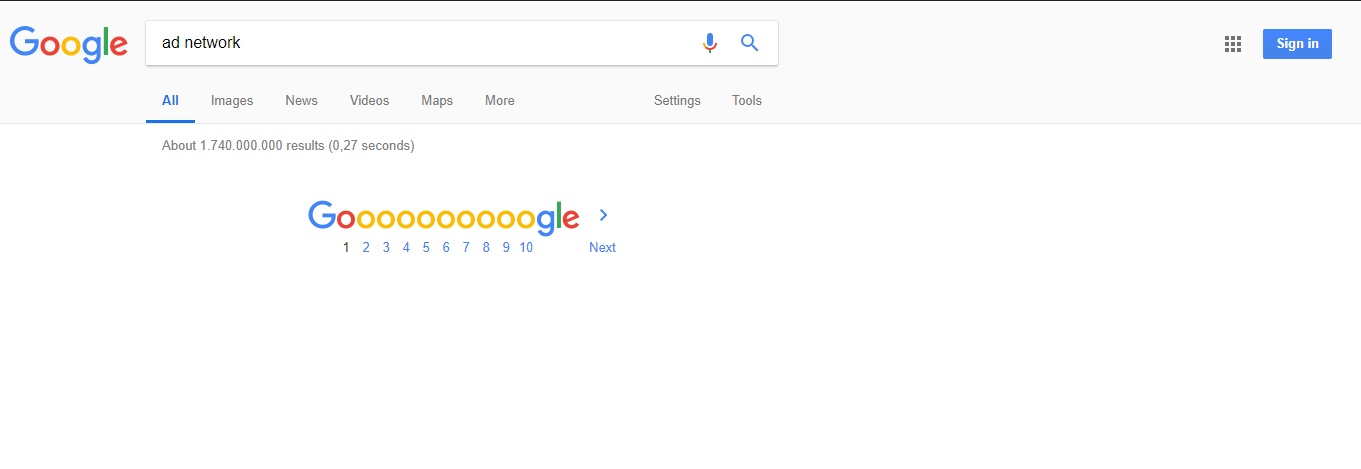
@gwarser google.*##div[data-hveid] filter seems to work fine and the ads indeed disappear. But I just found that all the search results also disappear when the user agent is set to Chrome. I don't know if this is just specific to UA spoofing on Firefox/Android or if this is the case with Chrome/Android browser too.
I presume many users would have set their UA for Google as Chrome to receive their tier 1 content. This filter might be a bummer for them.
in4u
on 24 Sep 2018
Using Chrome and adding
google.*##div[data-hveid]
 okiehsch
on 24 Sep 2018
okiehsch
on 24 Sep 2018
I just checked and UA is not spoofed on Firefox Android. On my phone I see Mozilla/5.0 (Android 7.1.2; Mobile; rv:63.0) Gecko/63.0 Firefox/63.0 When I copy this exact UA to "Custom Device" in Firefox Responsive Design Mode, then I see exact same source on desktop browser. (DPR 1.5, and 480x800 screen - ancient phone :] )
gwarser
on 24 Sep 2018
How about:
!#if env_mobile
google.*##div[data-hveid]
!#endif
Works setting the UA to android using Chrome on my end.
I do not have a device running android, so somebody who does is better equipped to test and add a fix.
okiehsch
on 24 Sep 2018
Same result with the updated filter. It works for Firefox/Android but switching the UA to Chrome/Android, Safari/iPhone or Safari/iPad, hides all the search results.
in4u
on 24 Sep 2018
@krystian3w I tested both your filters separately. First one has the same problem that @gwarser's filter had - it works in Firefox/Android but hides all search results in many other cases like Chrome/Android, Safari/iPhone, etc. The second filter was working fine until I noticed an ad sneaking past due to its data-hveid starting from "CB" instead of "CA".
In all ads, one constant seems to be a span element with the text "Ad". I am not sure but maybe some filter targeting data-hveid containing this particular span element might just do the trick?
in4u
on 24 Sep 2018
Okay guys, I did a little investigation by spoofing the user agent and here's what I found...
Following is the Tier 1 layout (received by mobile Chrome, Safari, etc.):
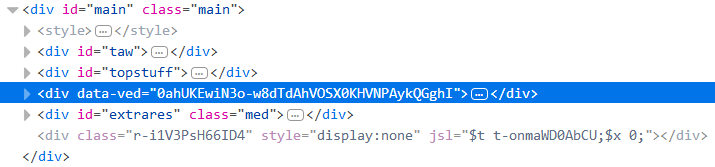
All the search results, including ads, are a few levels deep within the highlighted div and each of them has div[data-hveid].
Following is the Tier 2 layout (received by mobile Firefox):
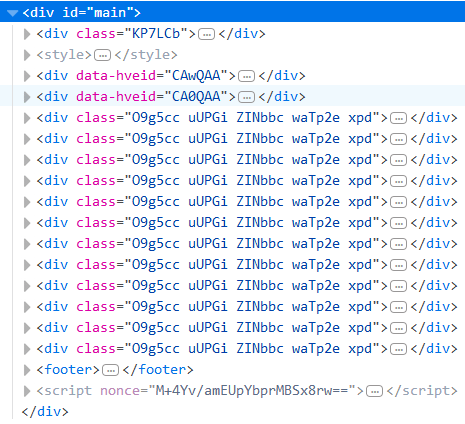
All the search results, including ads, are children of div[id="main"]. But only the ads have div[data-hveid] and not the search results.
Based on this, I tested a filter google.*###main > div[data-hveid] which seems to do the job without any unintentional adverse effect (so far), i.e. ads get blocked in Firefox and rest of the browsers remain unaffected. I haven't actually tested it in real browsers other than Firefox (just UA spoofing) so others should please test and confirm.
Now, would all this info be of any help in creating an efficient filter?
in4u
on 25 Sep 2018
@krystian3w I see no ads and only regular search results using those old version UA. The filter doesn't seem to negatively affect anything there. Do you get any problems with this new rule on either the mobile or desktop platform?
in4u
on 25 Sep 2018
Ah, alright @krystian3w. Let's see if this filter works for others too without causing any trouble. No problems highlighted by anyone so far, maybe this issue will be closed soon.
in4u
on 26 Sep 2018
Given that nothing else seems to be happening on this issue I am considering adding
!#if env_firefox
!#if env_mobile
google.*###main > div[data-hveid]
!#endif
!#endif
Does anyone have problems with this?
 ZaphodBeebblebrox
on 27 Sep 2018
ZaphodBeebblebrox
on 27 Sep 2018
Has the issue been fixed by the commit?
okiehsch
on 1 Oct 2018
I think so, I was leaving it open for someone to confirm.
ZaphodBeebblebrox
on 1 Oct 2018
Well, nobody is coming forward with any problem with this filter. I guess you guys should close the issue and re-open it later if someone does highlight a problem.
in4u
on 2 Oct 2018
Does the filter google.*###main > div[data-hveid]:if-not(span.spell_orig) work for you? I do not have an android phone, so I cannot test it myself.
ZaphodBeebblebrox
on 15 Oct 2018
@krystian3w @ZaphodBeebblebrox The links in that div start from /search. May be the filter needs to be modified to exclude such divs.
Edit: Does google.*###main > div[data-hveid]:if-not(a[href^="/search"]) work?
in4u
on 19 Oct 2018
@krystian3w Yes, do let us know if google.*###main > div[data-hveid]:if-not(a[href^="/search"]) works for you without causing any other trouble.
@ZaphodBeebblebrox The old filter is inadvertently hiding typo-related suggestions. Can you please re-open this issue until a new acceptable solution is found?
in4u
on 27 Oct 2018
Both looks good, both hide this:

gwarser
on 27 Oct 2018
@krystian3w @gwarser I noticed not only typo-related suggestions but "Top stories", "Popular on Twitter", etc. sections are also getting hidden. Meanwhile the ads seem to have their link href along the lines of <google domain>/aclk?... while also having a new attribute data-al. So, I guess our ad blocking approach needs to be changed so as to not hide genuine content.
I tried the following two filters separately:
google.*###main > div[data-hveid]:has(a[href*="/aclk?"])
google.*###main > div[data-hveid]:has(a[data-al])
Both seem to just block ads without affecting anything else. Can you guys test whether an ad gets through and/or some genuine content gets hidden with any of these filters?
in4u
on 27 Oct 2018
Just let me know what works, and I will add it. I don't have an android phone, so I can't test myself.
ZaphodBeebblebrox
on 27 Oct 2018
I don't have an android phone, so I can't test myself.
Do you really need one? https://www.digitalcitizen.life/emulate-mobile-device-desktop-browser
 kulfoon
on 27 Oct 2018
kulfoon
on 27 Oct 2018
Ok, I was able to test with a combination of responsive design mode and a user agent spoofer. Does google.*##:xpath(//span[text()="Ad"]//..//..//..//..) cause any problems for you?
ZaphodBeebblebrox
on 27 Oct 2018
@ZaphodBeebblebrox Unfortunately, that filter would not work on non-English languages. What is your feedback on the two filters I listed earlier?
in4u
on 27 Oct 2018
@krystian3w Try searching for "iPhone". It shows "Top stories" section in the search results. On one occasion, I also found "Popular on Twitter" feeds section on the same search results page but could not reproduce it (seems random).
And one would have to give one condition (mobile environment or Firefox environment, not together) for the time of repairing many servings as if gorhill added support multiple conditions.
AFAIK this particular layout is not served on any other platform. So, mobile/Firefox conditions are not really necessary. They were applied in the old filter but not actually required. Here too they can be applied but I think it's redundant, unless of course I am missing something.
in4u
on 27 Oct 2018
google.*###main > div[data-hveid]:has(a[data-al]) appears to work for me as well. Let us know if you have any problems with it.
ZaphodBeebblebrox
on 27 Oct 2018
Hey guys, two issues:
Easylisthas thisdiv#main > div.ZINbbc.xpd.O9g5cc.uUPGirule for many Google domains which is breaking the search results page on Firefox for Android. Sections like typo-related suggestions, what people ask, etc. are also getting blocked due to this rule.The conditional rule last added by @ZaphodBeebblebrox needs to be updated where
google.*###main > div[data-hveid]:has(a[data-al])should possibly be replaced bygoogle.*###main > div.ZINbbc.xpd.O9g5cc.uUPGi:has(a[data-al]).
If Easylist's rule in [1] is badfiltered and the one in [2] above is implemented then I think there should not be any issues. Maybe others can highlight any potential breakages and/or come up with a better solution.
in4u
on 22 Feb 2020
Does the filter in [1] breaks something on desktop ?
Why the change of [2] ?
 mapx-
on 22 Feb 2020
mapx-
on 22 Feb 2020
@ryanbr
mapx-
on 22 Feb 2020
I have not experienced any breakage with [1] on desktop.
The change of [2] maybe required since I no longer see div[data-hveid] but only div.ZINbbc.xpd.O9g5cc.uUPGi. Perhaps Google modified their code.
in4u
on 22 Feb 2020
Could you test on mobile:
!#if env_mobile
google.*#@#div#main > div.ZINbbc.xpd.O9g5cc.uUPGi
!#endif
No dice. Breakage is still there on Firefox for Android.
in4u
on 22 Feb 2020
Did you test on a mobile device or only using a desktop simulator ?
mapx-
on 22 Feb 2020
Both.
Edit: Never mind. It worked. Turns out Adguard Mobile Ads list has a similar rule as that of Easylist. Will have to report to them as well.
in4u
on 22 Feb 2020
Okay, after digging around a bit more I think google.*##a[href*="/aclk?"][data-al]:xpath(../..) could be a safe rule. It can be wrapped in a conditional mobile directive but it's not really required.
This combined with the Easylist exception rule by @mapx- suggested here should block just the ads without breaking anything.
It will also eliminate the need for two currently existing rules - this and [2] above.
in4u
on 22 Feb 2020
check again with the last filters
mapx-
on 22 Feb 2020
I used :nth-ancestor(2) for :xpath(../..)
mapx-
on 22 Feb 2020
Works great! Ads blocked. Nothing broken. Now waiting for the Adguard team to fix their rule.
in4u
on 22 Feb 2020
@mapx- You can remove the exception rule now that the concerned filter has been taken off Easylist.
in4u
on 24 Feb 2020
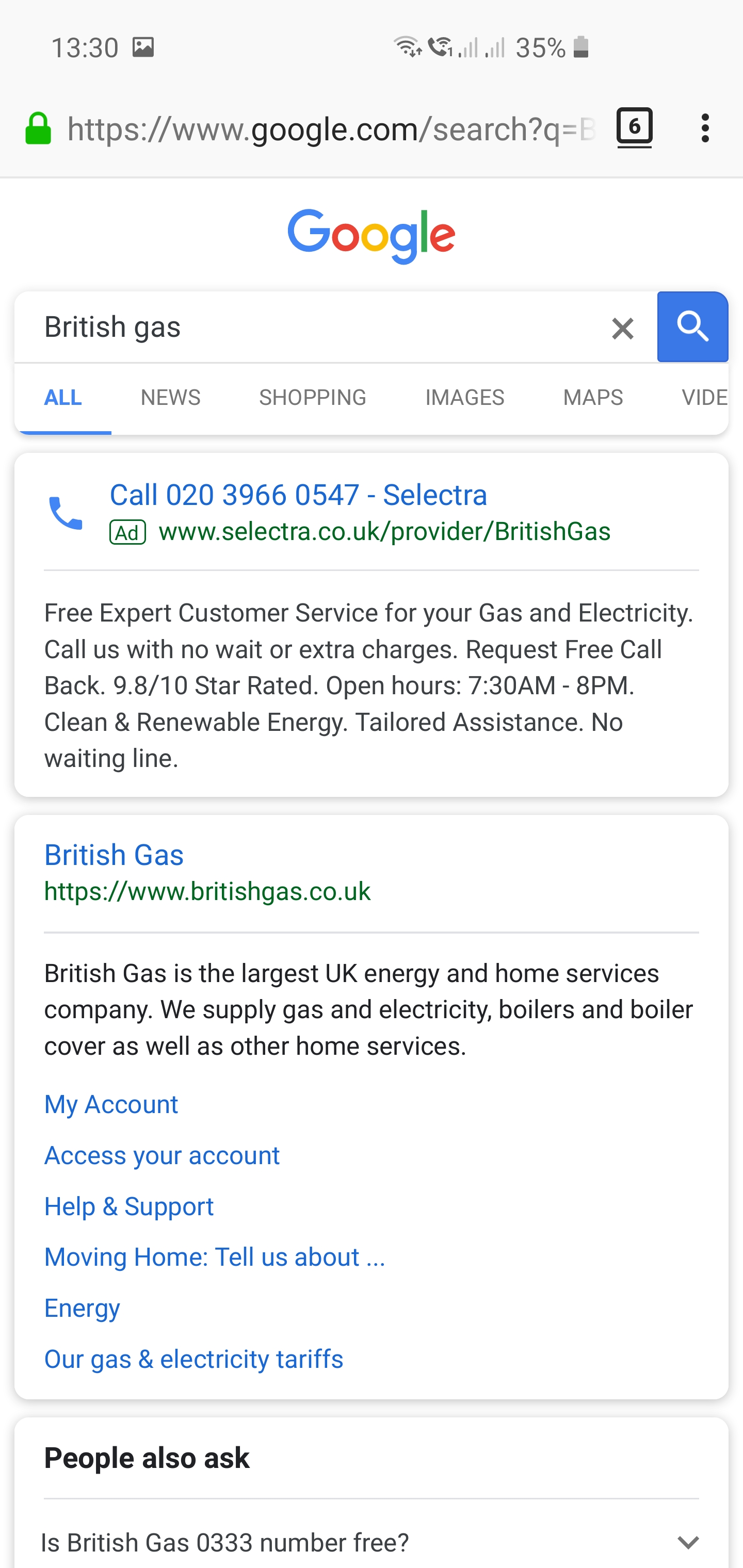
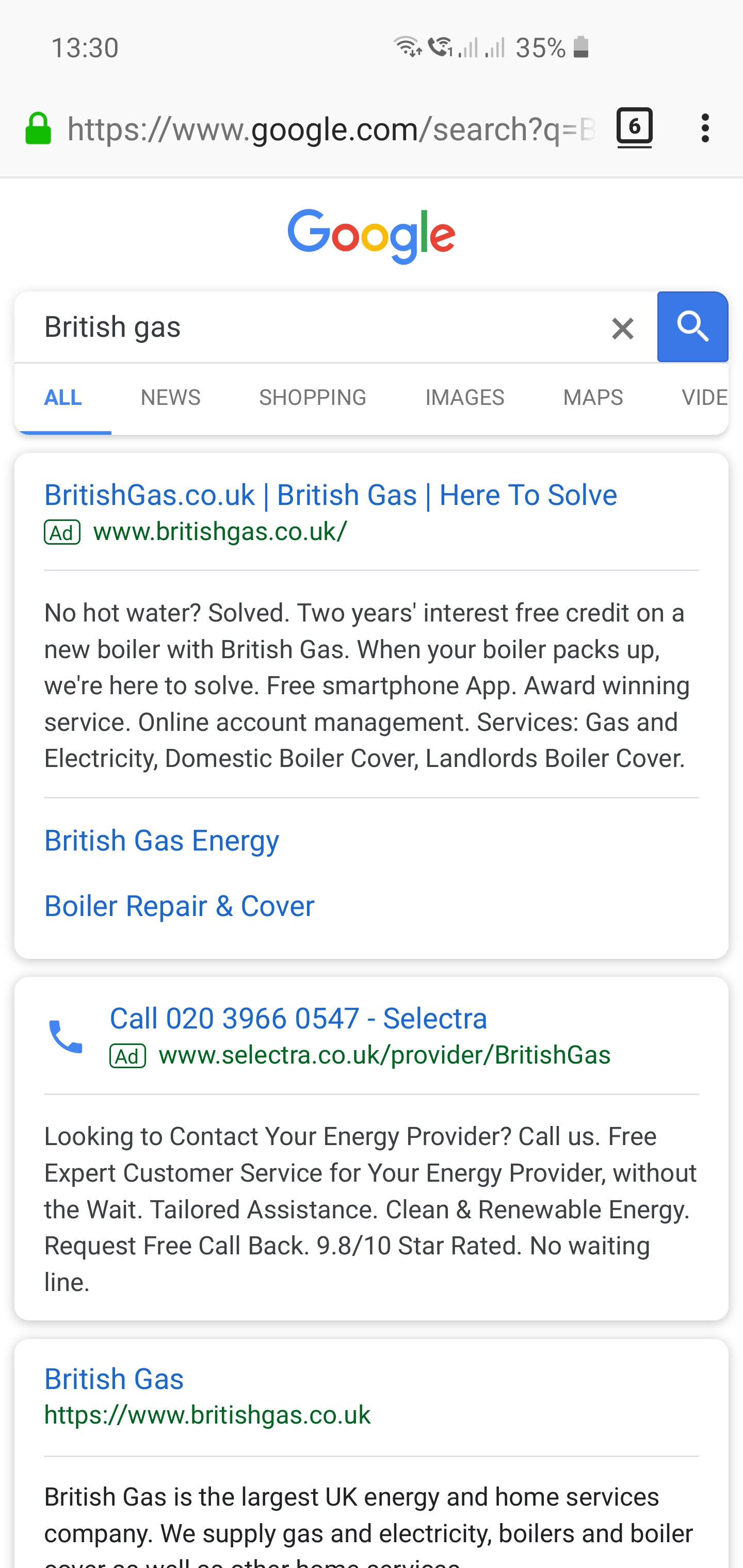
I may have the same issue. On Firefox Android I see 2 ads without ublock and 1 with it on. (I see a flash of both then one dissappears after less than a second.)
I have unsuccessfully attempted to use the rules above but I may have applied them wrong - I don't understand which comments above are still current.
 yaakovfeldman
on 10 Mar 2020
yaakovfeldman
on 10 Mar 2020
Hey @mapx-, perhaps you should modify this filter to replace :nth-ancestor with :upward as per the deprecation note in uBO's latest release.
in4u
on 6 Apr 2020
Everyone's not updated to the latest stable release.
uBlock-user
on 6 Apr 2020
Oh, right. Didn't realize that!
in4u
on 6 Apr 2020
Related issues
 patrickdrd
·
4Comments
patrickdrd
·
4Comments
 wis
·
4Comments
wis
·
4Comments
 sebastianbell
·
3Comments
sebastianbell
·
3Comments
 Htin
·
4Comments
Htin
·
4Comments
 ip012
·
3Comments
ip012
·
3Comments
Most helpful comment
Using Chrome and adding

google.*##div[data-hveid]