Uassets: Problems with Funimation subtitles & video player (NO THIS WASN'T FIXED)
URL(s) where the issue occurs
https://www.funimation.com/shows/blood-c/it-is-for-thy-sake/
Describe the issue
Ok so first off, can we please not close a post before confirming with the creator that the problem is actually resolved? The guy who posted about it a few days ago was referring to me in his post; the reddit exchange with me that i linked below is the convo we had, and as he told you in his post, that 'solution' didn't work me, so I'm puzzled why someone took it upon themselves to close my issue for a solution that had already been confirmed didn't work, without even asking for my feedback first.
So it does block all of the ads at the site, without triggering the site's adblocker detection, so there's that- but when I play a video, I immediately notice the video player GUI is screwed up- buttons are not the right size, and they are shifted over so the (time played) / (time remaining) is displayed where the / has been word-wrapped down to the next line and the (time remaining) has been word-wrapped down another line under that so when you mouse-over the bottom area of the video player where the progress bar and timestamp are, it comes up way too high and looks weird. Also the volume control button has been overlaid directly on top of the pause button. And, more importantly, while the video still plays, the real issue that initiated all of this is that it blocks the subtitles from coming through (funimation apparently uses a separate script to handle its subtitles). This has not happened with any other video player from any other site I've ever been to.
Also, note that if you want to test the site, you need a free account- you can do this by clicking login, clicking create account, and it will look like it's forcing you to start a free trial period. All you have to do is enter an email address and a password, and when it prompts you to input either a Paypal or CC# for a subscription payment method, hit Cancel at the bottom and it will leave you in the free account with the email you just created.
Screenshot(s)

Versions
Browser/version: Firefox Quantum: 61.0b11 (64-bit)/ Microsoft Edge 42.17134.1.0/ Google Chrome 67.0.3396.79 (Official Build) (64-bit)
uBlock Origin version: Firefox- 1.16.8/ Edge- 1.15.24/ Chrome- 1.16.8
Settings
All default.
Notes
I originally did a google search for the issue, which took me to an old reddit thread on the ublock origin subreddit from someone having the issue with a different site; i did try the suggestions there which did not resolve the issue. I did at one point open the logger and refresh the site and try both the dynamic and static filtering on the various elements being blocked, and nothing i tried worked. I then created my own reddit post on the subreddit (link: https://www.reddit.com/r/uBlockOrigin/comments/8p3nq2/blocking_subtitles_on_funimation/) and had a lengthy exchange with someone there; same story- everything i tried has changed nothing.
For the record, I tried removing it and reinstalling the extension (which didn't do anything as i had never changed any of the default settings or made my own rules/filters). I then used both Edge and downloaded Chrome to try the site with their respective ublock origin extensions; With edge, the video would not even play, and with Chrome I had the exact same issue. I have no idea what to try from here.
 SlippyFist
All 17 comments
The guy who posted about it a few days ago was referring to me in his post; the reddit exchange with me that i linked below is the convo we had, and as he told you in his post, that 'solution' didn't work me, so I'm puzzled why someone took it upon themselves to close my issue for a solution that had already been confirmed didn't work, without even asking for my feedback first.
I replied in the original issue and I fail to see why you had to open two new issues about the same site.
A closed issue does not mean that you can't continue the discussion and it certainly is no reason to open new ones.
You opened https://github.com/uBlockOrigin/uAssets/issues/2508 and you as the OP can reopen it by clicking the big "Reopen Issue" button.
Edit: @SlippyFist my bad I always thought the OP could reopen issues, but
If a contributor closes the issue, the original issue creator is not able to reopen it
Given that issues can be closed automatically with commit messages, the ability for the reporter to reopen the issue if the commit does not completely fix the issue would be logical, in my opinion.
Maybe Microsoft will "fix" this 😉
 okiehsch
on 10 Jun 2018
okiehsch
on 10 Jun 2018
From the screenshot, you have Adguard and ABP installed as well. Disable such extensions and only run with uBlock Origin, see if you can reproduce again.
 uBlock-user
on 10 Jun 2018
uBlock-user
on 10 Jun 2018
I replied in the original issue and I fail to see why you had to open two new issues about the same site.
A closed issue does not mean that you can't continue the discussion and it certainly is no reason to open new ones.
You opened #2508 and you as the OP can reopen it by clicking the big "Reopen Issue" button.
I opened the first discussion because I had no idea that the guy from reddit created an issue here; he said he "created an issue with the uBlock people" and I had no idea that meant github. Honestly, he came here with the issue and came back to the discussion with a solution that didn't work, so I probably wouldn't have even bothered coming here if i had realized it. I don't know why you would expect me to continue a conversation on a closed issue that no longer displays in the list of issues with the default filter set that only displays open ones. And are you sure as a new member I can reopen an issue, because i don't see any "big Reopen Issue" button anywhere on that page.
From the screenshot, you have Adguard and ABP installed as well. Disable such extensions and only run with uBlock Origin, see if you can reproduce again.
ah, i forgot to include in the notes that i obviously tried disabling all of the other extensions. again, keep in mind that the site isn't working in 2 other browsers, both of which have absolutely no other extensions installed
SlippyFist
on 10 Jun 2018
OK, OK, next time check also closed issues it's only one click away. Issue may be fixed and closed but your UBO may not have this list updated (for example). You can comment in closed issues, and we see this and reopen if needed. Yes, you can reopen issues only when closed by yourself.
 gwarser
on 10 Jun 2018
gwarser
on 10 Jun 2018
I think it's worth noting that the site that is being used to host the screenshot OP posted (https://postimg.cc/image/vxuea38od/) has unblocked ads.
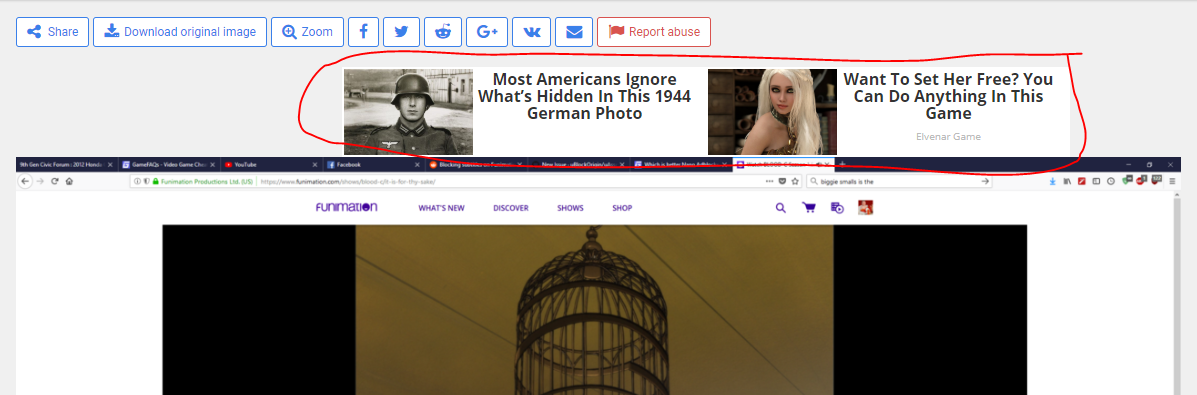
 terrorist96
on 11 Jun 2018
terrorist96
on 11 Jun 2018
that's weird.. i don't see any ads there. i do use a combo of adblockers though. please note that i did disable them at funimation when trying to figure this out- and that they don't work with the site in any capacity because they trigger the site's adblocker detection which blocks the video with a message telling you to disable them; ublock origin is the only one that bypasses this and allows the video to play
SlippyFist
on 11 Jun 2018
I can reproduce OP's issue. Here's an example link that is free to watch without an account:
https://www.funimation.com/shows/one-piece/cutting-the-father-son-relationship-sanji-and-judge/
Trying on a test profile, I noticed that the same issue existed with the video player looked deformed, but once I clicked the big GDPR-related ACCEPT button at the bottom, the video player played and looked normal. But the issue is ever-present on my main profile with uBO.
terrorist96
on 12 Jun 2018
@okiehsch Maybe Microsoft will "fix" this 😉
On GitLab, the reporter can reopen issue unless the issue is locked, which IMO makes sense. GitLab also has confidential issues which comes in handy when the website asks for an account.
The only problem is GitLab is hosted on Azure, and Microsoft is doing a pretty good job in making sure GitLab goes down on a weekly basis. Also it looks like GitLab had enough and is moving to Google.
 jspenguin2017
on 12 Jun 2018
jspenguin2017
on 12 Jun 2018
so is there any progress on this issue? funimation is the only site ive ever been to that has a problem with ublock origin
SlippyFist
on 15 Jun 2018
I don't have an account, so I can't test.

If you want, you can submit a confidential issue here, and I will have a look:
https://gitlab.com/xuhaiyang1234/NanoAdblockerSecretIssues/issues
jspenguin2017
on 15 Jun 2018
@jspenguin2017 try https://www.funimation.com/shows/one-piece/cutting-the-father-son-relationship-sanji-and-judge/
terrorist96
on 15 Jun 2018
That page does not work at all, even if I whitelist.

jspenguin2017
on 15 Jun 2018
Weird, it was working for me the other day. Not working for me right now either.
terrorist96
on 15 Jun 2018
If you double click on the video player when it looks like that, the video will load. Or at least it does for me.
 ZaphodBeebblebrox
on 15 Jun 2018
ZaphodBeebblebrox
on 15 Jun 2018
@zaphodbeebblebrox Yep, that works.
Subtitles work fine for me.

jspenguin2017
on 15 Jun 2018
If you double click on the video player when it looks like that, the video will load. Or at least it does for me.
@zaphodbeebblebrox that does not work for me :/ double clicking the video literally does nothing.
SlippyFist
on 16 Jun 2018
This is working fine for me now. Should it be closed?
terrorist96
on 22 Jul 2018
Related issues
 pepablock
·
4Comments
pepablock
·
4Comments
 Jose1971AB
·
3Comments
Jose1971AB
·
3Comments
 KiLL4FuNK
·
4Comments
KiLL4FuNK
·
4Comments
 ghost
·
3Comments
ghost
·
3Comments
 efih
·
4Comments
efih
·
4Comments
Most helpful comment
OK, OK, next time check also closed issues it's only one click away. Issue may be fixed and closed but your UBO may not have this list updated (for example). You can comment in closed issues, and we see this and reopen if needed. Yes, you can reopen issues only when closed by yourself.