Replace the bracketed [...] placeholders with your own information.
URL(s) where the issue occurs
https://www4.9anime.is/watch/steinsgate-0-dub.l9zn/wzowmk.
Describe the issue
[anti ad block "please disable adblock to continue to use this site.]
Screenshot(s)
Versions
- Browser/version: [chrome canary/idk latest version atm]
- uBlock Origin version: [1.0.0.5.0]
Settings
- [none pretty sure]
Notes
[disabling javascript = cant load video]
 scoutyongithub
All 106 comments
Did you update ublock filters ?
https://github.com/uBlockOrigin/uAssets/commit/5ab918d6cd5be5acda57cff82ad6113afbc35ff7
 mapx-
on 21 May 2018
mapx-
on 21 May 2018
Anti-adblock is back again. Click on video to trigger.
 ZaphodBeebblebrox
on 22 May 2018
ZaphodBeebblebrox
on 22 May 2018
The site changes regularly, so this issue will remain open for now, even if the issue is fixed at the moment.
 okiehsch
on 22 May 2018
okiehsch
on 22 May 2018
9anime.*##script:inject(setTimeout-defuser.js, return, 2000) isnt working and 9anime says to disable ublock to run service
 bdishan
on 22 May 2018
bdishan
on 22 May 2018
Force an update of your filter lists and it works.
ZaphodBeebblebrox
on 22 May 2018
Force an update of your filter lists and it works.
They changed something again, doesn't work, which is expected as they're keeping track of this issue tracker and swiftly firing back.
 uBlock-user
on 22 May 2018
uBlock-user
on 22 May 2018
Works fine on my end.
okiehsch
on 22 May 2018
Not working here anymore, did you add a new filter or removed an existing one ?
uBlock-user
on 22 May 2018
If your filters are up to date and you use a default setup it works, last filters added https://github.com/uBlockOrigin/uAssets/commit/c88dea10fd2d5e32343e56a0a58483738c8fb1f6
okiehsch
on 22 May 2018
It is updated, but not on the default setup, because I use numerous other filterlists which is fine, as, this filter Working now.@@||trends.revcontent.com/serve.js.php$script,domain=9anime.is won't do for me as I run a strict CSP policy and I don't whitelist any ad-servers. Nvm, will have to find another solution.
uBlock-user
on 22 May 2018
I'm using Nano Adblocker v1.0.0.42.
I'm using WaterFox 56.2.0 (64 bit)
URL Where this occurs is;
https://www4.9anime.ru/watch/black-clover-dub.2y44/1wqpqw
I updated my filters and still not able watch the video!
Loading the page with the Nano filters active causes the video element to be replaced with an element containing the message:
"Please disable AdBlock then try again. If you want to watch anime in high quality without ads,just get a subscription in premium anime site. Thanks for your supporting!"
What to do???
Side note; It is in First-Party Scripts...
 charlie309
on 23 May 2018
charlie309
on 23 May 2018
Update your filters again, your example link works now with Chrome and Firefox on my end.
okiehsch
on 23 May 2018
Not working... Still getting the "Please disable AdBlock then try again. If you want to watch anime in high quality without ads,just get a subscription in premium anime site. Thanks for your supporting!"
charlie309
on 23 May 2018
It works with uBlock and Nano using Chrome or Firefox.

Probably a Waterfox issue.
okiehsch
on 23 May 2018
I don't have a single rule in Nano Filters that could affect 9anime, stop blaming Nano please.
 jspenguin2017
on 23 May 2018
jspenguin2017
on 23 May 2018
I think 9anime changed something again, anti-adblock message pops up. I am using latest uBlock + Nano on Chrome and updated/purged filters.
 taeinha
on 23 May 2018
taeinha
on 23 May 2018

 KiLL4FuNK
on 23 May 2018
KiLL4FuNK
on 23 May 2018
The site is broken again.
ZaphodBeebblebrox
on 24 May 2018
Well, the site changes inside a few hours, so adding new filters to a list that auto-updates every 4 days seems rather pointless.
Adding
9anime.*##.rc-item-wrapper:style(height: 1px !important)
9anime.*###sidebar > .text-center.crop.widget:style(height: 7px !important)
9anime.*#@#.rc-item-wrapper:style(visibility: collapse !important)
9anime.*#@##sidebar > .text-center.crop.widget:style(height: 6px !important)
@@||jsc.mgid.com^$script,domain=9anime.is
to your filter list should fix the issue.
okiehsch
on 24 May 2018
every 4 days
Every 5 days.
jspenguin2017
on 24 May 2018
okiehsch
on 24 May 2018
When was that added?
The other uBlock filters don't have the header yet, do you plan on adding them?
jspenguin2017
on 24 May 2018
When was that added?
https://github.com/uBlockOrigin/uAssets/commit/74d3c608e81f51bea028f002b10f4c1f00f58f26
okiehsch
on 24 May 2018
Would you guys mind explaining a complete newbie why it still doesn't work for me while using nanoadblocker and defender even though I purged my cache and then updated filters?
 lpchagnon
on 24 May 2018
lpchagnon
on 24 May 2018
You need to add the filters that okiehsch posted in the tab labeled My Filters in uBlock's settings.
ZaphodBeebblebrox
on 24 May 2018
I tried that but it still doesn't work. Does the fact that I'm using nano adblocker and not ublock change something? I thought nano adblocker was an extension of ublock.
lpchagnon
on 24 May 2018
You use both uBlock Origin and Nano?
Just use one, does not matter which one, with a default setup add the filters to your My Filters tab and try again.
It works on my end.
okiehsch
on 24 May 2018
No I mean I thought nano was an upgraded version of ublock. I only use nano adblocker and nano defender. And for some reason it's still not working for me. Does the fact that I'm on a Mac change something?
lpchagnon
on 24 May 2018
the filters of ublock origin should be updated every 24 hours
KiLL4FuNK
on 24 May 2018
@lpchagnon "Does the fact that I'm on a Mac change something?"
That is certainly possible, I can't test with a system running MacOS.
I can tell you that it works with Windows and Linux on my end.
okiehsch
on 24 May 2018
@okiehsch just to make sure I followed the right steps, I clicked on your 74d3c60 link, I clicked on "view", I selected and then copied the whole thing, and I pasted it in My filters. Am I missing something?
lpchagnon
on 24 May 2018
No, you didn't follow the right steps, copy
9anime.*##.rc-item-wrapper:style(height: 1px !important)
9anime.*###sidebar > .text-center.crop.widget:style(height: 7px !important)
9anime.*#@#.rc-item-wrapper:style(visibility: collapse !important)
9anime.*#@##sidebar > .text-center.crop.widget:style(height: 6px !important)
@@||jsc.mgid.com^$script,domain=9anime.is
and paste it in to My filters, then click Apply changes
okiehsch
on 24 May 2018
Oh ok, but still I just tried and it's not working so I guess it's cause I'm on Mac?
lpchagnon
on 24 May 2018
Your guess is as good as mine.
okiehsch
on 24 May 2018
I see... well thanks anyway for introducing a newbie to the world of adblock filters!
lpchagnon
on 24 May 2018
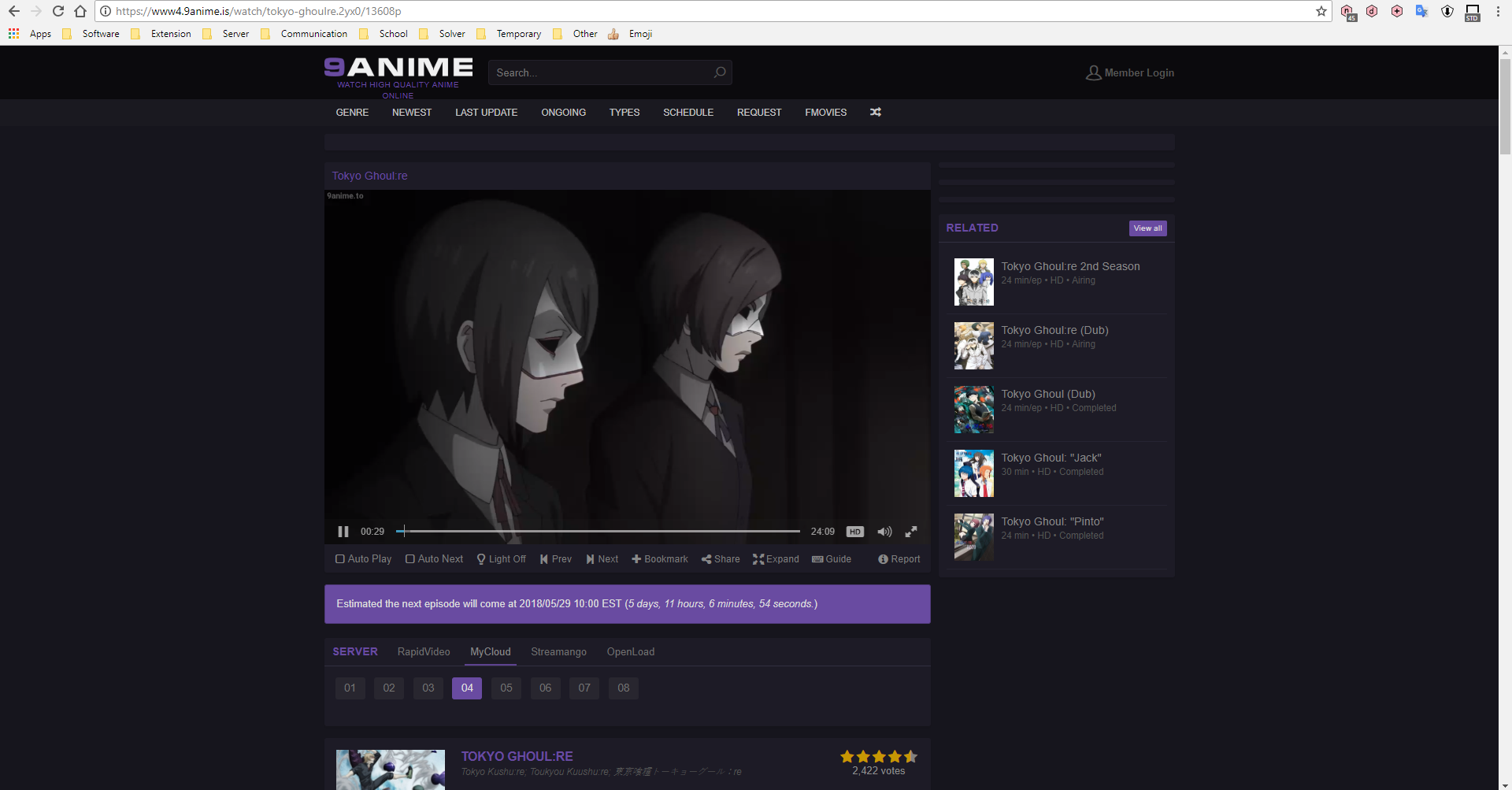
With the filters it works fine for me:
jspenguin2017
on 24 May 2018
@KiLL4FuNK
the filters of ublock origin should be updated every 24 hours
There is also a different expiration time between the EasyList mirrors used by uBo.
https://forums.lanik.us/viewtopic.php?f=23&t=40427
https://github.com/gorhill/uBlock/pull/3690
 smed79
on 24 May 2018
smed79
on 24 May 2018
@smed79 I had to look up "cupide", my six-years of french lessons at school were clearly not sufficient.
okiehsch
on 24 May 2018
@smed79 There's a difference, uBlock filters can be hosted on RawGit.
jspenguin2017
on 24 May 2018
@jspenguin2017 Are you on windows, osx or linux? and I just tried on my desktop with windows 10 and it works just fine. It's a damn shame if the problem really is osx cause it won't work on my laptotp if it is
lpchagnon
on 24 May 2018
@lpchagnon I only have access to a Windows 10 device and a Ubuntu 17.10 device. I tested it on Windows 10.
jspenguin2017
on 24 May 2018
So I guess the problem really is osx. Well not much I can do about it. Thanks for the help!
lpchagnon
on 24 May 2018
Hi. i'am an issue with 9anime, it can detect that i have an add block. i have tried everything i can. i have purged all the cashes in filters list and updated them but it didn't work. then i added all the filters for it but still it's not working. what should i do?
 osamayshak
on 24 May 2018
osamayshak
on 24 May 2018
^^
Find an alternative, this has now turned into a cat and mouse game. Not worth fighting over everyday.
uBlock-user
on 24 May 2018
I was having the same problem (of not working even with the filters added) so i reset to defaults on uBlock, update filters, then i added the filters from above. It works after
taeinha
on 24 May 2018
@xnieatx can you share a screen cap of your filters? i am new to all this so there could be something wrong in the way i added them or something. Here is a screen cap of my filters.
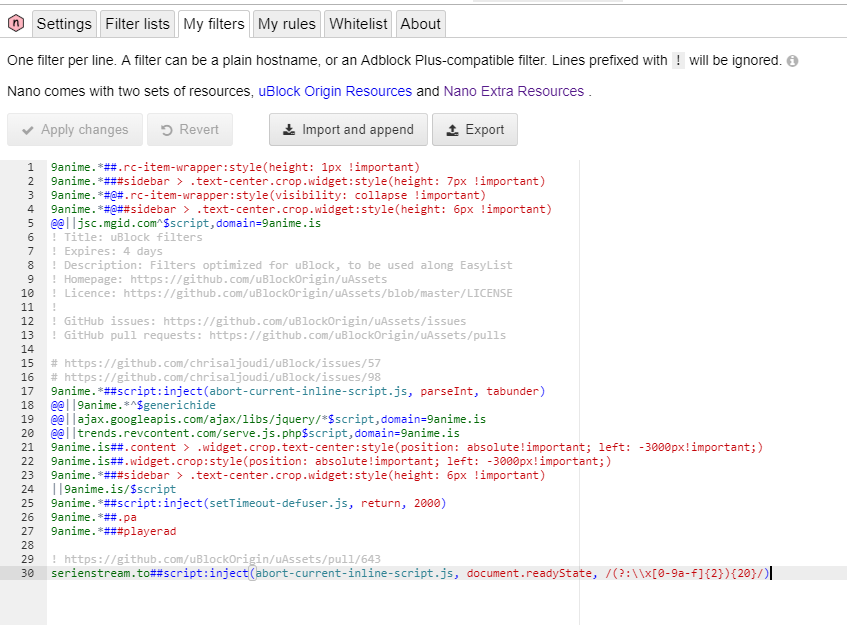
osamayshak
on 24 May 2018
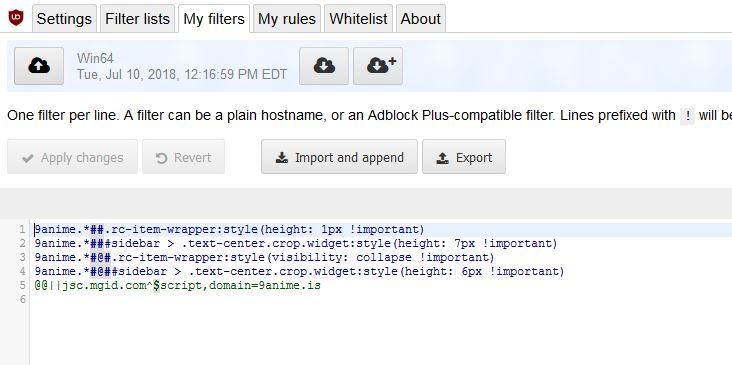
@osamayshak It should be just like this:

Also make sure to update your filters.
jspenguin2017
on 24 May 2018
@jspenguin2017 thank you for help it worked.
osamayshak
on 24 May 2018
Still having issue
 Asian-Rabbit
on 24 May 2018
Asian-Rabbit
on 24 May 2018
Add the filters that okiehsch listed above to my Filters. They still work.
ZaphodBeebblebrox
on 24 May 2018
@zaphodbeebblebrox still having the problem even with it and i had it back to default
Asian-Rabbit
on 24 May 2018
@osamayshak everything on my ublock is default except adding the 5 line filters above. Nothing else added or removed (even without the Nano defender filters). See screenshots:
https://prnt.sc/jm7tkh
https://prnt.sc/jm7too
@Asian-Rabbit make sure to update filters, and add the 5 line filters above
taeinha
on 24 May 2018
@xnieatx Its still not working
Showing https://drive.google.com/file/d/1TMwXkr2yKYbNbOagkClOakHJdteXWvV_/view?usp=sharing
Setting https://drive.google.com/file/d/1Iz1iaNSOD0kerU1xQYybi3Mkr7mwIrVz/view?usp=sharing
filter https://drive.google.com/file/d/1XUiGhz71OxbCL-SWUVY19sPelXQu_Lsj/view?usp=sharing
My filter https://drive.google.com/file/d/1seV8Isk2sCdf6jk_X1o2_MIqok7fK3Me/view?usp=sharing
Asian-Rabbit
on 24 May 2018
@Asian-Rabbit Is uBlock (v1.16.6), Chrome, and Windows updated? Also try not using any other adblock extensions and anti-adblock killer scripts
taeinha
on 24 May 2018
@xnieatx firefox quantum 60.0.1, window 10 home
Asian-Rabbit
on 24 May 2018
9anime Fixed
I found a easier way to get 9anime to work.
Just have everything default.
Then add this in "my filter"
9anime.##.rc-item-wrapper:style(height: 1px !important)
9anime.###sidebar > .text-center.crop.widget:style(height: 7px !important)
9anime.#@#.rc-item-wrapper:style(visibility: collapse !important)
9anime.#@##sidebar > .text-center.crop.widget:style(height: 6px !important)
@@||jsc.mgid.com^$script,domain=9anime.is
9anime.is##body > div:nth-of-type(6)
9anime.is##body > div:nth-of-type(8)
9anime.is##body > div:nth-of-type(7)
Now with the filter above added go to setting to set your self as advance user.
Make the right side box of the all to Green meaning ur allowing all function to work.
But the filter will help remove some ads on screen
P.S. can anyone shorten all of the filters?
And can someone teach me how to hide ads instead of removing it?
like this
9anime.is##.content > div.widget:nth-of-type(5)
9anime.is##div.text-center.widget:nth-of-type(7)
9anime.is##.content > .mgid.text-center.crop.widget
cant remove it or else it wont allow video to play.
Asian-Rabbit
on 25 May 2018
I have tried all of these ideas... Still can't play videos on 9Anime!
charlie309
on 25 May 2018
To recap:
Using Nano or uBlock Origin with a default setup, no other extensions or host files or Pi-hole etc. and adding
9anime.*##.rc-item-wrapper:style(height: 1px !important)
9anime.*###sidebar > .text-center.crop.widget:style(height: 7px !important)
9anime.*#@#.rc-item-wrapper:style(visibility: collapse !important)
9anime.*#@##sidebar > .text-center.crop.widget:style(height: 6px !important)
@@||jsc.mgid.com^$script,domain=9anime.is
to the "My filters" tab as shown here: https://github.com/uBlockOrigin/uAssets/issues/2333#issuecomment-391740005
still works on my end.
If you are using 9anime.ru or any other top level domain, you obviously have to add that one
so instead of @@||jsc.mgid.com^$script,domain=9anime.is you add
@@||jsc.mgid.com^$script,domain=9anime.ru
okiehsch
on 25 May 2018
I shut down all of my ad blockers and I still couldn't watch the videos.
charlie309
on 25 May 2018
The only way I get even close to watching a video, is when I activate this filter.
https://raw.githubusercontent.com/reek/anti-adblock-killer/master/anti-adblock-killer.user.js
Still searching for a way to bypass 9Anime though....
charlie309
on 25 May 2018
@charlie309 can you list steps then they may find a way to help you.
Just have everything default.
Then add this in "my filter"
9anime.##.rc-item-wrapper:style(height: 1px !important)
9anime.###sidebar > .text-center.crop.widget:style(height: 7px !important)
9anime.#@#.rc-item-wrapper:style(visibility: collapse !important)
9anime.#@##sidebar > .text-center.crop.widget:style(height: 6px !important)
@@||jsc.mgid.com^$script,domain=9anime.is
9anime.is##body > div:nth-of-type(6)
9anime.is##body > div:nth-of-type(8)
9anime.is##body > div:nth-of-type(7)
Now with the filter above added
go to setting to set your self as advance user.
Make the box 2 box to the right of “all” box to Green meaning ur allowing all function to work.
But the filter will help remove some ads on screen
Asian-Rabbit
on 25 May 2018
Can someone post filter that has all the ads hidden or removed and still work?
Asian-Rabbit
on 25 May 2018
Just update all built-in filters along with the filters posted here and it will work.
uBlock-user
on 26 May 2018
@okiehsch can you teach me or list all of the ads filter on 9anime?
Asian-Rabbit
on 26 May 2018
i picked this filter from element picker www4.9anime.is###body-container > .text-center.crop.widget
and saw logger , logger doesn't show me filter details(click on that filter in logger)
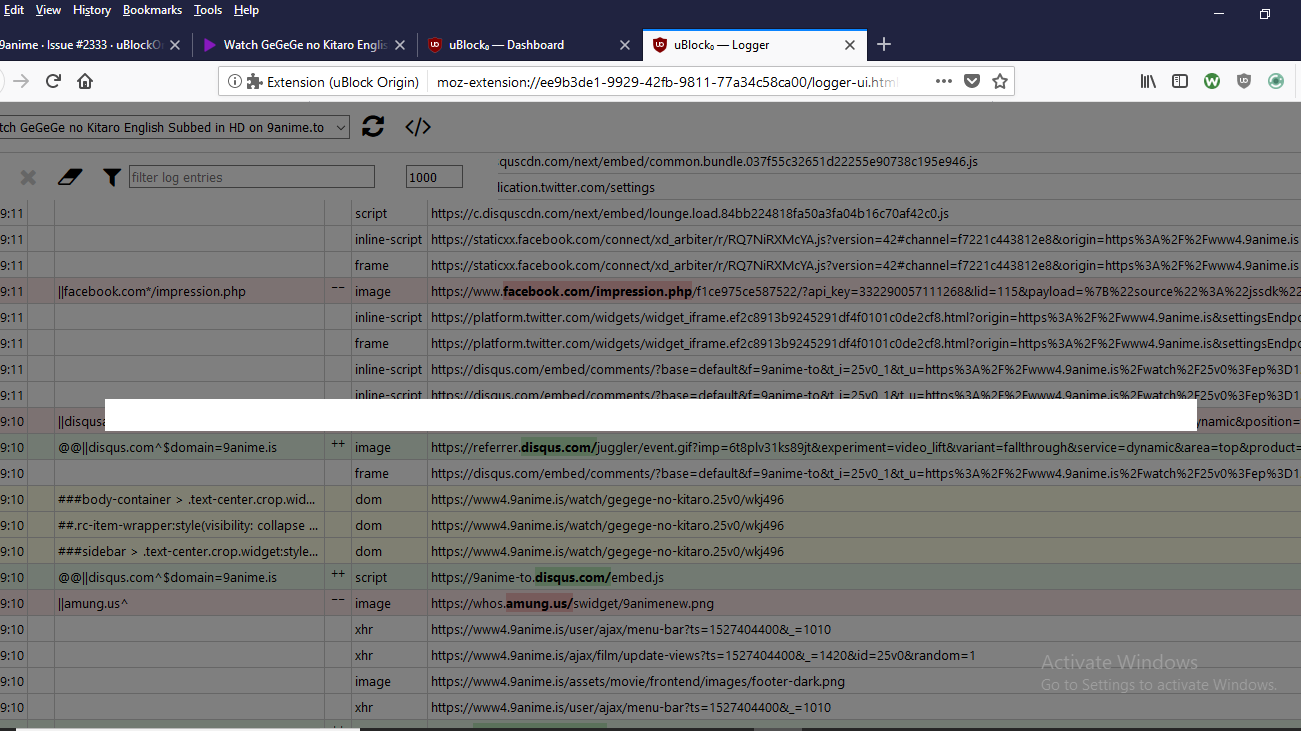
instead a blank
 ghajini
on 27 May 2018
ghajini
on 27 May 2018
logger doesn't show me filter details
 gwarser
on 27 May 2018
gwarser
on 27 May 2018
That will only happen if you remove the filter and click on the filter from the logger list because the filter no longer exists, it will fail and it will appear like that.
uBlock-user
on 28 May 2018
@okiehsch ads are back, this time leveraging the whitelisted script 9anime.is/assets/min/frontend/all.js
uBlock-user
on 4 Jun 2018
/9anime\.is\/[0-9a-zA-Z]{30,}/$domain=9anime.is,image
mapx-
on 4 Jun 2018
remove whitelists, no longer required
||www5.9anime.is^$generichide,domain=www5.9anime.is,important
||trends.revcontent.com^$script,domain=www5.9anime.is,important
ghajini
on 4 Jun 2018
9anime.##.rc-item-wrapper:style(height: 1px !important)
9anime.###sidebar > .text-center.crop.widget:style(height: 7px !important)
9anime.#@#.rc-item-wrapper:style(visibility: collapse !important)
9anime.#@##sidebar > .text-center.crop.widget:style(height: 6px !important)
@@||jsc.mgid.com^$script,domain=9anime.is
doesnt block all ads.
is there any more filter i need to add?
Asian-Rabbit
on 4 Jun 2018
ads are back, this time leveraging the whitelisted script 9anime.is/assets/min/frontend/all.js
https://github.com/uBlockOrigin/uAssets/commit/039b3d282bfc33adcf8d73cb1909b4d4f8bac1a4
okiehsch
on 5 Jun 2018
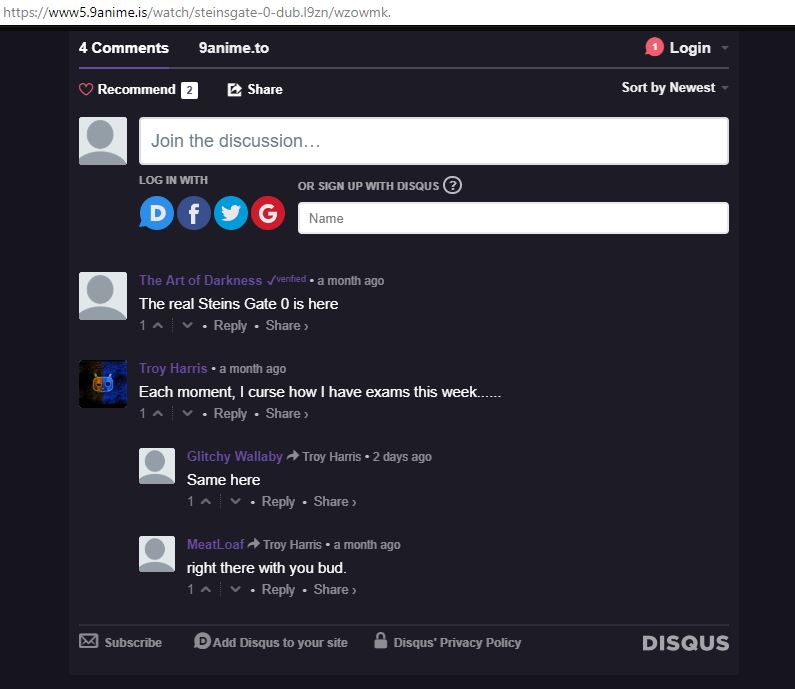
i have the same issue but also now the comment section is not loading or appearing at all
osamayshak
on 6 Jun 2018
okiehsch
on 6 Jun 2018
@okiehsch thanks for the help it worked, but the comment section is not appearing, it's not even loading. can you solve that issue as well? Please and thank you.
osamayshak
on 6 Jun 2018
The comment section works fine on my end.
okiehsch
on 6 Jun 2018
@okiehsch This time it's tabunder
uBlock-user
on 12 Jun 2018
9anime.*##script:inject(set-constant.js, Object.defineProperty, noopFunc) breaks search and the recent anime slider widget.
uBlock-user
on 13 Jun 2018
Search works fine on my end.
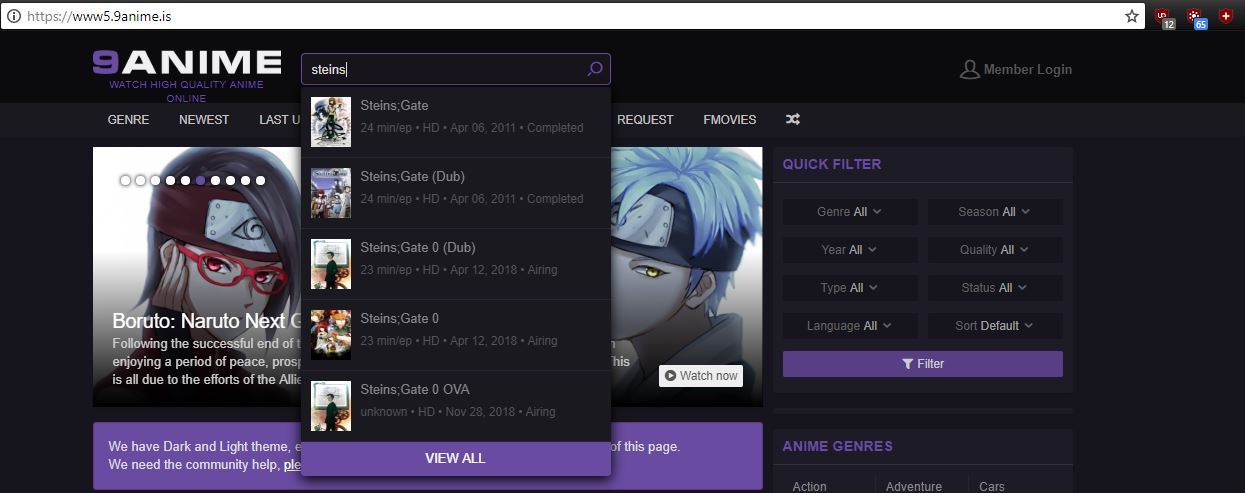
okiehsch
on 13 Jun 2018
When I click on search, nothing happens and the cursor doesn't appear, but if I add 9anime.*#@#script:inject(set-constant.js, Object.defineProperty, noopFunc) it starts functioning normally. Your choice if you want to add it or not.
Nvm, it's their tabunder script, since I'm neutralising their script with my own filters, as a side effect, search is getting broken.
uBlock-user
on 13 Jun 2018
i have a new issue. when i click on an anime to watch, i cant watch because no matter what i click on the picture of the anime,
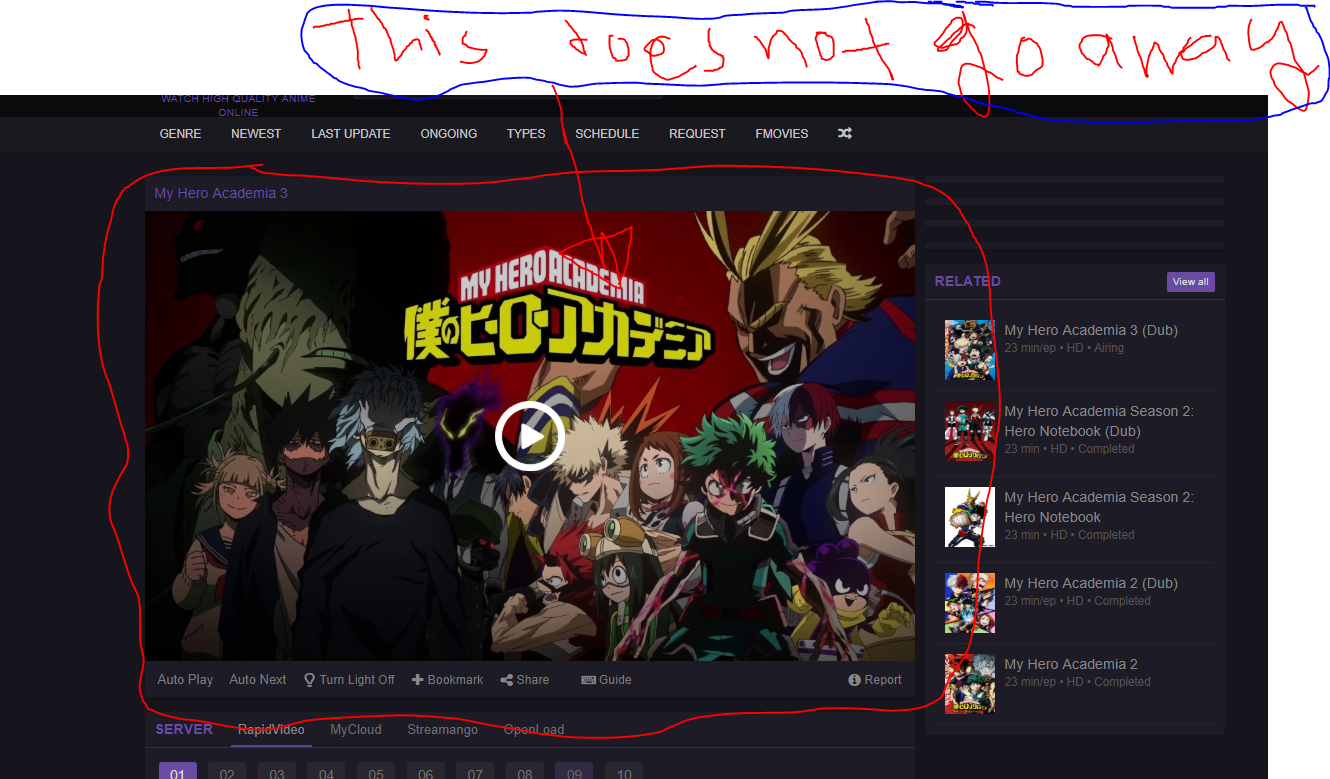
it doesn't go away
osamayshak
on 16 Jun 2018
Please always provide the URL where you have the issue. I had to find it myself -- providing the URL saves time to volunteers: https://www6.9anime.is/watch/my-hero-academia-3.l7yq/83jo2q.
Works fine here on Chrome/Firefox, using uBO + default settings + up to date default lists, no other extension.
 gorhill
on 16 Jun 2018
gorhill
on 16 Jun 2018
That happens when _all.js_ is blocked, if it is either $badfilter that filter or add - @@||9anime.is/assets/min/frontend/all.js
uBlock-user
on 16 Jun 2018
i added @@||9anime.is/assets/min/frontend/all.js and it worked. thank you @uBlock-user
osamayshak
on 16 Jun 2018
That exception filter is already part of EasyList.
gorhill
on 16 Jun 2018
https://www6.9anime.is/watch/cowboy-bebop-dub.l1n3/vyv106
https://i.imgur.com/bPe7rCd.jpg
There are ads on sides.
UPDATE:
This helped.
https://github.com/uBlockOrigin/uAssets/issues/2333#issuecomment-399050562
 krapans
on 21 Jun 2018
krapans
on 21 Jun 2018
before posting update your lists.
mapx-
on 21 Jun 2018
Server error, please refresh this page and try again is what i am seeing and i have updated my list also it isnt going away even after i refresh this page
bdishan
on 21 Jun 2018
Site works fine, try changing your video source.
ZaphodBeebblebrox
on 21 Jun 2018
i'am having a new issue. The website working fine, but The Rapid Video Media player is able to detect the add Blocker and refusing to work. i prefer to use it over the other mirror links because it works best for me. is there a possible fix for it?
osamayshak
on 2 Jul 2018
Did you update ublock filters ?
mapx-
on 2 Jul 2018
@mapx- i just did and it worked. (-.-) never mind
osamayshak
on 2 Jul 2018
https://www8.9anime.is/watch/one-piece.ov8/n019wm
rapidvideo server not working here showing blank screen
ghajini
on 20 Jul 2018
Works fine on my end.

okiehsch
on 21 Jul 2018
9Anime:

Problem With Member Login And Video Wont Play.
This is My Settings
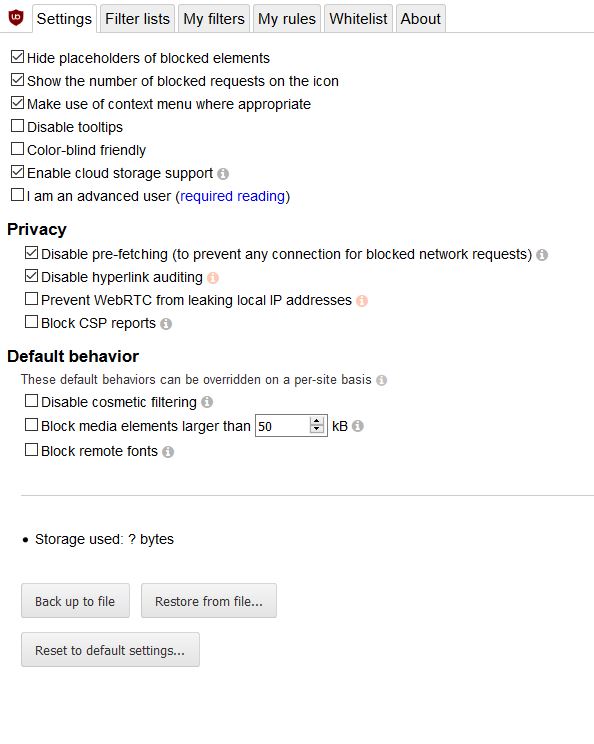
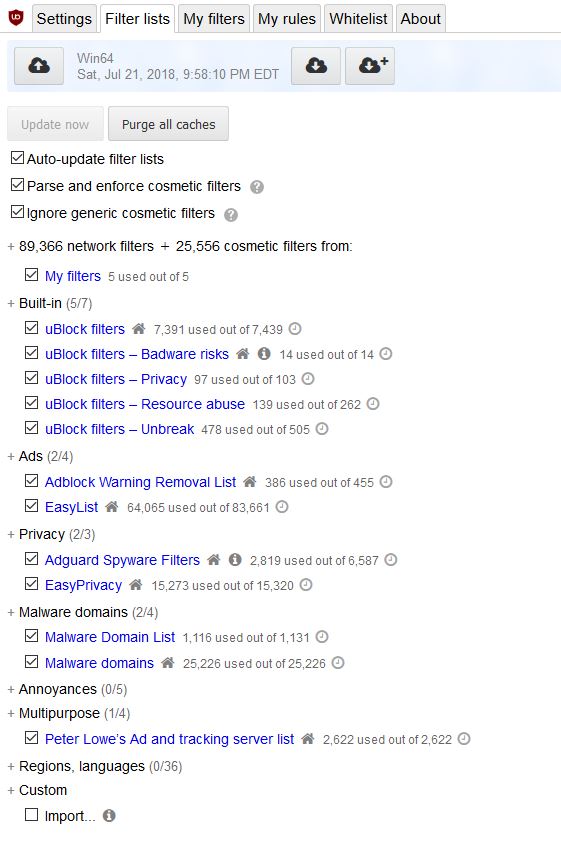
If Anyone Have A Custom Setting That Is For 9Anime Can I Have It Please.
Thank You!
Asian-Rabbit
on 23 Jul 2018
there is this new thing that is happening on the site. RapidVideo is doing this annoying dump thing were it will let you watch 1 or 2 anime's in a hour and after that it will tell you that you have to buy a membership to be able to watch more anime's. Do you guys have a fix for it or should i just ditch RapidVideo forever?
osamayshak
on 24 Jul 2018
How do you get the request Code fixed? The image is always missing
Asian-Rabbit
on 9 Aug 2018
9Anime stopped working again. Any fix?
 NoMod-Programming
on 24 Aug 2018
NoMod-Programming
on 24 Aug 2018
Update your uBO-unbreak list, should work after that.
okiehsch
on 24 Aug 2018
Awesome! It works, thanks!
NoMod-Programming
on 24 Aug 2018
https://www1.9anime.to/watch/aikatsu-friends.jy04
you can not see the video
KiLL4FuNK
on 11 Sep 2018
@KiLL4FuNK badfilter from easylist - /^https?:\/\/([0-9a-z\-]+\.)?(9anime|animeland|animenova|animeplus|animetoon|animewow|gamestorrent|goodanime|gogoanime|igg-games|kimcartoon|memecenter|readcomiconline|toonget|toonova|watchcartoononline)\.[a-z]{2,4}\/(?!([Ss]cripts|[Uu]ploads|[Ii]mages|combined|content|cover|img|static|wp-content|wp-includes))(.*)/$first-party,script,badfilter
uBlock-user
on 11 Sep 2018

The image never shows
Asian-Rabbit
on 7 Nov 2018
Their CDN is down from the past two days, nothing to do anti adblock.
uBlock-user
on 7 Nov 2018
Their CDN is down from the past two days, nothing to do anti adblock.
so do you know it will be fixed?
Thank you for telling me its not adblock
Asian-Rabbit
on 7 Nov 2018
@Asian-Rabbit https://www.reddit.com/r/9anime/comments/9uvhoj/the_site_is_taking_a_long_time_to_load_images/
uBlock-user
on 7 Nov 2018
Related issues
 macheteBadger
·
3Comments
macheteBadger
·
3Comments
 efih
·
4Comments
efih
·
4Comments
 patrickdrd
·
4Comments
patrickdrd
·
4Comments
 Jose1971AB
·
3Comments
Jose1971AB
·
3Comments
 JulianNorton
·
3Comments
JulianNorton
·
3Comments
Most helpful comment
https://github.com/uBlockOrigin/uAssets/commit/74d3c608e81f51bea028f002b10f4c1f00f58f26