Uassets: Spotify ads playing in web player
URL(s) where the issue occurs
Describe the issue
Ads are playing again today, wasn't an issue this week Tuesday (and forever before)
Screenshot(s)
No Screenshots as we are talking about sound playing.
Versions
Chrome Version 61.0.3163.100 (Official Build) (64-bit)
uBlock Origin 1.14.8
Settings
No changes, default settings
Notes
Not quite sure why ads appear again, I didn't change anything. I have a hard time interpreting the console of uBO correctly, but I still see some domains blocked (https://spclient.wg.spotify.com/ads/v2/config?payload=e30=, https://spclient.wg.spotify.com/ads/v1/ads/leaderboard?payload=e30=)
Did they maybe start distributing ads from the same domain that music is coming from?
 dc941
dc941
All 34 comments
Do you have an example-link, I listened to open.spotify.com for quite a while now without noticing any ads.
 okiehsch
on 28 Sep 2017
okiehsch
on 28 Sep 2017
I listened to the list of my liked songs, so not really. I can try to keep an eye on the log to maybe figure an URL out - I'll update when i find one.
dc941
on 29 Sep 2017
I have this issue, but in a different way. When an ad appears, the sound stops, and on the UI it says it is playing the song "ad". To continue listening to music I have to manually click on a song to play it.
It has been happening since more or less 3 days ago.
 alvarogzp
on 5 Oct 2017
alvarogzp
on 5 Oct 2017
@alvarogzp Are you using another blocker with uBO? Are you using all default filter lists -- the ones already selected at install time? Do you have custom filters?
 gorhill
on 5 Oct 2017
gorhill
on 5 Oct 2017
Are you using another blocker with uBO?
No, I still have installed AdBlock Plus, but it is disabled.
Are you using all default filter lists -- the ones already selected at install time? Do you have custom filters?
Yes, I have default lists (which are easy list + easy privacy + ublock filters + malware + peter lowe's + easy list spanish (my language)), and I have no custom filters.
Here is a screenshot of what is displayed on the web page when an ad appears:

alvarogzp
on 5 Oct 2017
It also happens to me. I refresh every day all filters but the music is stopped when an ad comes. The ad is not reproduced but the player is stopped and I have to F5 to continue.
 trocotronic
on 10 Oct 2017
trocotronic
on 10 Oct 2017
also started happening earlier today, I'll try to keep an eye open for more info~
 Komic
on 11 Oct 2017
Komic
on 11 Oct 2017
Hey! I have noticed something very strange that might be of your interest.
As I commented 5 messages above, I started seeing ad tracks, they didn't played but the music stopped. I suspect this can be related to a change in Spotify to circumvent ad blocking on the Web Player.
But, the most interesting part is that since a few days after having this issue I cannot play music on the Web Player any longer! When I hit any Play button, it does nothing.
At first, I thought this was because of the ad-blocker, but disabling uBlock had no effect (well, ad banners appeared, but Play kept doing nothing).
My second thought was that the update to Firefox 56 broke the Web Player, or that an update by Spotify to the Web Player broke it on Firefox, and I searched on the internet if more people were having this issue, even asked on @SpotifyCares on Twitter, but found nothing.
So then I thought that maybe I had changed something on my browser or on the OS that broke the Web Player and for some days I gave up hoping that Spotify updated their Web Player and fixed the "issue".
But today, I thought about trying with another account, I created a new account and it worked!
So, it seems that Spotify might be server-side blocking Web Player for users that previously blocked listening to their ad tracks.
I have not tried with the native player nor the mobile apps with the "blocked" account, as I only use the Web Player.
Has anyone of those who also had the ad-that-stops-music-playback issue seen anything similar?
Maybe I am totally wrong and they have blocked my account for other reason, or it isn't even blocked and it has only been corrupted.
alvarogzp
on 12 Oct 2017
@alvarogzp probably you selected the player on another device. You have to select Web Browser player.
trocotronic
on 12 Oct 2017
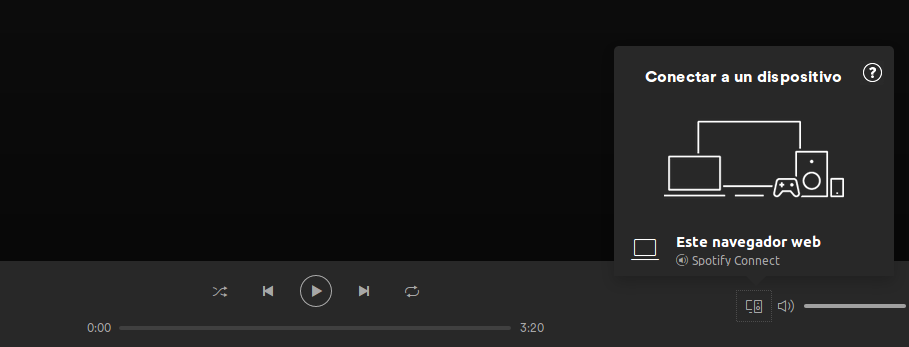
I do not have more linked devices (see the capture below). But yes, maybe the account is bugged because I opened many sessions while trying to get it working. Sorry if that is the case.
alvarogzp
on 12 Oct 2017
I have the same problem as @alvarogzp ... I do not "hear" any ads playing, but I see that an advertisement is supposed to be playing as it says "advertisement" in the bottom left.
I am using all the default lists and in addition some annoyances + privacy lists + easylist germany + 3rd party frames blocking.
 Snow8
on 13 Oct 2017
Snow8
on 13 Oct 2017
Yes, this is now the case for me as well. The ads themselves stopped playing again after I uninstalled the desktop app.
dc941
on 16 Oct 2017
So.. any update on this?
Spotify is still playing ads and everything I can find on the web for custom filters doesn't seem to be working.
I'd be fine with paying a $1/mo subscription for it to avoid ads (like Pandora had).. but at $10/mo it's completely out of the question.
 DAOWAce
on 12 Dec 2017
DAOWAce
on 12 Dec 2017
Is there any way we can help to resolve this problem? Is it because it took a long time to reproduce this bug so uBO team hasn't been looking into this problem? I don't know if this will help but, I've just found out that you can actually reproduce this problem by keep on clicking the next button a few dozen times. As it turns out, the ads doesn't played after a few minutes has passed, it's played after a few number of songs and the player will look like this:

I hope this will be any of help, and if it doesn't is there any way we can help? Please give us some information about how to do a proper way to troubleshoot and identifying the problem.
 Affratus
on 20 Dec 2017
Affratus
on 20 Dec 2017
For my part I just can't reproduce the issue, so I can't fix the problem.
For example I listened to this rather long set https://open.spotify.com/user/1267067856/playlist/4CtiTddOg79AFdvuwRTh70 without any ads or the sound stopping.
After your comment I fast forwarded through the same set by clicking the next button and I still can't reproduce.
okiehsch
on 21 Dec 2017
Thanks for the reply. Hmm, it's weird how this problem only affects a few people. Well how about this, I can reproduce the problem easily, so maybe you could give me instructions of how to get what you needed for the problem? I could run the log and provide it to you after I get home later tonight. Is there anything else you needed to fix the problem?
Affratus
on 21 Dec 2017
What I need is to be able to reproduce :).
Make sure that you only use uBO, no other extension before you post the log and I will have a look, but I can only guess what the problem is without being able to reproduce.
By the way what exactly is your issue, in this thread we have people hearing ads
Ads are playing again today
and we have people getting stuck
The ad is not reproduced but the player is stopped and I have to F5 to continue.
okiehsch
on 21 Dec 2017
Haha yeah that might be harder.
I'll do extensive test later, I'll try to use different browser, turning off all other extension, etc. Because from what I skim (and assume) a lot of people who encounter this problem are using Chrome.
For me it's the second one, it's like that one Spotify problem before this, there was a problem like this last year but gorhill fix it, but now suddenly it's back. I haven't encounter the first case where the ads is playing tho.
Affratus
on 21 Dec 2017
For me it's the second one, it's like that one Spotify problem before this, there was a problem like this last year but gorhill fix it, but now suddenly it's back. I haven't encounter the first case where the ads is playing tho.
I am exactly in the same situation as @Affratus. Earlier this year I was using AdBlock Plus when I started having this same issue, and searching on the internet gave me here, where I found that uBlock Origin had it fixed (https://github.com/uBlockOrigin/uAssets/issues/448), and that was my reason to switch to uBO. But now it has started to happen again even with uBO.
alvarogzp
on 21 Dec 2017
Looking at issue https://github.com/uBlockOrigin/uAssets/issues/448 the problem involved blocked media requests which needed to be redirected.

Are there blocked media-requests in your logger when the issue occurs?
okiehsch
on 21 Dec 2017
I've tried using Chrome and Firefox, both of them are affected with this problem, here's the capture of the log that I got from Chrome:
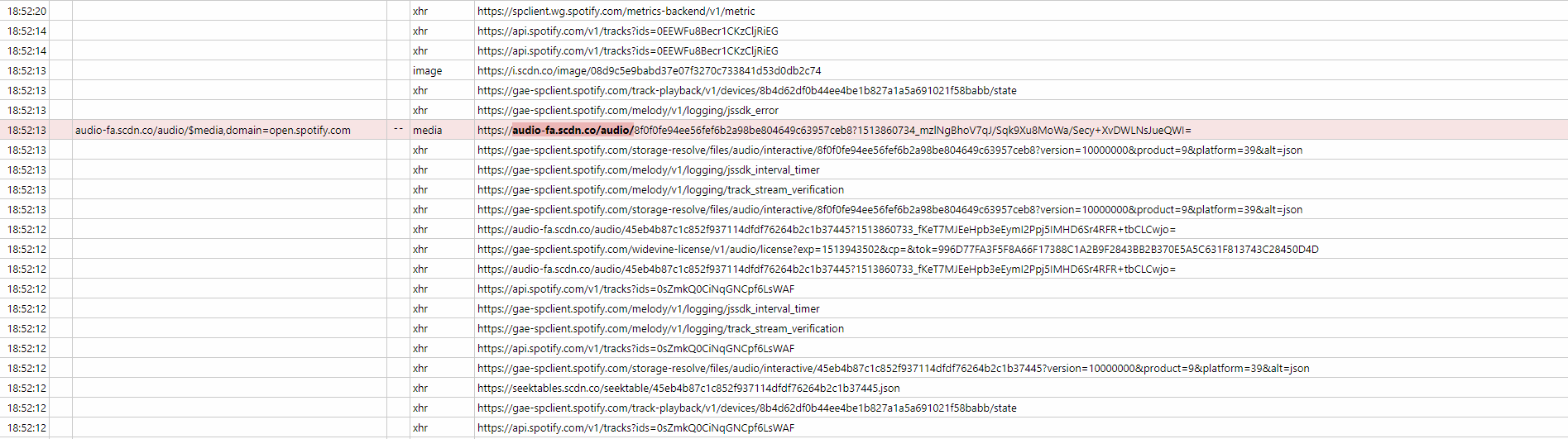
and the second one:

And this one is from Firefox:
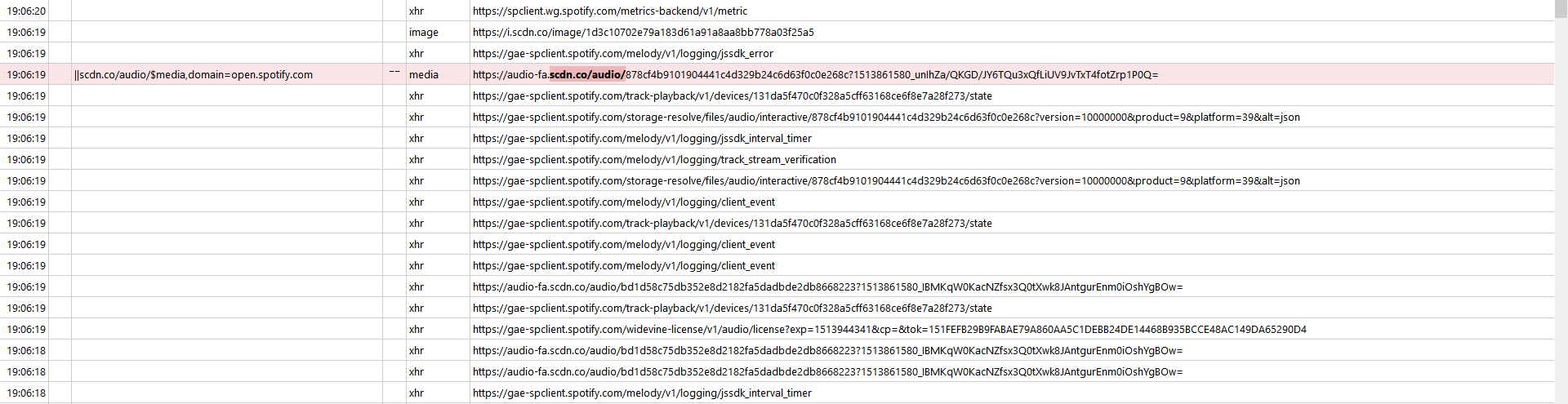
I log the Chrome twice, because the first one is with all other extension turned on, and the second one is all other extension except for uBO and uBO Extra turned off.
I don't know how to save the whole log as plain text, so I just copy the log to notepad++ just in case you need the whole log:
new 1.txt
or in html format here if you prefer:
Affratus
on 21 Dec 2017
Yeah so after trying Cent browser it appeared ads were being blocked; whether due to a recent filter update or not being my old Chrome v51.
Unfortunately, it seemed to also coincide with that problem where you're forced to refresh the page to get any song to play. This also seems random, as sometimes it works, other times it doesn't, and it's usually a laggy response.
Everything was fine after that.. until my next session. Randomly an ad starts blasting at a volume level far above my song, startling the hell out of me.
So, this appears to be an intermittent issue. Sometimes ads start playing after a few songs, sometimes a dozen, sometimes not at all, sometimes playback just stops entirely in an attempt to play an ad..
I replicated this behavior on my old Chrome v51 too.
Not entirely sure how to get the diagnostic data needed, so if anyone could let me know how I could also contribute to the logs.
DAOWAce
on 21 Dec 2017
@Affratus
Does
````
||audio-fa.scdn.co/audio/*$media,redirect=noopmp3-0.1s,domain=open.spotify.com
`````
work for you?
okiehsch
on 21 Dec 2017
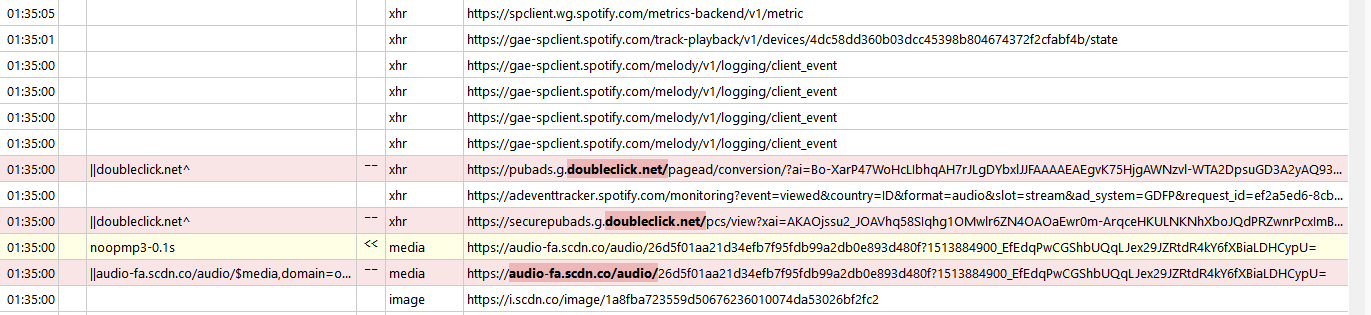
@okiehsch no, this is the log after I apply the filter:
Just to be sure, I also include the | | right? or should I leave the double | and copy it from audio-fa*~?
Edit: In case I shouldn't include the | | I also test it and here is the result:

Affratus
on 21 Dec 2017
Your logger shows that the request was redirected, so you added a correct filter.
This media request was basically the only difference between your log and mine.
The doubleclick requests are new, so you can try to allow them but I am really in the dark here.
@gorhill can you reproduce this issue by followong these steps https://github.com/uBlockOrigin/uAssets/issues/724#issuecomment-353205179
okiehsch
on 21 Dec 2017
how do I allow the doubleclick request?
Affratus
on 21 Dec 2017
@@||doubleclick.net/pcs/*$xmlhttprequest,domain=open.spotify.com
You can see if the filter worked in the logger, one of the two doubleclick requests should be green.
okiehsch
on 21 Dec 2017
I got a really weird result, so the first time I try the filter, it works, the banner popping up for a second but instantly move to the next song after 1 second, unfortunately I didn't get the log for that, so I try it for the second time, the ads have a different banner from the first one, but it stuck again and here's the log:
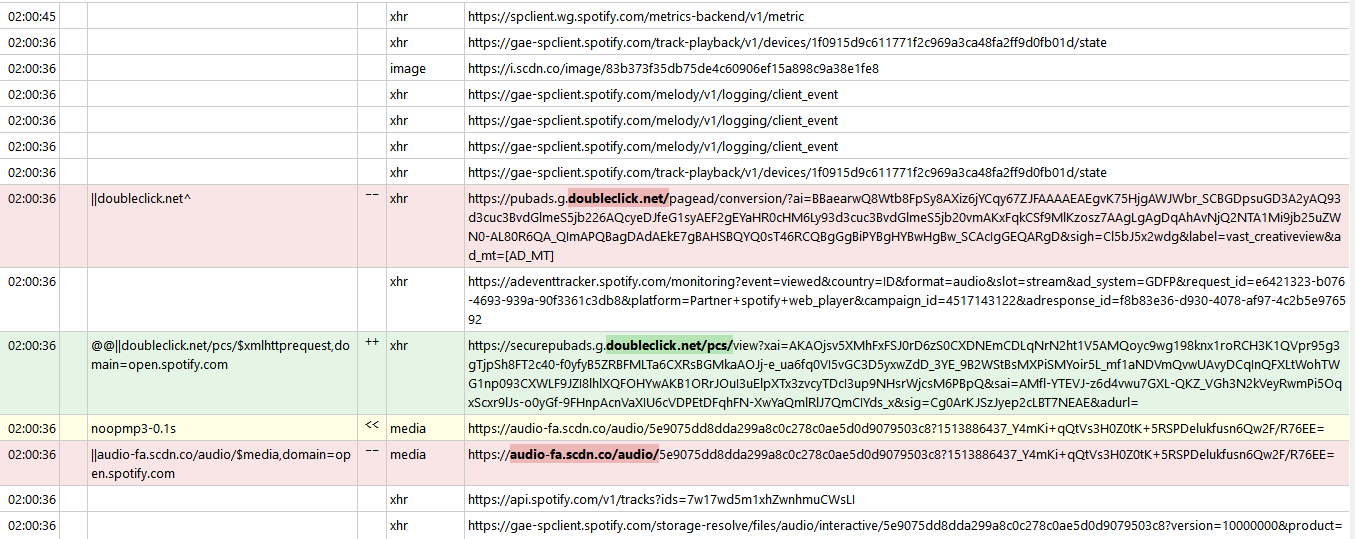
But, the weird thing is, I can't reproduce it again, after I refresh the page, I don't even get any ads banner playing at all and. So, it kind of work?
Oh and, after I read the previous post, I found another condition that maybe required to produce this bug, the other people and me are saving song to our own library and played the song from the library, but you are trying to reproduce it by opening playlist from someone else, maybe try to add song to library and spam next button?
Affratus
on 21 Dec 2017
You are right, if I play a list from my own library I can reproduce by spamming the next button.
Now the bad news, the issue is fixed on my end by adding
||audio-fa.scdn.co/audio/*$media,redirect=noopmp3-0.1s,domain=open.spotify.com
I have no clue why this filter does not work on your end.
okiehsch
on 21 Dec 2017
By the way my end is Windows 10 Chrome stable and Linux (manjaro) Chrome stable.
okiehsch
on 21 Dec 2017
Yep, mine is also Windows 10 Chrome stable Version 63.0.3239.108 (Official Build) (64-bit), Firefox Quantum 57.0.2 (64-bit), uBO version 1.14.22. Maybe it's because my uBO isn't a fresh install with a lot of 'my filter' rule and using a lot of 3rd-party filter, but for now it's working for me with blocking audio-fa and allowing doubleclick request, I'll report again if I found something in the future.
Thanks for the reply and for bearing with me :)
Affratus
on 21 Dec 2017
@okiehsch Looks like that addition to the filter is working.
Haven't had an ad play ever since adding it 2 days ago. I think maaaaybe it paused and tried to play an ad which was blocked, but I can't remember 100%.
Still need to reload the page initially sometimes to get songs to play, but otherwise it's been working great.
DAOWAce
on 23 Dec 2017
The new filter seems to be working for me too. It has successfully skipped some ads without interrupting playback.
Thanks!!
alvarogzp
on 26 Dec 2017
Sadly this is not yet resolved with the latest filters for me. The player gets stuck on "not playing" an advertisement still.
Relevant logger output:
12:36:35 |   | noopmp3-0.1s | << | media | https://audio-fa.scdn.co/audio/...
12:36:35 |   | \|\|audio-fa.scdn.co/audio/$media,domain=open.spotify.com | -- | media | https://audio-fa.scdn.co/audio/...
 0xC0FFEE
on 2 Jan 2018
0xC0FFEE
on 2 Jan 2018
Related issues
 KiLL4FuNK
·
4Comments
KiLL4FuNK
·
4Comments
 wis
·
4Comments
wis
·
4Comments
 Jose1971AB
·
3Comments
Jose1971AB
·
3Comments
 BurungHantu1605
·
3Comments
BurungHantu1605
·
3Comments
 terrorist96
·
3Comments
terrorist96
·
3Comments
Most helpful comment
The new filter seems to be working for me too. It has successfully skipped some ads without interrupting playback.
Thanks!!