Typescript: Typescript auto-complete not working in VSCode
I'm trying to make use of Puppeteer within a ts file which works fine except the VSCode Intellisense stops working a soon as I'm inside a .ts and not a .js file.
I've seen some posts about this incident but none could help me. What I did:
- created a project via npm init
- installed dependencies as follows:
    "dependencies": {
    "@types/node": "^14.0.14",
    "events": "^3.1.0",
    "puppeteer": "^4.0.1",
    "typescript": "^3.9.5" }

      "devDependencies": {
    "puppeteer-tsd": "0.0.2"  }
- created tsconfig.json
 "target": "es5",
 "lib": ["es2015", "dom"],
 "outDir": "./dist",
   .
   .
   .
  "include": ["src/**/*", "node_modules/puppeteer-tsd/src/index.d.ts"]
- created src and dist folder
- put a main.ts inside my src
- told VSCode to use the project TS version instead of its own
Then I compiled. Everything works fine. But I get no IntelliSense to help me out while I type.
So I created a .js file in my src directory, copied the code from my main.ts inside it and then I got Intellisense to work perfectly fine with all suggestions and so on. And I have no idea left what I could try except accepting it and code without it.
I'd be greatful for any suggestions on what could be the issue. Thx in advance!
Meanwhile I found out, that it works fine with non imported functions like console.log(). It's only Puppeteer (or probably any imported module).
 m1212e
All 17 comments
Can you share a copy of your project?
 mjbvz
on 29 Jun 2020
mjbvz
on 29 Jun 2020
Sure thing, here you go:
project.zip
m1212e
on 30 Jun 2020
I'm also seeing this on an Angular 10 application. I created a new Angular app:
ng new ng10-test-app
Added a class:
export class Contact {
name: string;
}
and tried to use it. VSCode doesn't find and suggest what the import for my class:

VSCode doesn't show any fix-its for adding an import for my class.
There is an error (repeated actually) in the Log (Window) output window:
[2020-06-30 17:37:02.038] [renderer1] [error] <semantic> TypeScript Server Error (4.0.0-dev.20200629)
No Project.
Error: No Project.
at Object.ThrowNoProject (/Users/john/.vscode-insiders/extensions/ms-vscode.vscode-typescript-next-4.0.20200629/node_modules/typescript/lib/tsserver.js:145281:23)
at ScriptInfo.getDefaultProject (/Users/john/.vscode-insiders/extensions/ms-vscode.vscode-typescript-next-4.0.20200629/node_modules/typescript/lib/tsserver.js:146062:46)
at ProjectService.doEnsureDefaultProjectForFile (/Users/john/.vscode-insiders/extensions/ms-vscode.vscode-typescript-next-4.0.20200629/node_modules/typescript/lib/tsserver.js:148858:48)
at ProjectService.ensureDefaultProjectForFile (/Users/john/.vscode-insiders/extensions/ms-vscode.vscode-typescript-next-4.0.20200629/node_modules/typescript/lib/tsserver.js:148853:75)
at IOSession.Session.getFileAndProjectWorker (/Users/john/.vscode-insiders/extensions/ms-vscode.vscode-typescript-next-4.0.20200629/node_modules/typescript/lib/tsserver.js:152892:87)
at IOSession.Session.getFileAndProject (/Users/john/.vscode-insiders/extensions/ms-vscode.vscode-typescript-next-4.0.20200629/node_modules/typescript/lib/tsserver.js:152875:29)
at IOSession.Session.getApplicableRefactors (/Users/john/.vscode-insiders/extensions/ms-vscode.vscode-typescript-next-4.0.20200629/node_modules/typescript/lib/tsserver.js:153331:31)
at Session.handlers.ts.createMapFromTemplate._a.<computed> (/Users/john/.vscode-insiders/extensions/ms-vscode.vscode-typescript-next-4.0.20200629/node_modules/typescript/lib/tsserver.js:152122:61)
at /Users/john/.vscode-insiders/extensions/ms-vscode.vscode-typescript-next-4.0.20200629/node_modules/typescript/lib/tsserver.js:153634:88
at IOSession.Session.executeWithRequestId (/Users/john/.vscode-insiders/extensions/ms-vscode.vscode-typescript-next-4.0.20200629/node_modules/typescript/lib/tsserver.js:153625:28)
at IOSession.Session.executeCommand (/Users/john/.vscode-insiders/extensions/ms-vscode.vscode-typescript-next-4.0.20200629/node_modules/typescript/lib/tsserver.js:153634:33)
at IOSession.Session.onMessage (/Users/john/.vscode-insiders/extensions/ms-vscode.vscode-typescript-next-4.0.20200629/node_modules/typescript/lib/tsserver.js:153658:35)
at Interface.<anonymous> (/Users/john/.vscode-insiders/extensions/ms-vscode.vscode-typescript-next-4.0.20200629/node_modules/typescript/lib/tsserver.js:155873:27)
at Interface.emit (events.js:203:13)
at Interface._onLine (readline.js:316:10)
at Interface._normalWrite (readline.js:461:12)
at Socket.ondata (readline.js:172:10)
at Socket.emit (events.js:203:13)
at addChunk (_stream_readable.js:295:12)
at readableAddChunk (_stream_readable.js:276:11)
at Socket.Readable.push (_stream_readable.js:210:10)
at Pipe.onStreamRead (internal/stream_base_commons.js:166:17): Error: <semantic> TypeScript Server Error (4.0.0-dev.20200629)
 jtsom
on 1 Jul 2020
jtsom
on 1 Jul 2020
@JackkGC Thanks. Can you please provide specific steps to reproduce this using using the project? I see IntelliSense working fine in the TS file:

mjbvz
on 2 Jul 2020
It partially works. For example if you try to auto-complete the page.setViewport function a few lines below you'll hopefully be able to reproduce the error. Then trying the whole thing in a normal js file in the same directory with the exact same code should work.
m1212e
on 2 Jul 2020
Same issue as @jtsom in every Angular 10 application I create on different machines, both Windows and Mac. The biggest problems are plain-old-classes and interfaces. Oddly enough, not seeing the same issue with components (anything in module declarations)
 sean-chase
on 2 Jul 2020
sean-chase
on 2 Jul 2020
It's not so much intellisense not working, it's failing to automatically find other files that need to be imported (auto-import). Normally, in my example above, VSCode would have automatically added a
import { Contact } from '../contact';
or would offer, in the Fixes, to add the import. It does neither, except show the Typescript error
jtsom
on 2 Jul 2020
Does intellisense starts working if you include let's say Contact class in any other file?
I noticed something similar with Angular 10, if file is not included in compilation it will not show up on intellisense, as soon as it's referenced anywhere it will start working.
 mateusz-pietrzak
on 6 Jul 2020
mateusz-pietrzak
on 6 Jul 2020
Again.. it's not really intellisense that's the issue, it's the fact that VSCode can't find the files to enable the auto import. Here's a little more of the layout of a sample:

Note that it's showing "no quick fixes available" .. that should be, and it used to be (something like) "... add import of Contact ...". Or ideally, it would have automatically added the import line as soon as I typed line 13.
I don't know if it's something to do with the way Angular changed the structure of the tsconfig files, or what the issue is.
jtsom
on 6 Jul 2020
I did a quick test. Angular 10 moved to a "solution-style tsconfig.json" - https://angular.io/guide/migration-solution-style-tsconfig.
In the tsconfig.app.json, a standard Angular 10 app has:
{
  "extends": "./tsconfig.base.json",
  "compilerOptions": {
    "outDir": "./out-tsc/app",
    "types": []
  },
  "files": [
    "src/main.ts",
    "src/polyfills.ts"
  ],
  "include": [
    "src/**/*.d.ts"
  ]
}
Once I changed the include like to be:
  "include": [
    "src/**/*.d.ts",
    "src/**/*.ts"
  ]
The quick fix now works, as well as the auto-import of the file:
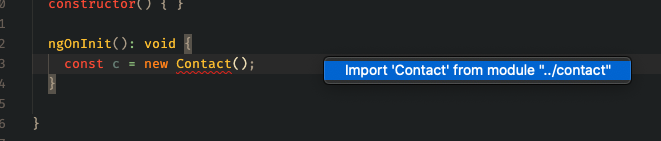
So this must be a result of this change to the tsconfig files in Angular 10.
Off to open an issue there...
jtsom
on 6 Jul 2020
While adding the item to the tsconfig.app.json does fix the auto-import and quick fix, it horribly breaks building the application, so that's not an acceptable solution.
This does look like an Angular 10 issue: https://github.com/angular/angular-cli/issues/18040
jtsom
on 6 Jul 2020
Hey I was having the same issue in a brand new Angular 10 project. When typing @Injecta.... there was no Intellisense when it comes to the imports at the top of the file.
So I did some checks in those new funky tsconfigs. Seems they are very strict when it comes to telling VSCode about project files.
Try dropping include and then reopen your VSCode.
My tsconfig.app.json after changes looks like this:
{
    "extends": "./tsconfig.base.json",
    "compilerOptions": {
        "outDir": "./out-tsc/app",
        "types": []
    },
    "files": ["./src/main.ts", "./src/polyfills.ts"]
}
Cheers!
 ArturKwiatkowski
on 14 Jul 2020
ArturKwiatkowski
on 14 Jul 2020
Is there any movement on this issue? Using VS Code with Angular 10 is difficult at best until this is fixed. Moving on 3 weeks without any solution.
jtsom
on 15 Jul 2020
The issue here seems to be that tsconfig.app.json does not include new file into the configured project as it explicitly lists files that should be and till you import new file it wont be part of the configured project. The issue is with configuration file and how it is structured.
Is new file suppose to go to tsconfig.app.json or tsconfig.spec.json or something else is not clear to derive either so there isnt much we can do.
 sheetalkamat
on 15 Jul 2020
sheetalkamat
on 15 Jul 2020
Oh so the movement is to just close it. Thanks for the help 😡
jtsom
on 15 Jul 2020
My original issue even hasn't got anything to do with Angular, btw. :(
m1212e
on 15 Jul 2020
There are a lot of people reporting a variety of things here that all seem fairly unrelated. If you have a concrete problem you can describe that doesn't match the description Sheetal gave, please log a new issue with clear repro steps that we can use to investigate further.
 RyanCavanaugh
on 15 Jul 2020
RyanCavanaugh
on 15 Jul 2020
Related issues
 uber5001
·
3Comments
uber5001
·
3Comments
 manekinekko
·
3Comments
manekinekko
·
3Comments
 CyrusNajmabadi
·
3Comments
CyrusNajmabadi
·
3Comments
 remojansen
·
3Comments
remojansen
·
3Comments
 dlaberge
·
3Comments
dlaberge
·
3Comments
Most helpful comment
I did a quick test. Angular 10 moved to a "solution-style tsconfig.json" - https://angular.io/guide/migration-solution-style-tsconfig.
In the tsconfig.app.json, a standard Angular 10 app has:
Once I changed the include like to be:
The quick fix now works, as well as the auto-import of the file:
So this must be a result of this change to the tsconfig files in Angular 10.
Off to open an issue there...