Typescript: Could not use `optional chaining` in nuxt.config.ts
Describe the bug
Using optional chaining in nuxt.config.ts causes run-time error.
 ERROR  Unexpected token .

  const hello = fuga?.foo.bar;
  ^

  SyntaxError: Unexpected token .
To Reproduce
See CodeSandbox
https://codesandbox.io/embed/nuxtnuxtjs-typescript-q064y?fontsize=14&hidenavigation=1&theme=dark
Expected behavior
No error happens
Additional context
To avoid this error, change target property's value of tsconfig.json into es2018 from esnext.
https://github.com/TypeStrong/ts-node/issues/903#issuecomment-551265568
But the configuration displayed in the official document says that targe value is esnext.
https://typescript.nuxtjs.org/guide/setup.html#configuration
 hagevvashi
All 10 comments
@azawakh Wow thanks, it seems that babel plugins are not needed at all then, we can let TypeScript handles the transpilation of the features by specifying.
Only esnext seems buggy, es5 / es2018 / es2019 / es2020 work well.
I'm gonna remove Babel plugins and tell people to update their TypeScript configuration file in release so it works out of the box for build & runtime ouf of the box !
 kevinmarrec
on 11 Dec 2019
kevinmarrec
on 11 Dec 2019
I'm also gonna update Test fixture to use both new features in runtime (nuxt.config.ts) & build (in a Nuxt page), so the tests check that features correctly work :)
kevinmarrec
on 11 Dec 2019
Closed by https://github.com/nuxt/typescript/commit/826234b5ff24a90e771d10b1029d1adabd8de6fb
Babel plugins will be removed (useless if using es2018 target) in next release later this day.
kevinmarrec
on 11 Dec 2019
That was what causing my issues as well it seems
 husayt
on 11 Dec 2019
husayt
on 11 Dec 2019
@kevinmarrec With this change optional chaining will only be possible inside <script lang="ts"> and no longer in v-if statements for example. We should add a note to the docs.
 P4sca1
on 11 Dec 2019
P4sca1
on 11 Dec 2019
@P4sca1 Interesting, Even with allowJs: true in tsconfig ?
EDIT : For "template" re-usability and share to people I wouldn't recommend using in v-if with such TS/proposal features in templates. I've warning eslint errors in IDE + fatal error in browser when doing so, and it doesn't output the message to install babel plugins.
Still, if there's a proof somehow it should wokr, we can eventually tell people they can manually install babel plugins to support it in templates, idk ..
kevinmarrec
on 11 Dec 2019
Yes, also with allowJs: true. However, I think that not shipping the babel plugins by default and only allowing optional chaining and nullish coalescing in the script tag is the best approach.
Maybe we can introduce a config variable for setting up the babel plugins along with a hint in the docs saying that you have to manually install the babel plugins and enable that config variable.
P4sca1
on 11 Dec 2019
Still not working for me :(
I've set target: "es2018", but I still got errors on Vuex modules
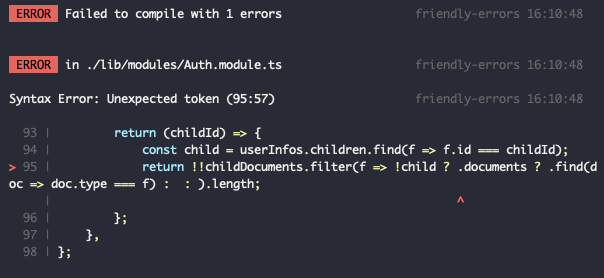
But I think it's from babel-loader because in the screeshot above, the code is purged from types so it passed the typescript compilation.
Even though I added @babel/plugin-proposal-optional-chaining, i still got errors

 victorgarciaesgi
on 12 Dec 2019
victorgarciaesgi
on 12 Dec 2019
What do you mean by purged from types ?
Are you able to give a repo with reproduction ?
Also your output show extra spaces between ? & .
kevinmarrec
on 12 Dec 2019
I mean it's after the typescript build, in my code I have (childId: string)
I have no space in my code and no errors from vscode
Can't do reproducible case right now, i will try tomorrow!
victorgarciaesgi
on 12 Dec 2019
Related issues
 b-m-f
·
6Comments
b-m-f
·
6Comments
 contrerascoder
·
5Comments
contrerascoder
·
5Comments
 JakubKoralewski
·
6Comments
JakubKoralewski
·
6Comments
 paveg
·
4Comments
paveg
·
4Comments
 stevenho0811
·
3Comments
stevenho0811
·
3Comments
Most helpful comment
@azawakh Wow thanks, it seems that babel plugins are not needed at all then, we can let TypeScript handles the transpilation of the features by specifying.
Only
esnextseems buggy,es5/es2018/es2019/es2020work well.I'm gonna remove Babel plugins and tell people to update their TypeScript configuration file in release so it works out of the box for
build&runtimeouf of the box !