Typescript: using @nuxt/typescript-build causes dead loop (npm only)
Describe the bug
When I run nuxt app using nuxt-ts in hoisted lerna monorepo, it causes weird behavior: when I open serve address, see 5 continuous reloads and this message:

To Reproduce
Steps to reproduce the behavior:
- Clone repository https://github.com/georgyfarniev/nuxt_lerna_repro
- Run
npm i && npm run bootstrap - Run
cd repro && npm run dev - Open localhost:7005
- See error described above
Expected behavior
Working correctly with hoisted lerna monorepo.
Additional context
Reproducible in both Windows 10 and Node 12, as well as Arch Linux with Node 12.
Please pay attention to lerna.json, as hoisted mode are enabled there.
Also, it's probably nuxt-ts issue, because everything works well with plain nuxt
This bug is a critical blocker for us, since we cannot use our applications written in nuxt+typescript using our lerna setup which is vital for us, so I will keep monitoring this issue and I'm ready to provide any possible assistance with fixing it.
 georgyfarniev
All 94 comments
@georgyfarniev Couldn't reproduce it with your steps.
Worth mentionning I did npm i inside repro repository before runing npm run dev.
So it means this is something to do with your lerna setup then ? (if it's supposed to download repro dependencies with the bootstrap command)
 kevinmarrec
on 10 Oct 2019
kevinmarrec
on 10 Oct 2019

kevinmarrec
on 10 Oct 2019
@kevinmarrec you have to do npm install and npm run bootstrap only in root of repository, not in repro dir. It is enabling learna hoisting. Then go to repro dir and execute npm run dev.
georgyfarniev
on 10 Oct 2019
@kevinmarrec yes, it reproducible only in hoisted lerna monorepository. I will try yo downgrade nuxt and nuxt typescript tomorrow to find out where regression was introduced and I will try to pin point into change that causes it unless you do it before me. It’s night here, in Indonesia.
Spent all day debugging it being sure it weird dependency collisions in our big monorepo, as it happened before with webpack, babel and similar stuff 😁
georgyfarniev
on 10 Oct 2019
Also, it's probably nuxt-ts issue, because everything works well with plain nuxt
Couldn't make it work with nuxt (i.e. without TypeScript), sounds more likely a more globally bug, not TypeScript one.
kevinmarrec
on 10 Oct 2019
@georgyfarniev Please have a look at :
https://github.com/nuxt/nuxt.js/issues/6173
kevinmarrec
on 10 Oct 2019
Also, it's probably nuxt-ts issue, because everything works well with plain nuxt
Couldn't make it work with nuxt (i.e. without TypeScript), sounds more likely a more globally bug, not TypeScript one.
I will double check my claim later, maybe I missed something out because my mind was messed up by end of the day after hardcore debugging session 😁. Thanks for Very quick reply to this issue. Strong,y appreciate it.
P. S checking your link
georgyfarniev
on 10 Oct 2019
@kevinmarrec I cannot reproduce issue with plain js version of nuxt, and advice to update enhanced-resolve didn't worked for me. I pushed update into repo in issue description that demonstrates it. Please pull, delete all node_modules and do npm i && npm run bootstrap && cd reprojs && npm run dev (all starting from repo root). I just double checked it and js use-case worked well for me, ts - not. Looks similar but probably different issue, unless I lost my sanity debugging frontend build toolchain :D
georgyfarniev
on 10 Oct 2019
@georgyfarniev Indeed it works for reprojs but then I did :
1) Replace reprojs by repro in lerna.json
2) npm run bootstrap
3) cd repro
4) npm run dev
And it works with TypeScript one
kevinmarrec
on 10 Oct 2019
Well it seems to be random OR I don't understand, probably something about node_modules caches, now it doesn't work anymore.
The issue is that I don't really know how to debug it...
kevinmarrec
on 10 Oct 2019
@kevinmarrec i would try with older version of nuxt-ts and nuxt to see if it will fail also. Then do “binary search” strategy between two git revisions where it work and where it doesn’t work.
georgyfarniev
on 10 Oct 2019
@georgyfarniev Did it ever use to work with nuxt-ts ?
kevinmarrec
on 10 Oct 2019
@kevinmarrec it worked before. I forgot to mention that it broke up when we updated package-lock.json.
Makes sense to downgrade nuxt-ts in provided example and see if it will work.
Another approach is to simply find out how to get more verbose information from nuxt than it provides in image above. It’s question to nuxt developers probably.
It’s definitely not a dependency collision, because monorepo in example has only one module inside. Probably something won’t getting resolved in hoisted setup.
georgyfarniev
on 11 Oct 2019
@kevinmarrec interesting fact, I did following:
- Removed @nuxt/typescript-build from buildModules
- Removed @nuxt/typescript-build from package.json inside repro directory
- Deleted all node_modules and executed npm i && npm run bootstrap (it's important to delete node_modules in this step!)
- Started npm run dev innside repro dir, and whoops, everything works!
But it only works if I also delete node_modules and delete @nuxt/typescript-build from package.json as well. Any ideas?
UPD1: So removing @nuxt/typescript-build from packages fixes issue, but simple deleting it (rm -rf node_modules/@nuxt/typescript-build) doesn't help. What could that mean? Obviously, it's not @nuxt/typescript-build causes issue, but it's dependencies. So I coped it's dependencies to my package.json and bootstrapped with them and without @nuxt/typescript-build, and surprisingly, it worked for me. What a mystery! I triple checked it
georgyfarniev
on 11 Oct 2019
@kevinmarrec also it works fine in production mode, only dev server have this dead loop
georgyfarniev
on 11 Oct 2019
Using the repro steps I was able to see this issue. Here's a GIF of development, noting there are no errors in the console.

@kevinmarrec Interested in hearing what debugging approaches might work best to tackle an issue like this given there are no errors. Should I set-up a debugging environment in an IDE and get a debugger in Node?
 ghost
on 11 Oct 2019
ghost
on 11 Oct 2019
@georgyfarniev Really weird, you can confirm that just removing the TypeScript module from nuxt.config doesn't fix the problem ? That you need to remove all the dependencies ?
May be related to TypeScript version shipped by @nuxt/typescript-build ?
@jhabdas Well, I succeeded to reproduce on my computer as well but looks like some magic random bug hard to debug x). I think it's something to do with @nuxt/loading-screen somehow, cause I don't really have clues what's doing the refresh of the page unless this Nuxt feature :/
kevinmarrec
on 11 Oct 2019
But overall I'd say it's npm dependencies crazy hell, could you try Lerna with yarn worskspaces to see if it's reproducible as well ?
kevinmarrec
on 11 Oct 2019
@kevinmarrec,
Really weird, you can confirm that just removing the TypeScript module from nuxt.config doesn't fix the problem ? That you need to remove all the dependencies ?
Yes. I tried to simply remove it from nuxt.config, but it has no effect, instead I have to even remove it from package.json and purge node_modules and reinstall (npm i && npm run bootstrap). I even modified installed module with console message to ensure that it aren't called, and I confirmed that this module has nothing to do in runtime.
But overall I'd say it's npm dependencies crazy hell, could you try Lerna with yarn worskspaces to see if it's reproducible as well ?
Good idea, I will try it later. But we cannot use yarn instead of npm, because so many things will break up accidentally (tried). We have very big monorepo so far. I rather spend time to migrate on pnpm, but problem with webpack loaders resolution blocks me.
Yes, npm dependencies is real hell and I spend a lot of time to fix related issues instead of being productive, because some people use a lot of small packages as left-pad or isobject. That's why we started to create something like standard library for NodeJS (WIP).
Can you please try to investigate further to fix this bug? I will try to reproduce it with yarn and help you as much as possible. But you know internals much better than me and I have close deadline now :(
georgyfarniev
on 11 Oct 2019
Thanks for the infos
Can you please try to investigate further to fix this bug? I will try to reproduce it with yarn and help you as much as possible. But you know internals much better than me and I have close deadline now :(
Well, if you have close deadline, consider asking your company (if it's a company project) to pay a Nuxt consulting (https://otechie.com/nuxt). It seems a bug that needs hours to debug and really specific to your company needs (npm hoist) and there are (probably) existing solutions like yarn workspaces. So I think it sounds relevant to get consulting for that.
kevinmarrec
on 11 Oct 2019
FYI: Even if I'm more likely the TypeScript guy, the issue doesn't sound really tied to it, so any core team member could be able to give some help through consulting.
kevinmarrec
on 11 Oct 2019
Still I'll try to dive into it again when I've some time, can't promise any fix soon, as I said it sounds really hard to debug :/
kevinmarrec
on 11 Oct 2019
FYI: Even if I'm more likely the
TypeScriptguy, the issue doesn't sound really tied to it, so any core team member could be able to give some help through consulting.
It might not be related with typescript, but related to module from this repository, that's why I submitted it here.
georgyfarniev
on 11 Oct 2019
Thanks for the infos
Can you please try to investigate further to fix this bug? I will try to reproduce it with yarn and help you as much as possible. But you know internals much better than me and I have close deadline now :(
Well, if you have close deadline, consider asking your company (if it's a company project) to pay a Nuxt consulting (https://otechie.com/nuxt). It seems a bug that needs hours to debug and really specific to your company needs (
npm hoist) and there are (probably) existing solutions likeyarnworkspaces. So I think it sounds relevant to get consulting for that.
By deadline I mean that I lack of time for investigation , not that it directly related to nuxt. But good to know about that service, thanks.
I will try to investigate bug tomorrow morning,it makes me very curious after all. I will try to get more debug output from nuxt. I would like to understand why it happens.
georgyfarniev
on 11 Oct 2019
Update: trying to patch @nuxt/loading-screen in order to get more useful debug information. Will keep you updated about progress.
georgyfarniev
on 12 Oct 2019
I met this too.
I use typescript + nuxt-property-decorator + [email protected] + ts-node + koa.
It works well on production after build, but has wrong with development mode. 😿😿
I've tried several days, waiting for your response.
 shalldie
on 15 Oct 2019
shalldie
on 15 Oct 2019
@georgyfarniev
Oh, i got it in my project.
The `order` of the deps which matters!
I solve it by thease steps:
rm -rf node_modules,rm package-lock.jsonnpm i nuxt --save, nuxt must install first!npm i @nuxt/typescript-build @nuxt/typescript-runtime --save, another modules install.npm i, other modules should be installed at last......
lerna bootstrap seems hard to handle the order of deps, Hope to help you. 😂😂
shalldie
on 15 Oct 2019
Other thing is that,
additionalExtensions: ['ts'] should be add into nuxt.config.ts's build, without which, it only works well in production after build, failed in development mode.
.ts file can't be found in store directory in 'development'.
You can see it at : https://github.com/nuxt/nuxt.js/blob/92c7f4ed249466870a477798f910c84eb1fdd18d/packages/builder/src/builder.js#L47
shalldie
on 15 Oct 2019
@shalldie additionalExtensions handle store/middleware/plugins TS files, it's later compiled to javascript in final bundles, so no need it in production
kevinmarrec
on 16 Oct 2019
@kevinmarrec
OK
In my case , i use nuxt with koa + ts-node, it's needed in development.
shalldie
on 16 Oct 2019
Still failed after 5 reloads, after adding additionalExtensions: ['ts']. I use .ts for stores and middlewares.
How i can get/produce more debug info?
 arkhamvm
on 16 Oct 2019
arkhamvm
on 16 Oct 2019
I don't have any experience using Nuxt programmatic usage (koa, express, ...) and can't really spend lot of time trying to know all the aspects that could make things buggy. As Best practices Nuxt core team recommend to use a separated standalone app with https://github.com/nuxt-community/proxy-module.
Still, this issue isn't related to programmatic usage.
kevinmarrec
on 16 Oct 2019
@kevinmarrec i have this problem using proxy-module, if it matters
modules: [
'@nuxtjs/axios',
'@nuxtjs/proxy',
],
axios: {
proxy: true,
},
proxy: {
'/fake-api/': {target: baseUrl, pathRewrite: {'^/fake-api/': '/api-fake/'}},
},
@arkhamvm @kevinmarrec @georgyfarniev
I tried another project just now , it really works for me.
It seems that the order of deps that matters.
Here is how i solve the failed after 5 reloads: https://github.com/nuxt/typescript/issues/145#issuecomment-542366859
shalldie
on 16 Oct 2019
@shalldie it's really weird. wonder how can it affect nuxt... I haven't much time on debugging, but I found that in case of this bug nuxt just trying to reload repeatedly, but build are passing without error. Still need some more time to find out. I hope nuxt team can help us, at least with advice how to debug it properly.
georgyfarniev
on 16 Oct 2019
At least, is there a option for downgrade to working version?
arkhamvm
on 16 Oct 2019
@arkhamvm @shalldie @kevinmarrec: temporary workaround for this thing, add the following into lerna.json:
"command": {
"bootstrap": {
"hoist": true,
"nohoist": [
"@nuxt/typescript-build"
]
}
}
}
Don't forget to purge all node_modules and install && bootstrap from scratch, otherwise it may fail to work.
georgyfarniev
on 16 Oct 2019
@georgyfarniev Sorry, i dont use lerna/hoist, just have the same error =(
arkhamvm
on 16 Oct 2019
@shalldie if you execute npm i inside actual package, then lerna hoisting doesn't make sense.
georgyfarniev
on 16 Oct 2019
@georgyfarniev Sorry, i dont use
lerna/hoist, just have the same error =(
That's interesting. Can you please provide minimal reproduction? For me it fails only with lerna. Did you tried to purge node_modules and package-lock.json?
georgyfarniev
on 16 Oct 2019
@georgyfarniev
I just met the same error failed after 5 reloads too,i don't use lerna。
shalldie
on 16 Oct 2019
@georgyfarniev
I just met the same error
failed after 5 reloadstoo,i don't use lerna。
Please provide minimal reproduction repository. It will help us to find issue faster and fix it for users.
In my case, it's reproducible only with lerna, tried and retried million times :)
georgyfarniev
on 16 Oct 2019
@georgyfarniev
Okay, after work tonight.
shalldie
on 16 Oct 2019
@georgyfarniev @kevinmarrec
I open a new issue about Programmatic mode, Failed to show Nuxt.js app after 5 reloads: https://github.com/nuxt/typescript/issues/152
There's a repository with two branches to show how i get the error, and the way works for me to fix it.
shalldie
on 16 Oct 2019
@shalldie Yours order of install really fix the problem, I'm completely bewildered, I never thought about the order in which npm packages were installed.
arkhamvm
on 17 Oct 2019
@shalldie usage with custom server are not recommended as mentioned by @kevinmarrec. However, nuxt exposes API for this purpose and therefore supports this. Also your case can be useful to debug my initial problem, as it may have same reason. I will take a look on your example.
georgyfarniev
on 17 Oct 2019
@shalldie I confirmed that it works when I follow your instruction. That's extremely weird, it doesn't even changes package.json, only package-lock.json. Weirdest bug I ever seen in my life. I do not give any promises, but I will try spend more time on debugging it this weekend.
First, I will try to build it without nodemon and ts-node and run. I think problem is related to nodemon or tsnode, but I have no idea how installation order may affect it. I need to look at the part that are responsible for sending reload push request to client. Everything seems clear on client side, so I suspect it dev server related issue, 99% sure.
UPDATE: even without nodemon and ts-node it fails to reload, I just tried to start built application.
georgyfarniev
on 17 Oct 2019
@kevinmarrec @shalldie @arkhamvm @jhabdas:
I spend half of day debugging this issue, and I found that it actually a blocker for dev mode. Here is a repro: https://github.com/georgyfarniev/nuxt-typescript-deadloop (typescript branch). I made cleanest repository for reproduction possible, without using 3rd party server or anything else.
Steps to reproduce:
- Clone repo above, use typescript branch for ts repro example, or master for plain nuxt
- Execute
npm i && npm run dev - Open address (localhost:3000)
- Observe infinite loop bug, same as in OP
I can't find exact issue, but here is a facts:
- Following steps of @shalldie (in my case,
npm run purge && npm i -S nuxt && npm i -S @nuxt/typescript-build && npm ifixes the problem. Extremely weird. - With yarn, everything works fine
- Presence of @nuxt/typescript-build module breaks even JS version of nuxt, check out repo above in master branch, follow instruction above for master branch also.
- Everything works fine in production mode, only in dev mode it fails.
- Either deleting of node_modules/@nuxt/typescript-build or installing dependencies of it's package.json without @nuxt/typescript-build doesn't reproduces issue alone.
- I explored source code of @nuxt/typescript-build and I didn't find anything suspicious
- When I did regular install (that reproduces error), added node_modules to git, then did steps described by @shalldie to "fix" it, I saw diff in node_modules about 200K lines long. This is about how undeterministic npm can be.
- This bug is seems unrelated to lerna, it happens even with standalone package.
So I think it should be considered a blocker and should have appropriate priority. Unfortunately, we cannot use yarn as workaround, because it breaks other packages, and npm are official package manager, so it should work. Thankfully, it works (at least now) with lerna nohoist in our very specific case. It can be an npm bug as well I presume. The further investigation are beyond limits of my mind and time bandwidth.
I'm not sure if it should be duplicated to nuxtjs repo or not, I just provided you all available information and I hope it will help to solve issue.
georgyfarniev
on 17 Oct 2019
Thanks @georgyfarniev for the hard efforts and your time, I'm gonna ask help to other core team members about what can be the possible reason why it wouldn't wort with npm but works with yarn.
One of the hardest-to-debug bugs I've ever seen with Nuxt though 😱
kevinmarrec
on 17 Oct 2019
@kevinmarrec thanks for reply. Let me know if I can help. I asked NPM guys, because same repro works well with yarn, so maybe npm bug as well: https://npm.community/t/weird-bug-with-npm-and-nuxt-js/10580
georgyfarniev
on 17 Oct 2019
Dropped thread to npm team: https://npm.community/t/weird-bug-with-npm-and-nuxt-js/10580
georgyfarniev
on 17 Oct 2019
Thanks @georgyfarniev , worth mentioning it also happens on Node v10.16.3 with npm v6.9.0 (my local versions). I'm using Ubuntu 19.04
kevinmarrec
on 17 Oct 2019
@kevinmarrec
The error is a combined effect of
lerna hoistandeslint-import-resolver-webpack.Because
eslint-import-resolver-webpackdepends onenhanced-resolve@~0.9.0which is far behind current wepback's dependencyenhanced-resolve@^4.1.0and learn hoisted[email protected]to root node_modules, so webpack used old version enhanced-resolve and lead to missing resources and endless reloading error.You can fix or verify by adding
"enhanced-resolve": "^4.1.0"manually in your package.json.I suggesting not using lerna hoist, if you have to use lerna, please use yarn workspaces together with lerna for implementing your hoisting requirement.
 ChrisKader
on 18 Oct 2019
ChrisKader
on 18 Oct 2019
I can confirm that adding "enhanced-resolve": "^4.1.0" fixed the reload issue for me. While I do not like just adding packages to "fix" things, it at least tells us what the issue is.
ChrisKader
on 18 Oct 2019
Yeah @ChrisKader I mentioned the issue earlier https://github.com/nuxt/typescript/issues/145#issuecomment-540614252 , but dunno if if fixed the issue for @georgyfarniev
We'd need to check if @nuxt/typescript-build has a nested dependency that may conflict with Webpack resolve.
kevinmarrec
on 18 Oct 2019
I can confirm that adding
"enhanced-resolve": "^4.1.0"fixed the reload issue for me. While I do not like just adding packages to "fix" things, it at least tells us what the issue is.
@ChrisKader this issue is not related to lerna in the end. I will try your solution once again in case without lerna. I tried in lerna case and didn’t helped
georgyfarniev
on 18 Oct 2019
ts-loader has an older enhanced-resolve dependency "enhanced-resolve": "^4.0.0",
ChrisKader
on 18 Oct 2019
@ChrisKader I can confirm that adding "enhanced-resolve": "^4.1.0" DID NOT help to solve the problem. We probably talking about different thing. Please check my repo link into this comment: https://github.com/nuxt/typescript/issues/145#issuecomment-543009573
(switch to master branch, try adding this dep manually, and then do npm i)
The werdest thing is that I tried to fork @nuxt/typescript-build and installed it instead of original one, and error are gone. The dependencies are same.
This fact and fact that it works well with yarn makes me think that it's npm issue.
Also, versions:
OS: Windows 10
NPM: 6.12.0
NODE: nv12.6.0
georgyfarniev
on 18 Oct 2019
With minimal @georgyfarniev reproduction, enhanced-resolve installed version is 4.1.1 so shouldn't be the problem
kevinmarrec
on 18 Oct 2019
@georgyfarniev Seems to be related how fsevents is linked by npm
-> Remove @nuxt/typescript-build from package.json
-> Remove node_modules && package-lock.json
-> npm i
Then compare in your GIT tool the difference between your remote package-lock.json and local one. You should be able to notice this :
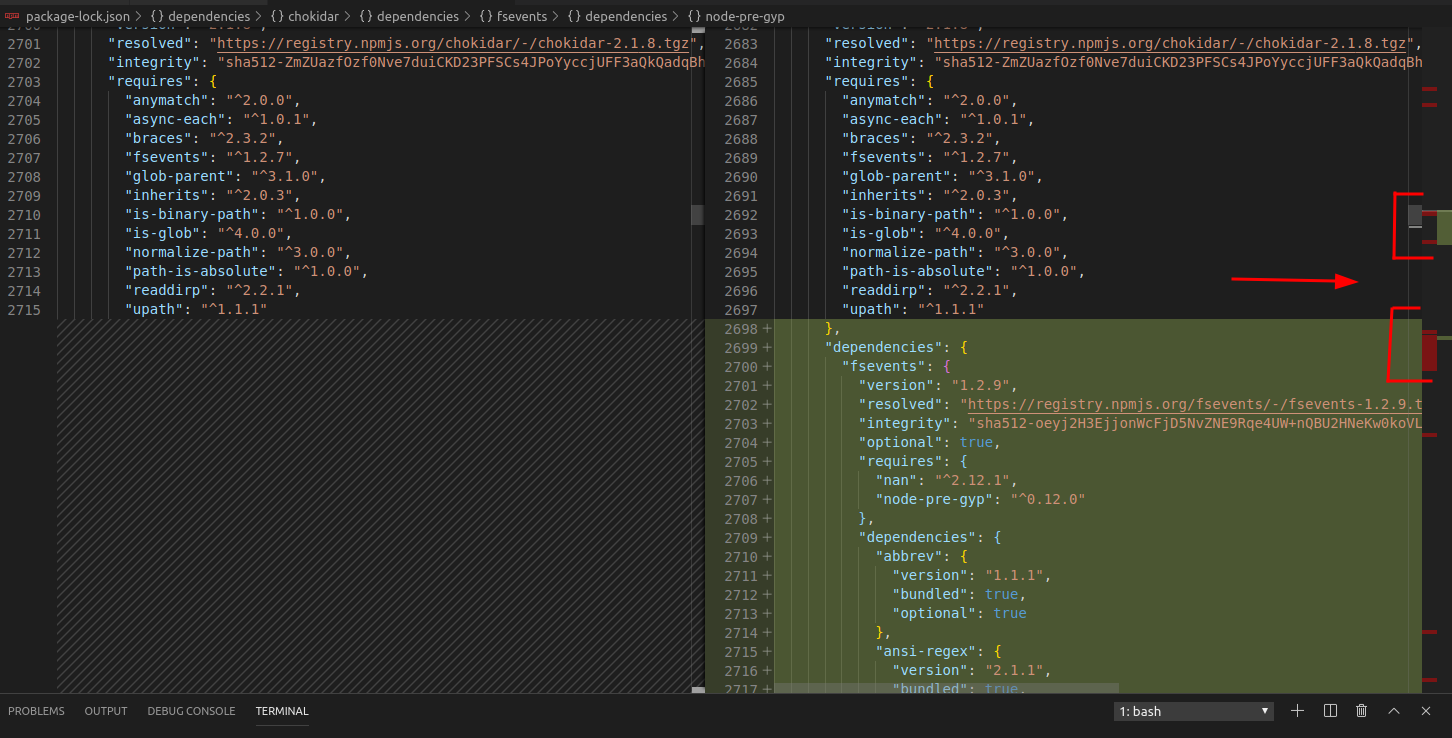
kevinmarrec
on 18 Oct 2019
Then :
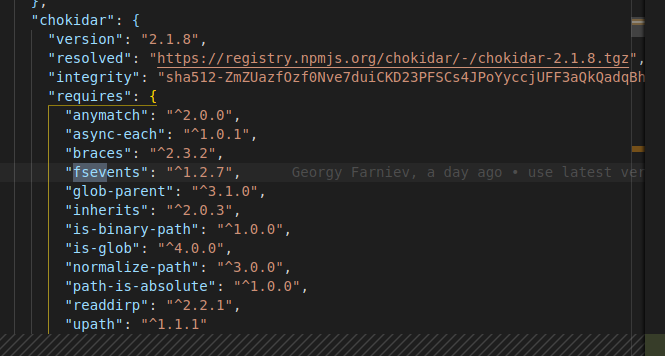
kevinmarrec
on 18 Oct 2019
And finally :
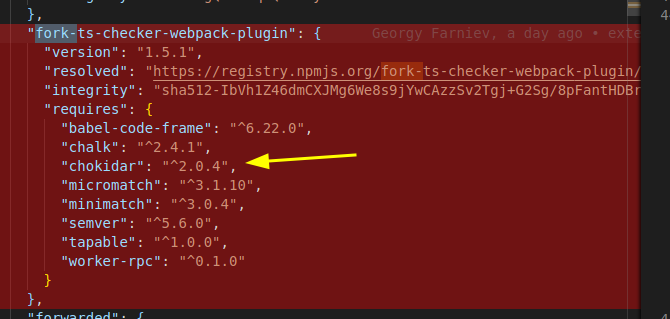
kevinmarrec
on 18 Oct 2019
Cause of fork-ts-checker-webpack-plugin, older chokidar (v2, using fsevents v1) is resolved before the chokidar of @nuxt/builder (v3, using fsevents v2) (i'm probably saying shit BUT I think i'm getting closer to the real bug, I let you know continuing on this as I don't have more time now)
kevinmarrec
on 18 Oct 2019
You can compare node_modules with and without the @nuxt/typescript-build and will observe that chokidar version is not the same.
kevinmarrec
on 18 Oct 2019
With @nuxt/typescript-build & yarn :
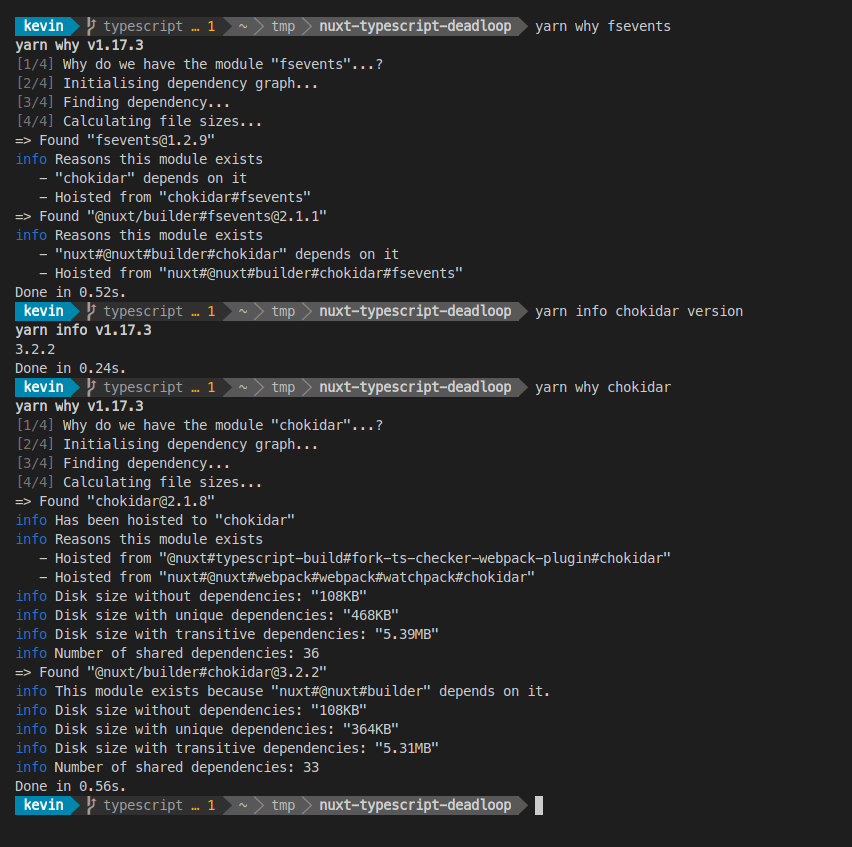
kevinmarrec
on 18 Oct 2019
Still forcing installing chokidar at version 3 doesn't fix the issue.
I think it's a npm global issue that make some dependency order broken.
kevinmarrec
on 18 Oct 2019
Are dependencies installed in the order in which they appear in the package.json?
ChrisKader
on 18 Oct 2019
No cause it depends also on nested dependencies, and npm / yarn resolves things differently
kevinmarrec
on 18 Oct 2019
@kevinmarrec maybe worth trying with pnpm, just in case. I will try later today. Also I will try to reach npm team in other channels. Very appreciated your effort and glad to observe good example of open source collaboration in the flesh. We will defeat this beast
georgyfarniev
on 18 Oct 2019
Thank you for explaining the difference we saw as well @kevinmarrec I was really excited as I fixed the issue for multiple of my own projects but it seems the rabbit hole just keeps going....
ChrisKader
on 18 Oct 2019
Tried with pnpm, looks like nuxt doesn't work well with pnpm at all, but it's not related to this bug directly.
georgyfarniev
on 18 Oct 2019
@paulmillr fyi and still need to read your latest post https://github.com/nuxt/typescript/issues/145#issuecomment-543602866
ghost
on 18 Oct 2019
@jhabdas thanks for mentioning me.
@georgyfarniev make the project use chokidar 3.0; or use its fork — 2.x is uncool.
 paulmillr
on 19 Oct 2019
paulmillr
on 19 Oct 2019
Cast @isaacs, @zkat: hello, we need your help to debug this please.
georgyfarniev
on 21 Oct 2019
@kevinmarrec can you create custom branch of @nuxt/typescript build with removed dependencies and try to reproduce using my example using it?
I tried to fork it together with deps, then installed from my repo, not reproducible. Maybe package name are hardcoded somewhere?
Or at least create custom branch of this project and give me access to it if you can, I will try to play around @nuxt/typescript-build and it's deps. I don't need to publish anything since I can install from github directly, so hope it will help to reproduce issue.
georgyfarniev
on 22 Oct 2019
Hello all, I found exact package that causes this problem: it's ts-loader. BUT, it broke build ONLY if it is a dependency of a dependency, e.g., if we will add ts-loader directly, it will not break build, but if it is part of @nuxt/typescript-build, then it breaks it.
I took sources of @nuxt/typescript-build, and disassembled it piece by piece until I was left with only package.json file with ts-loader as dependency. I even tried to rename @nuxt/typescript-build to other name, no result.
I hope this information was useful, keeping working on it.
georgyfarniev
on 23 Oct 2019
@georgyfarniev Nice, I still think it's even deeper and tied to nested dependency of ts-loader, keep it up, you're getting closer 😁
kevinmarrec
on 23 Oct 2019
@kevinmarrec it's enhanced-resolve. If I replace ts-loader with it, it broke build in same way. Keep going.
georgyfarniev
on 23 Oct 2019
https://github.com/nuxt/nuxt.js/issues/6173#issuecomment-518044164 ^^
https://github.com/nuxt/typescript/issues/145#issuecomment-543581140
Dunno
kevinmarrec
on 23 Oct 2019
@kevinmarrec the most interesting thing is that I have same version of enhanced-resolve in both cases (with only nuxt dependency and with @nuxt/typescript-build). It’s latest version. I will try downgrading it.
georgyfarniev
on 23 Oct 2019
Hello all, I found exact package that causes this problem: it's ts-loader. BUT, it broke build ONLY if it is a dependency of a dependency, e.g., if we will add ts-loader directly, it will not break build, but if it is part of @nuxt/typescript-build, then it breaks it.
I took sources of @nuxt/typescript-build, and disassembled it piece by piece until I was left with only package.json file with ts-loader as dependency. I even tried to rename @nuxt/typescript-build to other name, no result.
I hope this information was useful, keeping working on it.
I said the same thing and was told I was incorrect.
ChrisKader
on 24 Oct 2019
@ChrisKader, I apologize for telling that you was incorrect, because your solution doesn't work in our case, but our issue was caused by same module.
Updating to latest enhanced-resolve doesn't help at all. And another weird fact: when I replace @nuxt/typescript-build with enhanced-resolve of latest stable version (4.1.1), it breaks build also. But when I install it from master it works, until I add @nuxt/typescript-build as dep :)
See detailed examples here (each section represents dependencies):
Works (enhanced-resolve removed one of it's deps (memory-fs) in this version, but should not be relevant, since it already presented):
"enhanced-resolve": "webpack/enhanced-resolve#master",
"nuxt": "^2.10.1"
Doesn't work (enhanced-resolve from github repo mixed with @nuxt/typescript-build):
"@nuxt/typescript-build": "^0.3.2",
"enhanced-resolve": "webpack/enhanced-resolve#master",
"nuxt": "^2.10.1"
Doesn't work (latest stable version):
"enhanced-resolve": "^4.1.1",
"nuxt": "^2.10.1"
Also, for second example, I just checked that version of enhanced-resolve that actually ends up in node_modules are same as in current master. e.g. 5.0.0-beta.3
georgyfarniev
on 24 Oct 2019
Also works
"dependencies": {
"nuxt": "^2.10.2",
},
"devDependencies": {
"@nuxt/typescript-build": "^0.3.2"
}
 michalzaq12
on 29 Oct 2019
michalzaq12
on 29 Oct 2019
As this issue is really high edge case and that this module is not responsible of any dependency resolution issue, this is unfortunately not something we can fix, sorry.
Workarounds :
- Not using
hoisting
- Try to force the dependencies to resolve the right versions with
package.jsonconfiguration (https://yarnpkg.com/lang/en/docs/selective-version-resolutions/)
- Try to force the dependencies to resolve the right versions with
kevinmarrec
on 8 Dec 2019
@kevinmarrec, but it doesn’t work even in unhoisted environments (without lerna). And it’s unclear how to solve it by specifying exact version. This is probably most typical use case for this module. Anyway, I fixed all my problems by migrating back to vue cli from nuxt and totally removing it from my project, especially because how such issues “resolved”.
georgyfarniev
on 8 Dec 2019
Hi,
is there any progress with this issue, cause I'm running in a similar problem. I tried to get nuxtjs working with adonisjs and I'm stucked in a build loop. (tried on Windows 10 and Manjaro)
I made a simple repo.
Can someone confirm this issue?
 haexhub
on 22 Jun 2020
haexhub
on 22 Jun 2020
Hi guys.
However this (seems) was an issue with webpack-dev-middleware, i apologizes for this issue. Thanks to the works of @crutch12 and @simplesmiler this should be fixed with v2.13.2 :heart: Keeping issue open until can confirm it is gone.
 pi0
on 26 Jun 2020
pi0
on 26 Jun 2020
Is there anyone that can confirm something has been indeed fixed around this ?
kevinmarrec
on 6 Jul 2020
I get this error:
ERROR When you use this plugin you must install typescript. 19:01:42
at ForkTsCheckerWebpackPlugin.validateTypeScript (/project/node_modules/fork-ts-checker-webpack-plugin/src/index.ts:250:13)
at new ForkTsCheckerWebpackPlugin (/workspace/node_modules/fork-ts-checker-webpack-plugin/src/index.ts:197:14)
at WebpackBundler.<anonymous> (/workspace/node_modules/@nuxt/typescript-build/src/index.ts:77:28)
at WebpackBundler.<anonymous> (/workspace/node_modules/@nuxt/utils/dist/utils.js:1875:29)
at WebpackClientConfig.extendConfig (/workspace/node_modules/@nuxt/webpack/dist/webpack.js:4884:37)
at WebpackClientConfig.config (/workspace/node_modules/@nuxt/webpack/dist/webpack.js:4919:45)
at WebpackClientConfig.config (/workspace/node_modules/@nuxt/webpack/dist/webpack.js:5083:26)
at WebpackBundler.getWebpackConfig (/workspace/node_modules/@nuxt/webpack/dist/webpack.js:5391:19)
at WebpackBundler.build (/workspace/node_modules/@nuxt/webpack/dist/webpack.js:5398:12)
at Builder.build (/workspace/node_modules/@nuxt/builder/dist/builder.js:5643:30)
at Object._buildDev (/workspace/node_modules/@nuxt/cli/dist/cli-dev.js:106:5)
at Object.startDev (/workspace/node_modules/@nuxt/cli/dist/cli-dev.js:64:7)
at Object.run (/workspace/node_modules/@nuxt/cli/dist/cli-dev.js:51:5)
at NuxtCommand.run (/workspace/node_modules/@nuxt/cli/dist/cli-index.js:2809:7)
I'm using a yarn workspace. The error occurs in the catch statement:
const typescriptPath = options.typescript || require.resolve('typescript');
const tsconfig = options.tsconfig || './tsconfig.json';
const compilerOptions = typeof options.compilerOptions === 'object'
? options.compilerOptions
: {};
let typescript, typescriptVersion;
try {
typescript = require(typescriptPath);
typescriptVersion = typescript.version;
}
catch (_ignored) {
throw new Error('When you use this plugin you must install `typescript`.');
}
The variable typescriptPath is equal to:
{
configFile: '/workspace/project/tsconfig.json',
extensions: {
vue: true
}
}
The following change makes the build succeed:
- const typescriptPath = options.typescript || require.resolve('typescript');
+ const typescriptPath = require.resolve('typescript');
so this module seems to be passing an object when a string is expected. However, that seems to be because the version of fork-ts-checker-webpack-plugin that yarn decided to install was version 3, even though this project asks for v5 (it installs a separate package, fork-ts-checker-webpack-plugin-v5, that does not exist on npm). This is because I had a vue-cli app in another package, which uses v3. Adding fork-ts-checker-webpack-plugin as a dev dependency to my package fixed the issue.
 lights0123
on 3 Oct 2020
lights0123
on 3 Oct 2020
I had the same problem as @lights0123 with yarn.
 frankier
on 16 Oct 2020
frankier
on 16 Oct 2020
@frankier @lights0123
I had the same issue (_ERROR When you use this plugin you must install typescript_). Was able to resolve it in nuxt.config:
[
      '@nuxt/typescript-build',
      {
        typeCheck: {
          typescript: require.resolve('typescript'),
        },
      },
    ],
]
 ebeloded
on 17 Oct 2020
ebeloded
on 17 Oct 2020
I'm still getting the same screen as OP.
I'm on:
    "@nuxt/typescript-runtime": "2.0.0",
    "nuxt": "2.14.7",
    "vue": "2.6.12",
    "@nuxt/types": "2.14.7",
    "@nuxt/typescript-build": "2.0.3",
    "fork-ts-checker-webpack-plugin": "5.2.0",
    "typescript": "4.0.3",
I'd love to help figuring this out. But I am not seeing any useful output anywhere.
Nothing in the console. Nothing useful when running with DEBUG=*.
If you can give me some pointers as to where to look for the root cause, I might be able to resolve this.
Thanks.
 moltar
on 19 Oct 2020
moltar
on 19 Oct 2020
For people encountering @lights0123 issue on Yarn, I've fixed in the following way:
- Add
fork-ts-checker-webpack-pluginas a dev dependency into your Nuxt project'spackage.json. - Edit your root
package.jsonas follow:
-  "workspaces": [
-    "packages/*"
-  ],
+  "workspaces": {
+    "packages": ["packages/*"],
+    "nohoist": [
+      "**/fork-ts-checker-webpack-plugin",
+      "**/fork-ts-checker-webpack-plugin/**"
+    ]
+  },
- Delete root
node_modulesdirectory. - Run
yarn - Run your Nuxt project.
 IGassmann
on 25 Nov 2020
IGassmann
on 25 Nov 2020
I encountered this error and the fix for me was:
yarn add typescript fork-ts-checker-webpack-plugin -D
Nothing above seemed to work.
 mikedidomizio
on 18 Feb 2021
mikedidomizio
on 18 Feb 2021
Related issues
 contrerascoder
·
5Comments
contrerascoder
·
5Comments
 JakubKoralewski
·
6Comments
JakubKoralewski
·
6Comments
 dclovec
·
4Comments
dclovec
·
4Comments
 e-lobo
·
4Comments
e-lobo
·
4Comments
 Exeteres
·
3Comments
Exeteres
·
3Comments
Most helpful comment
@frankier @lights0123
I had the same issue (_ERROR When you use this plugin you must install typescript_). Was able to resolve it in
nuxt.config: