Typescript: Language service frequently stops in these days
Language service warns wrong errors based on old code and I have to restart language service.
TypeScript Version: 3.4.0-dev.20190817
VSCode 1.37.1
[2019-08-18 01:55:51.644] [exthost] [error] Error: <semantic> TypeScript Server Error (3.7.0-dev.20190817)
Not supported
Error: Not supported
    at Object.get yieldType [as yieldType] (tsserver.js:32546:37)
    at getIteratedTypeOrElementType (tsserver.js:57722:61)
    at getContextualTypeForElementExpression (tsserver.js:49558:20)
    at checkArrayLiteral (tsserver.js:50019:49)
    at checkExpressionWorker (tsserver.js:55222:28)
    at checkExpression (tsserver.js:55147:38)
    at checkFunctionExpressionOrObjectLiteralMethodDeferred (tsserver.js:53886:36)
    at checkDeferredNode (tsserver.js:59994:21)
    at Map.forEach (<anonymous>)
    at checkDeferredNodes (tsserver.js:59982:37)
    at checkSourceFileWorker (tsserver.js:60044:17)
    at checkSourceFile (tsserver.js:60014:13)
    at getDiagnosticsWorker (tsserver.js:60089:17)
    at Object.getDiagnostics (tsserver.js:60075:24)
    at isMissingAwaitError (tsserver.js:116089:39)
    at getAwaitableExpression (tsserver.js:116110:20)
    at Object.getCodeActions (tsserver.js:116050:34)
    at tsserver.js:115926:121
    at Object.flatMap (tsserver.js:583:25)
    at Object.getFixes (tsserver.js:115926:23)
    at tsserver.js:125977:35
    at Object.flatMap (tsserver.js:583:25)
    at Object.getCodeFixesAtPosition (tsserver.js:125975:23)
    at IOSession.Session.getCodeFixes (tsserver.js:135174:64)
    at Session.handlers.ts.createMapFromTemplate._a.(anonymous function) (tsserver.js:133961:61)
    at tsserver.js:135367:88
    at IOSession.Session.executeWithRequestId (tsserver.js:135358:28)
    at IOSession.Session.executeCommand (tsserver.js:135367:33)
    at IOSession.Session.onMessage (tsserver.js:135390:35)
    at Interface.<anonymous> (tsserver.js:136705:27)
    at Interface.emit (events.js:182:13)
    at Interface._onLine (readline.js:290:10)
    at Interface._normalWrite (readline.js:433:12)
    at Socket.ondata (readline.js:149:10)
    at Socket.emit (events.js:182:13)
    at addChunk (_stream_readable.js:283:12)
    at readableAddChunk (_stream_readable.js:264:11)
    at Socket.Readable.push (_stream_readable.js:219:10)
    at Pipe.onStreamRead [as onread] (internal/stream_base_commons.js:94:17)
    at Function.create (c:\Users\\AppData\Local\Programs\Microsoft VS Code\resources\app\extensions\typescript-language-features\dist\extension.js:53:63463)
    at h.dispatchResponse (c:\Users\\AppData\Local\Programs\Microsoft VS Code\resources\app\extensions\typescript-language-features\dist\extension.js:53:56618)
    at h.dispatchMessage (c:\Users\\AppData\Local\Programs\Microsoft VS Code\resources\app\extensions\typescript-language-features\dist\extension.js:53:55516)
    at constructor._reader.onData.e (c:\Users\\AppData\Local\Programs\Microsoft VS Code\resources\app\extensions\typescript-language-features\dist\extension.js:53:54992)
    at u.fire (c:\Users\\AppData\Local\Programs\Microsoft VS Code\resources\app\out\vs\workbench\services\extensions\node\extensionHostProcess.js:50:207)
    at t.Reader.onLengthData (c:\Users\\AppData\Local\Programs\Microsoft VS Code\resources\app\extensions\typescript-language-features\dist\extension.js:53:61683)
    at Socket.t.Reader.constructor.e.on.e (c:\Users\\AppData\Local\Programs\Microsoft VS Code\resources\app\extensions\typescript-language-features\dist\extension.js:53:61331)
    at Socket.emit (events.js:182:13)
    at addChunk (_stream_readable.js:283:12)
    at readableAddChunk (_stream_readable.js:264:11)
    at Socket.Readable.push (_stream_readable.js:219:10)
    at Pipe.onStreamRead [as onread] (internal/stream_base_commons.js:94:17)
[2019-08-17 16:27:42.203] [exthost] [error] Error: DisposableStore is missing...
    at R._convertCompletionItem (c:\Users\\AppData\Local\Programs\Microsoft VS Code\resources\app\out\vs\workbench\services\extensions\node\extensionHostProcess.js:563:173)
    at define.resolveCompletionItem.o.asPromise.then.e (c:\Users\\AppData\Local\Programs\Microsoft VS Code\resources\app\out\vs\workbench\services\extensions\node\extensionHostProcess.js:562:707)
 falsandtru
All 26 comments
This error may be caused by #32955.
falsandtru
on 20 Aug 2019
Confirmed this problem appeared without any errors. All output panels are useless.
falsandtru
on 22 Aug 2019
The errors might be hidden by the update of TS.
falsandtru
on 22 Aug 2019
@falsandtru do you have a minimal repro to trigger this in the editor? I haven't been able to craft a test case that triggers this.
 rbuckton
on 24 Aug 2019
rbuckton
on 24 Aug 2019
The problem which stops/breaks language service locally appears when I mistype something and fix it like mistyping refs and fixing it to return. Then language service warns based on the removed word refs. But unfortunately this is not reproducible because this is time-sensitive. Have you seen a similar problem?
falsandtru
on 24 Aug 2019
@falsandtru we had a couple sets of eyes try to figure out how this happens, but weren't able to come up with any way to trigger this. The way the code is written seems to make this impossible, but obviously it's happening anyway. Can you provide a concrete repro where we can try to cause the crash locally and understand what the problem is? Thanks!
 RyanCavanaugh
on 26 Aug 2019
RyanCavanaugh
on 26 Aug 2019
I found a repro! This is reproducible on both Ubuntu 18.04 and Win10.
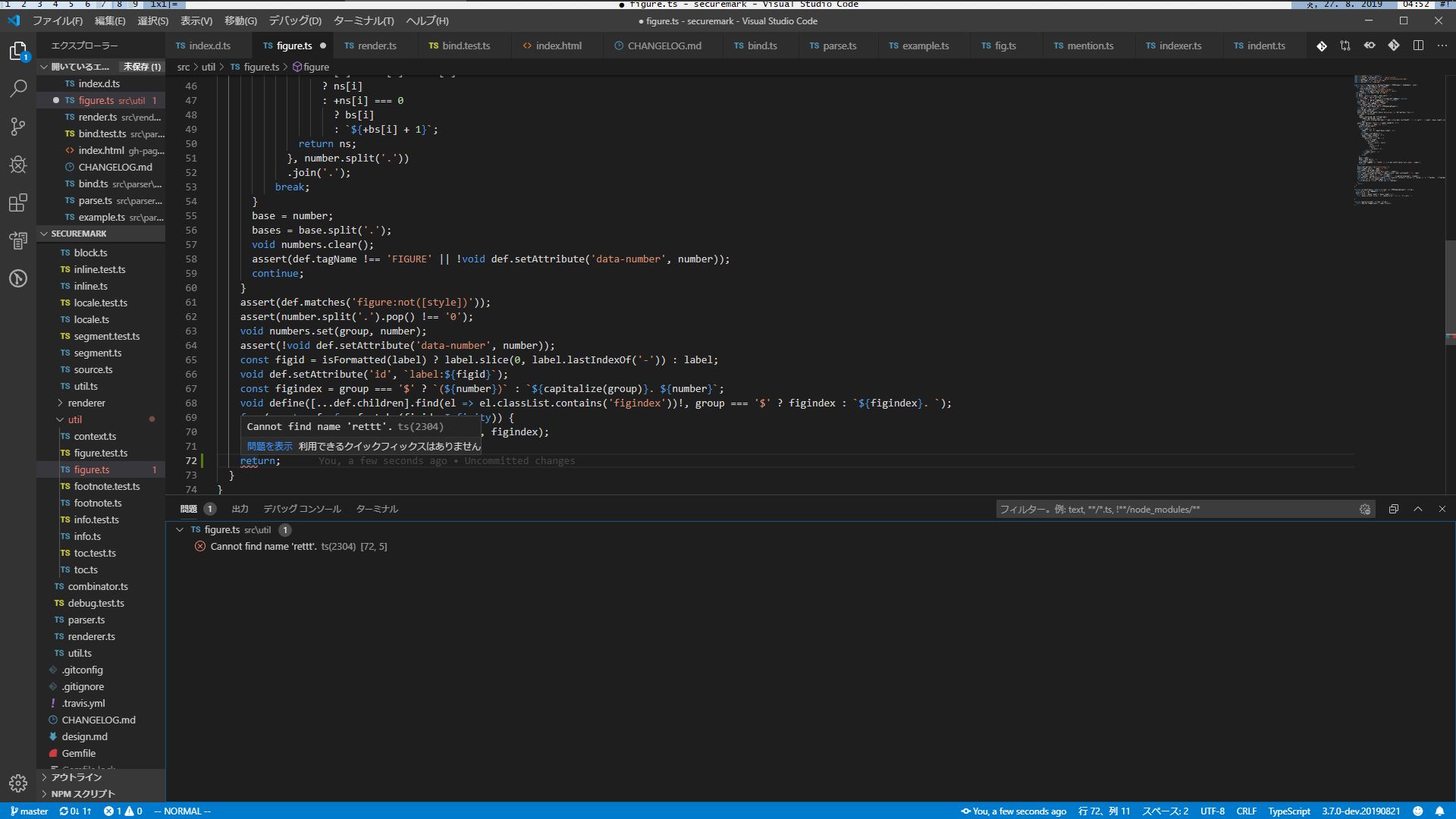
- clone https://github.com/falsandtru/securemark
- run
npm i - run
code --disable-extensions - open
./src/util/figure.ts - insert 72th line (refer the ss)
- type
ret - wait for
returnto appear in the suggestions and typettt...immediately! this is very important. - delete the verbose
t - language service suggests
returnagain - complete
returnby choosing the suggestedreturn - the error based on the removed code remains and we can't remove this.
falsandtru
on 26 Aug 2019
@rbuckton Can you repro?
falsandtru
on 28 Aug 2019
No, I have not been able to reproduce this even when simulating a heavy load on my machine to see if it might be related to some kind of out-of-sync cache timing issue. Would you be able to send us a tsserver log?
To enable tsserver logging, add the following to .vscode/settings.json:
{
    "typescript.tsserver.log": "verbose"
}
Once enabled, restart VS Code and open the Output Pane (usually Ctrl+Shift+U) and switch to the TypeScript output log:

In the TypeScript Output Pane you should see something like the following:
[Info  - 6:07:08 PM] Using tsserver from: c:\dev\scratch\securemark\node_modules\typescript\lib
[Info  - 6:07:08 PM] <syntax>  Log file: c:\Users\rbuckton\AppData\Roaming\Code\logs\20190828T120253\exthost1\vscode.typescript-language-features\tsserver-log-mtllMx\tsserver.log
[Info  - 6:07:08 PM] <syntax> Forking...
[Info  - 6:07:08 PM] <syntax> Starting...
[Info  - 6:07:08 PM] <semantic>  Log file: c:\Users\rbuckton\AppData\Roaming\Code\logs\20190828T120253\exthost1\vscode.typescript-language-features\tsserver-log-h4jCQn\tsserver.log
[Info  - 6:07:08 PM] <semantic> Forking...
[Info  - 6:07:08 PM] <semantic> Starting...
Once you are sure the server logs are being generated, reproduce the scenario in question. You should then be able to send us the files from the paths listed in the output log. Please review the files before sending them as verbose logging can include possibly sensitive information such as local paths.
Hopefully the additional context provided by the logs will help us to narrow down the cause.
rbuckton
on 29 Aug 2019
Unfortunately the logs give no info.
[Info  - 8:09:00 PM] Using tsserver from: /home//development/securemark/node_modules/typescript/lib
[Info  - 8:09:00 PM] <syntax>  Log file: /home//.config/Code/logs/20190829T200854/exthost1/vscode.typescript-language-features/tsserver-log-ArJjYi/tsserver.log
[Info  - 8:09:00 PM] <syntax> Forking...
[Info  - 8:09:00 PM] <syntax> Starting...
[Info  - 8:09:00 PM] <semantic>  Log file: /home//.config/Code/logs/20190829T200854/exthost1/vscode.typescript-language-features/tsserver-log-xEZ3tP/tsserver.log
[Info  - 8:09:00 PM] <semantic> Forking...
[Info  - 8:09:00 PM] <semantic> Starting...
FYI, "immediately" means within 0.1-0.2ms.
falsandtru
on 29 Aug 2019
So looks like this is a failure of AST update.
falsandtru
on 29 Aug 2019
Facing the same problem :(
@falsandtru what does "cache poisoning" mean here ? Any way to invalidate/delete it ?
 nunoleong
on 28 Nov 2019
nunoleong
on 28 Nov 2019
I fixed that expression because it was incorrect. Probably tsserver has wrong AST based on old code. tsserver has to correctly update AST.
falsandtru
on 29 Nov 2019
@rbuckton https://github.com/microsoft/TypeScript/issues/36081#issuecomment-572460424 has tsserver log for the issue.
 sheetalkamat
on 10 Jan 2020
sheetalkamat
on 10 Jan 2020
Version: 1.41.1
Commit: 26076a4de974ead31f97692a0d32f90d735645c0
Date: 2019-12-18T15:04:31.999Z
Electron: 6.1.5
Chrome: 76.0.3809.146
Node.js: 12.4.0
V8: 7.6.303.31-electron.0
OS: Linux x64 4.15.0-74-generic snap
Same
 epranka
on 15 Jan 2020
epranka
on 15 Jan 2020
I feel #32856 may relate to this issue.
falsandtru
on 20 Jan 2020
Any news on this. I still see this very frequently when using TypeScript.
https://github.com/microsoft/TypeScript/issues/36081 has nice traces how this is happening.
 dbaeumer
on 23 Jan 2020
dbaeumer
on 23 Jan 2020
Me too. Another, this problem may silently make responses of the language service slow because of awaiting recovery from this problem.
falsandtru
on 23 Jan 2020
I'm currently investigating this. Unfortunately, I don't have a consistent repro I can use for debugging. What is causing me to scratch my head is that the noIterationTypes sentinel value that produces this exception should never be returned by getIterationTypesOfIterable, as it defends against this value at all of its return positions. It shouldn't be possible for it to escape into getIteratedTypeOrElementType. I consistent repro would help significantly in isolating the cause of this issue.
rbuckton
on 23 Jan 2020
I can still repro https://github.com/microsoft/TypeScript/issues/32953#issuecomment-525017513 with 3.8.0-dev.20200123. However, a few steps have to be changed because tsserver is changed not to provide suggestions when deleting the letters.
- 8. delete the verbose t
- 9. language service suggests return again
+ 8. delete the all t
+ 9. type t, and then language service suggests return again
I got the following logs from this repro. Is this the logs you want?
...
Info 1094 [10:34:44.757] request:
    {"seq":160,"type":"request","command":"geterr","arguments":{"delay":0,"files":[".../securemark/src/util/figure.ts","d:/develop/personal/component/securemark/src/parser/api/bind.ts"]}}
Perf 1095 [10:34:44.758] 160::geterr: async elapsed time (in milliseconds) 0.5820
Info 1096 [10:34:44.760] event:
    {"seq":0,"type":"event","event":"syntaxDiag","body":{"file":".../securemark/src/util/figure.ts","diagnostics":[]}}
Err 1097  [10:34:44.868] Exception on executing command delayed processing of request 160:

    Not supported

    Error: Not supported
        at Object.get yieldType [as yieldType] (...\securemark\node_modules\typescript\lib\tsserver.js:34315:37)
...
I think we may have discovered the root cause. We cache the nameType of a symbol for things like properties (i.e., for { x: 1} the property symbol for "x" has a literal name type of "x"), however nameType was inadvertently stored on Symbol, such that it would persist even after we discard the current TypeChecker when we incrementally parse changes to a source file. If we were to then get the iteration types of a string literal type from a property, we might possibly cache the noIterationTypes sentinel on that type, allowing it to leak out of one incarnation of the TypeChecker to another.
Since noIterationTypes is created per each instance of a TypeChecker, this checker's noIterationTypes is not the same reference as the previous incarnation, so it leaks.
I'm investigating two fixes to address this:
- Use a single shared instance of the
noIterationTypessentinel so that referential comparison should succeed. - Move the
nameTypeoff ofSymboland toSymbolLinks, so that we can be sure it does not outlive theTypeCheckerthat created it.
I have a draft PR at https://github.com/microsoft/TypeScript/pull/36388 where I am investigating this. Our build automation is generating a tarball of the proposed fix that you should be able to try out shortly.
rbuckton
on 24 Jan 2020
@rbuckton thanks a lot for looking into this. Let me know when I can beta test something.
dbaeumer
on 24 Jan 2020
Found the instructions in the PR :-)
dbaeumer
on 24 Jan 2020
@rbuckton FYI, I saw this problem at the different place with 3.8.0-dev.20200130 and it may had caused #32856. So #32856 may also be a cause of the problem.
falsandtru
on 30 Jan 2020
@rbuckton This bug has certainly appeared again. Do you have any info?
falsandtru
on 6 Mar 2020
I upgraded last week to 3.8.x and I saw some stale errors as well. Not sure if the are triggered by the same problem. I will see if I can distill some steps.
dbaeumer
on 9 Mar 2020
Related issues
 seanzer
·
3Comments
seanzer
·
3Comments
 weswigham
·
3Comments
weswigham
·
3Comments
 bgrieder
·
3Comments
bgrieder
·
3Comments
 Antony-Jones
·
3Comments
Antony-Jones
·
3Comments
 Roam-Cooper
·
3Comments
Roam-Cooper
·
3Comments