Typescript: Typescript warning (ts7016) is showed in Javascript Files
- VSCode Version: 1.35.1
- OS Version: macOS Mojave 10.14.5
Steps to Reproduce:
- create a file ended in .js with import like my
rollup.config.js

The only workaround I found is adding a typescript config tsconfig.json in my javascript project folder like
{
    "compilerOptions": {
        "outDir": "./xyz",
        "noImplicitAny": true,
        "suppressImplicitAnyIndexErrors": true,
        "allowJs": true
    }
}
I hope one day I could get rid of typescript config from a javascript project...
Does this issue occur when all extensions are disabled?: Yes
 wangchou
All 16 comments
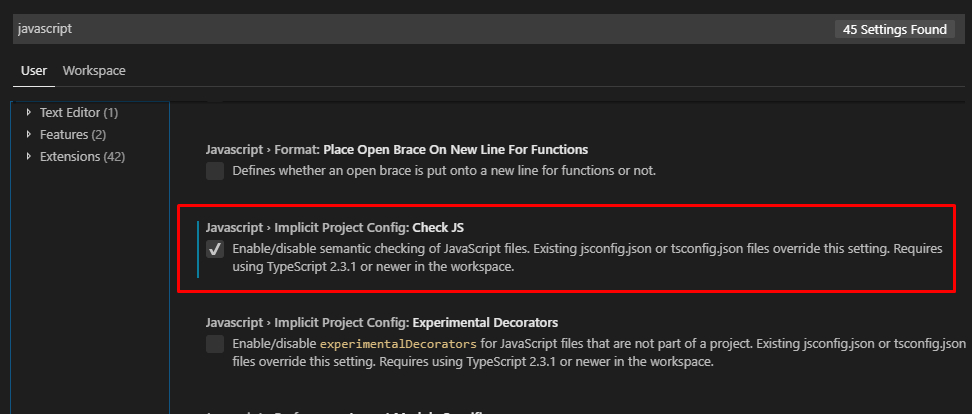
@wangchou You can use this option to disable it.
 NizamLZ
on 19 Jun 2019
NizamLZ
on 19 Jun 2019
@NizamLZ Thank you. But I just tried, ts7016 warning is still there.

wangchou
on 19 Jun 2019
@wangchou For me it took effect immediately. Refreshing the view (CTRL + R) or closing and opening vscode also did not help?
NizamLZ
on 23 Jun 2019
@NizamLZ Just tried. It's not working after restarting vscode.(cmd + q and launching it) Not knowing what's wrong with it. haha~ Are you using mac?
wangchou
on 23 Jun 2019
Windows:
Version: 1.35.1 (system setup)
Commit: c7d83e57cd18f18026a8162d042843bda1bcf21f
Date: 2019-06-12T14:30:02.622Z
Electron: 3.1.8
Chrome: 66.0.3359.181
Node.js: 10.2.0
V8: 6.6.346.32
OS: Windows_NT x64 10.0.17134
NizamLZ
on 27 Jun 2019
The ... indicates a suggestion, not warning. The Ts shows this comes from the js/ts extension. In this case, the suggestion tells you won't get any IntelliSense for rollup-plugin-svelte because we could not find any typings for it. You can disable suggestions such as this by setting: "javascript.suggestionActions.enabled": false
Moving upstream to see if we want to change the UX
 mjbvz
on 27 Jun 2019
mjbvz
on 27 Jun 2019
@mjbvz thanks for replying. it works 👍
vscode now shows suggestions with prefix like js(6133) or ts(7016).
I think showing js suggestions only for js file by default would generate better UX.
wangchou
on 28 Jun 2019
@mjbvz I don't think one feedback on this is enough to warrant doing anything. It's a good suggestion for people who want high-quality completion results
 RyanCavanaugh
on 28 Jun 2019
RyanCavanaugh
on 28 Jun 2019
This issue has been marked 'Working as Intended' and has seen no recent activity. It has been automatically closed for house-keeping purposes.
 typescript-bot
on 30 Jun 2019
typescript-bot
on 30 Jun 2019
@RyanCavanaugh two feedbacks, now.
https://github.com/microsoft/vscode/issues/75858
Seeing a ts suggestion in a javascript file == Seeing an objective-c/c++ warning in a c file.
Right, this is not important for Typescript developers.
But I think it will confuse Javascript developers.
wangchou
on 1 Jul 2019
Would it be possible to have a typescript.suggestionActions.enabled option?
Why is this marked working as expected? I wouldn't expect Typescript warnings outside of Typescript files.
 mehas
on 1 Jul 2019
mehas
on 1 Jul 2019
Version: 1.36.0 (user setup)
Commit: 0f3794b38477eea13fb47fbe15a42798e6129338
Date: 2019-07-03T13:25:46.372Z
Electron: 4.2.5
Chrome: 69.0.3497.128
Node.js: 10.11.0
V8: 6.9.427.31-electron.0
OS: Windows_NT x64 10.0.18362
I have to agree with @wangchou in this one. I don't want TS warnings, suggestions, etc, in my JS files, heck sometimes this errors pop up when I simply delete a line in my code, and they come in bunches all over a single file.
The main problem here is that somehow you're stating: "Use TS instead of JS". While there are advantages in using TS is just not right to force people to use a particular technology.
The only workaround I've found is to disable js validate, close the program, start it again and enable js validate again.
@RyanCavanaugh that would be three feedbacks now. While this is not happening a lot all over the user base it has been reported quite a few times already: #54261, #54868 and also if you look in stackoverflow you'll see a few incidences there.
Hopefully this can be solved.
Anyway thanks for your hard work and dedication, VSCode is a great piece of software that makes coding very easy and fun.
Best,
Rodrigo.
 rhernandog
on 8 Jul 2019
rhernandog
on 8 Jul 2019
I don't want TS warnings, suggestions, etc, in my JS files, heck sometimes this errors pop up when I simply delete a line in my code, and they come in bunches all over a single file.
You can turn off this behavior, as noted above.
The main problem here is that somehow you're stating: "Use TS instead of JS".
This isn't the intent.
RyanCavanaugh
on 8 Jul 2019
You can turn off this behavior, as noted above.
But it disables Javascript AND Typescript warnings.
This does not match the expected behavior. Disabling validation for JS should disable validation for JS, not other languages.
Can we just add a typescript.validate.enable, like javascript.validate.enable?
Seems to be a lot of pushback from the devs on the 3 or 4 tickets opened by users that are confused by this behavior. Is there a reason why?
mehas
on 8 Jul 2019
@RyanCavanaugh I know that is not the intend and I'm not implying that and I'd like to apologize for not making myself clear.
Unfortunately the implementation in the software causes this discomfort, that forces to disable JS validation because of a different file type validation is being enforced in a file that has no trace of the aforementioned file type.
Finally the issue does not comes up every day and at every working hour, but I'm used to seeing it a couple of times a week for the past few months. I can't pinpoint when exactly this started but it has been a while though.
Once again, thanks for all your work and sorry I wasn't clear enough in my previous post.
Have a nice day!!
rhernandog
on 8 Jul 2019
I want the js errors. I do not want the ts errors.
The codes are known.
Would it not be possible (and maybe even simple) to provide an option that allows the results to be filtered to exclude ts errors?
 Relequestual
on 3 Dec 2019
Relequestual
on 3 Dec 2019
Related issues
 weswigham
·
3Comments
weswigham
·
3Comments
 Antony-Jones
·
3Comments
Antony-Jones
·
3Comments
 seanzer
·
3Comments
seanzer
·
3Comments
 CyrusNajmabadi
·
3Comments
CyrusNajmabadi
·
3Comments
 zhuravlikjb
·
3Comments
zhuravlikjb
·
3Comments
Most helpful comment
Would it be possible to have a typescript.suggestionActions.enabled option?
Why is this marked
working as expected? I wouldn't expect Typescript warnings outside of Typescript files.