Typescript: Generated JS files not included when publishing to Azure cloud service
Closed issue #6570 refers...
I have recently discovered a situation where the packaging of an application for an Azure cloud service excludes a number of generated JS files (and their folder tree).
I have created a sample VS2017 project that can reproduce the issue.
I have tried the recommendations in Issue 6570, but they did not work.
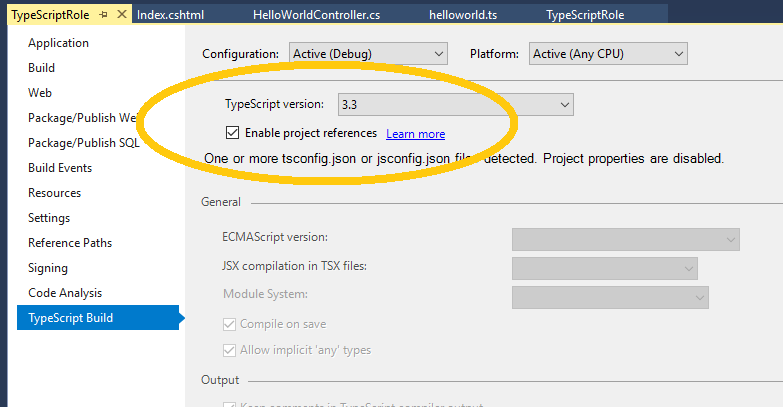
I think that I have tracked the issue down to a specific setting "Enable project references" in the TypeScript tab of the project properties.
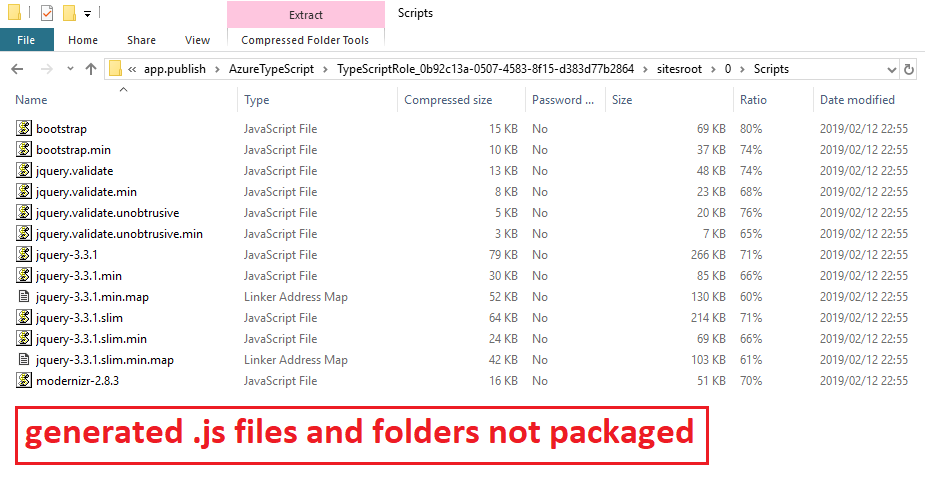
- When this setting is enabled, generated JS files are NOT included in the Azure package.
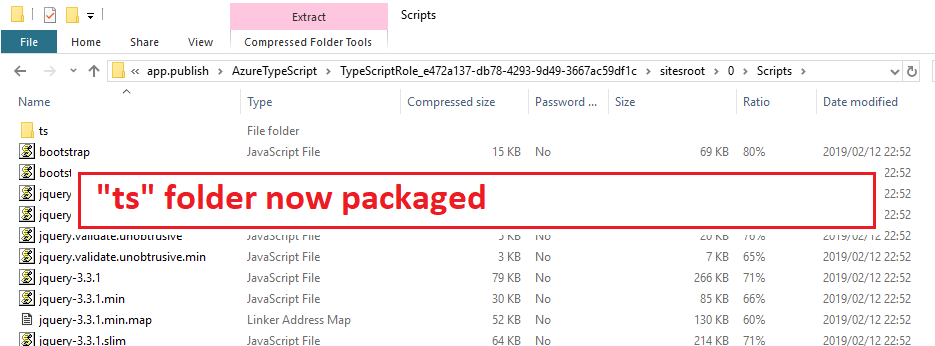
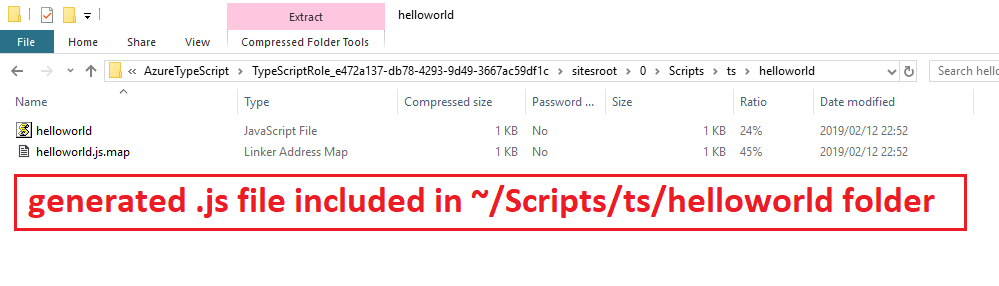
- When the setting is disabled, then the generated JS files ARE included.
Please advise why this behaviour exists and how/why this setting is impacting the Azure packaging process.
Issue was previously discussed with @MicahMcKittrick-MSFT
 elroyheynes
All 14 comments
@minestarks can you have someone take a look?
 DanielRosenwasser
on 15 Feb 2019
DanielRosenwasser
on 15 Feb 2019
@elroyheynes just to confirm, was this working for you in an earlier version of TS or VS?
 minestarks
on 15 Feb 2019
minestarks
on 15 Feb 2019
@jessetrinity can you tell if this is a distinct issue from https://developercommunity.visualstudio.com/content/problem/328795/web-deploy-not-including-some-js-files-generated-b.html ?
minestarks
on 15 Feb 2019
@elroyheynes just to confirm, was this working for you in an earlier version of TS or VS?
@minestarks This is the first time that I published using TS, so I can't comment re earlier versions of TS or VS.
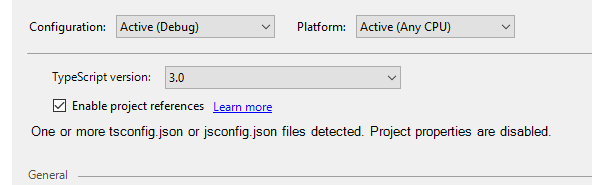
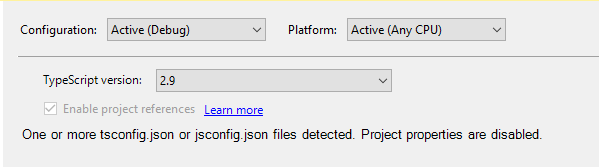
What I did though, was to run a quick test on the installed versions of TS that I have. For me, my testing confirmed:
- a direct relationship to "Enable project references" option and functionality; and
- that this is therefore limited to TS version 3.0 and newer.
On versions 3.0, 3.1, 3.2 and 3.3 the "Enable project references" option is available and the problem occurs (JS files not packaged) if that option is selected.
From version 2.9 down (tested 2.9, 2.8 & 2.3) the "Enable project references" option is greyed out.
In these versions the generated JS file are packaged correctly.
elroyheynes
on 15 Feb 2019
No movement in last 11 days?
elroyheynes
on 26 Feb 2019
@minestarks any other suggestions or thoughts on this? Or the best way to move forward?
 mimckitt
on 26 Feb 2019
mimckitt
on 26 Feb 2019
Thanks for all the details - it sure does look like a bug but I don't have a workaround or solution at the moment. We'll be investigating.
minestarks
on 26 Feb 2019
How about fixing the bug? Or do we not do that any more?
I've already given you the workaround by disabling the "Enable project references" option...
I really expected better - Bug reports are clearly a waste of time & effort, not to mention the time lost to the original problem!
NewMicrosoft...
elroyheynes
on 26 Feb 2019
No movement in last 11 days?
We can't prioritize every single issue immediately. As with many engineering teams, we have finite time and resources.
How about fixing the bug? Or do we not do that any more?
I've already given you the workaround by disabling the "Enable project references" option...
I really expected better - Bug reports are clearly a waste of time & effort, not to mention the time lost to the original problem!
@elroyheynes we've already said someone will be investigating fixing the issue. We'd appreciate a respectful tone as we try to do so.
DanielRosenwasser
on 26 Feb 2019
@DanielRosenwasser I appreciate your response, but I am definitely underwhelmed by it.
I understand that you have to balance demand for resources, but the lack of response to this issue and then the very open "we'll be investigating" is disrespectful.
After the time taken to identify, reproduce and document the bug I couldn't even get an acknowledgement in 7-11 days? THAT is disrespectful!
elroyheynes
on 27 Feb 2019
I understand your frustration. I apologize for the delay. Rest assured I did not intend any disrespect by my comment and we really will investigate the bug. Thanks for taking the time to report the details.
minestarks
on 27 Feb 2019
@elroyheynes , I reproduced your issue (it was really easy thanks to the really helpful sample project you provided), and was able to root cause it.
When build mode (a.k.a. project references, or the --build flag) is enabled, our MSBuild task fails to gather the outputs from the compiler invocations and feed them to Azure publish.
This isn't the greatest workaround, but for the time being I can suggest including the output .js files as Content items in your project, which will force publishing to pick them up. In any other case I wouldn't recommend including output files in your project.
So like so:
<Content Include="Scripts\ts\helloworld\helloworld.js" />
For multiple .js files, I think globbing may work here too (**/*.js etc).
Assigning to @jessetrinity to look into a proper fix.
minestarks
on 2 Mar 2019
@minestarks, I am quite surprised that this issue had not been identified/logged before given that it has probably been around since TS 3.0 was released. I think that we got lucky that the "cause" was identified fairly easily, which made reproducing the problem easy to do via that sample project file.
Thanks for following up and for root-causing it.
Now that your workaround is documented it may also help others with a similar issue whilst the final fix is produced.
elroyheynes
on 2 Mar 2019
Accidentally left this issue open - sorry if there has caused any confusion. This was fixed in the linked VS feedback item. Adding again here for convenience:
 jessetrinity
on 27 Jan 2020
jessetrinity
on 27 Jan 2020
Related issues
 zhuravlikjb
·
3Comments
zhuravlikjb
·
3Comments
 MartynasZilinskas
·
3Comments
MartynasZilinskas
·
3Comments
 remojansen
·
3Comments
remojansen
·
3Comments
 weswigham
·
3Comments
weswigham
·
3Comments
 siddjain
·
3Comments
siddjain
·
3Comments