Typescript: JSDoc @typedef not working as expected
_From @ffxsam on June 29, 2018 16:44_
- VSCode Version: 1.24.1
- OS Version: macOS 10.13.5
@typedef support seems a bit buggy. There are a couple of things going on, but related.
First, typdefs with properties don't seem to work as expected. I have the following file, funcs.js:
/**
 * API options.
 * @typedef {Object} ApiOptions
 * @property {number} artificialDelay Number of milliseconds for an artificial delay
 * @property {boolean} debug Debug mode
 */

/**
 *
 * @param {string} url URL to call
 * @param {ApiOptions} [options] API options
 */
export function apiCall(url, options = {}) {}
And in index.js, I import apiCall but the JSDoc hints don't show the properties of ApiOptions:

Also, typdefs should be able to be "exportable". I modified funcs.js to this:
/** @module api */

/**
 * API options.
 * @typedef {Object} module:api.ApiOptions
 * @property {number} artificialDelay Number of milliseconds for an artificial delay
 * @property {boolean} debug Debug mode
 */

/**
 *
 * @param {string} url URL to call
 * @param {module:api.ApiOptions} [options] API options
 */
export function apiCall(url, options = {}) {}
I added a new file called middle.js:
import { apiCall } from './funcs';

/**
 *
 * @param {module:api.ApiOptions} options
 */
export function test(options) {}
VSCode doesn't seem to understand this usage at all:

It would be great if VSCode fully supported this for projects that aren't using TypeScript.
Does this issue occur when all extensions are disabled?: Yes
_Copied from original issue: Microsoft/vscode#53348_
 mjbvz
mjbvz
All 21 comments
_From @Lenophie on June 30, 2018 22:10_
What's weird is Intellisense/VSCode already exports typedef across a project by default BUT it can fail if the custom type uses other custom types.
Here are some test cases.
Declaration of CustomType in a file :

Declaration of a variable of type CustomType in another file :

Quick info works. 👍
Displayed type is correct. 👍
Displayed type property is correct. 👍
Declaration of CustomType using another custom type CustomType2 in a file :

Declaration of a variable of type CustomType in another file :

Quick info doesn't work. 👎
Declaration of CustomType using another custom type CustomType2 AND declaration of a variable of type CustomType in the same file :

Quick info works. 👍
Displayed type is correct. 👍
Displayed type property is correct. 👍
Declaration of CustomType AND declaration of a variable of type CustomType in the same file BUT declaration of CustomType2 in another file :

Quick info works. 👍
Displayed type is correct. 👍
Displayed type property is wrong. 👎
I hope this breakdown of different cases help solve the issue !
mjbvz
on 3 Jul 2018
Please try upgrading your workspace to use typescript@next by following these instructions. Which of these issues still exists when using typescript@next?
mjbvz
on 3 Jul 2018
The {module:api.ApiOptions} syntax isn't currently supported. If you enable "checkJs": true in compilerOptions in your tsconfig.json, you'll see errors at JSDoc that's not supported.
 andy-ms
on 3 Jul 2018
andy-ms
on 3 Jul 2018
I installed typescript@next globally and updated my VSCode settings as such:
"typescript.tsdk": "/Users/samh/.nvm/versions/node/v8.10.0/lib/node_modules/typescript/lib"
This still doesn't show the options:

However, if I start to type an option, it does display. I think I shouldn't have to start typing in order to see what options are available.

 ffxsam
on 3 Jul 2018
ffxsam
on 3 Jul 2018
here is what i see on typescript@next:

 mhegazy
on 3 Jul 2018
mhegazy
on 3 Jul 2018
I see a similar behavior when using a typedef reference in @return tag
/**
 * @typedef {object} CancelReservationResult
 * @property {number} updated 1 if the vehicle was updated, zero otherwise
 * @property {boolean} [vehicle] - The updated vehicle
 * @property {boolean} [reservation] - The former reservation of the updated vehicle
 * @memberof VehicleService
 */
//some code in between
  /**
   * @summary Remove a reservation from a vehicle if that reservation is owned by the given user
   *
   * @param {Object} params
   * @param {Number} vehicleId The vehicle that will have its reservation removed
   * @param {Number} userId The user holding the reservation
   * @returns {VehicleService.CancelReservationResult}
   */
  // service method declaration...
The returns section in intellisense is completely empty. I have tried referencing the type with different patterns. jsdoc picks it up correctly.
 bennidi
on 11 Jul 2018
bennidi
on 11 Jul 2018
@bennidi I created #25579 which is likely the issue there.
andy-ms
on 11 Jul 2018
The imports problem highlighted in my previous comment seem to be fixed in the latest VSCode version. (All the custom types on this screenshot come from a different file)

🍾 🍾 🍾 🍾 🍾
 Lenophie
on 12 Jul 2018
Lenophie
on 12 Jul 2018
@Lenophie I'm not familiar with that syntax, what is it?
ffxsam
on 12 Jul 2018
Should be working correctly in latest drop of TypeSript (typescript@next). VSCode ships with an older version of TypeScript. Please see Using Newer TypeScript Versions documentation for more details on updating your VSCode to use a different version of TypeScript.
mhegazy
on 12 Jul 2018
The following works for me, to get a typedef from another file:
/** @typedef {object} EncodeVideox265Options
 * @property {import('./ffprobe').VideoDimensions} dimensions Dimensions of the *original* video.
 * @property {string} source Path to source file.
 * @property {string} target Path to target file.
 */
// file: ffprobe.js
/** @typedef {object} VideoDimensions
 * @property {number} height Height of the video in pixels.
 * @property {number} width Width of the video in pixels.
 */
However, in a different situation, the following doesn't work despite all typedefs being in the same file:
'use strict';
/**
 * Transcodes a file from the given message.
 * @param {TranscodeMessage} message
 */
function handleMessage(message) {
  message.payload.?????
}
module.exports = handleMessage;

/** @typedef {object} TranscodeMessage
 * @property {TranscodePayload} payload
 */

/** @typedef {object} TranscodePayload
 * @property {string} service Service name.
 * @property {string} action Action name.
 */
Changing the 2nd examples typedef to use the import('./same-file').TranscodePayload does work:
/** @typedef {object} TranscodeMessage
 * @property {import('./transcode').TranscodePayload} payload
 */

// ...
 waynebloss
on 12 Jul 2018
waynebloss
on 12 Jul 2018
After setting VSCode to use typescript@next, typedefs again work as expected.
Here is what I did:
1.)
> mkdir \usr && cd \usr
> npm install typescript@next
2.) Change vscode settings:
{
  "typescript.tsdk": "C:\\usr\\node_modules\\typescript\\lib",
}
3.) Restart VSCode
waynebloss
on 12 Jul 2018
None of the above works for me.

options is never spelled out as showing what the options are. But in the actual JS file where the ApiOptions typedef is defined, it at least shows it (though it doesn't list the properties in the popup):

But if I get to that final argument and hit ctrl-space to trigger suggestions, I see the properties:
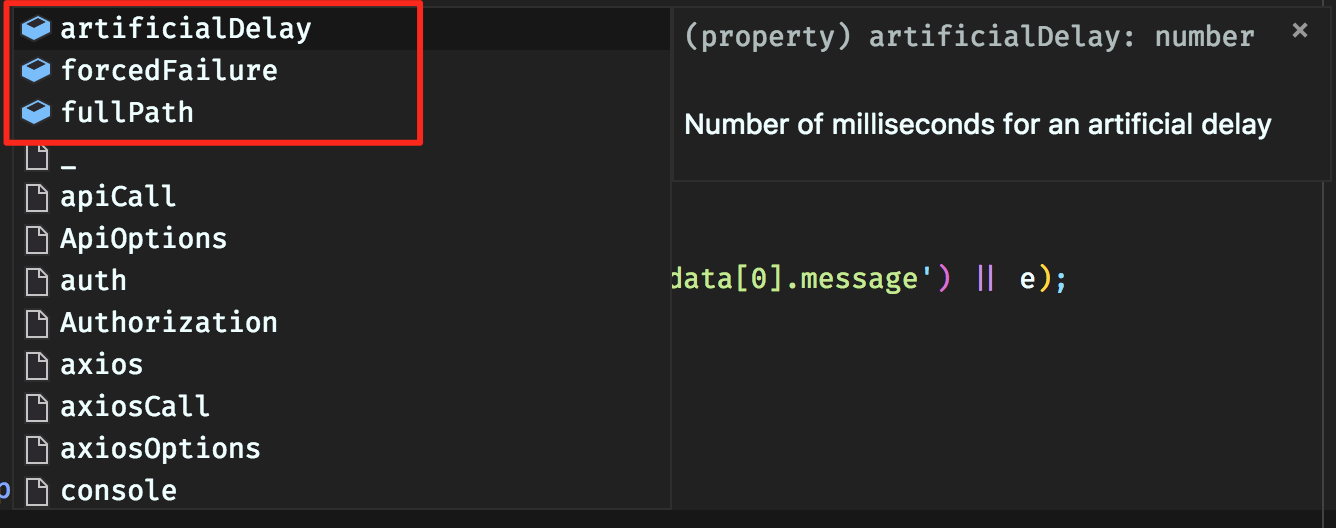
I've tried stable TypeScript and typescript@next.
ffxsam
on 12 Jul 2018
@ffxsam The {module:api.ApiOptions} syntax isn't supported. Try just @typedef {Object} ApiOptions and reference it with {ApiOptions} (in the same module) or {import("./funcs").ApiOptions} (from a different module).
andy-ms
on 12 Jul 2018
@andy-ms I did change my syntax to use import() instead. It still doesn't work for me.
ffxsam
on 12 Jul 2018
OK, could you write down the full updated example? For example, the following is working for me:
a.js
/**
 * @typedef {object} T
 * @property {number} x
 */
export {};
b.js
/** @type {import("./a").T} */
const o = { x: 0 };
Did discover #25624 though.
andy-ms
on 13 Jul 2018
Confirmed, I started a fresh folder with three simple files and it works (even with the built-in version of TypeScript), though maybe not ideally.
core.js
/**
 * @typedef {object} ApiOptions
 * @property {boolean} debugMode
 * @property {number} delay
 */

/**
 * Does stuff.
 * @param {ApiOptions} [options]
 */
export function magic(options) {}
helpers.js
import { magic } from './core';

/**
 * Wrapper func.
 * @param {import('./core').ApiOptions} [options]
 */
export function wrapper(options) {
  magic(options);
}
index.js
import { wrapper } from './helpers';

wrapper({});
Now, in index.js, when I type wrapper({, it would be nice if it expanded ApiOptions and showed me what the options were. I swear it did this once, but I haven't seen it do this since then. Instead, I see this:

If I hit the key shortcut for Trigger Suggest, though, then I see the individual options in the typedef:

Stand by, going to try to replicate the instance where this is _not_ working at all.
ffxsam
on 19 Jul 2018
Ah, never mind. I was missing the import in my referenes to ApiOptions. Also, it works fine in JS files, but not Vue files, so this is now a Vetur issue.
ffxsam
on 19 Jul 2018
@ffxsam hey—sorry to hijack, and this has obviously been a while. I've been trying to get the exact behavior you're talking about: the individual options/properties defined inside a typedef to expand automatically inside what VS Code shows in its tooltip. I simply cannot get that behavior to occur. It always seems to require doing the Trigger Suggest keyboard shortcut.
Is this still 'working' for you? Is doing something special/particular needed?
 chrisaljoudi
on 29 Nov 2019
chrisaljoudi
on 29 Nov 2019
Hey @chrisaljoudi, I honestly couldn't tell you, as I've stopped using JSDoc and entirely use TypeScript annotations to document my stuff, and it works like a charm.
ffxsam
on 29 Nov 2019
I am using vscode 1.51 (the latest one as in 2020.12) but I still can't get typedef object's property show. So I stick with
 * @param {Object}  objectA
 * @param {number} objectA.property1
 * @param {string} objectA.property2
 qiulang
on 5 Dec 2020
qiulang
on 5 Dec 2020
Related issues
 remojansen
·
3Comments
remojansen
·
3Comments
 manekinekko
·
3Comments
manekinekko
·
3Comments
 siddjain
·
3Comments
siddjain
·
3Comments
 wmaurer
·
3Comments
wmaurer
·
3Comments
 Antony-Jones
·
3Comments
Antony-Jones
·
3Comments
Most helpful comment
Ah, never mind. I was missing the
importin my referenes toApiOptions. Also, it works fine in JS files, but not Vue files, so this is now a Vetur issue.