Typescript: Auto import suggests from umd instead of module in ionic 3
_From @surajrao on June 25, 2018 9:19_
- VSCode Version: 1.24.1
- OS Version:Mac OS High Sierra (10.13.5)
Steps to Reproduce:
- Start a new ionic project.
ionic start myApp tabs
- Try to import a component from ionic-angular.
The auto import seems to import from ionic-angular/umd which has ionic-angular/umd/index.d.ts
instead of ionic-angular which also includes ionic-angular/index.d.ts.
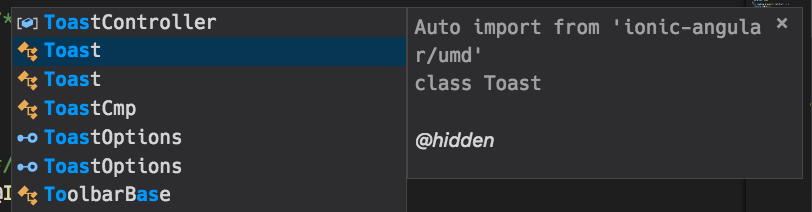
This results in the below error on running.
    Uncaught Error: Cannot find module "."
        at webpackMissingModule (index.js:3)
        at e.code (index.js:3)
        at Object.<anonymous> (index.js:9)
        at __webpack_require__ (bootstrap 62d6a5897825ac327001:54)
        at Object.690 (slide.transition.ts:67)
        at __webpack_require__ (bootstrap 62d6a5897825ac327001:54)
        at Object.495 (main.js:1885)
        at __webpack_require__ (bootstrap 62d6a5897825ac327001:54)
        at Object.487 (notification-api.ts:6)
        at __webpack_require__ (bootstrap 62d6a5897825ac327001:54)
Related StackOverflow post: ionic-uncaught-error-cannot-find-module
Does this issue occur when all extensions are disabled?: Yes
Is this because of the ionic project structure or an issue with vscode import?
"ionic-angular": "3.9.2"
typescript version in workspace - 2.9.1
_Copied from original issue: Microsoft/vscode#52786_
 mjbvz
mjbvz
All 15 comments
Using 3.0.0-dev-20180623, we get these suggestions:
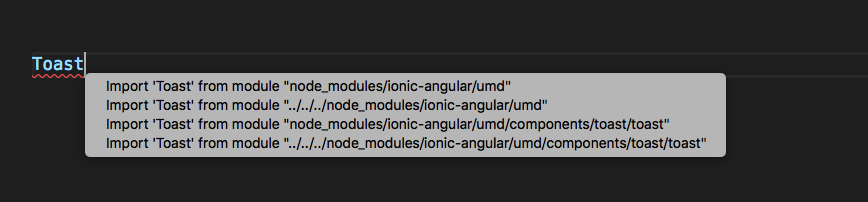
With TS 2.6.x, we get the proper suggestion
mjbvz
on 25 Jun 2018
Same issue here with IonicModule.
Auto import recommends "import { IonicModule } from 'ionic-angular/umd';" which generated the same exact errors.
I resolved it by manually adjusting to "import { IonicModule } from 'ionic-angular';"
 aparkertg
on 26 Jun 2018
aparkertg
on 26 Jun 2018
In main.ts, I'm not getting any suggestions from ../../../node_modules in typescript@next:

There's an option to import from the original declaration, which is in node_modules/ionic-angular/umd/toast/toast.d.ts, but it's the second suggestion, and doesn't affect completions, so that seems to be working as intended.
@aparkertg What file are you in when you try the import? Also, what operating system are you on?
 andy-ms
on 27 Jun 2018
andy-ms
on 27 Jun 2018
May be a duplicate of #25279. Could you test again with tomorrow's typescript@next release.
I've never been able to reproduce the original issue with /umd appearing at the end of recommended imports.
andy-ms
on 4 Jul 2018
I'm getting the same problem after updating VSCode just yesterday. Was a pretty annoying problem to fix. Once all the /umd additions are removed it works fine again. Had to switch back to TS 2.6.2 to prevent this from continuing to happen.
 jickay
on 13 Jul 2018
jickay
on 13 Jul 2018
I'm having the same issue 😢
 eduardoRoth
on 15 Jul 2018
eduardoRoth
on 15 Jul 2018
Just started using VSCode, and enjoying it, though finding my app all of a sudden stopped working, I realize it's polluted every instance of ionic-angular with ionic-angular/umd (I did save them, but I made the dangerous assumption that VSCode knew better), and sure enough ran into the issue everyone else is
 Maraket
on 16 Jul 2018
Maraket
on 16 Jul 2018
I had a similar problem with ionic-angular when I update VSCode today (1.25.1). Had to revert to a previous commit and do a code compare to figure it out. It also tidied all imports to barrels etc - which is could be cool but I've found ionic-angular to produce errors on occasion when using barrels, and have sometimes had to explicitly import a desired class, so in this case import tidying while a neat idea is problematic. Love VSCode and TS generally though!
 Maevus
on 18 Jul 2018
Maevus
on 18 Jul 2018
I've been having this issue too.
 ffMathy
on 19 Jul 2018
ffMathy
on 19 Jul 2018
I have been debugging this for 2 days now, thinking that I somehow messed up my code. Feeling frustrated.
 Voricles
on 19 Jul 2018
Voricles
on 19 Jul 2018
Can anyone come up with a sample project that reproduces this error in typescript@next? (Installation instructions here) I tested again and still cannot reproduce this error using [email protected].
andy-ms
on 19 Jul 2018
@andy-ms I just checked by starting a new project with ionic. Seems like it is happening for [email protected] (The one installed with the stable vscode). I am not getting the issue in [email protected] for the same new project.
Screenshots:
2.9.2

3.1.0-dev.20180717

 surajrao
on 20 Jul 2018
surajrao
on 20 Jul 2018
thanks @surajrao for confirming the issue is fixed in typescript@next. closing.
 mhegazy
on 23 Jul 2018
mhegazy
on 23 Jul 2018
Wow. I had the same issue with "/umd" on type script ~2.6.2. I am sure the core issue is related to how typescript translates and how webpack handles this translation. I see the latest version of typescript is 3.0. I have tested ^2.6.2, as well as 2.8.0, 2.9.0 and I still had issues.
 moleisking
on 31 Jul 2018
moleisking
on 31 Jul 2018
@moleisking please file a new ticket, and giving us enough context to enable us diagnose the issue.
mhegazy
on 31 Jul 2018
Related issues
 weswigham
·
3Comments
weswigham
·
3Comments
 uber5001
·
3Comments
uber5001
·
3Comments
 Zlatkovsky
·
3Comments
Zlatkovsky
·
3Comments
 jbondc
·
3Comments
jbondc
·
3Comments
 siddjain
·
3Comments
siddjain
·
3Comments
Most helpful comment
I've been having this issue too.