Typescript: JSDoc comment for destructuring param: description text not displayed
TypeScript Version:
2.9
Search Terms:
JSDoc destructuring param
Code
/**
 * @param {Object} arg
 * @param {number} arg.id - This param description won't show up
 */
function foo({ id }) {}
Expected behavior:
In VSCode 1.24.0, when typing foo(, IntelliSense should display the full param description, including its type and text.
Actual behavior:
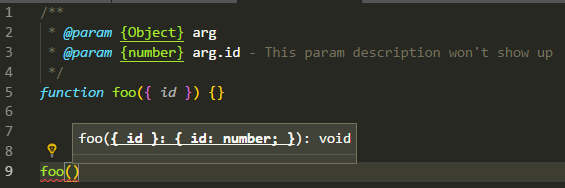
The type is displayed ("number"), but not the text ("This param description won't show up"):
Related Issues:
https://github.com/Microsoft/TypeScript/issues/19645
Additional remark
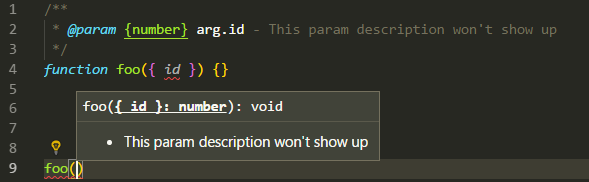
When omitting the {Object} line, the param text shows up correctly:
 steph643
All 7 comments
PRs welcomed.
 mhegazy
on 7 Jun 2018
mhegazy
on 7 Jun 2018
That's because TypeScript treats JSDoc types object and Object as any. You can designate a generic object using Object.<string, any>. So, redoing the above will give you the proper intellisense for id:
/**
* @param {Object.<string, any>} arg
* @param {number} arg.id - This param description will show up
*/
function foo({ id }) {}
// Intellisense for id will work
foo({id: 1})
 rbiggs
on 6 Jul 2018
rbiggs
on 6 Jul 2018
@rbiggs That does indeed work. However, VSCode only displays the description of the first parameter in the destructured object.


I feel like we are so close here!
 tannerbaum
on 14 Sep 2018
tannerbaum
on 14 Sep 2018
@THoisington, for that to work, you need to first define a custom object for the options, and then define its properties. Then you assign that custom type as your parameter:
/**
 * Entries Object.
 * @typedef {Object.<string, any>} requiredArguments
 * @property {string} timeSince
 * @property {string} timeUntil
 */
/**
 *
 * @param {requiredArguments} param
 */
async function getEntries({timeSince, timeUntil}) {}
That'll give you IntelliSense for each property on the options parameter.
rbiggs
on 14 Sep 2018
This appears to have popped up in several issues, perhaps there could be some consolidation: #11597 and #11859, for example.
@rbiggs , I attempted your solution and found the vscode intellisense didn't display the subkeys or comments at all when using the @typedef and @property combination.
At the risk of making a huge comment, I will document my findings here.
Outcome 1: ❌ Top level details, ❌ subkey descriptions, ❌ current subkey highlighting.


_JSDOC that caused this:_
/**
 * @typedef {Object} requiredArguments
 * @property {string} timeSince Beginning date for the range...
 * @property {string} timeUntil End date for the range...
 */
/**
 * @param {requiredArguments}
 * @param {*} options - { filterUserId, filterCustomerId ... }
 * @see https://www.clockodo.com/en/api/entries/
 */
/**
 * @param {Object} requiredArguments
 * @param {string} requiredArguments.timeSince - Beginning date for the range...
 * @param {string} requiredArguments.timeUntil - End date for the range...
 * @param {Object} options { filterUserId, filterCustomerId ... }
 * @see https://www.clockodo.com/en/api/entries/
 */
/**
 * @typedef {Object.<string, any>} RequiredArguments
 * @property {string} RequiredArguments.timeSince - Beginning date for the range...
 * @property {string} RequiredArguments.timeUntil - End date for the range...
 */
/**
 * @param {RequiredArguments} params
 * @param {Object} options { filterUserId, filterCustomerId ... }
 */
Outcome 2: ✅ Top level details, ✅ subkey descriptions, ❌ current subkey highlighting.


_JSDOC that caused this:_
/**
 * @typedef {Object.<string, any>} RequiredArguments
 * @param {string} timeSince - Beginning date for the range...
 * @param {string} timeUntil - End date for the range...
 */
/**
 * @param {RequiredArguments} params
 * @param {Object} options { filterUserId, filterCustomerId ... }
 */
/**
 * @typedef {Object} RequiredArguments
 * @param {string} RequiredArguments.timeSince - Beginning date for the range...
 * @param {string} RequiredArguments.timeUntil - End date for the range...
 */
/**
 * @param {RequiredArguments} paramsss
 * @param {Object} options { filterUserId, filterCustomerId ... }
 */
I could move this comment to a different issue if it helps.
tannerbaum
on 17 Sep 2018
11859 is just for Typescript, but is otherwise the same. Let's use this issue to track bugs in the Javascript side.
 sandersn
on 31 Jan 2019
sandersn
on 31 Jan 2019
Interestingly, both the typedef and the integrated properties syntax work if you declare the argument you're destructuring to be a @property instead of the @param that it is.
 lookuh
on 7 Apr 2020
lookuh
on 7 Apr 2020
Related issues
 seanzer
·
3Comments
seanzer
·
3Comments
 remojansen
·
3Comments
remojansen
·
3Comments
 weswigham
·
3Comments
weswigham
·
3Comments
 zhuravlikjb
·
3Comments
zhuravlikjb
·
3Comments
 Zlatkovsky
·
3Comments
Zlatkovsky
·
3Comments
Most helpful comment
@THoisington, for that to work, you need to first define a custom object for the options, and then define its properties. Then you assign that custom type as your parameter:
That'll give you IntelliSense for each property on the options parameter.