Typescript: [Suggestion] No suggestions in workspace which ask programmers to convert a CommonJS module into an ES6 module
_From @momocow on April 9, 2018 3:23_
As in #47299, it is obvious to say that many people got annoyed by those ... under our lovely require expression.
I suggest VSC to ask programmers which import style is more preferable based on project by popups (or any fashion that does not persist in workspace).
I have to say that I'm not a conservative who dislikes changing and learning new things. I do love ES6 style but not in NodeJS modules.
Here's my reason.
ES6 modules break some already-existing features of NodeJS, i.e. optional dependencies Once you import a dependency module in an ES6 fashion, you should also install it to make it work. Thus there will be no optional dependencies in ES6 modules. (ES6 modules cannot perform conditional imports)
It is always welcome for someone to correct me if I do mistake something and I must say that I love coding with VSC.
Happy coding everyone 😄
_Copied from original issue: Microsoft/vscode#47458_
 mjbvz
mjbvz
All 26 comments
@andy-ms Should this suggestion perhaps be disabled by certain module or target settings in a jsconfig?
mjbvz
on 13 Apr 2018
// CC @DanielRosenwasser
that is something we were concerned about.. so we need to address that.
@andy-ms let's chat about what needs to be done here..
one option is to disable this suggestion by default, and have a configuration option to enable it.
the other is to enable it only if we module !== commonJS
 mhegazy
on 13 Apr 2018
mhegazy
on 13 Apr 2018
@mhegazy I am guessing your second option will not work for people using relative CommonJS modules, as we need module: system to trigger the classic module resolution strategy: https://github.com/Microsoft/vscode/issues/47619
 ferrao
on 14 Apr 2018
ferrao
on 14 Apr 2018
not sure why you need system. you can just set "moduleResolution": "classic" in your config file.
mhegazy
on 14 Apr 2018
@mhegazy I am not sure either, but it only works with system, as recommended in https://github.com/Microsoft/vscode/issues/47619. For some reason, "moduleResoluton": "classic" does not work.
ferrao
on 14 Apr 2018
I will need more context to be able to diagnose your issue.. here is what i am seeing:
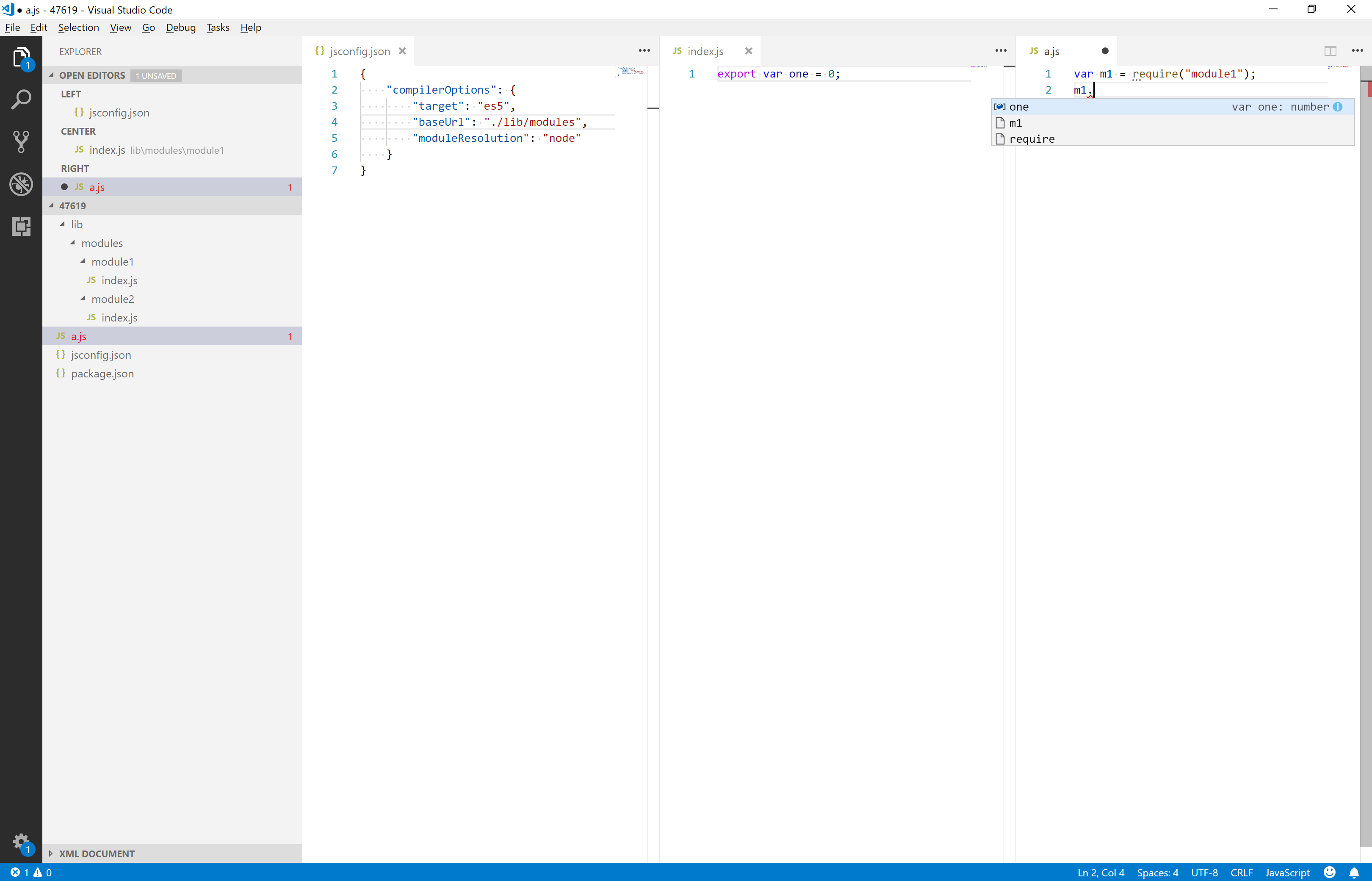
mhegazy
on 16 Apr 2018
It works with your config @mhegazy, I had not seen that moduleConfig option before. It is not in here and that is why I did not saw it.
ferrao
on 17 Apr 2018
that is a doc's issue really. @mjbvz can we get moduleResolution added to the VSCode docs?
mhegazy
on 17 Apr 2018
I would really prefer it if no changes to the code would be suggested if no environment was configured.
On other issues, I've read the argument that changes were not implemented to stay true to the lightweight feel of VS Code. Suggesting code changes that will break my code and requiring me to opt-out of these features, feels like it doesn't further that goal.
 oliversalzburg
on 19 Apr 2018
oliversalzburg
on 19 Apr 2018
@oliversalzburg not sure i understand what you are referring to with "code changes". no one is asking to change your code. it is not clear to me what is the issue you are running into either. please file a new ticket and give us some context, like a repro project, for us to investigate further.
mhegazy
on 19 Apr 2018
@mhegazy My ticket was https://github.com/Microsoft/vscode/issues/48132. Beyond that, I thought the problem itself was already outlined clearly in the original ticket for this thread.
I was merely criticizing the general approach the team seems to be taking with these types of features, as this is not the first time a change like that made it into a release. I believe the approach is counter-productive and not in-line with the goals that are brought up against implementation of other features in other areas.
oliversalzburg
on 20 Apr 2018
Sorry, i lost context with @ferrao's comments in the middle. yes, this is a bug, we plan to fix it before the next release. we should only show the suggestion if you have at least one reference to import or export syntax in your project, otherwise we should not assume you want to change require to import.
mhegazy
on 20 Apr 2018
what if you want to use es6 features but just not import/export as those haven't been implemented properly yet... what if you could tell vscode through eslintrc that you are doing node development?
 techsin
on 17 Jul 2018
techsin
on 17 Jul 2018
@techsin You can just go ahead and use any esnext features you want, and they shouldn't show up as errors, as long as they've been implemented by TypeScript. All ES6 features (such as arrow functions) have been implemented.
 andy-ms
on 17 Jul 2018
andy-ms
on 17 Jul 2018
what if you want to use es6 features but just not import/export as those haven't been implemented properly yet...
ES6 features can be used without import/export. It's the default behavior for vscode, or you can explicitly specified the target ES version in a jsconfig.json. (reference)
 momocow
on 17 Jul 2018
momocow
on 17 Jul 2018
I'm having problem listed in this issue, require is being underlined with suggestion to convert it to import statement. Which is a es6 feature. While nodejs support many es6 feature this isn't the one yet.
how can i tell vscode either to not mark require OR understand im using es6 features available in nodejs.
i'd love if it can be done with just eslintrc or jsconfig.json
techsin
on 17 Jul 2018
@techsin
Currently you can add this line to your vscode user settings to make it not marking your require's.
{
    "javascript.suggestionActions.enabled": false
}
but this disable all suggestions?
techsin
on 17 Jul 2018
The es6 module suggestion should only be triggered if one of:
- The program already contains ES6 module syntax somewhere.
- Compiler options are set in a way that indicates modules will be used:
--moduleis set,--targetis set higher than es2015, or--noEmitis set (but see #25721)
andy-ms
on 17 Jul 2018
@andy-ms I do have es6 module syntax but it's in frontend/, whereas the code im having trouble with is nodejs code in different directory.
/
/frontend/js/
/frontend/js/jsconfig.json
/routes/ problem
/jsconfig.json
techsin
on 17 Jul 2018
Maybe you could fix the problem by having separate jsconfig.json for frontend and routes.
andy-ms
on 17 Jul 2018
{
  "compilerOptions": {
    "target": "esnext",
    "module": "commonjs"
  }
}
/routes/jsconfig.json
/routes/index.js
first require is being marked no change
techsin
on 17 Jul 2018
@techsin I know it's been several months but (if you're still looking) I've found a way to turn this specific suggestion off without completely disabling JavaScript suggestions. In the jsconfig.json for your node.js code (in your case, the routes/ folder), add the following options:
{
  "compilerOptions": {
    "noEmit": false,
    "outDir": "this_folder_should_never_appear"
  }
}
If your routes/ folder is part of a larger node.js project (and frontend/ is one of many folders), then In the root of your project, use the following jsconfig.json file:
{
  "compilerOptions": {
    "noEmit": false,
    "outDir": "this_folder_should_never_appear"
  },
  "exclude": [
    "node_modules",
    "frontend"
  ]
}
This is assuming you have a project structure like so:
/– your project's top-level directory/jsconfig.json– use the second code block above/routes/– one of many folders with node.js backend code/frontend/– your bundled/transpiled frontend code that uses ES6+ syntax
Now you should no longer the the ES6 Modules suggestion in your node.js code, but IntelliSense and other TypeScript/VS Code features should still work in both your backend and frontend code.
The reasoning behind those options is detailed in [my comment] on [this closed pull request].
 jarrodldavis
on 20 Jan 2019
jarrodldavis
on 20 Jan 2019
@jarrodldavis The noEmit + outDir trick described here and on https://github.com/Microsoft/TypeScript/pull/25721 doesn't seem to work in the current version of VS Code.
 pikeas
on 10 Aug 2019
pikeas
on 10 Aug 2019
@pikeas As a last resort, you can mangle with TypeScript's source code to shutdown this suggestion, and tell vscode to use your fork of TypeScript (via tsdk setting). Check my stackoverflow answer for details.
 weakish
on 15 Dec 2019
weakish
on 15 Dec 2019
Sorry, I still didn't get it. I have nodejs 10.20 project with plain js (not typescript). I set node version in package.json engines parameter and created jsconfig.json with content like:
{
    "compilerOptions": {
        "target": "es3",
        "moduleResolution": "node",
        "module": "commonJS"
    }
}
but I still see suggestion to convert require to es6 import. node 10 does not support import! Why do I see it?
 GDreyV
on 29 Apr 2020
GDreyV
on 29 Apr 2020
Related issues
 jbondc
·
3Comments
jbondc
·
3Comments
 kyasbal-1994
·
3Comments
kyasbal-1994
·
3Comments
 uber5001
·
3Comments
uber5001
·
3Comments
 Roam-Cooper
·
3Comments
Roam-Cooper
·
3Comments
 MartynasZilinskas
·
3Comments
MartynasZilinskas
·
3Comments
Most helpful comment
Sorry, i lost context with @ferrao's comments in the middle. yes, this is a bug, we plan to fix it before the next release. we should only show the suggestion if you have at least one reference to
importorexportsyntax in your project, otherwise we should not assume you want to changerequiretoimport.