Typescript: Type definitions bundled with npm modules are not recognised but only the ones under `node_modules/@types`
_From @mogarick on February 11, 2018 15:46_
Issue Type
Bug
Description
I have a JS project that depends on mobx and other libs that include its own type definitions bundled and properly declared in its package.json file under the typings key. I added the checkJs: true in my jsconfig.json file but vscode is having problems to recognize mobx type defs because I'm getting the next error when importing any mobx component into my project files:
[js] Cannot find module 'mobx'.
I'm using mobx version 3.4.1 and its package.json file has the proper typings property with the following values:
"typings": "lib/mobx.d.ts"
yet vscode is not recognising it.
I found a SO question that describes the same problem but for a TS project. I followed the ugly workaround by renaming mobx.d.ts to index.d.ts and moving the file to the root lib directory (/node_modules/mobx/index.d.ts), fixing the types paths accordingly and changing the typings property to "typings": "./index.d.ts" but the error remains.
I also have react as dependency and I added the @types/react as dev dependency and in this case vscode does recognises the type defs because they are in the npm_modules/@types directory
So it appears vscode is not processing the package.json typings property but only the ones under node_modules/@types.
It's important to notice the the problem is not related to extensions added. It occurs with a clean vscode version. I uninstalled vscode, deleted all extensions, then re installed it and yet the problem was still there.
It's also important to notice that is not only mobx. I have other dependencies with its type defs bundled and properly declared in its package.json file and I get the same error message for them.
VS Code Info
VS Code version: Code 1.20.0 (c63189deaa8e620f650cc28792b8f5f3363f2c5b, 2018-02-07T17:02:34.244Z)
OS version: Darwin x64 15.6.0
System Info
|Item|Value|
|---|---|
|CPUs|Intel(R) Core(TM)2 Duo CPU P8800 @ 2.66GHz (2 x 2660)|
|Load (avg)|2, 2, 2|
|Memory (System)|8.00GB (0.27GB free)|
|Process Argv|/Applications/Visual Studio Code.app/Contents/MacOS/Electron|
|Screen Reader|no|
|VM|0%|
Extensions (9)
Extension|Author (truncated)|Version
---|---|---
material-icon-theme|PKi|3.2.2
npm-intellisense|chr|1.3.0
gitlens|eam|8.0.0
prettier-vscode|esb|1.1.3
mssql|ms-|1.3.0
debugger-for-chrome|msj|4.1.0
java|red|0.18.1
vscode-java-debug|vsc|0.6.0
vscode-java-pack|vsc|0.2.0
_Copied from original issue: Microsoft/vscode#43431_
 mjbvz
mjbvz
All 9 comments
_From @mogarick on February 11, 2018 16:14_
I forgot to include my jsconfig.json:
{
    "compilerOptions": {
        "target": "ES6",
        "experimentalDecorators": true,
        "checkJs": true,
    }

}
_From @mogarick on February 11, 2018 16:29_
I activated the tsserver log and I'm attaching the resulting file.
tsserver.log
(please note I redacted the project home path)
mjbvz
on 26 Mar 2018
_From @mogarick on March 5, 2018 15:22_
I forgot to mention that I noticed this problem is also present in version 1.19.
mjbvz
on 26 Mar 2018
_From @mogarick on March 15, 2018 14:15_
Hi @octref and @mjbvz
I'd like to know if this has been scheduled for the next release or If it's not been planned for the near future I'd appreciate if you or someone can suggest a workaround that I can use meanwhile.
Thank you in advance. :)
mjbvz
on 26 Mar 2018
@mogarick Can you please try this in the current vscode insiders build. If you still see the issue, could you please provide a minimal sample project that demonstrates the issue. I could not reproduce this with a simple project that uses [email protected].
mjbvz
on 26 Mar 2018
Hi,
The problem persists on the insiders version. I'm working with React Native using Expo.
Pre requisites
yarn global add exp
Steps to reproduce
exp init test-projectcd test-project- Create file
jsconfig.jsonwith the next content:
{
    "compilerOptions": {
        "target": "ES6",
        "experimentalDecorators": true,
        "checkJs": true,
        "jsx": "react-native"
    }
}
yarn add [email protected]- Open
App.js - VSCode shows error in mobx _"[js] Cannot find module 'mobx'"_ but the module is right there (image 2).
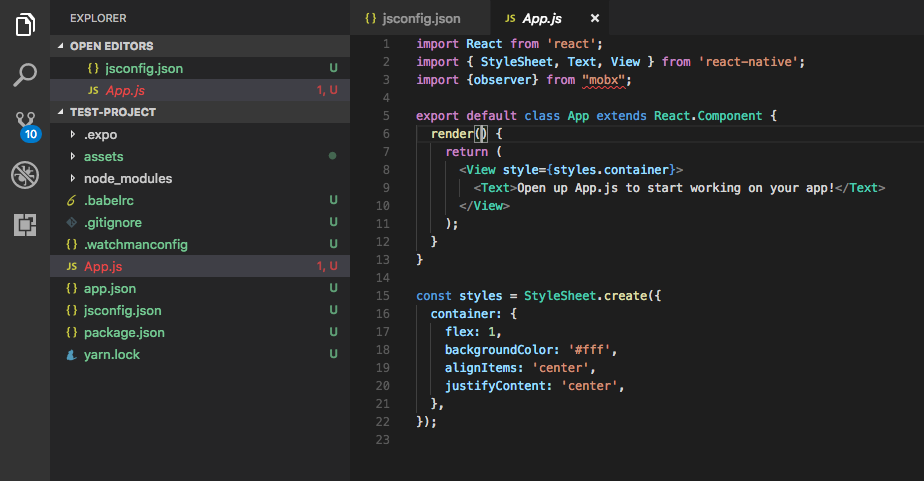

If i remove the checkJs:true line from jsconfig.json or set it to false, the error goes away because that way vscode it's not validating the JS code anymore.
I hope this can help.
 mogarick
on 27 Mar 2018
mogarick
on 27 Mar 2018
This is because you have target:es6 which means the default module resolution would be "classic" resolution.
From traceResolution log:
nfo 92   [13:32:19.461] ======== Resolving module 'mobx' from 'c:/temp/test4/test-project/App.js'. ========
Info 93   [13:32:19.461] Module resolution kind is not specified, using 'Classic'.
Info 94   [13:32:19.461] File 'c:/temp/test4/test-project/mobx.ts' does not exist.
Info 95   [13:32:19.462] File 'c:/temp/test4/test-project/mobx.tsx' does not exist.
Info 96   [13:32:19.462] File 'c:/temp/test4/test-project/mobx.d.ts' does not exist.
Info 97   [13:32:19.462] File 'c:/temp/test4/mobx.ts' does not exist.
Info 98   [13:32:19.462] File 'c:/temp/test4/mobx.tsx' does not exist.
Info 99   [13:32:19.462] File 'c:/temp/test4/mobx.d.ts' does not exist.
Info 100  [13:32:19.462] File 'c:/temp/mobx.ts' does not exist.
Info 101  [13:32:19.463] File 'c:/temp/mobx.tsx' does not exist.
Info 102  [13:32:19.463] File 'c:/temp/mobx.d.ts' does not exist.
Info 103  [13:32:19.463] File 'c:/mobx.ts' does not exist.
Info 104  [13:32:19.463] File 'c:/mobx.tsx' does not exist.
Info 105  [13:32:19.463] File 'c:/mobx.d.ts' does not exist.
Info 106  [13:32:19.464] Directory 'c:/temp/test4/test-project/node_modules/@types' does not exist, skipping all lookups in it.
Info 107  [13:32:19.464] Directory 'c:/temp/test4/node_modules' does not exist, skipping all lookups in it.
Info 108  [13:32:19.464] Directory 'c:/temp/node_modules' does not exist, skipping all lookups in it.
Info 109  [13:32:19.464] Directory 'c:/node_modules' does not exist, skipping all lookups in it.
Info 110  [13:32:19.464] File 'c:/temp/test4/test-project/mobx.js' does not exist.
Info 111  [13:32:19.464] File 'c:/temp/test4/test-project/mobx.jsx' does not exist.
Info 112  [13:32:19.464] File 'c:/temp/test4/mobx.js' does not exist.
Info 113  [13:32:19.465] File 'c:/temp/test4/mobx.jsx' does not exist.
Info 114  [13:32:19.465] File 'c:/temp/mobx.js' does not exist.
Info 115  [13:32:19.465] File 'c:/temp/mobx.jsx' does not exist.
Info 116  [13:32:19.465] File 'c:/mobx.js' does not exist.
Info 117  [13:32:19.465] File 'c:/mobx.jsx' does not exist.
Info 118  [13:32:19.465] ======== Module name 'mobx' was not resolved. ========
Setting "moduleResolution": "node" in jsconfig.json resolves the file correctly.
nfo 96   [13:37:54.964] ======== Resolving module 'mobx' from 'c:/temp/test4/test-project/App.js'. ========
Info 97   [13:37:54.964] Explicitly specified module resolution kind: 'NodeJs'.
Info 98   [13:37:54.964] Loading module 'mobx' from 'node_modules' folder, target file type 'TypeScript'.
Info 99   [13:37:54.967] 'package.json' has 'typings' field 'lib/mobx.d.ts' that references 'c:/temp/test4/test-project/node_modules/mobx/lib/mobx.d.ts'.
Info 100  [13:37:54.967] Found 'package.json' at 'c:/temp/test4/test-project/node_modules/mobx/package.json'. Package ID is 'mobx/lib/[email protected]'.
Info 101  [13:37:54.969] File 'c:/temp/test4/test-project/node_modules/mobx.ts' does not exist.
Info 102  [13:37:54.970] File 'c:/temp/test4/test-project/node_modules/mobx.tsx' does not exist.
Info 103  [13:37:54.970] File 'c:/temp/test4/test-project/node_modules/mobx.d.ts' does not exist.
Info 104  [13:37:54.970] 'package.json' has 'typings' field 'lib/mobx.d.ts' that references 'c:/temp/test4/test-project/node_modules/mobx/lib/mobx.d.ts'.
Info 105  [13:37:54.971] File 'c:/temp/test4/test-project/node_modules/mobx/lib/mobx.d.ts' exist - use it as a name resolution result.
Info 106  [13:37:54.975] Resolving real path for 'c:/temp/test4/test-project/node_modules/mobx/lib/mobx.d.ts', result 'c:/temp/test4/test-project/node_modules/mobx/lib/mobx.d.ts'.
Info 107  [13:37:54.975] ======== Module name 'mobx' was successfully resolved to 'c:/temp/test4/test-project/node_modules/mobx/lib/mobx.d.ts'. ========
 sheetalkamat
on 29 Mar 2018
sheetalkamat
on 29 Mar 2018
Thank you @sheetalkamat!
I didn't know I had to set such option if I used target:es6. Do you know if this is documented somewhere? If so I'd like to check it for this and other configs I may not aware of.
Thank you in advance. :)
mogarick
on 30 Mar 2018
https://www.typescriptlang.org/docs/handbook/module-resolution.html has information on module resolution
sheetalkamat
on 30 Mar 2018
Related issues
 seanzer
·
3Comments
seanzer
·
3Comments
 jbondc
·
3Comments
jbondc
·
3Comments
 remojansen
·
3Comments
remojansen
·
3Comments
 siddjain
·
3Comments
siddjain
·
3Comments
 weswigham
·
3Comments
weswigham
·
3Comments
Most helpful comment
https://www.typescriptlang.org/docs/handbook/module-resolution.html has information on module resolution