TypeScript Version is Unavailable (NuGet)
I created a project with Asp.Net Core using TypeScript with MSBuild everything worked fine, then I installed the NuGet version for use with MSBuild, in the "TypeScript Build" tab I found that the TypeScript version is not available.
Then I selected the option "Use latest available", went back to my TypeScript file and did not compile when saving it (before installing NuGet, I was able to compile the file when saving it without problems), and when I run Rebuild / Build, it compiles the TypeScript files.
TypeScript Version:
Microsoft.TypeScript.MSBuild 2.7.1
Microsoft Visual Studio Community 2017
Version 15.5.5
TypeScript Tools - 15.5.11025.1
TypeScript Tools for Microsoft Visual Studio
Search Terms: TypeScript Version Unavailable, Visual Studio 2017, TypeScript NuGet
Images:

 alejandroldev
All 9 comments
The nuget version is available as 2.7.1: https://www.nuget.org/packages/Microsoft.TypeScript.MSBuild/2.7.1
What you need is the SDK for the version to show up in your drop down list. you can install it from: https://www.microsoft.com/en-us/download/details.aspx?id=55258
 mhegazy
on 2 Feb 2018
mhegazy
on 2 Feb 2018
TypeScript MSBuild can be used with MSBuild on non-Window platforms. src
A nightly build from the TypeScript's master branch is published by midnight PST to NPM and NuGet. src
I'm trying to use the NuGet package for compile my TypeScript files on non-windows platform, that's what the documentation says.
If I can use npm package to compile the files, can I also do it with the NuGet? or how can I use MSBuild with Linux for example?
alejandroldev
on 2 Feb 2018
yes you can, just add it the nuget package to your project, but you do not need the version at this point. i am a bit confused about what the question is really.
mhegazy
on 2 Feb 2018
I'm sorry if I did not explain my questions well.
Follow the next instructions for reproduce the issue:
- Create a new project (AspNet Core Empty)
- Create a new folder called Scripts.
- Create a new TypeScript file with Hello World, or what you like.
- Do the following tests.
- Install the NuGet
- Do the following tests, again.
How can I know if the installed NuGet is working?
This table is a summary of my tests.
Test | Without NuGet | NuGet Installed | Notes |
-|-|-|-|
Build | works | works |
Rebuild | works | works |
Compile on save | works | it doesn't work | bug?
Versions displayed |  |
| 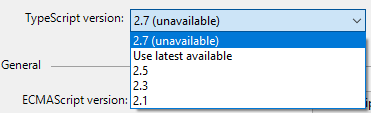 | bug?
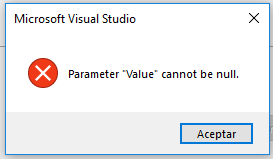
And this dialog box appears when you tried to save the project with the unavailable version selected.
but you do not need the version at this point
But you're right, maybe it's irrelevant to select a version at this point.
I followed the following instructions to install the NuGet. Source
NuGet
- Right-Click -> Manage NuGet Packages
- Search for Microsoft.TypeScript.MSBuild
- Hit Install
- When install is complete, rebuild!
Note: When I install the NuGet for the first time, the folder that I created disappears.
alejandroldev
on 2 Feb 2018
There are two parts of what TS services. the build tools including the command line compiler (SDK), and the language services (the VS plugin).
The build tools is what runs the build thoguh MSBuild, etc..., and that can be either installed globally ("C:\Program Files (x86)\Microsoft SDKs\TypeScript\2.7\tsc.exe"), or can be local to your project using Nuget.
There is the language service in your VS, that drives your IDE experience in terms of completions, signature help, go to def, etc.. as well as Compile on Save. At the moment, only global installations of TS are recognized.
The version picker is only applicable if you are using the global installed version of the SDK, if you are using Nuget to build, then it is only used for picking the language service.
We did talk about loading the Language Service portion from Nuget in the past, but there are some technical hurdles there we will need to cross, and so far we have not had a lot of requests to do that. keep in mind that for stable releases, Nuget packages and global installers are available, and you can have your build and VS use the same version any ways.
As for the dialog box, i do not know what is going on here, we will need to investigate more to know.
mhegazy
on 3 Feb 2018
//cc @uniqueiniquity and @billti
mhegazy
on 3 Feb 2018
@raky291 The 'Parameter "Value" cannot be null.' dialog you're seeing should be fixed in VS 15.6.
 uniqueiniquity
on 6 Feb 2018
uniqueiniquity
on 6 Feb 2018
@mhegazy apologies if I'm unclear here - are there still no plans to allow the Language Service to use an SDK from the local Nuget packages?
Or is there a "best way" to keep all devs' VS instances using the same SDK for their Language Service?
 dixon
on 12 Apr 2018
dixon
on 12 Apr 2018
are there still no plans to allow the Language Service to use an SDK from the local Nuget packages?
This is something we are actively looking in to.
 RyanCavanaugh
on 12 Apr 2018
RyanCavanaugh
on 12 Apr 2018
Related issues
 remojansen
·
3Comments
remojansen
·
3Comments
 wmaurer
·
3Comments
wmaurer
·
3Comments
 MartynasZilinskas
·
3Comments
MartynasZilinskas
·
3Comments
 uber5001
·
3Comments
uber5001
·
3Comments
 jbondc
·
3Comments
jbondc
·
3Comments
Most helpful comment
This is something we are actively looking in to.