Typescript: Source shown as a string in chrome dev tools when use string template with decorators
I have a Typescript solution, where I also use Babel and Webpack. I use decorators in the my code. I found a problem that when I use an optional member decorator in class and somewhere after (in the same file) I use string template expression, then when I debug application Google Chrome shows me source as a STRING constrant from the point where the template expression starts till the end of a file. The code works through, it's just hard to debug.
TypeScript Version: 2.5.3 / nightly (2.5.0-dev.201xxxxx)
Code
function myDecorator(...params):any
{
    return ;
}

export class MyClass
{
    @myDecorator()
    optionalProperty?:any;

}

function test(p1,p2,p3)
{
    let a= `${123}`
    let b = "1235345";
    let c = b + "asdas"
    debugger;
    console.log(c);
}

test(11,22,33)
Expected behavior:
proper display of code in google chrome dev tools
Actual behavior:
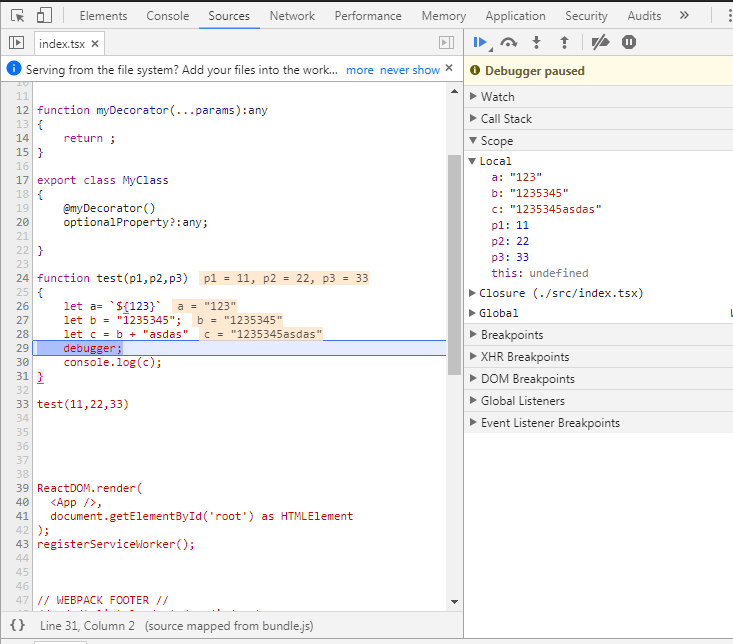
PS: what makes me think it's typescript's problem is the fact that if I don't use decorator then it works properly or If I make a decorated member not optional then it also works fine:

 pmunin
All 2 comments
@andy-ms a few weeks ago, said this was an issue with the code highlighter used by chrome. If that's the case, this complaint may be better directed at codemirror. @andy-ms is this the same issue you were seeing?
 weswigham
on 5 Oct 2017
weswigham
on 5 Oct 2017
100%, this is a chrome devtools issue with codemirror. The latest codemirror doesn't exhibit this behavior, but you can open the devtools, find any js file in the page and paste the above code into it to witness the behavior. In fact, here's the crbug. Watch that issue for when they mark it as closed when they update codemirror.
weswigham
on 7 Oct 2017
Related issues
 MartynasZilinskas
·
3Comments
MartynasZilinskas
·
3Comments
 dlaberge
·
3Comments
dlaberge
·
3Comments
 remojansen
·
3Comments
remojansen
·
3Comments
 zhuravlikjb
·
3Comments
zhuravlikjb
·
3Comments
 kyasbal-1994
·
3Comments
kyasbal-1994
·
3Comments
Most helpful comment
100%, this is a chrome devtools issue with codemirror. The latest codemirror doesn't exhibit this behavior, but you can open the devtools, find any js file in the page and paste the above code into it to witness the behavior. In fact, here's the crbug. Watch that issue for when they mark it as closed when they update codemirror.