Typescript: JavaScript language service: Node.exe scans entire hard drive
Hello,
I'm using Visual Studio 2017 15.3 Preview6 Community for developing/testing with aspnet core 2.0 and I have javascript language service enabled. After quite some time a Node.exe process appears in ProcessExplorer and loads my CPU up to 25% on every core. After some minutes its done but then Node.exe starts to reads through all my directories on every drive specially outside the solution/project folder!
TypeScript Version: 2.4.0 (VS 2017 preview6 built-in)
Expected behavior:
Node.exe process for javascript language service should only scan solution/project folder for type definitions.
Actual behavior:
Node.exe process scans all drives and folders on the system even outside solution/project folders!
A small section of the procmon window. These folders have nothing to do with projects/solution I'm currently working on!
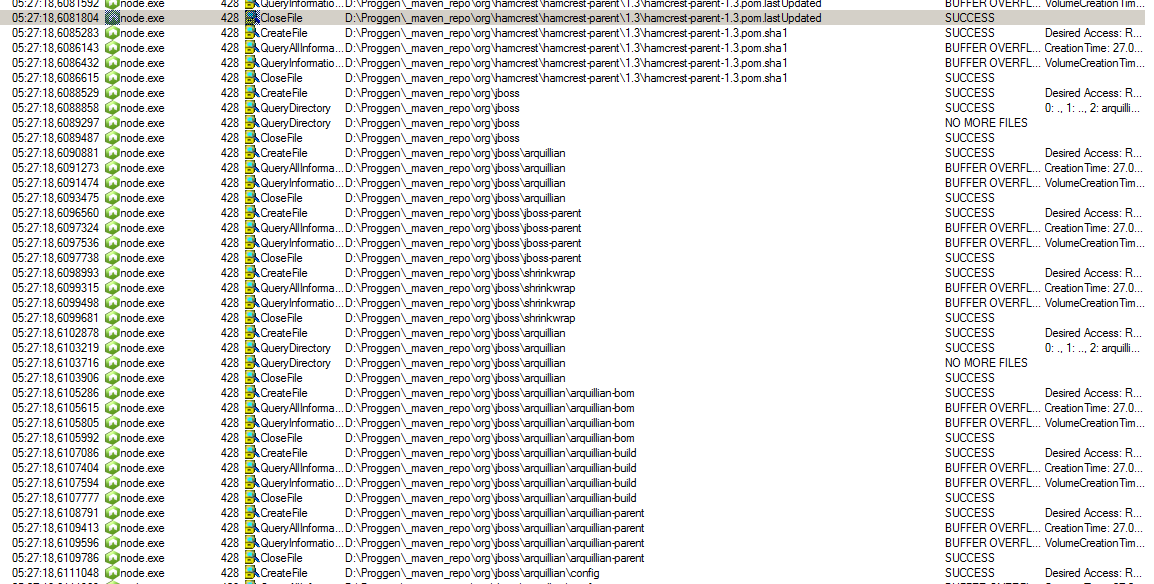
Command Line: C:\Program Files (x86)\Microsoft Visual Studio\Preview\Community\Web\External\x86\node.exe" --expose-gc "C:\Program Files (x86)\Microsoft SDKs\TypeScript\2.4\tsserver.js" --cancellationPipeName \\.\pipe\tsserver-cancellation-5452 --useSingleInferredProject --locale en-US --typingSafeListLocation "C:\Program Files (x86)\Microsoft Visual Studio\Preview\Community\Common7\IDE\CommonExtensions\Microsoft\TypeScript\typingSafeList.json" --allowLocalPluginLoads --eventPort 60206
Could someone please explain this behavior?
If more information are needed, i'll try my best to provide what I can.
Many Thanks!
 enricoreich
All 10 comments
Can you tell me more about your solution? What kind/how many projects do you have? Do you have a tsconfig.json ? Do you have TypeScript files in the project? Thanks for filing the issue!
 bowdenk7
on 1 Aug 2017
bowdenk7
on 1 Aug 2017
Hello,
apologize for the delayed response.
I can provide my solution at: Library_Demo
It's a simple solution with one aspnetcore web-project an two dotnetcore class-libraries all NetStandard 2.0.
In the web-project there is a library.json working with the visual studio extension Microsoft Library Installer for managing client-side-libraries. No npm or bower. I don't write typescript or javascripts currently but I have a tsconfig.json in my user-home:
{
"compileOnSave": true,
"compilerOptions": {
"allowJs": true,
"experimentalDecorators": true,
"module": "commonjs",
"noEmit": true,
"noImplicitAny": true,
"sourceMap": true,
"target": "es5"
},
"exclude": [
"node_modules"
]
}
To repro:
After the solution is loaded in VS simply open the file src/Library/Views/Shared/_Layout.cshtml and than Node.exe process gets loaded (I suppose to provide some fancy service).
After closing_Layout.cshtml Node.exe causes high cpu load for a short period of time and then it reads through my whole drive.
This only happens if JavaScript Language Service is enabled at Tools->Options->Text Editor->JavaScript/TypeScript->Language Service.
NEW INFO ABOUT REPRO PLEASE LOOK BELOW
OS: Windows 7 64Bit (upToDate)
VS: 2017 15.3preview7
enricoreich
on 2 Aug 2017
I'm having trouble causing this to repro on my local machine.
Could you please try collecting a trace of the TypeScript Server when it occurs for you and sharing it with me?
Here's some information on how to do this by setting the TSS_LOG environment variable:
https://github.com/Microsoft/TypeScript/wiki/Standalone-Server-%28tsserver%29#logging
From a command line, run:
set TSS_LOG=-level verbose -file c:\tmp\tsserver.log
Let me know if you have any questions about this.
 uniqueiniquity
on 2 Aug 2017
uniqueiniquity
on 2 Aug 2017
Sorry to hear you have trouble to repro this but for simplicity and to get to the bottom of the matter I could repro this even with a complete new empty aspnet core 2.0 project.
Steps to Reproduce:
- Start VS 15.3preview7 (clean new start of VS and make sure you kill any VS related process in TaskManager, specially MSBuild.exe and PerfWatson2.exe)
- create a new empty AspNetCore Web Project (2.0)
- add a new cshtml to the root of the project (I took
MVC View Layout Page) - add at least one script reference to the head of the cshtml (e.g.
<script src="~/libs/jquery/jquery.min.js"></script>) [this triggers the language serve but I'm sure you know that :) ] - save the file and Node.exe appears in the process tree
- close the cshtml in VS and the magic happens
1st high load on CPU for a few seconds:

after the cpu load drops, Node.exe starts to read from my drive:

I do not know how long it reads from the hard drive, killed the Node.exe process tree after about 1-2 Minutes but it gets automatically recreated but he remains calm.
Here the requested logs:
tsserver.logs.zip
Info about my VS setup:
VS_info.txt
Thank you for investigating this issue!
enricoreich
on 2 Aug 2017
What version of Node.js do you have installed?
uniqueiniquity
on 2 Aug 2017
Separately 8.2.1 located under D:\installed\nodejs\node.exe (64Bit) and latest stable npm but VS uses its own Node.js located under C:\Program Files (x86)\Microsoft Visual Studio\Preview\Community\Web\External\x86\Node.exe (5.4.1 32Bit) and also its own npm (3.3.4) for internal tasks. Both are about 1.5-2 years old. Or I'm wrong with it?
The separate node.exe is on PATH environment variable. PATH is also configured in VS at Tools->Options->Projects and Solutions->Web Package Management as 2nd entry, 1st is .\node_modules\.bin.
enricoreich
on 2 Aug 2017
Great, thank you.
Could you please follow these steps:
- Close all instances of VS.
- Open regedit.
- Navigate to HKEY_CURRENT_USER\Software\Microsoft\VisualStudio.
There should be one or more keys titled "15.0_*" where * is a string of numbers and letters. - You'll need to add a subkey to the one corresponding with your most recent version of VS.
If you run the following as administrator, it will print information for each version you have installed.
Here, we want to find the Instance Id for the most recent version of VS. - Within the key titled "15.0_*", where * is the instance id found in the previous step, create a subkey titled "TypeScriptLanguageService", and add the value
"CustomNodePath"="D:\installed\nodejs\node.exe". - Try to repro the behavior again.
This will retarget the version of node being used by VS to your newer version installed elsewhere.
This will help me to figure out whether the issue is with the version of Node itself or our usage.
I am still unable to repro the behavior myself.
uniqueiniquity
on 3 Aug 2017
You are welcome but I believe I have to say thank you to you all because with your help I found the bad guy...it's me because I'm to scatty. :(
I totally forgot about a tsconfig.json at the root of my D:\ drive. The tsserver.log brought me on it:
Info 106 Config file name: D:/tsconfig.json
I deleted the file and the language service works as expected.
This explains me the accessibility for Node.exe on my whole D:\ drive because my project folder is located at D:\workspace. I've read something about it at: typescriptlang.org - tsconfig.json
But if you do not provide any tsconfig.json at all which configuration is used instead?
@uniqueiniquity:
The trick with editing the registry works and VS is now using the newer version of node.js, Thank you.
Related to this I looked again through the tsserver.log files (old and new) and noted that the old logs generated with the VS built-in Node.js show an error Err 6 quite often
Info 0    Binding...
Info 1    event: {"seq":0,"type":"event","event":"typingsInstallerPid","body":{"pid":5140}}
Info 2    request: {"seq":25,"command":"configure","arguments":{"extraFileExtensions":[{"extension":".js","scriptKind":1,"isMixedContent":false},{"extension":".ts","scriptKind":3,"isMixedContent":false},{"extension":".ascx","scriptKind":1,"isMixedContent":true},{"extension":".aspx","scriptKind":1,"isMixedContent":true},{"extension":".cshtml","scriptKind":1,"isMixedContent":true},{"extension":".htm","scriptKind":1,"isMixedContent":true},{"extension":".html","scriptKind":1,"isMixedContent":true},{"extension":".master","scriptKind":1,"isMixedContent":true},{"extension":".vbhtml","scriptKind":1,"isMixedContent":true},{"extension":".vue","scriptKind":1,"isMixedContent":true}]}}
Info 3    Host file extension mappings updated
Info 4    response: {"seq":0,"type":"response","command":"configure","request_seq":25,"success":true}
Perf 5    25::configure: async elapsed time (in milliseconds) 1.5429
Err 6     Exception on executing command unknown:
Implement me. Unknown stream file type!
Error: Implement me. Unknown stream file type!
    at createWritableStdioStream (node.js:648:15)
    at process.stderr (node.js:679:16)
    at WriteWrap.afterWrite (net.js:753:23)
Info 7    request: {"seq":26,"command":"openExternalProjects","arguments":{"projects":[{"projectFileName":"D:\\Workspaces\\_playground\\LanguageServiceIssue\\LanguageServiceIssue\\LanguageServiceIssue.csproj","rootFiles":[],"options":{"allowJs":true,"allowNonTsExtensions":false,"allowSyntheticDefaultImports":false,"allowUnreachableCode":false,"allowUnusedLabels":false,"alwaysStrict":false,"compileOnSave":true,"declaration":false,"emitBOM":false,"emitDecoratorMetadata":false,"experimentalAsyncFunctions":false,"experimentalDecorators":false,"forceConsistentCasingInFileNames":false,"importHelpers":false,"inlineSourceMap":false,"inlineSources":false,"isolatedModules":false,"jsx":0,"moduleResolution":2,"noEmit":true,"noEmitHelpers":false,"noEmitOnError":true,"noFallthroughCasesInSwitch":false,"noImplicitAny":false,"noImplicitReturns":false,"noImplicitThis":false,"noImplicitUseStrict":false,"noLib":false,"noResolve":false,"noUnusedLocals":false,"noUnusedParameters":false,"preserveConstEnums":false,"removeComments":false,"skipDefaultLibCheck":false,"skipLibCheck":false,"sourceMap":true,"strictNullChecks":false,"stripInternal":false,"suppressExcessPropertyErrors":false,"suppressImplicitAnyIndexErrors":false,"target":2},"typeAcquisition":{"include":[]}}]}}
Info 8    Scheduling throttled operation: {"projectName":"D:\\Workspaces\\_playground\\LanguageServiceIssue\\LanguageServiceIssue\\LanguageServiceIssue.csproj","fileNames":["C:/Program Files (x86)/Microsoft SDKs/TypeScript/2.4/lib.es6.d.ts"],"compilerOptions":{"allowJs":true,"allowNonTsExtensions":true,"allowSyntheticDefaultImports":false,"allowUnreachableCode":false,"allowUnusedLabels":false,"alwaysStrict":false,"compileOnSave":true,"declaration":false,"emitBOM":false,"emitDecoratorMetadata":false,"experimentalAsyncFunctions":false,"experimentalDecorators":false,"forceConsistentCasingInFileNames":false,"importHelpers":false,"inlineSourceMap":false,"inlineSources":false,"isolatedModules":false,"jsx":0,"moduleResolution":2,"noEmit":true,"noEmitHelpers":false,"noEmitOnError":true,"noFallthroughCasesInSwitch":false,"noImplicitAny":false,"noImplicitReturns":false,"noImplicitThis":false,"noImplicitUseStrict":false,"noLib":false,"noResolve":false,"noUnusedLocals":false,"noUnusedParameters":false,"preserveConstEnums":false,"removeComments":false,"skipDefaultLibCheck":false,"skipLibCheck":false,"sourceMap":true,"strictNullChecks":false,"stripInternal":false,"suppressExcessPropertyErrors":false,"suppressImplicitAnyIndexErrors":false,"target":2,"noEmitForJsFiles":true},"typeAcquisition":{"include":[],"enable":true,"exclude":[]},"unresolvedImports":[],"projectRootPath":"D:/Workspaces/_playground/LanguageServiceIssue/LanguageServiceIssue","kind":"discover"}
Info 9    updating project structure from ...
Info 10   Project 'D:\Workspaces\_playground\LanguageServiceIssue\LanguageServiceIssue\LanguageServiceIssue.csproj' (External) 0
C:/Program Files (x86)/Microsoft SDKs/TypeScript/2.4/lib.es6.d.ts
With the node v.8.2.1 this error disappears.
Info 0    Binding...
Info 1    request: {"seq":0,"command":"configure","arguments":{"extraFileExtensions":[{"extension":".js","scriptKind":1,"isMixedContent":false},{"extension":".ts","scriptKind":3,"isMixedContent":false},{"extension":".ascx","scriptKind":1,"isMixedContent":true},{"extension":".aspx","scriptKind":1,"isMixedContent":true},{"extension":".cshtml","scriptKind":1,"isMixedContent":true},{"extension":".htm","scriptKind":1,"isMixedContent":true},{"extension":".html","scriptKind":1,"isMixedContent":true},{"extension":".master","scriptKind":1,"isMixedContent":true},{"extension":".vbhtml","scriptKind":1,"isMixedContent":true},{"extension":".vue","scriptKind":1,"isMixedContent":true}]}}
Info 2    Host file extension mappings updated
Info 3    response: {"seq":0,"type":"response","command":"configure","request_seq":0,"success":true}
Perf 4    0::configure: async elapsed time (in milliseconds) 3.3280
Info 5    request: {"seq":1,"command":"openExternalProjects","arguments":{"projects":[{"projectFileName":"D:\\Workspaces\\_playground\\LanguageServiceIssue\\LanguageServiceIssue\\LanguageServiceIssue.csproj","rootFiles":[{"fileName":"D:\\Workspaces\\_playground\\LanguageServiceIssue\\LanguageServiceIssue\\_Layout.cshtml","scriptKind":1,"hasMixedContent":true}],"options":{"allowJs":true,"allowNonTsExtensions":false,"allowSyntheticDefaultImports":false,"allowUnreachableCode":false,"allowUnusedLabels":false,"alwaysStrict":false,"compileOnSave":true,"declaration":false,"emitBOM":false,"emitDecoratorMetadata":false,"experimentalAsyncFunctions":false,"experimentalDecorators":false,"forceConsistentCasingInFileNames":false,"importHelpers":false,"inlineSourceMap":false,"inlineSources":false,"isolatedModules":false,"jsx":0,"moduleResolution":2,"noEmit":true,"noEmitHelpers":false,"noEmitOnError":true,"noFallthroughCasesInSwitch":false,"noImplicitAny":false,"noImplicitReturns":false,"noImplicitThis":false,"noImplicitUseStrict":false,"noLib":false,"noResolve":false,"noUnusedLocals":false,"noUnusedParameters":false,"preserveConstEnums":false,"removeComments":false,"skipDefaultLibCheck":false,"skipLibCheck":false,"sourceMap":true,"strictNullChecks":false,"stripInternal":false,"suppressExcessPropertyErrors":false,"suppressImplicitAnyIndexErrors":false,"target":2},"typeAcquisition":{"include":[]}}]}}
Info 6    Scheduling throttled operation: {"projectName":"D:\\Workspaces\\_playground\\LanguageServiceIssue\\LanguageServiceIssue\\LanguageServiceIssue.csproj","fileNames":["C:/Program Files (x86)/Microsoft SDKs/TypeScript/2.4/lib.es6.d.ts","D:/Workspaces/_playground/LanguageServiceIssue/LanguageServiceIssue/_Layout.cshtml"],"compilerOptions":{"allowJs":true,"allowNonTsExtensions":true,"allowSyntheticDefaultImports":false,"allowUnreachableCode":false,"allowUnusedLabels":false,"alwaysStrict":false,"compileOnSave":true,"declaration":false,"emitBOM":false,"emitDecoratorMetadata":false,"experimentalAsyncFunctions":false,"experimentalDecorators":false,"forceConsistentCasingInFileNames":false,"importHelpers":false,"inlineSourceMap":false,"inlineSources":false,"isolatedModules":false,"jsx":0,"moduleResolution":2,"noEmit":true,"noEmitHelpers":false,"noEmitOnError":true,"noFallthroughCasesInSwitch":false,"noImplicitAny":false,"noImplicitReturns":false,"noImplicitThis":false,"noImplicitUseStrict":false,"noLib":false,"noResolve":false,"noUnusedLocals":false,"noUnusedParameters":false,"preserveConstEnums":false,"removeComments":false,"skipDefaultLibCheck":false,"skipLibCheck":false,"sourceMap":true,"strictNullChecks":false,"stripInternal":false,"suppressExcessPropertyErrors":false,"suppressImplicitAnyIndexErrors":false,"target":2,"noEmitForJsFiles":true},"typeAcquisition":{"include":[],"enable":true,"exclude":[]},"unresolvedImports":[],"projectRootPath":"D:/Workspaces/_playground/LanguageServiceIssue/LanguageServiceIssue","kind":"discover"}
Info 7    updating project structure from ...
Info 8    Project 'D:\Workspaces\_playground\LanguageServiceIssue\LanguageServiceIssue\LanguageServiceIssue.csproj' (External) 0
C:/Program Files (x86)/Microsoft SDKs/TypeScript/2.4/lib.es6.d.ts
D:/Workspaces/_playground/LanguageServiceIssue/LanguageServiceIssue/_Layout.cshtml
That means it has nothing to do with the Node.js version but you should be careful where you store tsconfig.json files specially when using the language service because the service will scan for type definitions in all folders at the same path level of the used tsconfig.json and below. For me its was really noticeable with more than 2 million files in 150k folders ~450GB of Data on my non-ssd wd-blue hard disc D:\.
Lesson learned! Can someone confirm that please?
Thank you again!
enricoreich
on 3 Aug 2017
That makes sense! Glad you found it.
If you don't have a tsconfig.json, it searches based on MSBuild defaults associated with your project.
uniqueiniquity
on 3 Aug 2017
Thank you for your answer.
I guess, since the problem is clarified, this issue can be closed.
enricoreich
on 5 Aug 2017
Related issues
 uber5001
·
3Comments
uber5001
·
3Comments
 DanielRosenwasser
·
3Comments
DanielRosenwasser
·
3Comments
 dlaberge
·
3Comments
dlaberge
·
3Comments
 blendsdk
·
3Comments
blendsdk
·
3Comments
 Zlatkovsky
·
3Comments
Zlatkovsky
·
3Comments
Most helpful comment
Great, thank you.
Could you please follow these steps:
There should be one or more keys titled "15.0_*" where * is a string of numbers and letters.
If you run the following as administrator, it will print information for each version you have installed.
Here, we want to find the Instance Id for the most recent version of VS.
"CustomNodePath"="D:\installed\nodejs\node.exe".
This will retarget the version of node being used by VS to your newer version installed elsewhere.
This will help me to figure out whether the issue is with the version of Node itself or our usage.
I am still unable to repro the behavior myself.