Typescript: Unexpected error from forceConsistentCasingInFileNames when using `extends` in tsconfig
TypeScript Version: 2.4.0
On case-insensitive systems, projects with forceConsistentCasingInFileNames enabled – which are located at a path which contains capital letters – issue an unexpected compiler error:
error TS1149: File name '[...]/capitalization-in-path/src/index.ts' differs from already included file name '[...]/CAPITALIZATION-IN-PATH/src/index.ts' only in casing.
Similar to #9934, #10095, and #10474, but seems to be a slightly different issue.
Example repo
https://github.com/bitjson/typescript-bug
Specifically, this is only happening when tsc is passed a tsconfig.json that extends another tsconfig.json. In the example repo, note that there is no difference in configuration:
tsc -p tsconfig.json" # working
tsc -p config/tsconfig.json # error
where config/tsconfig.json contains only:
{
  "extends": "../tsconfig"
}
 bitjson
All 9 comments
It's worth noting that this affects pretty much any Mac user with a TypeScript project in their home directory, since Macs use a case-insensitive file system by default and the home directory is by default contained in the Users folder (with a capital U). I just had to turn forceConsistentCasingInFileNames off to fix this error:
error TS1149: File name '/users/markamery/my-project/node_modules/@types/body-parser/index.d.ts' differs from already included file name '/Users/markamery/my-project/node_modules/@types/body-parser/index.d.ts' only in casing.
 ExplodingCabbage
on 24 Jul 2017
ExplodingCabbage
on 24 Jul 2017
looks like a duplicate of https://github.com/Microsoft/TypeScript/issues/17617
 mhegazy
on 17 Aug 2017
mhegazy
on 17 Aug 2017
@mhegazy Please reopen, the duplicate you mentioned is closed, yet this bug is still there on TS 2.5.3.
 ip
on 25 Oct 2017
ip
on 25 Oct 2017
@ip at the linked duplicate, @mhegazy claimed the fix would go out in 2.6, so the bug still existing in 2.5.3 is expected. Have you tried reproducing in 2.6? (I haven't, yet.)
ExplodingCabbage
on 25 Oct 2017
@ExplodingCabbage Ok then, thanks for the info.
ip
on 25 Oct 2017
@ExplodingCabbage I am still seeing this issue with 2.6.1:
error TS1149: File name '/users/patrickhousley/documents/projects/my-projects/my-project/node_modules/@types/lodash/index.d.ts' differs from already included file name '/Users/patrickhousley/Documents/projects/my-projects/my-project/node_modules/@types/lodash/index.d.ts' only in casing.
 patrickhousley
on 8 Nov 2017
patrickhousley
on 8 Nov 2017
@patrickhousley can you please file a new issue, and give us some more context to be able to reproduce it locally.
mhegazy
on 8 Nov 2017
It's still there in 2.7.1.
@mhegazy I believe this isn't a duplicate of the issue you mentioned, especially since that issue is closed. So please reopen.
For now I just avoided using extends property and merging my configs manually, it works.
ip
on 11 Feb 2018
TypeScript version: 2.6.2
I faced the same issue.
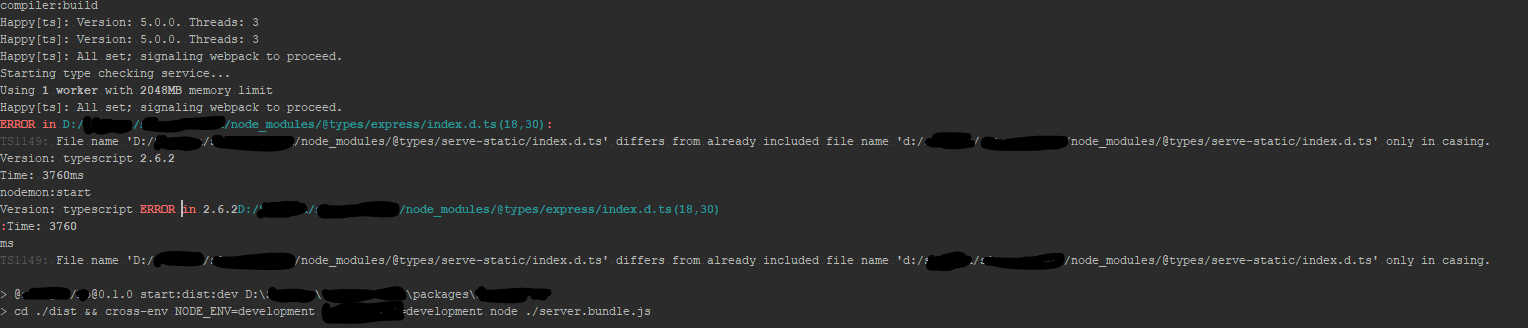
My guess is this causing because of extending of tsconfig from the root level resolved typeRoots from its level.
In child tsconfig I added typeRoots relative to it. It helped me.
Parent tsconfig.json:
{
    ...,
    "compilerOptions": {
        ...,
        "typeRoots": [
            "../../node_modules/@types/"
        ]
    },
   ...
}
Child tsconfig:
{
    "extends": "../tsconfig.json",
    "compilerOptions": {
        ...,
        "typeRoots": [
            "../../../node_modules/@types/"
        ]
    },
    ...
}
 xilaraux
on 13 Jun 2018
xilaraux
on 13 Jun 2018
Related issues
 Roam-Cooper
·
3Comments
Roam-Cooper
·
3Comments
 jbondc
·
3Comments
jbondc
·
3Comments
 MartynasZilinskas
·
3Comments
MartynasZilinskas
·
3Comments
 siddjain
·
3Comments
siddjain
·
3Comments
 fwanicka
·
3Comments
fwanicka
·
3Comments
Most helpful comment
It's worth noting that this affects pretty much any Mac user with a TypeScript project in their home directory, since Macs use a case-insensitive file system by default and the home directory is by default contained in the
Usersfolder (with a capitalU). I just had to turnforceConsistentCasingInFileNamesoff to fix this error: