Typescript-react-starter: Enzyme test fails
Followed the instructions, built the app, which runs without a problem.
However npm test results in output:
Test Suites: 1 failed, 1 total
Tests: 3 failed, 2 passed, 5 total
npm --version 3.10.8
node --version v6.9.1
The installation procedure installed React 16.0.0
Other error output:
"renders the correct text when no enthusiasm level is given
      Enzyme Internal Error: Enzyme expects an adapter to be configured, but found none. To
      configure an adapter, you should call `Enzyme.configure({ adapter: new Adapter() })`
      before using any of Enzyme's top level APIs, where `Adapter` is the adapter
      corresponding to the library currently being tested. For example:

      import Adapter from 'enzyme-adapter-react-15';

      To find out more about this, see http://airbnb.io/enzyme/docs/installation/index.html"
Tried to follow the referenced airbnb directions (which conflict with other error output), putting the 'configure' method into src/setupTests.js
import { configure } from 'enzyme';
import Adapter from 'enzyme-adapter-react-16';

configure({ adapter: new Adapter() });
...but same result.
Any ideas?
 mfsjr
mfsjr
All 15 comments
I was able to run enzyme by deleting node_modules, replacing my package.json with that from the project, then running npm install.
However, then npm start is broken. In fact simply cloning the project and doing npm start results in:
Failed to compile.
Error in /Users/mattschleindl/WebstormProjects/node/TypeScript-React-Starter/node_modules/@types/enzyme/index.d.ts
(14,35): error TS2305: Module '"/Users/mattschleindl/WebstormProjects/node/TypeScript-React-Starter/node_modules/@types/react/index"' has no exported member 'AllHTMLAttributes'.
mfsjr
on 19 Oct 2017
Are you sure that your src/setupTests.js got run?
I put the code direct into Hello.test.tsx, and I get different now:
src/components/Hello.test.tsx
● Test suite failed to run
TypeError: enzyme_adapter_react_16_1.default is not a constructor
at Object.<anonymous> (src/components/Hello.test.tsx:6:29)
I installed @types/enzyme-adapter-react-16 but that didn't help.
I'm new at Typescript, so I'm not sure how to tell it that adapter: new Adapter() is OK (even assuming that it is in fact OK!)
 GreenAsJade
on 29 Oct 2017
GreenAsJade
on 29 Oct 2017
Typescript to the rescue. I noticed it was reporting that enzyme_adapter_react_16 has no default export.
This works:
import * as ReactSixteenAdapter from 'enzyme-adapter-react-16';
enzyme.configure({ adapter: new ReactSixteenAdapter() });
I was able to get this to work installing modules as instructed from the airbnb site, installing types
npm install @types/enzyme-adapter-react-16
then by by creating a file called setupTests.ts in the src/ directory, and putting the following in:
import { configure } from 'enzyme';
import * as ReactSixteenAdapter from 'enzyme-adapter-react-16';

configure({ adapter: new ReactSixteenAdapter() });
as suggested here.
Note that this did not work for me when the file extension was .js or .tsx.
 steveQuadros
on 30 Oct 2017
steveQuadros
on 30 Oct 2017
When I build from scratch now it appears to be working. Maybe just caught some versioning issues. Can leave this open for a bit, see if others are OK.
mfsjr
on 1 Nov 2017
@mfsjr are you running the Hello tests, or just the single test written when you first start off in App.test.tsx?
The initial test in App.test.tsx will run and pass for the initial smoke test, but will fail with anything that uses enzyme to render an element.
steveQuadros
on 1 Nov 2017
I tried the steps above:
I have
"enzyme-adapter-react-16": "^1.1.0",
and setupTests.ts
import { configure } from 'enzyme';
import * as Adapter from 'enzyme-adapter-react-16';

configure({ adapter: new Adapter() });
But when I run my tests like:
import React from 'react';
import { shallow } from 'enzyme';
import App from './App';

describe('App', () => {
  it('renders without crashing', () => {
    shallow(<App />);
  });
});
I get:
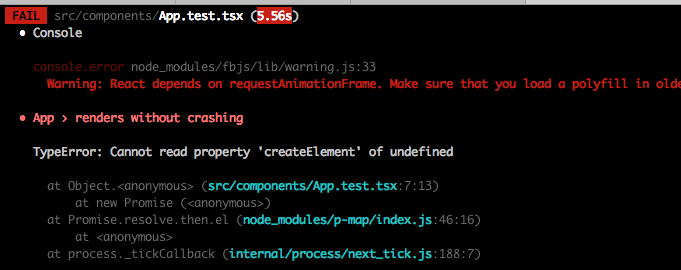
any ideas?
 quantuminformation
on 27 Nov 2017
quantuminformation
on 27 Nov 2017
Hey, guys!
Here is the solution:
run next command to install enzyme-adapter-react-16:
npm install -D enzyme-adapter-react-16 @types/enzyme-adapter-react-16create file setupTests.ts as steveQuadros described it in his comment: https://github.com/Microsoft/TypeScript-React-Starter/issues/76#issuecomment-340544510
 anatolii-bohdanov
on 10 Dec 2017
anatolii-bohdanov
on 10 Dec 2017
I FINALLY got this to work after adding
 ..."jest": {
    "setupTestFrameworkScriptFile": "<rootDir>/src/setupTests.js"
  },...
to my package.jsaon (I'm using create-react-app)
and setting up my src/setupTest.js like this
import Enzyme from 'enzyme';
import Adapter from 'enzyme-adapter-react-16';
import 'jest-enzyme'

Enzyme.configure({ adapter: new Adapter() });
 ElishebaW
on 10 Feb 2018
ElishebaW
on 10 Feb 2018
This worked for me:
import { configure } from 'enzyme';
import { default as Adapter } from 'enzyme-adapter-react-16';

configure({ adapter: new Adapter() });
 elhesuu
on 3 Apr 2018
elhesuu
on 3 Apr 2018
Like @ElishebaW said on her comment, you have to set the "setupTestFrameworkScriptFile" property on jest configuration to use the "setupTests.ts" file in order to configure the adapter with this file.
 MaikeMota
on 11 Jul 2018
MaikeMota
on 11 Jul 2018
I followed the document and had the same error. Got it work by removing setupTests.ts excluded in tsconfig.json:
// tsconfig.json
{
  "exclude": [
    "node_modules",
    // "src/setupTests.ts" <-- remove this
  ]
}
And added setupTests.ts in setupFiles in package.json like so:
// package.json
"jest": {
    "setupFiles": [
      ...
      "<rootDir>/src/setupTests.ts"   // add this
    ],
}
My src/setupTest.ts looks like this:
// setupTest.ts
import { configure } from "enzyme";
import * as Adapter from "enzyme-adapter-react-16";
configure({ adapter: new Adapter() });
 jyhwng
on 16 Aug 2018
jyhwng
on 16 Aug 2018
My setupTests.ts file:
import { configure } from 'enzyme'
import * as Adapter from 'enzyme-adapter-react-16'

configure({ adapter: new Adapter() })
I get this
TypeError: Adapter is not a constructor
  2 | import * as Adapter from 'enzyme-adapter-react-16'
  3 |
> 4 | configure({ adapter: new Adapter() })
    |                      ^
Ok this fixed it
import Adapter from 'enzyme-adapter-react-16'
docs need updating
quantuminformation
on 14 Mar 2019
Create setupTests.ts inside the src folder with the following:
import { configure } from 'enzyme';
import Adapter from 'enzyme-adapter-react-16';

configure({ adapter: new Adapter() });
Be sure to have installed both:
@types/enzyme
@types/enzyme-adapter-react-16
 quirimmo
on 21 Mar 2019
quirimmo
on 21 Mar 2019
Related issues
 wilomgfx
·
6Comments
wilomgfx
·
6Comments
 corydeppen
·
6Comments
corydeppen
·
6Comments
 simonccarter
·
3Comments
simonccarter
·
3Comments
 Yang09701194
·
7Comments
Yang09701194
·
7Comments
 BenjaminWatts
·
6Comments
BenjaminWatts
·
6Comments
Most helpful comment
I was able to get this to work installing modules as instructed from the airbnb site, installing types
npm install @types/enzyme-adapter-react-16then by by creating a file called
setupTests.tsin thesrc/directory, and putting the following in:as suggested here.
Note that this did not work for me when the file extension was
.jsor.tsx.