Typeorm: v0.2.24 not registering entities through ormconfig.js as v0.2.22
Issue type:
[ ] question
[x ] bug report
[ ] feature request
[x ] documentation issue
Database system/driver:
[ ] cordova
[ ] mongodb
[ ] mssql
[ ] mysql / mariadb
[ ] oracle
[x ] postgres
[ ] cockroachdb
[ ] sqlite
[ ] sqljs
[ ] react-native
[ ] expo
TypeORM version:
[ ] latest
[ ] @next
[x ] 0.2.24
Been using v0.2.22 and my ormconfig.js is as follows
module.exports = {
  type: 'postgres',
  host: process.env.TYPEORM_HOST,
  port: process.env.TYPEORM_PORT,
  username: process.env.TYPEORM_USERNAME,
  password: process.env.TYPEORM_PASSWORD,
  database: process.env.TYPEORM_DATABASE,
  synchronize: false,
  logging: false,
  entities: ['build/entity/*.js'],
  migrations: ['build/migration/*.js'],
  subscribers: ['build/subscriber/*.js'],
  cli: {
    entitiesDir: 'src/entity',
    migrationsDir: 'src/migration',
    subscribersDir: 'src/subscriber',
  },
};
which works fine, but I updated to v0.2.24 and I'm getting
"No repository for \"
await getConnection()
        .getRepository(<Entity>)
        .find({ where: { active: true } });
Is there a documentation I am missing?
 nealdyrkacz
All 48 comments
I also found this bug with mysql & typeorm v0.2.24 arising with getRepository(<Entity>)
everything was fine with typeorm v0.2.22
following is Error Message
RepositoryNotFoundError: No repository for "<Entity>" was found. Looks like this entity is not registered in current "default" connection?
 YoonSeongKyeong
on 14 Mar 2020
YoonSeongKyeong
on 14 Mar 2020
Debugger Behavior in RepositoryNotFoundError
this is v0.2.24 behavior with getRepository(<Entity>)
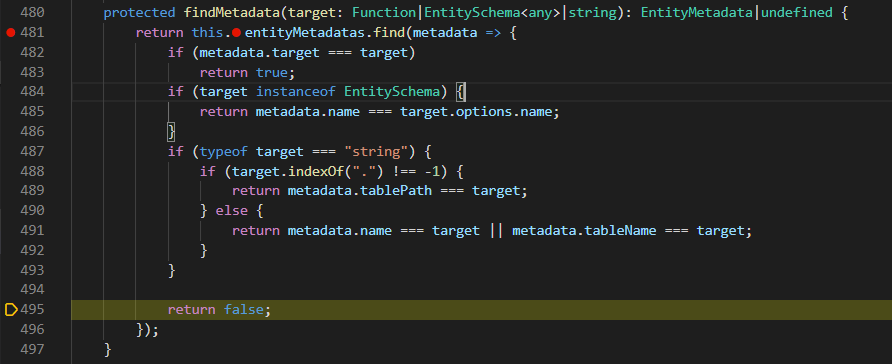
None of above condition fall in to true
this is v0.2.22 behavior with getRepository(<Entity>)
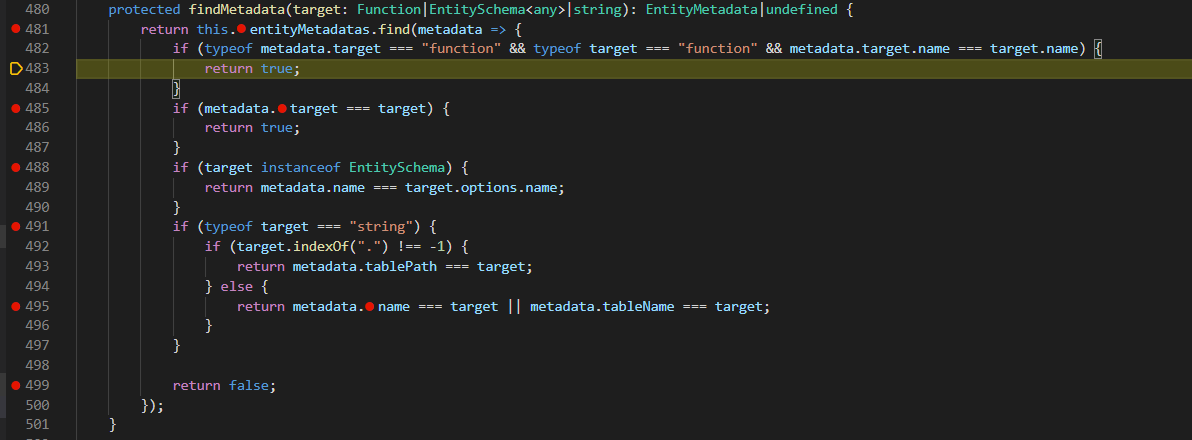
They fall to first condition and return true
this is watch of comparing targets: metadata.target , target, metadata.target === target
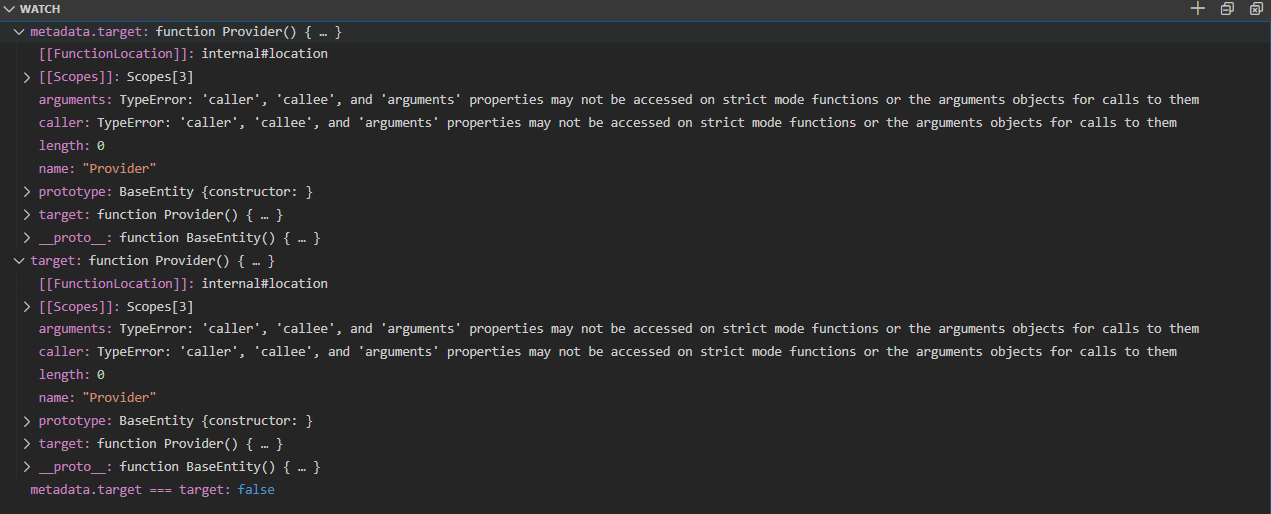
I think the removal of first condition is the source of this bug.
to make it have a right behavior
update of protected findMetadata(target: Function|EntitySchema<any>|string): EntityMetadata|undefined is necessary
I just find the source of this bug. #5486
YoonSeongKyeong
on 14 Mar 2020
I'm also experiencing this, someone made a PR to fix but it's disputed: https://github.com/typeorm/typeorm/pull/5627
 seandearnaley
on 17 Mar 2020
seandearnaley
on 17 Mar 2020
also see this thread: https://github.com/typeorm/typeorm/issues/5592, not resolved yet
seandearnaley
on 17 Mar 2020
I have solution @seandearnaley
we can solve this problem with replacing code like this
Before
protected findMetadata(target: Function|EntitySchema<any>|string): EntityMetadata|undefined {
        return this.entityMetadatas.find(metadata => {
            if (metadata.target === target)
                return true;
            if (target instanceof EntitySchema) {
                return metadata.name === target.options.name;
            }
            if (typeof target === "string") {
                if (target.indexOf(".") !== -1) {
                    return metadata.tablePath === target;
                } else {
                    return metadata.name === target || metadata.tableName === target;
                }
            }

            return false;
        });
    }
After
protected findMetadata(target: Function|EntitySchema<any>|string): EntityMetadata|undefined {
        return this.entityMetadatas.find(metadata => {
            if (Object.getPrototypeOf(metadata.target) === Object.getPrototypeOf(target)&&metadata.target.name===target.name)
                // First Check if target is made from same entity constructor as metadata target have. Then check if target name is same as metadata target name
                return true;
            if (target instanceof EntitySchema) {// I don't know if this condition is necessary
                return metadata.name === target.options.name;
            }
            if (typeof target === "string") {// I don't know if this condition is necessary
                if (target.indexOf(".") !== -1) {
                    return metadata.tablePath === target;
                } else {
                    return metadata.name === target || metadata.tableName === target;
                }
            }

            return false;
        });
    }
Object.getPrototypeOf(metadata.target) === Object.getPrototypeOf(target) will satisfy the problem requirement
- check if metadata.target is same as target
- check if target is not only same named function but also created by entity constructor (resolve false positivity)
YoonSeongKyeong
on 17 Mar 2020
unfortunately I don't have test environment yet. I want anybody who already set up environment pull request from this revision
YoonSeongKyeong
on 17 Mar 2020
@YoonSeongKyeong , I left a note on the PR but nobody from the TypeORM team are responding yet... this issue looks the same as the issue I posted 3 weeks ago: https://github.com/typeorm/typeorm/issues/5592
seandearnaley
on 22 Mar 2020
also this issue looks the same also: https://github.com/typeorm/typeorm/issues/5587
seandearnaley
on 22 Mar 2020
I encountered the same issue with postgres + nestjs and spent few hours to debug Connection.js
I will downgrade to 0.2.22 until this is resolved.
Thanks.
 railsstudent
on 31 Mar 2020
railsstudent
on 31 Mar 2020
Same for me (NestJS 7 server). I tried to mitigate the issue by loading the entities directly, not via a glob pattern string, but setting up an array of all the entities. But the issues remains.
I'm willing to change my code accordingly if I knew what in my source is causing the issue. For now only sticking to the previous version is the only workaround I found.
 tuhlmann
on 31 Mar 2020
tuhlmann
on 31 Mar 2020
Don't know if it's the same problem but I also encountered this and the problem in my case was that I had an ormconfig.js file but also a .env file with:
TYPEORM_CONNECTION = mysql
TYPEORM_HOST = localhost
TYPEORM_USERNAME = test
TYPEORM_PASSWORD = test
TYPEORM_DATABASE = test
TYPEORM_PORT = 3306
And because of this, TypeORM was loading the configuration from .env and completely ignored .ormconfig.js. I solved this by renaming my env vars.
 robertgr991
on 26 Apr 2020
robertgr991
on 26 Apr 2020
Is there any update on this issue?
 jmann-tw
on 13 May 2020
jmann-tw
on 13 May 2020
likewise interested in any updates, been months since an update.... wondering if there are factors preventing progress. I don't mind switching solutions.
seandearnaley
on 14 May 2020
I'm also stuck with the previous version, would love to see an update here!
tuhlmann
on 14 May 2020
Can you guys specify if are you using serverless and who is not using serverless? As I understand only serverless users might have this problem.
 pleerock
on 18 May 2020
pleerock
on 18 May 2020
@pleerock , I am not using serverless, I think I commented on this here or another one of the related threads, I have a starter kit using 0.2.22, it runs on my node desktop, but parts of my app specifically unit tests fail with 0.2.24, no serverless involved https://github.com/seandearnaley/brainstrike-typescript-starter
seandearnaley
on 18 May 2020
@pleerock I'm also not using serverless. I'm running a Nest 7 / NodeJS server.
I'm fine with changing my code, but I can't find what goes wrong and why the new version doesn't find my entity files any more. If it helps, this is my build & run command from package.json. From the built JS structure I read the entities (not from the source TS):
"dev:server": "tsc-watch -p tsconfig.server.json --onSuccess \"cross-env TZ=utc TS_NODE_PROJECT=tsconfig.server.json node -r tsconfig-paths/register -r ts-node/register/transpile-only dist-srv/server/main.js\""
I get the feel that maybe the paths I define in tsconfig.json mess with the entity detection somehow, but that's just a feeling...
tuhlmann
on 18 May 2020
i am not using serverless, and have this issue aswell. last working version, as others, is 0.2.22
 davecarlson
on 21 May 2020
davecarlson
on 21 May 2020
Not server-less here as well. Using node 12.16.1
jmann-tw
on 2 Jun 2020
@pleerock @millsmcilroy Is there any update on this issue?
Would a (kind of) minimal example help you find a solution- or tell me how I can persuade typeorm to accept my entities?
I took the better half of the day to strip down my NestJS application to a small example app with just one entity.
I added 2 start scripts:
- if I start the app with ts-node-dev and point entities to the
/src/**/*.entity{.ts,.js}directory or to the Entity class, this works fine. - if I start by compiling to JS and then point node to the compiled JS or the Entity class, this fails.
- if I point the entities property to the source ts files (not the compiled output) this also works, but it fails in the real app with multiple entities.
Not sure if this problem has to do with ts-config paths that I'm using in the scripts below.
Should the entities property point to the TS source files or the generated JS output, what is the recommended way?
Please let me know how I can help to resolve this issue.
Thank you!
--
This is the start script that works:
"dev:server2": "cross-env NODE_ENV=development ts-node-dev --type-check --no-notify --project tsconfig.server.json --respawn --transpileOnly --all-deps -r tsconfig-paths/register ./src/server/main.ts"
This is the more involved start script that fails:
"dev:server": "tsc-watch -p tsconfig.server.json --onSuccess \"cross-env TZ=utc TS_NODE_PROJECT=tsconfig.server.json node -r tsconfig-paths/register -r ts-node/register/transpile-only dist-srv/server/main.js\""
Here's a small example repository that exhibits this problem: https://github.com/tuhlmann/typeorm-entity-not-found
tuhlmann
on 7 Jun 2020
@pleerock Any news on this, any advice how to change the code to still be able to use the latest typeOrm?
tuhlmann
on 29 Jun 2020
I have updated the sample application with a branch that uses mikro-orm instead of typeorm. Seems to work well enough: https://github.com/tuhlmann/typeorm-entity-not-found/tree/mikro-orm-v4
I also added a Sequelize branch, but compared to Typeorm that feels a bit clumsy to use. Not so mikro-orm.
tuhlmann
on 6 Jul 2020
There are no problems with using TypeORM without NestJS and I checked your repo @tuhlmann and I see the problem, but I'm sure it doesn't go from TypeORM. We had one change somewhere in 0.2.20 and it clearly didn't work well, we had to revert it in 0.2.24. So, code you have right now in 0.2.24 and above is the same what we had in 0.2.19 and earlier. Try to test your app with 0.2.19 and earlier. I guess it would not work.
I assume there was a change on NestJS side that somehow rely on the wrong change we had in 0.2.20 and 0.2.23.
This is something related to references, maybe something is being cloned, or some references are being replaced.
Adding @kamilmysliwiec maybe he can help
pleerock
on 7 Jul 2020
You're right, 0.2.19 behaves the same for me as 0.2.24+. I did add some logging to Connection.prototype.findMetadata in Connection.js. It finds a function "User" (my entity), but only in version 0.2.22 it checks if the target is a function and then compares names. The other versions see the User entity as a function type but discard it.
tuhlmann
on 7 Jul 2020
any updates on this?
seandearnaley
on 4 Aug 2020
@seandearnaley I didn't get any feedback. I moved my app to Mikro-ORM's latest v4. It's working really well for me so far and the support is near instant.
They do something that might be able to resolve this problem for TypeOrm we're having here- Mikro-Orm allows pluggable resolvers that will find your entities. I didn't need this is it was working right away, but If TypeOrm would do that, it would be fairly straightforward to provide your own resolver based on the code that once worked and don't need a solution that has to fit for all...
tuhlmann
on 4 Aug 2020
@tuhlmann thanks for the update!, yeah I guess I'm moving to Mikro-ORM or back to Sequelize, I can't use typeorm if I cant run unit tests/ pretty showstopping problem.
seandearnaley
on 4 Aug 2020
@pleerock are there any plans/work being done to address this problem?
seandearnaley
on 9 Aug 2020
We also getting this error on 0.2.22. Is there any update on this?
 rehtori
on 13 Aug 2020
rehtori
on 13 Aug 2020
We also getting this error on 0.2.22. Is there any update on this?
haven't heard anything, been around for months unfortunately, I'm concerned its a dead issue, I'm starting to rewrite in mikro orm, but would love to be able to use typeorm
seandearnaley
on 13 Aug 2020
https://github.com/typeorm/typeorm/issues/5676#issuecomment-600072626
I think @YoonSeongKyeong 's suggestion is good enough... Why doesn't select this code fix?
In my case, this issue only happens when executing TS script with ts-node with tsconfig-path.
Anyway, because of this issue, I have trouble to upgrade typeORM version..
Is any update ongoing???
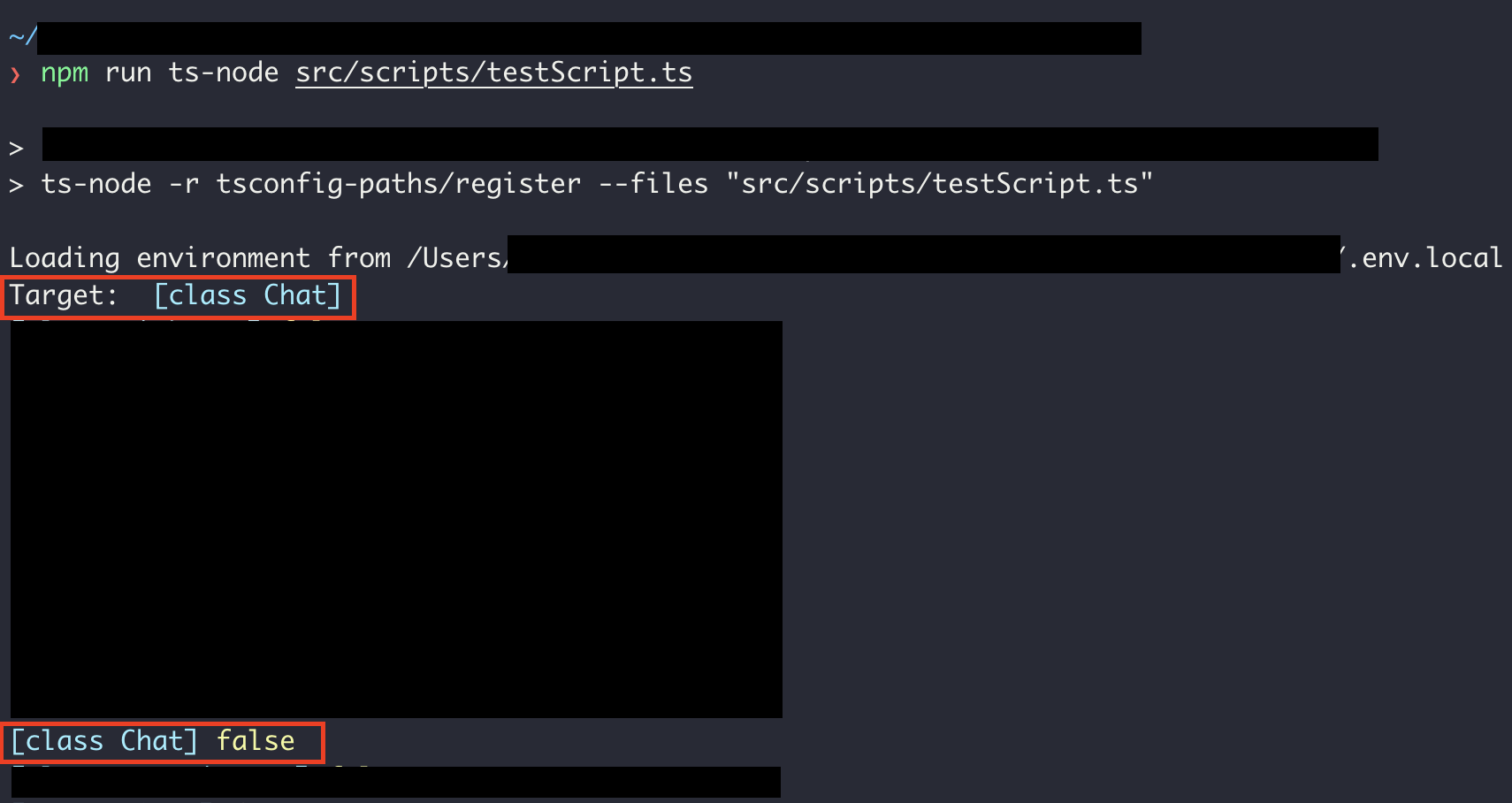
Here, My Entity Target is [Chat], and there exists metadata [Chat] in connection, but metadata.target === target returns false... I don't know why this happens..
@pleerock
 Atanatous
on 16 Sep 2020
Atanatous
on 16 Sep 2020
Is this still an issue in 0.2.27?
 imnotjames
on 30 Sep 2020
imnotjames
on 30 Sep 2020
I think i'm facing this issue if I pass the entity.name to get repository works but the entity object itself it doesn't
 krolow
on 2 Oct 2020
krolow
on 2 Oct 2020
Do you have a way to replicate?
imnotjames
on 2 Oct 2020
it's weird b/c in my test env (my tests mocking the reach to the api and calling the services that uses the repository directly)... it works but when using in nextjs reaching the request it doesn't 😕
I gonna try create the scenario... by the way I revert to 0.2.22 and works...
As I'm new in typeorm it was quite confusing for me to get what is going on at least this thread helped figure out and not give up! 💪
krolow
on 2 Oct 2020
Tests are needed that validate https://github.com/typeorm/typeorm/issues/4958 & https://github.com/typeorm/typeorm/issues/4967 don't recur when fixing this issue.
EDIT: Opened PR #6835 to handle protect us from regression
imnotjames
on 2 Oct 2020
I think @YoonSeongKyeong 's suggestion is good enough... Why doesn't select this code fix?
We cannot use this code because it has side effects that break other use cases.
imnotjames
on 4 Oct 2020
I've merged in the tests that will prevent #4958 from recurring.
imnotjames
on 7 Oct 2020
We still need a Reproducible Example for this issue. I have no way of replicating it locally. A repository would be great.
When opening an issue, people will be better able to provide help if you provide code that they can easily understand and use to reproduce the problem. This boils down to ensuring your code that reproduces the problem follows the following guidelines:
- Minimal – Use as little code as possible that still produces the same problem
- Complete – Provide all parts someone else needs to reproduce your problem in the question itself
- Reproducible – Test the code you're about to provide to make sure it reproduces the problem
Minimal
The more code there is to go through, the less likely people can find your problem. Streamline your example in one of two ways:
- Restart from scratch. Create a new program, adding in only what is needed to see the problem. Use simple, descriptive names for functions and variables – don’t copy the names you’re using in your existing code.
- Divide and conquer. If you’re not sure what the source of the problem is, start removing code a bit at a time until the problem disappears – then add the last part back.
Don't sacrifice clarity for brevity when creating a minimal example. Use consistent naming and indentation, and include code comments if needed. Use your code editor’s shortcut for formatting code.
Don't include any passwords or credentials that must be kept secret.
Complete
Make sure all information necessary to reproduce the problem is included in the issue itself.
If the problem requires some code as well as some XML-based configuration, include code for both. The problem might not be in the code that you think it is in.
Use individual code blocks for each file or snippet you include. Provide a description for the purpose of each block.
DO NOT use images of code. Copy the actual text from your code editor, paste it into the issus, then format it as code. This helps others more easily read and test your code.
Reproducible
To help you solve your problem, others will need to verify that it exists.
Describe the problem. "It doesn't work" isn't descriptive enough to help people understand your problem. Instead, tell other readers what the expected behavior should be. Tell other readers what the exact wording of the error message is, and which line of code is producing it. Use a brief but descriptive summary of your problem as the title of your question.
Eliminate any issues that aren't relevant to the problem. If your question isn’t about a compiler error, ensure that there are no compile-time errors.
Double-check that your example reproduces the problem! If you inadvertently fixed the problem while composing the example but didn't test it again, you'd want to know that before asking someone else to help.
imnotjames
on 21 Oct 2020
@imnotjames I've set up this repo a while back: https://github.com/tuhlmann/typeorm-entity-not-found
It contains NestJS and it may well be that Nest is part of the problem as has been pointed out in this thread.
Other than that I tried to keep it minimal. A description of how to start and the expected behavior is in the master branch's README.
tuhlmann
on 21 Oct 2020
Apologies, I missed that! There was a lot to the thread. :bow:
imnotjames
on 21 Oct 2020
@tuhlmann
It looks like I'm this case you are definitely loading two different sets of entities, and two completely different classes. This is some weirdness between the compilation & the hot-reloading / just in time transpilation going on.
I don't see it mentioned in the readme anywhere - does importing the entities directly and passing them directly into the entities option fix this for you?
If so - I think the big issue you're facing is that whatever static analysis transpilation isn't happening when we're running our imports via the globbing. It's one of the big reasons there's been some possibilities floated to drop (or separate off) the globbing entity loader - it breaks in TONS of situations and is very fragile.
If not - I'll be digging into that repo. I'm not sure if it's the same issue as elsewhere here but it's the most I've got to go off of :shrug:
imnotjames
on 21 Oct 2020
Thanks for looking into it @imnotjames !
If you mean by "passing them directly" to add the classes to the entities: [class, class, ...] array- yes I tried that, and it also resulted in an error.
tuhlmann
on 21 Oct 2020
We hit a very similar issue as this starting at version 0.2.23 with our jest tests and it turned out that somehow because we were using typescript tests (as opposed to transpiled js tests). Our orm configuration was passing in a function for entityMetadata and this commit caused the EntityMetadataNotFound error: https://github.com/typeorm/typeorm/commit/e3be9e34e00768af3304b238389fb80ce13bb567
If we reverted that commit all was well. I think there might be a regression in that commit. Or, somehow I'm misunderstanding how the entities should be configured, but otherwise our ormconfig entities configuration works fine.
 theothermattm
on 11 Nov 2020
theothermattm
on 11 Nov 2020
I don't think this is an issue caused by changes on NestJS's side.
First time I hit this problem was back in March when upgrading TypeOrm to make use of the new soft-delete feature. I did not update NestJS back then nor since, but the app still broke when attempting to go above 0.2.22.
In my case it was pretty clear isolated breakage on TypeOrm's side starting from 0.2.23.
 Devimal
on 14 Nov 2020
Devimal
on 14 Nov 2020
I have arrived here after many battles - happy to know this is being looked into.
 wi-ski
on 28 Nov 2020
wi-ski
on 28 Nov 2020
Confirming downgrading to 0.2.22 worked for me.
wi-ski
on 28 Nov 2020
Related issues
 CodingVampyre
·
34Comments
CodingVampyre
·
34Comments
 ct-reposit
·
36Comments
pleerock
·
66Comments
ct-reposit
·
36Comments
pleerock
·
66Comments
 dinfer
·
53Comments
dinfer
·
53Comments
 alfaproject
·
35Comments
alfaproject
·
35Comments
Most helpful comment
Thanks for looking into it @imnotjames !
If you mean by "passing them directly" to add the classes to the
entities: [class, class, ...]array- yes I tried that, and it also resulted in an error.