Typeorm: [Question] Is it possible to include Nth-level relationship data using find options?
If I have a Person entity with a one-to-many relationship with a Home entity, and then the Home entity has a many-to-one relationship with a HomeType entity, is there a way to get the Home entities to include their HomeType data when selecting Person's and including their Home relations?
let personsWithHomes = await Person.find({ where: { id: id }, relations: ["homes"] })
This would return my Person records with their associated Home records, but the Home records do not include their associated HomeType. I tried adding the type as an eager loaded relationship, but it still does not get included.
Is there a way to specify the sub relations to include?
let personsWithHomes = await Person.find({ where: { id: id }, relations: ["homes", "homes.homeType"] })
 kenpederson
All 35 comments
You can create your query by using the query builder
let personsWithHomesAndTypes = await repository.createQueryBuilder("person")
   .innerJoinAndSelect("person.homes", "home")
   .innerJoinAndSelect("homes.homeType", "homeType")
   .getMany()
 daniel-lang
on 30 Nov 2017
daniel-lang
on 30 Nov 2017
Since you are suggesting using a different method, is it safe to assume that the answer to my question is "no", that I cannot accomplish what I am trying to do using the find options?
kenpederson
on 30 Nov 2017
@daniel-lang your comment combine with a more thorough reading of the doc has provided me with the answer to my question. It is in fact possible using the find options, I just needed to use the "join" option instead of the relations.
let personsWithHomes = await Person.find({
    where: {
        id: id
    },
    join: {
        alias: "person",
        leftJoinAndSelect: {
            "homes": "person.homes",
            "homeType": "homes.homeType"
        }
    }
});
Thank you for the assistance.
kenpederson
on 1 Dec 2017
You are right, sorry, I missed that
daniel-lang
on 1 Dec 2017
I added more advanced support to relations of the find options, e.g.
const posts = await connection.getRepository(Post).find({ relations: ["photos", "user", "photos.user", "counters.author"] });
It was a hard feature to implement, because sub-relations can be joined via embeds, but I did it ;)
This feature will be available in 0.1.7. Contributions to docs are welcomed.
 pleerock
on 1 Dec 2017
pleerock
on 1 Dec 2017
OH WOW, excellent work @pleerock . Great to see that added!
 recurrence
on 7 Dec 2017
recurrence
on 7 Dec 2017
@pleerock, just to confirm, when using find options, is it limited to 2 levels? I don't see any examples anywhere of using more than 2 levels of relations and I am getting errors locally using 0.1.12 like
{
    "message": "Relation \"level1.level2.level3\" was not found, please check if it is correct and really exist in your entity."
}
even though I can get to level 3 if I start at level 2 so I know the relationships are configured correctly.
An example of what I am talking about would be:
const posts = await connection.getRepository(Post).find({ relations: ["photos", "photos.user", "photos.user.profile"] });
where photos.user.profile will be "not found" but if I try to find a userand expand to profile, it would work.
Thanks!
 theigor
on 6 Mar 2018
theigor
on 6 Mar 2018
And nevermind - I just came across https://github.com/typeorm/typeorm/issues/1504 and updated to 0.1.14 and everything works. Great job!
theigor
on 6 Mar 2018
@pleerock Just started using typeorm with graphql this weekend. Amazing library and Super Kudos 🚀 👍 🎉 on the nested relations feature! It's a must have with graphql.
If Medium-like-clapping was available here, you'd get several hundred claps 👏 from yours truly. Nice job.
 jboothe
on 19 Mar 2018
jboothe
on 19 Mar 2018
@jboothe thanks. If you want to use typeorm with graphql there is a framework Im currently working on - you can try it.
pleerock
on 26 Mar 2018
Good to know. I'll check it out.
jboothe
on 28 Mar 2018
This feature is super nice, but I can't find it in the documentation. Are the docs updated? Or am I missing something?
 biels
on 23 May 2018
biels
on 23 May 2018
@biels what docs are you talking about? I provided an example code above.
pleerock
on 24 May 2018
Yes, thank you for that. But I shouldn't have to come to a github issue to learn about a feature, right?
biels
on 24 May 2018
No, if you read all parts of the documentation.
pleerock
on 24 May 2018
@pleerock Thanks for creating this library! We are starting to use it in a production environment.
Regarding this issue, thanks for implementign this:
const posts = await connection.getRepository(Post).find({ relations: ["photos", "user", "photos.user", "counters.author"] });
It is very helpful to be able to fetch nth level relationships. However, it would be great if we could filter (maybe using .where) based on properties of the related objects. I have seen other issues where you mention that the queryBuilder is the tool for this case. But the problem with the query builder is that we wont have typed queries. Im assuming is a very hard feature to implement. Let me know if you have any plans on doing something like I mention.
 svegalopez
on 13 Sep 2018
svegalopez
on 13 Sep 2018
@pleerock
Nested props don't work in current alpha version published on npm. But working at 0.2.8
 Alex0007
on 31 Oct 2018
Alex0007
on 31 Oct 2018
I don't think this works anymore. Currently getting a typescript error when using sub-relations
Argument of type '{ relations: string[]; }' is not assignable to parameter of type 'FindOptionsWhere<User>'.
  Object literal may only specify known properties, and 'relations' does not exist in type 'FindOptionsWhere<User>'.
even though the property exists
 adesege
on 6 Mar 2019
adesege
on 6 Mar 2019
It's very cool!)
But. You have more specific topics for relations in the Docs such as whole section "Relations" or topic "Working with Relations", but you put this example to "Find Options". I'd never look for it there... As result I have spent too much time to find this solution((
Yes, I know that this is my problem, but maybe can you put few examples in this section/topic
 Evilart86
on 23 Mar 2019
Evilart86
on 23 Mar 2019
@Evilart86 Contributions to make documentation better are always welcomed.
 Kononnable
on 3 Apr 2019
Kononnable
on 3 Apr 2019
I tried to load nested relations as the doc suggest but no matter what I do I always get an error.
The message looks usually like this
Relation with property path title in entity was not found. with title being my property.
Is the current version of the package broken ?
 mbret
on 27 Jun 2019
mbret
on 27 Jun 2019
I added more advanced support to
relationsof the find options, e.g.const posts = await connection.getRepository(Post).find({ relations: ["photos", "user", "photos.user", "counters.author"] });It was a hard feature to implement, because sub-relations can be joined via embeds, but I did it ;)
This feature will be available in0.1.7. Contributions to docs are welcomed.
i try this code and got an error relation * was not found, so i change my code with this :
const posts = await connection.getRepository(Post).find({ relations: ["photos", "photos.user", "counters.author"] })
i remove the user entity and works fine
 MarkJAmes1217
on 7 Jul 2019
MarkJAmes1217
on 7 Jul 2019
I am not getting this feature. I have used it like this. Is there anything i am missing. I am only getting the first relation, that is user. The version of typeorm is 0.2.13
const response = await getManager().find(Post, {
    relations: ["user", "user.company"]
});
These are my entities
@Entity()
export class Post {
    @PrimaryGeneratedColumn("uuid")
    public id: string;

    @ManyToOne(() => User, (user) => user.id, { nullable: false })
    @JoinColumn({ name: "user_id" })
    public user: User;
}
@Entity()
export class User {

  @PrimaryGeneratedColumn("uuid")
  public id: string;

  @ManyToOne(() => Company, (company) => company.id)
  public company: Company;
}
@Entity()
export class Company {

  @PrimaryGeneratedColumn()
  public id!: number;

  @Column({ nullable: false })
  public name!: string;

}
 midhunadarvin
on 20 Nov 2019
midhunadarvin
on 20 Nov 2019
It's in the documentation but it's not working nor in the @next. I had a lot of interesting moments with it.
https://typeorm.io/#/find-options/basic-options
userRepository.find({ relations: ["profile", "photos", "videos", "videos.video_attributes"] });
 romcok
on 3 Dec 2019
romcok
on 3 Dec 2019
thanks @pleerock !
 kastudillo
on 4 Dec 2019
kastudillo
on 4 Dec 2019
Does this works for next level too? like video.video_attributes.uploadedBy
 iamchathu
on 18 Feb 2020
iamchathu
on 18 Feb 2020
Hi, I wanna do something similar but then for mapping.
I have a company entity, a reviews entity and an industry entity, I wanna get a company by Id with all the linked industries to it's linked reviews. I managed to get all the reviews with their industry using the following query:
      const company = await this.companyRepository
        .createQueryBuilder('company')
        .where({
          'company.id': companyId
        })
        .leftJoinAndSelect("company.agency", "agency")
        .leftJoinAndSelect('company.reviews', 'review')
        .leftJoinAndSelect('review.industry', 'industry')
        .loadRelationCountAndMap('company.like_count', 'company.like')
        .loadRelationCountAndMap('company.review_count', 'company.reviews')
        .getOne();
Now what I actually want is to add a industries property to company that links all the industries linked to the review, any tips?
 ItsWendell
on 2 Mar 2020
ItsWendell
on 2 Mar 2020
FindRelationsNotFoundError: Relation "photos.url" was not found, please check if it is correct and really exist in your entity
const users = await repoUser.find({
    select: ['email', 'username'],
    relations: ["photos", "photos.url"],
})
Entitys
- Photo
@Entity()
export class Photo {
  @PrimaryGeneratedColumn()
  id: number;

  @Column()
  url: string;

  @ManyToOne(type => User, user => user.photos)
  user: User;
}
- User
@Entity('User')
export class User {
    @PrimaryGeneratedColumn('uuid')
    id: string

    @Column()
    username: string;

    @Column()
    email: string;

    @Column()
    password: string;

    @CreateDateColumn({ type: 'timestamp' })
    createdAt: Date;

    @UpdateDateColumn({ type: 'timestamp' })
    updatedAt: Date;

    @OneToMany(type => Photo, photo => photo.user)
    photos: Photo[];

    @BeforeInsert()
    async hashPassword(): Promise<void> {
      const hash = await bcrypt.hash(this.password, 8)
      this.password = hash
    }
}
 t-heu
on 20 Apr 2020
t-heu
on 20 Apr 2020
Excellent feature. using like this and worked well.
findOne(id,{
    relations: ["nominees", "nominees.guardian"]
});
 ovichowdhury
on 16 Jun 2020
ovichowdhury
on 16 Jun 2020
I added more advanced support to
relationsof the find options, e.g.const posts = await connection.getRepository(Post).find({ relations: ["photos", "user", "photos.user", "counters.author"] });It was a hard feature to implement, because sub-relations can be joined via embeds, but I did it ;)
This feature will be available in0.1.7. Contributions to docs are welcomed.
you the best m8
 backciro
on 23 Jun 2020
backciro
on 23 Jun 2020
Is there a way to use a relation to filter a query results?
const posts = await connection
    .getRepository(Post)
    .find({
      relations: ['photos', 'user', 'photos.user', 'counters.author'],
      where: {
        'photos.name': 'Nature',
      },
    });
 tooleks
on 26 Jun 2020
tooleks
on 26 Jun 2020
I am getting:
error TS2769: No overload matches this call
When switchting from:
return StrategyEntity.findOne({
  relations: ['account'],
  where: {
    id: strategyId,
    account: {
      owner: {
        userId: query.userId,
        platform: query.platform,
      },
    },
  },
});
to:
return StrategyEntity.findOne({
  relations: ['account', 'account.owner'],
  where: {
    id: strategyId,
    account: {
      owner: {
        userId: query.userId,
        platform: query.platform,
      },
    },
  },
});
Tested with: typeorm v0.3.0-rc.19
 bennycode
on 17 Aug 2020
bennycode
on 17 Aug 2020
still so inefficient... :(
backciro
on 22 Oct 2020
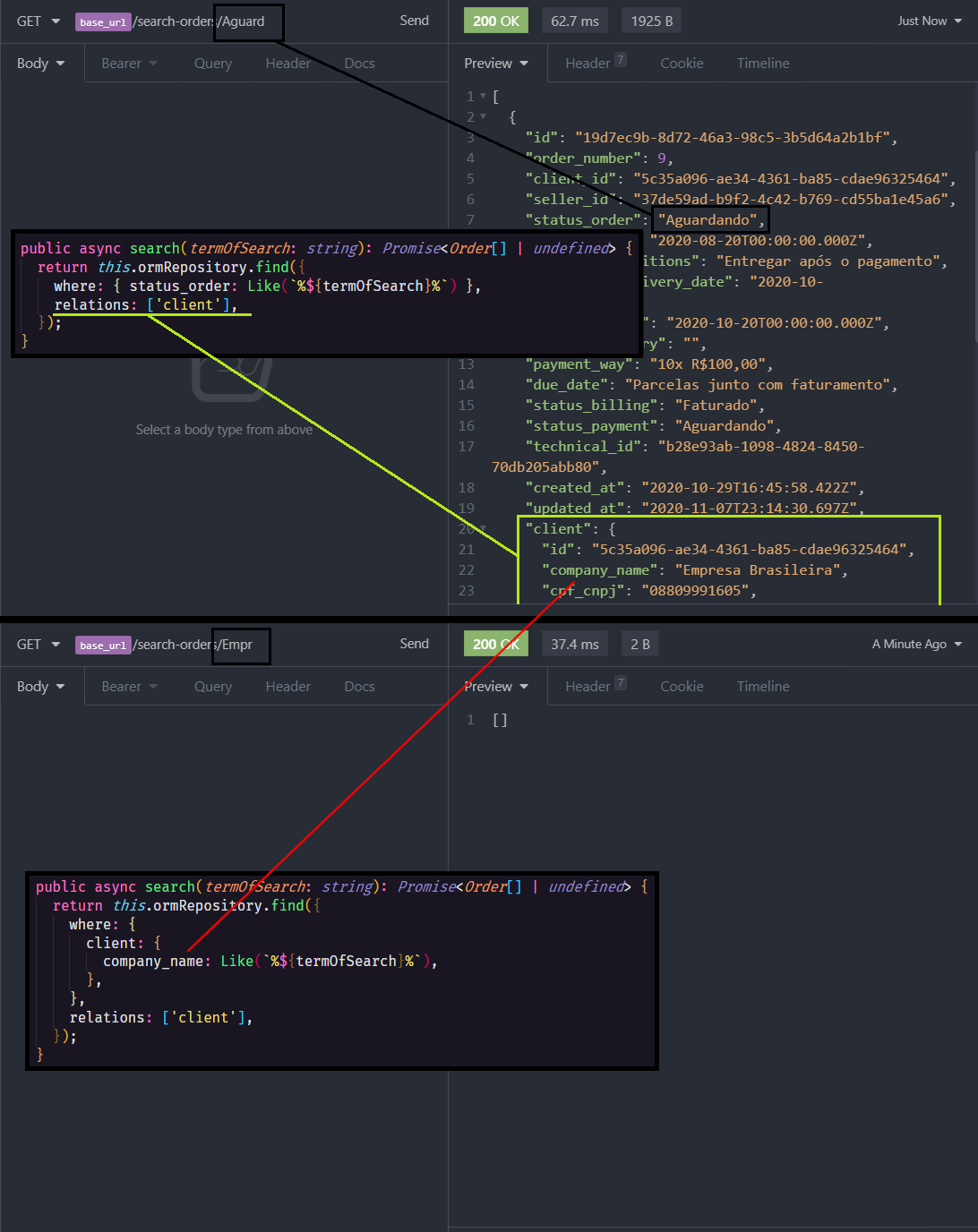
Hi,
Does everyone know how to find in a sub-relations?
On the image below you can see...
- on top, I search for
status_orderon the main object and it works fine, look that I bring theclientsobject withrelationsoptions; - at bottom, I search for
company_nameon the sub-relation object, and nothing returns.
 guitexa
on 10 Nov 2020
guitexa
on 10 Nov 2020
I added more advanced support to
relationsof the find options, e.g.const posts = await connection.getRepository(Post).find({ relations: ["photos", "user", "photos.user", "counters.author"] });It was a hard feature to implement, because sub-relations can be joined via embeds, but I did it ;)
This feature will be available in0.1.7. Contributions to docs are welcomed.
Hi,
I'm trying to achieve the same result using query builder but couldn't quite get it. Can anybody help how to do the same using querybuilder?
 Dr-Phone
on 29 Nov 2020
Dr-Phone
on 29 Nov 2020
Related issues
 adrianhara
·
49Comments
adrianhara
·
49Comments
 trixden
·
50Comments
trixden
·
50Comments
 cometta
·
41Comments
cometta
·
41Comments
 zxr90
·
58Comments
pleerock
·
135Comments
zxr90
·
58Comments
pleerock
·
135Comments
Most helpful comment
I added more advanced support to
relationsof the find options, e.g.It was a hard feature to implement, because sub-relations can be joined via embeds, but I did it ;)
This feature will be available in
0.1.7. Contributions to docs are welcomed.