type-graphql, Typegoose: Cannot determine GraphQL output type for
I got the following exception by adding ItemResolver to the schema.
Error:
(node:30641) UnhandledPromiseRejectionWarning: Error: Cannot determine GraphQL output type for getItemById
What i'm missing?
index.ts
public static async connectProvider() {

        const redis = new Redis(6379, process.env.redisuri);

        console.log(`Redis online ${process.env.redisuri}:${6379}`);

        const schema = await buildSchema({
            resolvers: [ItemResolver, BookResolver],
            globalMiddlewares: [TypegooseMiddleware],
            emitSchemaFile: path.resolve(__dirname, "schema.gql")
        });

        const server = new GraphQLServer({
            schema
        });

        server.start(({ port, endpoint }) => { console.log(`Graphql online ${endpoint}:${port}`) });
    }
ItemResolver.ts
import { ItemField } from './ItemField';
import { Resolver, Query, Arg, FieldResolver, Root } from "type-graphql";
import Item, { ItemModel } from "./generic-graph-schema";

@Resolver(of => Item)
export default class ItemResolver {

    @Query(returns => Item, { nullable: true, description: "Search and GET a single Item by ID" })
    async getItemById(@Arg("id") id: string) {
        return await ItemModel.findById(id);
    }

    @Query(returns => [Item], { nullable: true, description: "Search by dynamic field" })
    async getAllItemsBy(@Arg("query") query: string) {
        console.log(query);

        return await ItemModel.find();
    }

    @Query(returns => [Item])
    async getAllItems(@Arg("limit", { nullable: true }) limit: number) {

        if (limit == null || limit == undefined) {
            limit = 100;
        }

        return await ItemModel.find().limit(limit);
    }


};
ItemGraph.ts
import { ObjectType, Field } from "type-graphql";
import { prop as Property, Typegoose, arrayProp, Ref } from "typegoose";
import { ItemField } from "./ItemField";


ObjectType()
export default class Item extends Typegoose {

    @Field()
    @Property()
    id: string;

    @Field()
    @Property()
    itemType: string;

    @Field()
    @Property()
    createdBy: string;

    @Field()
    @Property()
    createdOn: string;

    @Field()
    @Property()
    changedBy: string;

    @Field()
    @Property()
    changedOn: string;

    @Field(type => [ItemField])
    @arrayProp({ items: ItemField, default: [] })
    fields: ItemField[];

};

export const ItemModel = new Item().getModelForClass(Item);
ItemField.ts
import { Field } from "type-graphql";
import { prop as Property, Typegoose } from "typegoose";
export class ItemField extends Typegoose {

    @Field()
    @Property()
    id: string;

    @Field()
    @Property()
    name: string;
    @Field()
    @Property()
    showAs: string;
    @Field()
    @Property()
    fieldType: string;
    @Field()
    @Property()
    value: string;
}
 LearningProcesss
All 8 comments
-ObjectType()
+@ObjectType()
export default class Item extends Typegoose {
+@ObjectType()
export class ItemField extends Typegoose {
 MichalLytek
on 6 May 2019
MichalLytek
on 6 May 2019
@ObjectType() added to ItemField class.
Same error.
LearningProcesss
on 6 May 2019
@LearningProcesss
Please create a repository with a MINIMAL reproducible code example (not a dump of your whole project), e.g. by removing all other classes from your code until it starts working.
MichalLytek
on 6 May 2019
As requested:
https://github.com/LearningProcesss/SupportTicket
Thank you,
Mattia
LearningProcesss
on 6 May 2019
It's not a minimal, why I have to lanuch mongodb server?
Please create bare object types, resolver and buildSchema and see if you still have this problem.
MichalLytek
on 6 May 2019
In the latest commit i removed the connection to mongodb.
Now the repo contains only what i need for Graphql.
LearningProcesss
on 6 May 2019
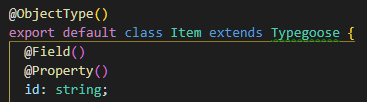
As I said, all you need to do is to use the decorator as the decorator.
So @ObjectType(), not ObjectType() because it's not a function.
MichalLytek
on 6 May 2019
Thank you.
LearningProcesss
on 6 May 2019
Related issues
 avkonst
·
3Comments
avkonst
·
3Comments
 itsgracian
·
3Comments
itsgracian
·
3Comments
 Janushan
·
3Comments
Janushan
·
3Comments
 Asim13se
·
3Comments
Asim13se
·
3Comments
 tafelito
·
3Comments
tafelito
·
3Comments
Most helpful comment
As I said, all you need to do is to use the decorator as the decorator.
So
@ObjectType(), notObjectType()because it's not a function.