Twint: [REQUEST] Store Lookup outputs into Pandas
Issue Template
Please use this template!
Initial Check
If the issue is a request please specify that it is a request in the title (Example: [REQUEST] more features). If this is a question regarding 'twint' please specify that it's a question in the title (Example: [QUESTION] What is x?). Please only submit issues related to 'twint'. Thanks.
Make sure you've checked the following:
- [x] Python version is 3.6;
- [x] Updated Twint with
pip3 install --upgrade -e git+https://github.com/twintproject/twint.git@origin/master#egg=twint; - [x] I have searched the issues and there are no duplicates of this issue/question/request.
Command Ran
Please provide the _exact_ command ran including the username/search/code so I may reproduce the issue.
c = twint.Config()
c.Username = "noneprivacy"
c.Limit = 20
c.Pandas = True
twint.run.Following(c)
c = twint.Config()
c.Username = "noneprivacy"
c.Limit = 20
c.Pandas = True
twint.run.Followers(c)
Description of Issue
Please use as much detail as possible.
Hey there, I made some researches (and I may have done them wrong) but I couldn't find a way to store outputs from the Lookup search function thus I thought that it would be great to either be able to clean the data stored with the Store_object function or to implement a new function that would allow to store this kind of data into pandas dataframe which is doable with searches about Tweets, Followers, Following and Profile.
EDIT : It is not directly concerning the lookup function but the c.Pandas parameter is not working along with neither the twint.run.Following nor twint.run.Followers functions as it returns an "AttributeError: 'str' object has no attribute 'type'" related with the following line : if config.Pandas and obj.type == "user":.
Environment Details
Using Windows, Linux? What OS version? Running this in Anaconda? Jupyter Notebook? Terminal?
Running it on Spyder 3.2.8 with Python 3.6. Using macOS 10.14.5
 Jordan9675
All 14 comments
Some testing might be needed, for now you get the data as expected
Now you can have dataframes for tweets, users (full info, like number of followers/following, etc) and following/followers (just lists)
To access the data of following users:
twint.storage.panda.Follow_df[config.Username]['following']
The same for followers
 pielco11
on 27 May 2019
pielco11
on 27 May 2019
Hey @pielco11, thanks for the answer !
I'm however still facing some troubles as I'm a beginner.
I'm running the following :
c = twint.Config()
c.Username = "noneprivacy"
c.Limit = 20
c.Pandas = True
twint.run.Following(c)
Following = twint.storage.panda.Follow_df[config.Username]['following']
The c.Pandas is still returning the same error and removing this line gives me a "NameError: name 'config' is not defined" when trying to retrieve data from the Follow_df dataframe.
Also, I can't manage to obtain a dataframe containing the number of followers/following, while running the following code :
c = twint.Config()
c.Username = "noneprivacy"
c.Limit = 20
twint.run.Lookup(c)
data = twint.storage.panda.User_df
which returns a NoneType object :/
I'd be very thankful if you could provide some examples !
Jordan9675
on 27 May 2019
Maybe I was not clear enough
config.Username in your case is c.Username. I specified in the first way as "general rule"
I tested pandas integration with .Lookup and it seems to work properly (updated now). Please don't forget c.Pandas = True in your second example
pielco11
on 28 May 2019
Everything works fine now after the update.
Thanks for the much appreciated help @pielco11 !
Jordan9675
on 28 May 2019
Feel free to do some testing and provide any kind of suggestion, I don't really use Pandas so I don't know what one would want
pielco11
on 28 May 2019
I just figured out another problem :/
I tried to adapt the workaround you provided to clean the data stored in pandas however, while it does work with the twint.storage.panda.Tweets_df, it does not work when trying to empty twint.storage.panda.Follow_df.
Code ran :
c = twint.Config()
c.Username = "noneprivacy"
c.Hide_output = True
c.Pandas = True
c.Store_pandas = True
c.Pandas_clean=True
c.Store_object = True
c.Limit= 20
twint.run.Following(c)

followed = twint.storage.panda.Follow_df["following"].tolist()[0]
twint.storage.panda.Follow_df = None
Running it twice returns a list "followed" with 40 elements, running it three times returns a list with 60 ... :/
The strange thing being that after running twint.storage.panda.Follow_df = None, followed = twint.storage.panda.Follow_df["following"].tolist()[0] returns a "TypeError: 'NoneType' object is not subscriptable" which tends to say that the data stored have been successfully cleaned. I can't figure out where the problem is coming from.
Jordan9675
on 28 May 2019
Fixed, I also removed c.Store_pandas because it was deprecated
pielco11
on 28 May 2019
Working perfectly, thanks !
Jordan9675
on 28 May 2019
Since config.Store_object and config.Pandas share an object if used with .Followers or .Following, you should not use them together. Otherwise you will not be able to automatically remove already scraped followers/following
    if config.Pandas_clean and not config.Store_object:
        output.clean_follow_list()
output.clean_follow_list() resets twint.output.follow_object as well, that variable is where following/followers are stored if you set config.Store_object = True or config.Pandas = True
So in your case that you reported above, don't set config.Store_object = True since there could be conflicts
pielco11
on 28 May 2019
To resume
To use Pandas do
c = twint.Config()
c.Username = "noneprivacy"
c.Hide_output = True
c.Pandas = True
c.Limit= 20
twint.run.Following(c)

followed = twint.storage.panda.Follow_df["following"].tolist()[0]
twint.storage.panda.Follow_df = None
To use Store_object do
c = twint.Config()
c.Username = "noneprivacy"
c.Hide_output = True
c.Store_object = True
c.Limit= 20
twint.run.Following(c)

followed = twint.output.follow_object
twint.output.clean_follow_list()
Both last lines of code reset already scraped data in the variables
pielco11
on 28 May 2019
Using Pandas do:
AttributeError: 'str' object has no attribute 'type'
To resume
To use Pandas do
c = twint.Config()
c.Username = "noneprivacy"
c.Hide_output = True
c.Pandas = True
c.Limit= 20
twint.run.Following(c)

followed = twint.storage.panda.Follow_df["following"].tolist()[0]
twint.storage.panda.Follow_df = None
To use Store_object do
c = twint.Config()
c.Username = "noneprivacy"
c.Hide_output = True
c.Store_object = True
c.Limit= 20
twint.run.Following(c)

followed = twint.output.follow_object
twint.output.clean_follow_list()
Both last lines of code reset already scraped data in the variables
 amruizva
on 6 Jun 2019
amruizva
on 6 Jun 2019
@amruizva there was an issue that has been fixed, you should not get that error message. Please update and retry
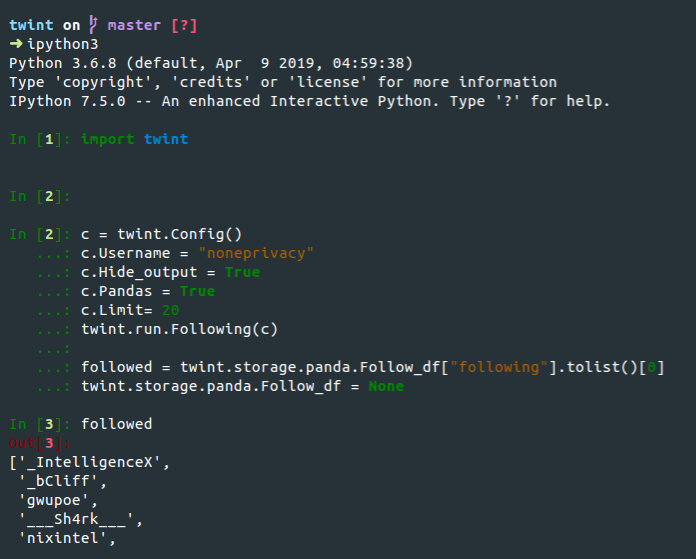
pielco11
on 8 Jun 2019
Hello once again !
I'm getting back there as I faced the same problem as I described initially.
Indeed, I cannot clean the Pandas dataframe in which informations scraped thanks to the Lookup function are stored.
I ran the following code :
c = twint.Config()
c.Username="noneprivacy"
c.Hide_output = True
c.Pandas = True
twint.run.Lookup(c)

df = twint.storage.panda.User_df
twint.storage.panda.User_df = None
I end up having as much dataframe rows than the number of times I've run the code :/
Note that I've already updated twint.
Some help would be much appreciated !
Jordan9675
on 18 Jun 2019
@Jordan9675
import twint

c = twint.Config()
c.Username="noneprivacy"
c.Hide_output = True
c.Pandas = True
twint.run.Lookup(c)

df = twint.storage.panda.User_df

twint.storage.panda.clean()

twint.run.Lookup(c)
df = twint.storage.panda.User_df
print(df)
Related issues
 cbjrobertson
·
5Comments
cbjrobertson
·
5Comments
 wagerpascal
·
4Comments
wagerpascal
·
4Comments
 Nestor75
·
3Comments
Nestor75
·
3Comments
 sillyfatcat
·
4Comments
sillyfatcat
·
4Comments
 evoke0
·
3Comments
evoke0
·
3Comments
Most helpful comment
@amruizva there was an issue that has been fixed, you should not get that error message. Please update and retry