Twint: Several Users - use file as userlist arg ~Pielco11
Is there the option to get the tweets of several users in the same CSV file? That is, with a command like this:
python Twint.py -u ursername -o file.csv --csv
How can I add more than one user to get all their tweets at the same time?
I had thought about looping or creating a list. But in the Command Prompt it does not allow it. So I would not know how I could do it.
 DavidPerea
All 23 comments
Hi, I added a new arg, userlist, to let you do so. Try with something like python Twint.py --userlist user1,user2 -o file.csv --csv
 pielco11
on 25 May 2018
pielco11
on 25 May 2018
Great!!!
It works perfectly.
Thank you very much for your input.
DavidPerea
on 25 May 2018
You can also parse files as input, nothing change just do python Twint.py --userlist path/to/file.txt --csv -o file.csv be sure to have one user for line
pielco11
on 25 May 2018
The truth is that it is very useful to analyze files as input.
However, I have used the command that you have given me, indicating the TXT file address, but I do not know why I extracted tweets from other users. I've put the users well and one on each line.
It's very strange.
DavidPerea
on 25 May 2018
Hmmm, going to check right now!
pielco11
on 25 May 2018
Now it works, there were readline instead of readlines but with the 2nd one you have annoying \n
pielco11
on 25 May 2018
Nothing. The same thing keeps happening to me. That is to say that it analyzes other users and not those that I have the TXT file.
I do not know if I'm doing something wrong. But I have a user per line and I put the address of entries well. So I do not know.
DavidPerea
on 25 May 2018
Ok, now it uses abspath, should work!
pielco11
on 25 May 2018
Would it be something like this?
python Twint.py --userlist os.path.abspath("user.txt") --csv -o file.csv
I do not know very well how to use abspath
DavidPerea
on 25 May 2018
Don't worry about that, the abspath is included in the code. Just try as earlier python Twint.py --userlist path/to/file.txt --csv -o file.csv
pielco11
on 25 May 2018
Nothing. The same thing keeps happening to me. I do not know why. But do not worry, I will put one by one the users in the code. But it is strange.
DavidPerea
on 25 May 2018
Really really strange
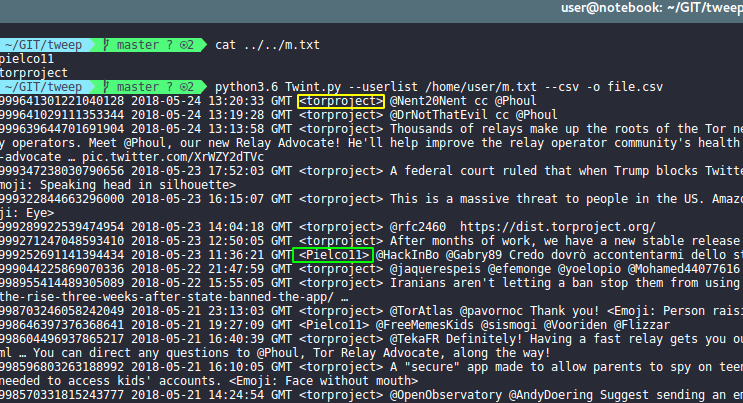
pielco11
on 25 May 2018
This happens to me. I have the txt document on my desktop and when I run the command it does not return the tweets from this users. If not of others. And I have tried to put the address of the txt document in different ways and nothing.
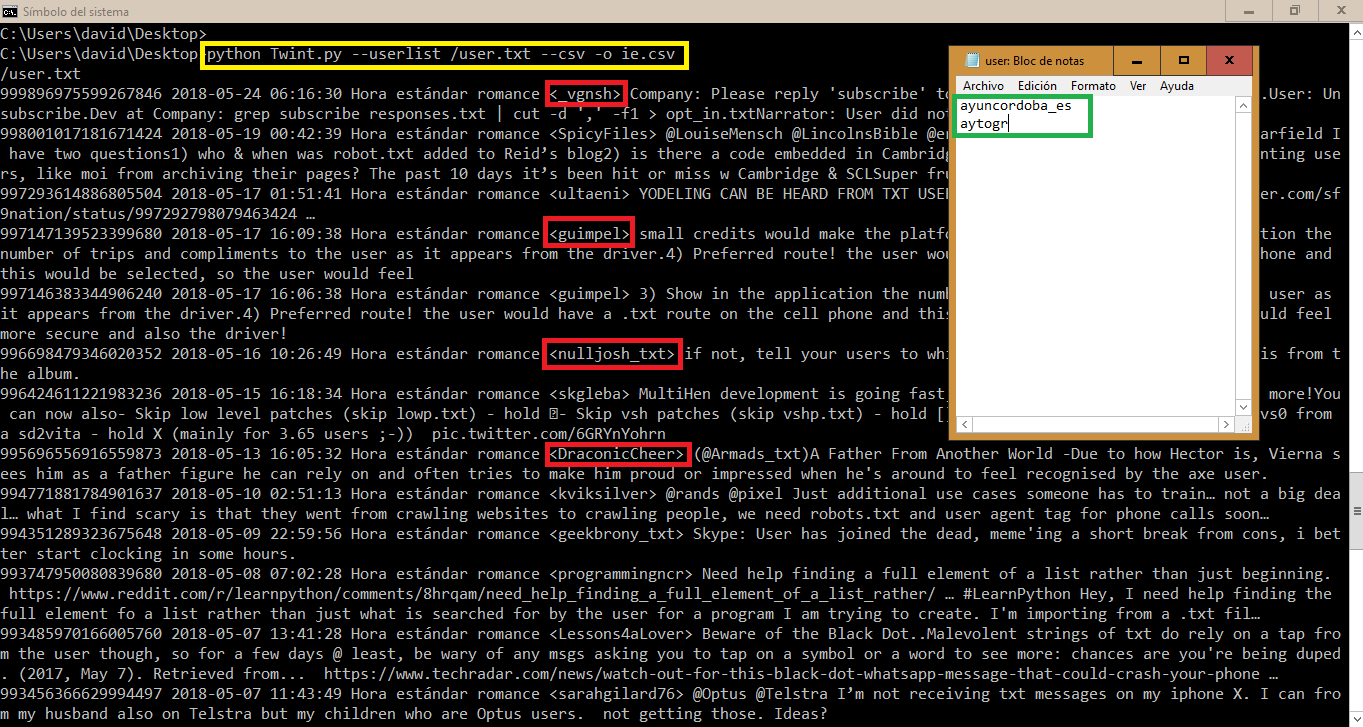
DavidPerea
on 25 May 2018
Hmm, maybe with Windows there are problems with slashes...
Can you add print(url) in twint/get.py at line 73, please?
So that you have something like:
    self.config.Near = self.config.Near.replace(",", "%2C")
    url+= "%20near%3A{0.Near}".format(self.config)
    print(url)
return url
Try adding the line and post the output, please
PS: I have never played with Windows so I don't know what one could expect.... btw looking around for a solution
pielco11
on 25 May 2018
In Twint.py can you also do
(lines 59-60)
def loadUserList(ul):
    print(os.path.abspath(ul))
    if os.path.exists(os.path.abspath(ul)):
please?
pielco11
on 25 May 2018
I've only read this briefly, but on Windows use \ instead of / for path to file:
Example:
Desktop\file.txt
or it's in the directory:
.\file.txt
 haccer
on 25 May 2018
haccer
on 25 May 2018
Sorry, @pielco11 for my absence these days. I've been away.
I have made the changes you told me in the Twint.py file and nothing. It keeps giving me the same results. It obtains tweets from other users that I indicate in the input document. Very strange
DavidPerea
on 27 May 2018
@DavidPerea While we try to find a solution, I suggest you to use a string as --userlist arg
Sorry for the inconvenience
pielco11
on 27 May 2018
Nothing. Upside down. Thank you very much for the help and the contribution of the string as --userlist.
I will do so meanwhile.
DavidPerea
on 27 May 2018
Sorry to ask again here.
But I've been working with strings as userlist arg but it gives me a problem. And it happens when I put more than 25 users does not get tweets.
So see if you know how to solve this problem and increase the limit of users. That now stands at 25 users.
DavidPerea
on 28 May 2018
Hmm, well I tried something and I can get results with no more than 27 users
To be sure that's not an issue with Twint, try printing the url and search with the browser
pielco11
on 28 May 2018
@pielco11 Thank you for the amazing tool for scraping Twitter. I'm facing the same issue with the user limit of ~25 when getting usernames from the text file (my file has ~1000 usernames). I'm using it with time range to get tweets from specific period from all users in txt file: twint --userlist parth/to/file.txt --since 2018-07-01 --until 2018-09-19 -o file.csv --csv The error is CRITICAL:root:twint.run:Twint:Feed:noData'items_html which I know you've discussed also in #360
Is there any way around those limits? I guess I could loop through my list 20 at the time but I'm new to Python so making this loop is quite tricky for me. Any other solutions that emerged since you've discussed it here?
 GeekOnAcid
on 10 Sep 2019
GeekOnAcid
on 10 Sep 2019
@GeekOnAcid that limit is imposed by Twitter. You would have to split your file in chunks of 25 users and then run the command with every list
pielco11
on 10 Sep 2019
Related issues
pielco11
·
17Comments
 riishabhz
·
23Comments
riishabhz
·
23Comments
 mshayes18
·
18Comments
DavidPerea
·
27Comments
mshayes18
·
18Comments
DavidPerea
·
27Comments
 fsiep
·
31Comments
fsiep
·
31Comments
Most helpful comment
Hi, I added a new arg,
userlist, to let you do so. Try with something likepython Twint.py --userlist user1,user2 -o file.csv --csv