Twin.macro: Classes setting colour set RGB value but not hex
Given a tailwind class to set a background colour like this:
.bg-off-black {
  --bg-opacity: 1;
  background-color: #131b20;
  background-color: rgba(19, 27, 32, var(--bg-opacity));
}
If I set it via: className='bg-off-black' I get an output of this:
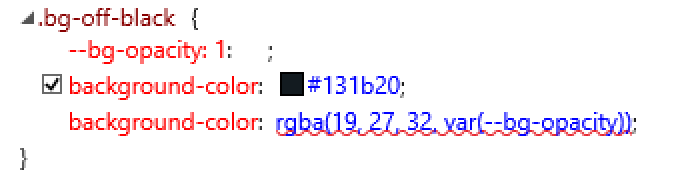
This is correct as hex and rgb are applied.
Using the tw='bg-off-black' or using it in a styled-component ${tw`bg-off-black`} prop

This mostly proves a problem for me setting up ie11 compatibility as the variables which set opacity are failing so that method isn't working (not worked out why just yet), either way the hex values should still be applied I believe?
CodeSandbox example: https://codesandbox.io/s/busy-moser-yxl7g?file=/src/App.tsx
 kieran-osgood
All 5 comments
There are issues adding the fallback IE11 hex values because duplicate keys aren't possible in javascript objects. eg, this would error:
{
  backgroundColor: "red",
  backgroundColor: "rgba(...)",
}
So at the moment, unless we can work out another tactic, IE11 isn't supported by Twin.
 ben-rogerson
on 5 Jun 2020
ben-rogerson
on 5 Jun 2020
Ah okay, out of curiosity as I'm sure you've thought of it, is it not possible to make the hex the default value option as that'd give forward and backward compatibility? Is there some potential downside, or is it just not possible to adjust that?
(p.s. I may have to remove this from my current project as it's for schools and client needs ie support, but I am loving twin and will 110% be using on everything in future, love what you're doing guys and appreciate the help so far!).
p.p.s I'm sure the subset of people supporting ie now is small, is it worth updating docs in the mean time to reflect twin not supporting ie 11
kieran-osgood
on 5 Jun 2020
Tailwind moved to using css variables for colors and backgrounds so they could support opacity.
So rather than stick with an old implementation (using the hex values), I moved Twin along with Tailwind.
Sucks to hear you can't stick with Twin in your project. I'm racking my brain for a solution but can't think of anything that's in the "nice to use" category :(
I'll definitely be updating the docs to show the lack of ie11 support now that you've brought it up.
ben-rogerson
on 5 Jun 2020
I seeeee, okay cool not to worry! Before I remove I'm gonna try adding css-vars-ponyfill and see if I can just set the --bg-opacity to 1 (doubt I'll need the opacity set, and if I do I'm using styled-components so i can get around it). Otherwise I'm sure I'll see you again when I get to my next project where I will hopefully not be forced to support ie11!
Keep up the good work and thanks for the help :)
FWIW: to anyone else who might face this, the css-vars-ponyfill did successfully allow me to continue using twin (weigh up whether this makes a difference to you yourselves).
kieran-osgood
on 5 Jun 2020
In Tailwind, disabling the text and background opacity would remove the variables but this is not case for twin.macro.
// tailwind.css (original)
.bg-red-400 {
  --bg-opacity: 1;
  background-color: #fc8181;
  background-color: rgba(252, 129, 129, var(--bg-opacity));
}

// tailwind.config.js
  corePlugins: {
    textOpacity: false,
    backgroundOpacity: false,
  },

// tailwind.css (with above settings)
.bg-red-400 {
  background-color: #fc8181;
}

// twin.macro
console.log(tw`bg-red-400`) // { --bg-opacity: "1", backgroundColor: "rgba(252, 129, 129, var(--bg-opacity))"}
this is adding some unnecessary overhead, in my case i'm using twin.macro to animate object properties so I would prefer to only manipulate the background or color properties(as it should).
 cybervaldez
on 12 Oct 2020
cybervaldez
on 12 Oct 2020
Related issues
 lukasluecke
·
6Comments
lukasluecke
·
6Comments
 nightgrey
·
3Comments
nightgrey
·
3Comments
 hendrul
·
3Comments
hendrul
·
3Comments
 vincent-vieira
·
7Comments
vincent-vieira
·
7Comments
 theairbend3r
·
3Comments
theairbend3r
·
3Comments
Most helpful comment
I seeeee, okay cool not to worry! Before I remove I'm gonna try adding css-vars-ponyfill and see if I can just set the --bg-opacity to 1 (doubt I'll need the opacity set, and if I do I'm using styled-components so i can get around it). Otherwise I'm sure I'll see you again when I get to my next project where I will hopefully not be forced to support ie11!
Keep up the good work and thanks for the help :)
FWIW: to anyone else who might face this, the css-vars-ponyfill did successfully allow me to continue using twin (weigh up whether this makes a difference to you yourselves).