Twill: Form fields error messages are not flashed when validating
Hi,
On a fresh install of Laravel with Twill 2, when I use rules to validate form fields entry, the error messages are not shown on the relevant field, only a _"Your submission could not be validated"_ global message appears.

Here are the relevant parts :
composer.json
"require": {
        "php": "^7.2.5",
        "area17/twill": "^2.0",
        "fideloper/proxy": "^4.2",
        "fruitcake/laravel-cors": "^1.0",
        "guzzlehttp/guzzle": "^6.3",
        "laravel/framework": "^7.0",
        "laravel/tinker": "^2.0"
    },
Installation process I underwent, in a nutshell:
composer create-project --prefer-dist laravel/laravel blog
composer require area17/twill:"^2.0"
php artisan twill:install
php artisan twill:module article
php artisan migrate
Only modifications :
ArticleRequest.php :
class ArticleRequest extends Request
{
    public function rules()
    {
        return [
          'description' => 'required|alpha_dash',
        ];
    }
}
twill-navigation.php:
return [
  'articles' => [
      'title' => 'Articles',
      'module' => true
  ]
];
routes/admin.php:
Route::module('articles');
No other modifications whatsoever.
I then proceed on creating a new 'article', and when I edit it, I put some non-valid characters in the description, I only get the global message.
What I expected
If I'm not mistaken, the field should be flagged as non-valid, and be at least red-bordered, with a message (_"The description may only contain letters, numbers, dashes and underscores."_) attached to it.
As far as I understand, the response from the backend / api is correct, with the error message and relevant field :
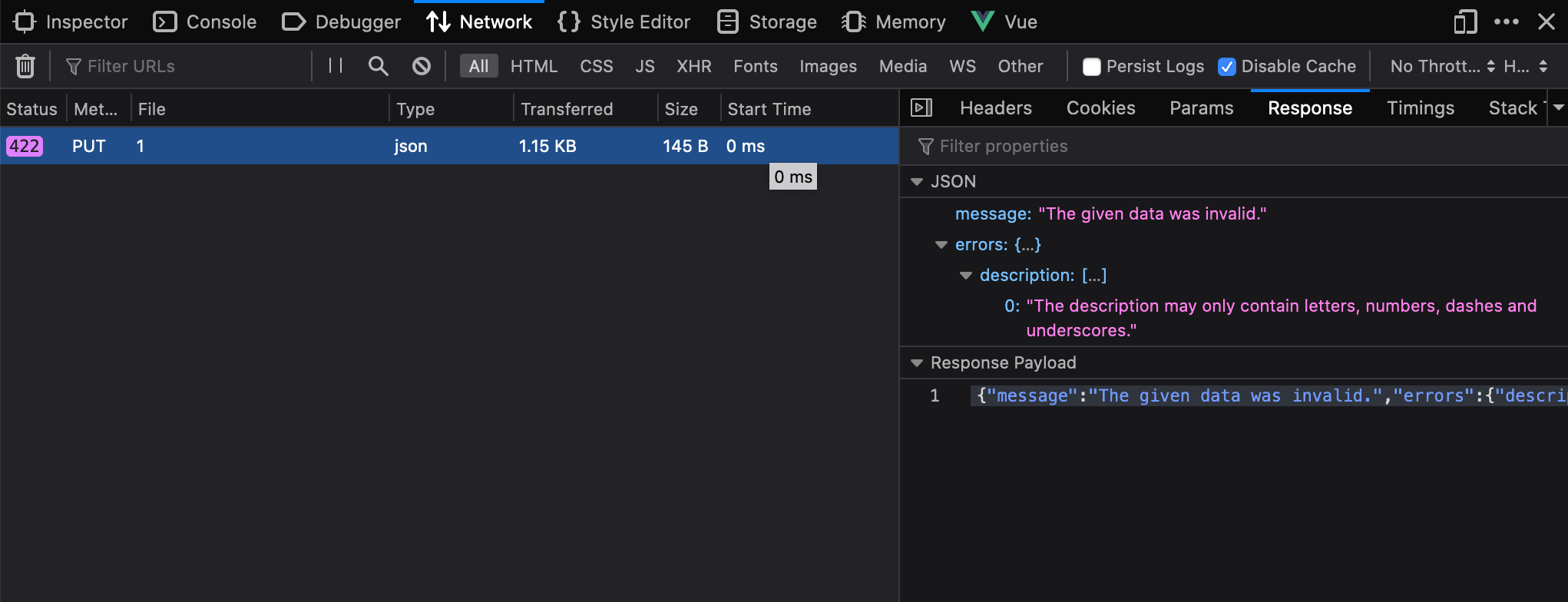
Is there something that I missed ? It looks like a bug to me.
Happy to give more details if needed.
Thanks a lot !
 tchapi
All 9 comments
Just found the same thing, I'm sure there is a problem here. I'm on sites that were built in 1.2 and upgrade to v2 recently. Field validation that used to work now doesn't properly.
No matter how simple the model, adding just the most simple 'required' requirement to say a text field results in 2 things not happening that should...
1) nothing changes at the problem field to flag it - aren't they meant to go red?
2) any custom msg that was defined to appear no longer works - its just always the same general validation msg that appears as shown in @tchapi 's screenshot.
@ifox any chance of clarifying what's going on? For me this is really important, I have a site I need to put live this week and if field validation doesn't work I think I'm going to have a lot of problems for one of my more complex models with lots of fields.
 arkid
on 25 Mar 2020
arkid
on 25 Mar 2020
Also just to say, when you try and use the preview option when editing content with a valid set of form data that doesn't have errors you get the same generic validation error if there is a problem calling the blade template used for previewing. Naturally this is a totally inappropriate and confusing msg to appear.
This may be a totally separate thing or this generic error that now appears all the time is catching a more accurate error that normally shows ?
arkid
on 27 Mar 2020
Can confirm this behavior after updating to the latest release (2.0.1). No validation messages on the inputs themselves, just the flash bar. Worked fine before upgrading from a 2.0 pre-release version.
 daun
on 30 Mar 2020
daun
on 30 Mar 2020
Don't think it's Laravel 6 specific @philippdaun , i'm on Laravel 5.8 for a few projects still and get the same issue.
arkid
on 30 Mar 2020
@arkid What's strange is I looked through all the commits between when it was last working for me and the latest release and there's nothing that looks probable to be causing this. That's why I figured it might be further up the tree. But yeah, looks like it's not a Laravel regression.
daun
on 30 Mar 2020
Hi guys, I'm investigating this and planning to release 2.1 asap with recent bug fixes and exciting PRs I'm reviewing.
 ifox
on 30 Mar 2020
ifox
on 30 Mar 2020
Amazing thanks @ifox ! :)
arkid
on 30 Mar 2020
Hi @ifox
Do you think you can release a patch version (2.0.2?) with this fix, sometimes soon, before the 2.1 ? We have migrated a few clients to Twill 2.0 but now we're stuck with this bug which is quite annoying
Thanks a lot !
tchapi
on 20 Apr 2020
Ok, in fact, I did some more testing following https://github.com/area17/twill/commit/fc5b16a9179fcba57d3424ef2456a9efa74ce68f.
The fields are now correctly highlighted as errored (in red) as expected, but the required fields do not have any text message:

(In this example, both fields have the required|alpha_num requirement)
The return from the API is good though, with the correct error messages:

The culprit is in mixins/inputFrame.js here : https://github.com/area17/twill/blob/4b61b78e1ab746fbe9975be23993adfd4a6d1391/frontend/js/mixins/inputFrame.js#L58
I don't really understand why you would silence the messages finishing with 'is required.' — that is the bug here. More over, this is quite dangerous since now the UI is localized ...
Do I need to create a separate issue for that ?
tchapi
on 21 Apr 2020
Related issues
 newvladimirov
·
5Comments
newvladimirov
·
5Comments
 manuelsofia
·
4Comments
manuelsofia
·
4Comments
 zipavlin
·
3Comments
zipavlin
·
3Comments
 dafyd
·
3Comments
newvladimirov
·
3Comments
dafyd
·
3Comments
newvladimirov
·
3Comments
Most helpful comment
Just found the same thing, I'm sure there is a problem here. I'm on sites that were built in 1.2 and upgrade to v2 recently. Field validation that used to work now doesn't properly.
No matter how simple the model, adding just the most simple 'required' requirement to say a text field results in 2 things not happening that should...
1) nothing changes at the problem field to flag it - aren't they meant to go red?
2) any custom msg that was defined to appear no longer works - its just always the same general validation msg that appears as shown in @tchapi 's screenshot.
@ifox any chance of clarifying what's going on? For me this is really important, I have a site I need to put live this week and if field validation doesn't work I think I'm going to have a lot of problems for one of my more complex models with lots of fields.