Twilio-video.js: Primary video track is delayed after a screen sharing track is unpublished in Group Rooms
- [x] I have verified that the issue occurs with the latest twilio-video.js release and is not marked as a known issue in the CHANGELOG.md.
- [x] I reviewed the Common Issues and open GitHub issues and verified that this report represents a potentially new issue.
- [x] I verified that the Quickstart application works in my environment.
- [x] I am not sharing any Personally Identifiable Information (PII)
or sensitive account information (API keys, credentials, etc.) when reporting this issue.
Expected behavior:
When a participant in a Group Room (H.264) shares a screen and it is published as a second track, then later (after one minute) stops sharing the screen and unpublishes the track, the original webcam video track should remain near-real-time and should be synchronized with the audio track.
Actual behavior:
When a participant in a Group Room (H.264) shares a screen and it is published as a second track, then later (after one minute) stops sharing the screen and unpublishes the track, the original webcam video track slowly begins to slow down, eventually, the video can be up to 3000ms behind real-time. In some cases the audio is near-real-time, but the video remains delayed. This can cause audio/video sync issues.
Steps to reproduce:
- Join a Group Room with at least two participants. You may use two tabs in Chrome on the same machine or use separate devices. Here is a Group Room you may use for testing.
- Have one of the participants share a screen for at least one minute. Note that the video from the webcam of this participant remains near-real-time during the screen-sharing session.
- Stop screen sharing.
- Note that the video of the participant that ended the screen-sharing session slowly drifts behind. The video may eventually be up to ~3000ms behind real-time. Do a clap test to check if the audio/video are synchronized. Oftentimes, the audio is near-real-time, but the video is delayed up to ~3000ms.
You can also follow the same steps using a P2P Room to confirm that this behavior does not happen in P2P mode. Here is a P2P Room you may use for testing.
Additional Notes:
This behavior is only observed in Group Rooms, it does not impact P2P rooms. The video of the participant that ended the screen-sharing session becomes delayed for all connected participants. There are a few ways to restore video/audio synchronization or reduce the video latency.
- Unpublish and republish the delayed video track.
- Have the screen-sharing participant leave the room and return.
Have all other participants (not the participant that did the screen-share) leave the room and rejoin.
I was also able to reproduce this using twilio-video-react-app (https://github.com/twilio/twilio-video-app-react) using the same steps-to-reproduce as above.
Software versions:
- [x] Browser(s):
- Chrome Windows (88.0.4324.104)
- Firefox Windows (84.0.2)
- [x] twilio-video.js:
- twilio-video.js 2.10.0
- [x] Third-party libraries (e.g., Angular, React, etc.):
- React 16.13.1
 Bumbolio
All 24 comments
Hi @Bumbolio,
Thank you for the high quality bug report!
I have also experienced some synchronization issues with an internal deployment of twilio-video-app-react where screenshare is used. I was wondering if H.264 is important to reproduce the issue, or if it occurs for you with Vp8 as well?
We are preferring vp8 for screen share in the internal deployment.
Best,
Chris
 ceaglest
on 28 Jan 2021
ceaglest
on 28 Jan 2021
Hi @ceaglest,
Thanks for the quick response. I haven't tried to recreate the issue in VP8 yet but will give it a try. We use H.264 because our application, Switcher Studio, is a video mixer that runs on iOS and we try to reduce the load on the CPU by taking advantage of hardware encoding/decoding. While VP8 is possible, it would likely limit the number of video tracks we could offer, especially on older hardware.
Kind regards,
Ernesto
Bumbolio
on 28 Jan 2021
Hi Ernesto,
Understood, I do not want to force you to use vp8 when h.264 is accelerated on iOS devices.
Lets make sure to keep this channel of communication open while the issue is being investigated.
Cheers,
Chris
ceaglest
on 28 Jan 2021
Thanks @ceaglest! I was able to test a VP8 Group Room locally and can confirm that the issue is not present. It seems to only affect H.264 Group Rooms. Let me know if there's anything else I can provide.
Bumbolio
on 28 Jan 2021
Hey @Bumbolio,
I can confirm that the issue is reproducible in the Group Rooms link that you shared, and that the delay is very noticeable (in the multiple seconds range). In my case the audio and video were mostly in sync with each other despite being delayed. If I repeat the same reproduction steps in the Peer-to-Peer app then there is no delay after unpublishing the screenshare.
I noticed that you were testing on a Windows machine. My setup is slightly different:
- Chrome (88.0.4324.96), macOS 10.15.7
I hope you don't mind if I point other Twilio engineers at the test links that you provided. Some might be running Windows or Linux with Chrome but I think they will be able to match your findings as well.
Best,
Chris
ceaglest
on 29 Jan 2021
Hi @ceaglest,
Thanks for the response. Yes, I'm going to leave those links up until the issue is closed. The links are exclusively being used for this issue. Feel free to use them as much as you'd like.
In some situations, I have also experienced the audio being perfectly in sync with the video (both delayed by several seconds). But I've also been able to reproduce scenarios where the audio is near-real-time, but the video is delayed. It seems random, I'm not sure that it's specific to any browser/platform. I'll continue to run more tests to see if I can narrow down the conditions under which the audio/video would become desynchronized.
Kind regards,
Ernesto
Bumbolio
on 29 Jan 2021
We started seeing this issue in our product recently and learned about this ticket from Twilio support rep. Out customers tell that this is a relatively new issue for them (few weeks). It seems matches precisely with the description provided by @Bumbolio. Please let me know if I can help with anything. Appreciate your help.
 genevpd
on 29 Jan 2021
genevpd
on 29 Jan 2021
Update from our end:
- We reproduced this today
- We didn't use screen-share
- This doesn't seem related to the client library. We switched to 2.11.0 just a three days ago, but experience this issue for couple of weeks. Before that we were on 2.9.0 for three months.
- All of us were in Chrome (mac + windows)
- Today is Saturday so I doubt this is related to the network quality or Twilio server capacity
I've sent our room ID to support.
Appreciate any help, user experience is very bad and I feel like it's getting worse.
genevpd
on 30 Jan 2021
Audio & video on the recordings appear to be out of sync as well.
genevpd
on 31 Jan 2021
Concur with @genevpd that this issue seems to be getting worse, especially with more room participants.
 matt-hensley
on 1 Feb 2021
matt-hensley
on 1 Feb 2021
Hi @ceaglest,
We use Twilio video rooms for our engineering team meetings on Mondays. Today we had 11 participants in a Group Room (H.264) and the audio/video delay got so bad we are 1 minute+ behind real-time, we all left and rejoined and it was still bad. We ended up having to switch to another video conferencing software to finish the meeting. Please note that we didn't use any screen sharing, this was just 11 participants publishing one video and audio track each. Our client allows a maximum of 4 video tracks. We'll conduct some more tests and enable recording for the next session. As @matt-hensley stated, it does seem to get worse with more people in the room. The Room SID for this morning's meeting is RM14b9faf28459bc78c8af8cdb701e07ff.
Kind regards,
Ernesto
Bumbolio
on 1 Feb 2021
Hi @Bumbolio,
I am sorry to hear of the bad sync issue you experienced today. One thing that jumped out at me is that a Participant had pretty bad RTT with the server (2-4 seconds), while another experienced RTT as high as 32.5 seconds.
participant_sid                       25th    50th    99th
----------------------------------  ------  ------  ------
PAcc056906c1d3156a2f76b6ba86d6fed4    2181    2784    3751
PA876450af5a7d8eade7eeab40f1bc950b     168     240   32523
We are investigating further and will update this issue as soon as we have more information to share.
Best,
Chris
ceaglest
on 2 Feb 2021
Hi @matt-hensley, @genevpd,
Concur with @genevpd that this issue seems to be getting worse, especially with more room participants.
Are your Rooms also H.264 only or a mix of VP8 and H.264 video?
Best,
Chris
ceaglest
on 2 Feb 2021
Hi @ceaglest,
Those two participants were the same person. He left the room after 13:42 minutes about the time everyone tried to leave and rejoin the room. Part of the reason we had to leave was that there was a very delayed echo from one of the participants, I believe it was from PA876450af5a7d8eade7eeab40f1bc950b. The echo was very strange because we would hear everyone's voice delayed (possibly by 32.5 seconds). But the echo would happen multiple times meaning I would hear the same phrase said over and over again. We asked this participant to mute their mic, but he mentioned that he was also hearing the echo and at one point I was getting delayed audio even when everyone's mic was off. Of course, this could make sense if the delay was 32 seconds, I could have been receiving old audio from before everyone was muted. What's strange is that participant PA876450af5a7d8eade7eeab40f1bc950b never left my screen even though he wasn't speaking. If his RTT was that bad, that track should have probably switched off and been replaced with a higher-quality track from a different participant. It's all very strange, will definitely need to do more tests to see if we can reproduce this again. For me, it's like the media server is not willing to drop video/audio frames that are late, and therefore will buffer and deliver old data at all costs. I'll continue running more tests, will let you know what I find.
Kind regards,
Ernesto
Bumbolio
on 2 Feb 2021
Hi @Bumbolio,
We have been investigating internally to determine if a fix is needed for our SDKs, our media servers, or in Chrome / libwebrtc itself. One interesting finding from testing in your Group Room demo app is that the publisher's packet send buffer is filling up after unpublishing the screen track. The publisher's buffer grows to several seconds in size and is not drained, leading to the delayed audio/video for subscribers.
When repeating the test in your Peer-to-Peer demo we noticed that Vp8, as opposed to H.264 was used and that the send buffer was not growing after unpublishing.
So, while the delay is being introduced on the sender side it does not necessarily mean that the sender is the culprit. It could be a result of incorrect RTCP feedback sent from the server, and in this case reproducing similar conditions (same codec, relay through TURN to the same data center) in a Peer-to-Peer Room would rule out several components.
This issue is a top priority, and we are working fully characterize this problem so that we can land a fix in the right area. I will continue to provide updates as we make progress.
Cheers,
Chris
ceaglest
on 2 Feb 2021
Hi @ceaglest,
I did a test where I connected using a web client (Chrome) and an iOS client (Switcher Studio App) using a P2P room. This forced the connection between the two clients to be H.264. I did not notice a latency issue using the steps-to-reproduce from above. I can provide you and your team a log-in for Switcher which would connect to the P2P room above if that would be helpful. I can also provide a different login for the Group Room as well. The Room SID for my P2P test is RMa4438fee542391fb12fe260203f0e575.
Let me know if it would be helpful to do a call with our team. I'm happy to set up more test URLs or Switcher accounts if it's helpful.
Kind regards,
Ernesto
Bumbolio
on 2 Feb 2021
Hey @Bumbolio,
Interesting findings, and thanks for sharing more information. I think it would be useful to hop on a call tomorrow once we have done some more investigation. Do you have any support tickets open about this issue by chance? I'm sure we could exchange contact info there.
One thing to note is that the delay issue was not 100% reproducible for me in Group Rooms. In order to increase the odds of the problem I artificially limited my bandwidth to 1000 kbps up/down. In that case the screen share publisher is more likely to reproduce the issue. This webrtc-internals graph demonstrates the packet send delay increasing and not recovering for the camera video track.
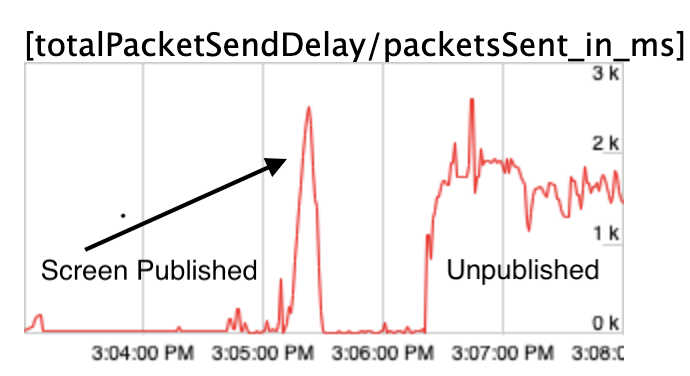
There is also a recoverable blip when the screen was first published.
Best,
Chris
ceaglest
on 3 Feb 2021
Hi,
Last update for today. I went to some lengths to reproduce the same problem in Group and Peer-to-Peer Rooms using an internal test application. I made sure to do the following:
- Prefer H.264 using the codec preferences API.
- Force a relayed connection to more closely mimic Group Rooms.
- Enable Network Link Conditioner on my Mac to constrain uplink and downlink bandwidth to 1000 kbps.
- Form a GUM call that is identical to your demo to acquire the screen share track.
After repeating these steps several times in P2P Rooms, and in the same region (us2) as my Group Room tests I could not reproduce the delay after unpublishing the screen share. For comparison here is what one of my P2P tests looked like.
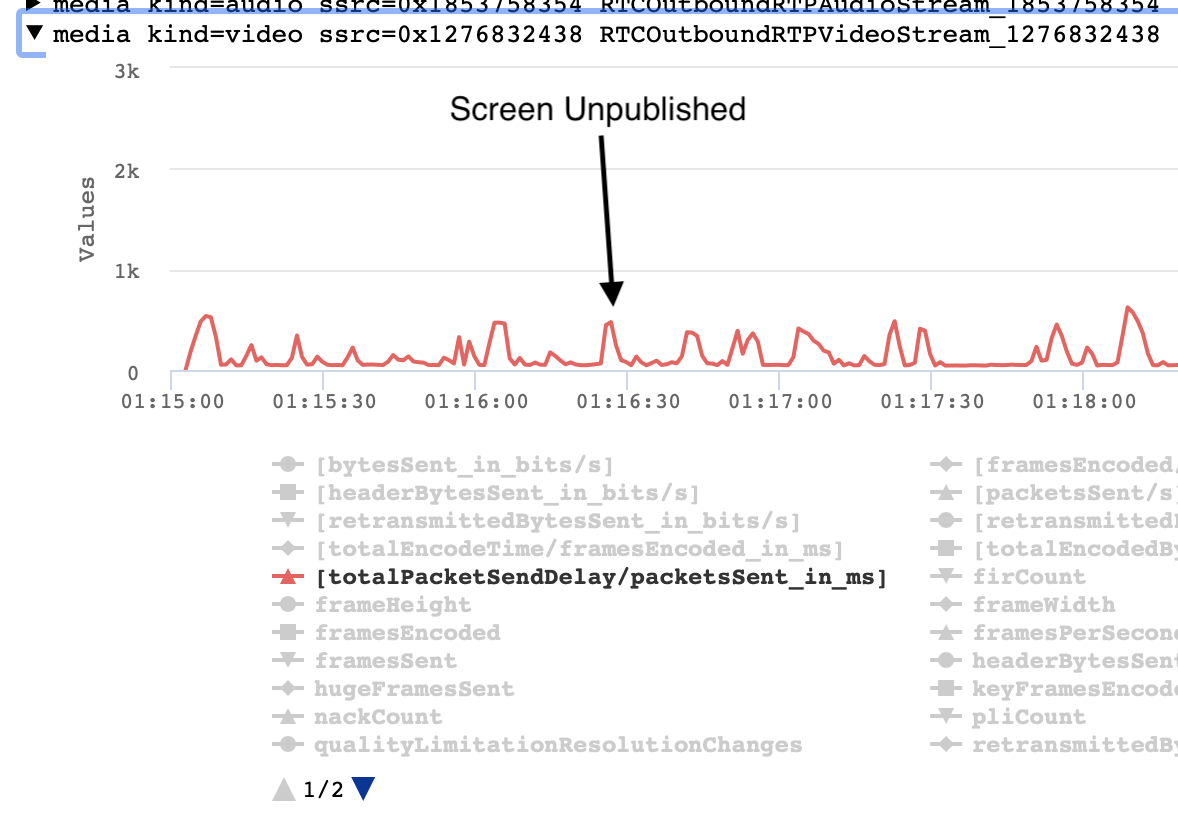
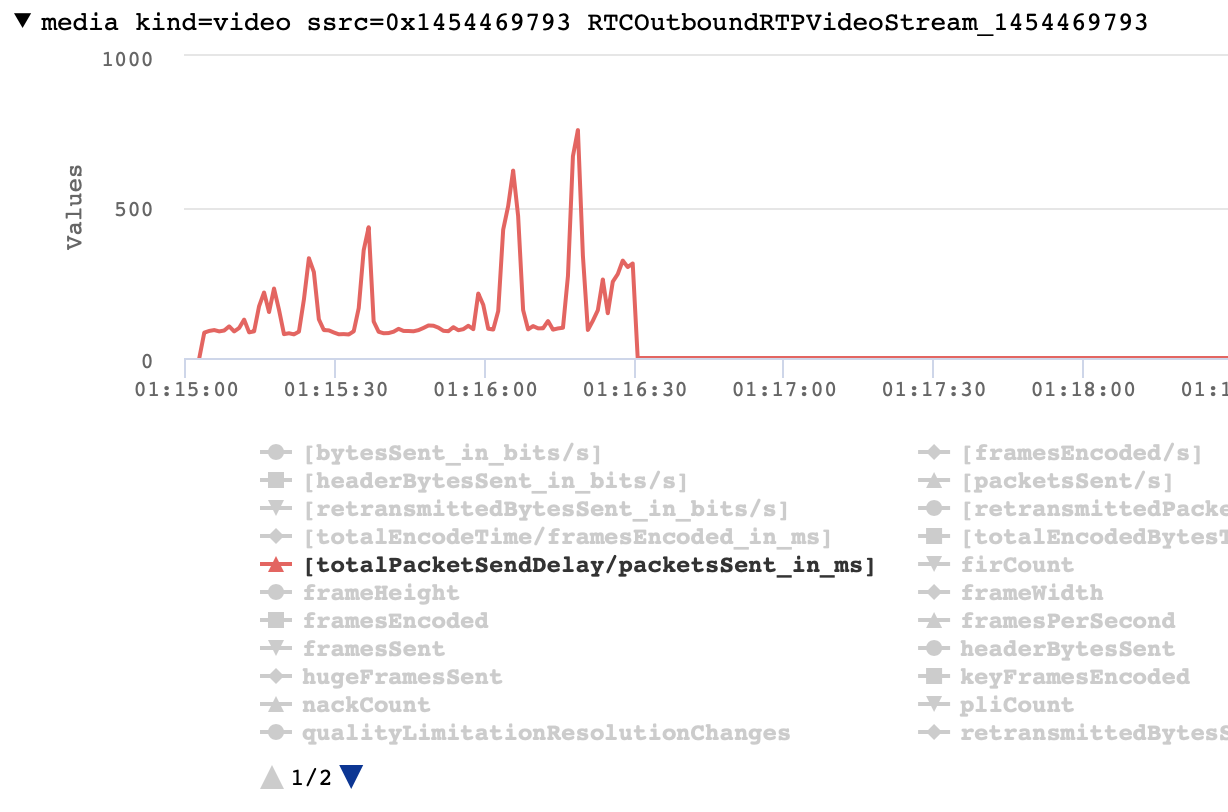
I cannot say with full authority until I review packet captures to see RTCP, but these results are now pointing to a bad interaction between Chrome / twilio-video.js and our Group Rooms media servers.
Thank you for bearing with us. We are getting closer to narrowing this issue down.
Good evening,
Chris
ceaglest
on 3 Feb 2021
Hi @ceaglest,
Our Twilio rep opened a support ticket on our behalf. The ticket number is 5754504. Thanks again for the continued updates on this issue!
Kind regards,
Ernesto
Bumbolio
on 3 Feb 2021
Are your Rooms also H.264 only or a mix of VP8 and H.264 video?
Sorry for delayed response. We are on H.264 only. We shared room ids through support channels ticket 5754099, please let me know if we can help with anything else.
genevpd
on 4 Feb 2021
Hi @genevpd and @Bumbolio,
I have responded on your Zendesk tickets, as we are rolling out a workaround for this issue. The workaround will be enabled by request on a per-account basis.
If anyone else is reading this issue, is impacted by poor audio/video synchronization and would like to try the workaround please post your Zendesk ticket number here and I will reach out personally.
Also, we have filed Issue 12453 in libwebrtc while our internal investigation to root cause sender pacing delay continues.
Best,
Chris
ceaglest
on 11 Feb 2021
Hi @ceaglest
Thanks for the update! I'll follow-up via Zendask to enable the workaround in our dev environment first and then our production environment after testing.
Kind regards,
Ernesto
Bumbolio
on 11 Feb 2021
The workaround for this audio/video synchronization issue is now fully rolled out and enabled for all Twilio Video accounts. Thanks for reporting and helping us in troubleshooting the issue!
Best regards, Twilio Video team
 anna-vasilko
on 19 Feb 2021
anna-vasilko
on 19 Feb 2021
Thanks @ceaglest, @anna-vasilko, and the rest of the Twilio team for fixing this issue quickly! The team at Switcher really appreciates it. We have been using the workaround prior to the wide release and it has been working great for us. Glad to see this has been made generally available!
Bumbolio
on 19 Feb 2021
Related issues
 lightbringer2994
·
4Comments
lightbringer2994
·
4Comments
 tapannathvani
·
5Comments
tapannathvani
·
5Comments
 himichaelroberts
·
3Comments
himichaelroberts
·
3Comments
 gregoryjjb
·
3Comments
gregoryjjb
·
3Comments
 vincentwoo
·
4Comments
vincentwoo
·
4Comments
Most helpful comment
Thanks @ceaglest, @anna-vasilko, and the rest of the Twilio team for fixing this issue quickly! The team at Switcher really appreciates it. We have been using the workaround prior to the wide release and it has been working great for us. Glad to see this has been made generally available!