Twilio-video.js: iphone / ipad cant see local video preview
Hello,
I follow doc and create preview of self camera, then i connect to room. Code works fine on any device except mobile ios.
control.js
/**
 * @description return local audio and video
 * @returns {Promise<*>}
 */
export async function getLocalTracks(LocalVideoConstraints) {
  return await createLocalTracks(LocalVideoConstraints);
}

/**
 * @description setLocal prev video
 * @param videoTrack
 */
export function appendLocalVideoToPrev(videoTrack) {
  const localMediaContainer = document.getElementById("local-media");
  return localMediaContainer.appendChild(videoTrack.attach());
}

main.js
async function init() {
  localTracks = await getLocalTracks(LocalVideoConstraints);
  localVideoTrack = localTracks[1];
  localVideoTrackAttached = appendLocalVideoToPrev(localVideoTrack);

  connect(hostAccessToken, { ...OptionsAdmin, track: localTracks }).then(
    (room) => {
//assign room participants info ect
      connectedAdminRoom(room);
    },
    (error) => {
      console.error(`Unable to connect to Room: ${error.message}`);
    }
  );
}
Also i found same bug on stack.
https://stackoverflow.com/questions/58450344/twilio-video-camera-not-showing-on-ios-iphone-safari-only
And i applay solution in my connectedAdminRoom function like so:
  room.localParticipant.tracks.forEach((track) => {
    // console.log(track);
    if (track.kind == "video") {
      console.log(track.track);
      localVideoTrackAttached = track.track;
    }
  });
No results.
Expected i can see prev on self camera and connect room.
Note: participant in room can see me. so camera is working.
- [safari ] Browser(s):
- [ ios] Operating System:
- [2 ] twilio-video.js:
- [ ] Third-party libraries (e.g., Angular, React, etc.):
 felek000
All 13 comments
Hello @felek000
Can you check if the the quickstart sample works in your case. The sample demonstrates how to preview local video tracks and use them when connecting to the room.
You can also find more detailed sample of using specific camera on mobile devices @ https://github.com/twilio/video-quickstart-js/tree/quick_start_with_track_bytes/examples/mediadevices
Thanks,
Makarand
 makarandp0
on 2 Apr 2020
makarandp0
on 2 Apr 2020
Hi @felek000 ,
It is most likely that you are creating 2 video tracks, one for publishing to the Room and one for preview. In mobile browsers, only one track can reserve the camera. So, I recommend that you use only one video track both for preview and publishing to the Room.
Thanks,
Manjesh Malavalli
JSDK Team
 manjeshbhargav
on 3 Apr 2020
manjeshbhargav
on 3 Apr 2020
As posted in code
I take local track assign to variable. Get only video assign variable pass to local, then pass audio and video to connect room. No idea how this is suppose be 2 video track.
``` localTracks = await getLocalTracks(LocalVideoConstraints);
localVideoTrack = localTracks[1];
localVideoTrackAttached = appendLocalVideoToPrev(localVideoTrack);
and then
connect(hostAccessToken, { ...OptionsAdmin, track: localTracks }).
``` So i have no idea were addicional video track might be ?
felek000
on 3 Apr 2020
Hi @felek000 ,
Please try out our quick start example specified by my colleage @makarandp0 in the previous comment and let us know if you are seeing the same problem.
Thanks,
Manjesh Malavalli
JSDK Team
manjeshbhargav
on 3 Apr 2020
I tried the quickstart example with iPhone iOS 13.4. Clicking the preview button logs > Unable to access Camera and Microphone. The same example works in Firefox 74.0 on macOS.
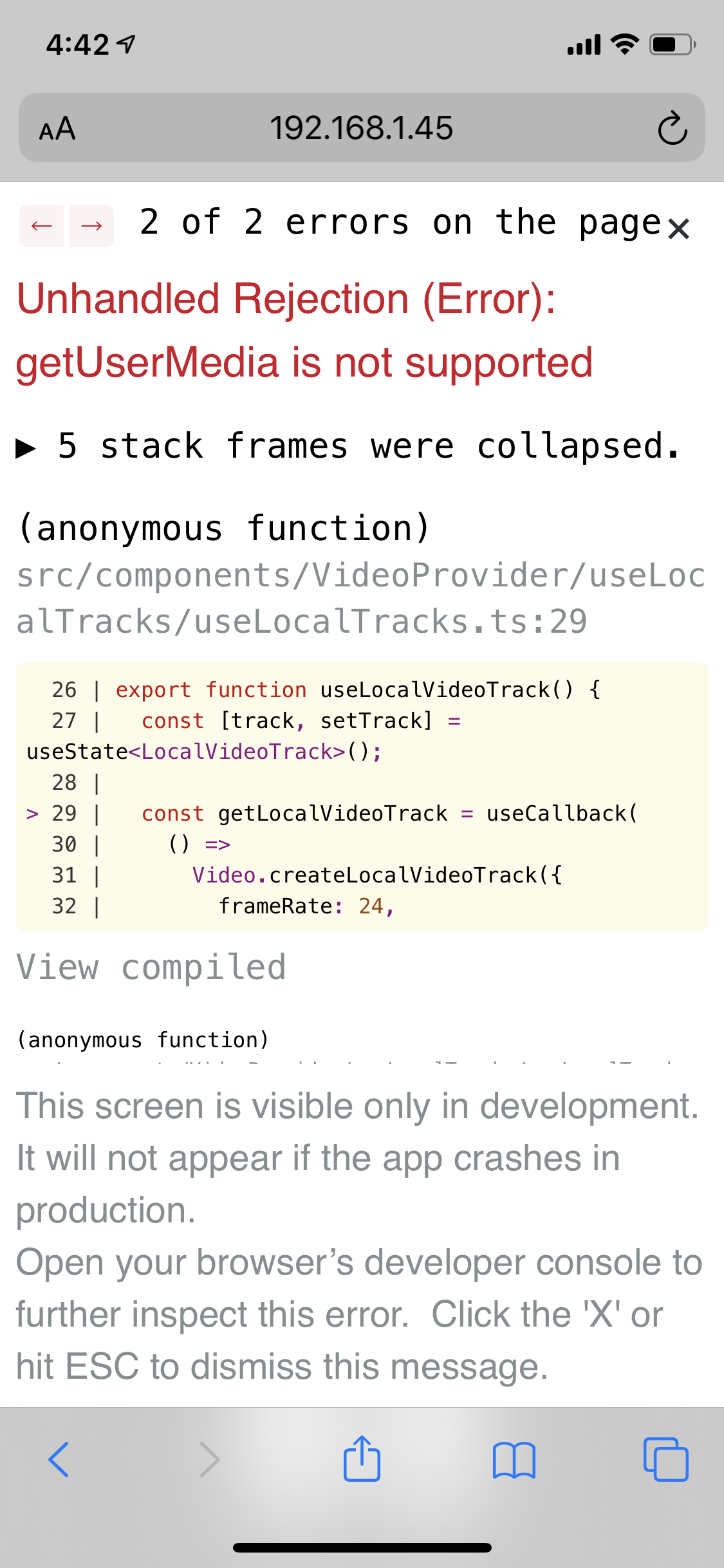
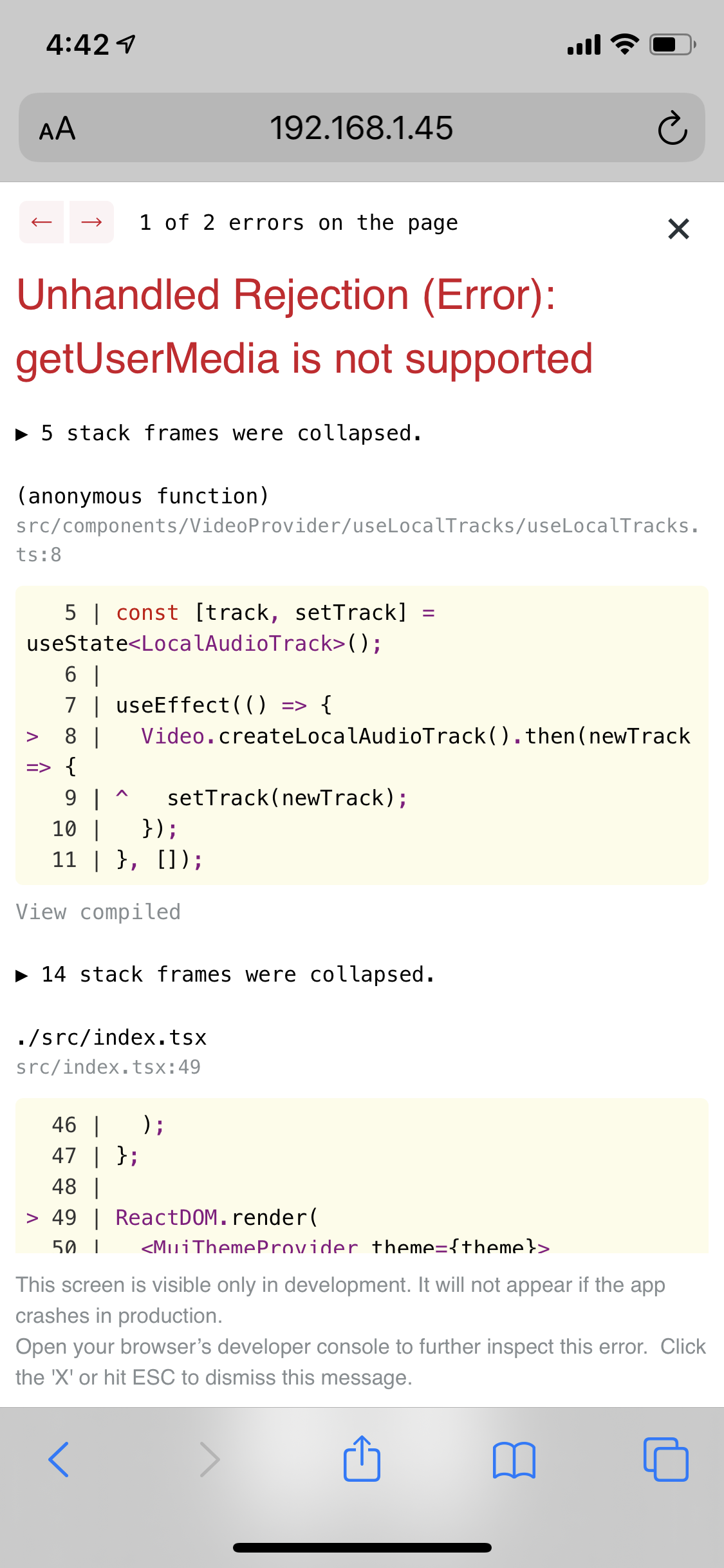
I also tried the twilio-video-app-react example. It also works fine on Firefox macOS and on iOS fails with getUserMedia is not supported (see attached screenshots)
twilio-video-app-react worked on this iPhone recently - I believe I upgraded from 13.3 to 13.4 since then so perhaps that broke it?
 rectalogic
on 4 Apr 2020
rectalogic
on 4 Apr 2020
Hmm, when I deploy twilio-video-app-react serverless (npm run deploy:twilio-cli) then it works fine on the same iOS device. So it only fails when run locally - possibly a difference between the app being built for production vs debugging?
rectalogic
on 4 Apr 2020
Hi @rectalogic ,
It looks like when you run locally, you are using a http URL. WebRTC APIs are only supported on a https URL. You can use something like ngrok to create an https tunnel to your locally deployed application.
Thanks,
Manjesh Malavalli
JSDK Team
manjeshbhargav
on 4 Apr 2020
Late replay no one have apple device for test. I put track in
window.localTracks = await createLocalTracks({
  audio: true,
  video: true,
});
than on div element
const localMedia = document.querySelector("#local-media");
localMedia.appendChild(window.localTracks[1].attach());
And still i don`t see any prev video only on apple mobile. So no idea what im doing wrong and i cant test your example. On android works perfect. Must be new cool feature on apple side.
felek000
on 14 Apr 2020
I use HTTPS with production and get this error on iOS....... we need immediate solution for this please.
 mikron123
on 5 May 2020
mikron123
on 5 May 2020
@mikron123 - can you provide more details on you setup? Which OS / Browser version do you see this error on ? Please note that on iOS getUserMedia works only on Safari - and not on other browsers.
Thanks,
Makarand
makarandp0
on 5 May 2020
That means that the web solution for this is almost not viable. The project has to use the mobile SDK...
Since we cannot also redirect from Chrome to Safari.
mikron123
on 5 May 2020
Hi @mikron123 ,
Chrome and Firefox on iOS does not support the WebRTC APIs. So I think it is reasonable for you to ask users to use your web app on Safari. I don't think this should be a deal-breaker for customers. iOS Safari has a substantial user base.
Thanks,
Manjesh Malavalli
JSDK Team
manjeshbhargav
on 5 May 2020
@felek000 This happens to me also. Exact same problem as you mention.
It is most likely that you are creating 2 video tracks
This was the reason. With my application, there was another library that accesses the camera. That cause the issue.
@manjeshbhargav It would be great if you guys mention especially this in the docs.
 pathum-kalhan
on 22 Feb 2021
pathum-kalhan
on 22 Feb 2021
Related issues
 HandsomeMedia
·
3Comments
HandsomeMedia
·
3Comments
 julien-l
·
4Comments
julien-l
·
4Comments
 kumail-raza
·
5Comments
kumail-raza
·
5Comments
 akvaliya
·
5Comments
akvaliya
·
5Comments
 gregoryjjb
·
3Comments
gregoryjjb
·
3Comments
Most helpful comment
Hi @felek000 ,
It is most likely that you are creating 2 video tracks, one for publishing to the Room and one for preview. In mobile browsers, only one track can reserve the camera. So, I recommend that you use only one video track both for preview and publishing to the Room.
Thanks,
Manjesh Malavalli
JSDK Team