Twilio-video.js: Improving the user experience when there's high-latency, freezing
I think the user experience of my app could be improved by indicating when there's high latency or a participant's video stream is frozen. For example, in one recent video chat, the logs showed ICE failed; attempting to restart ICE warnings repeatedly, everything was frozen for awhile, and then it came back.
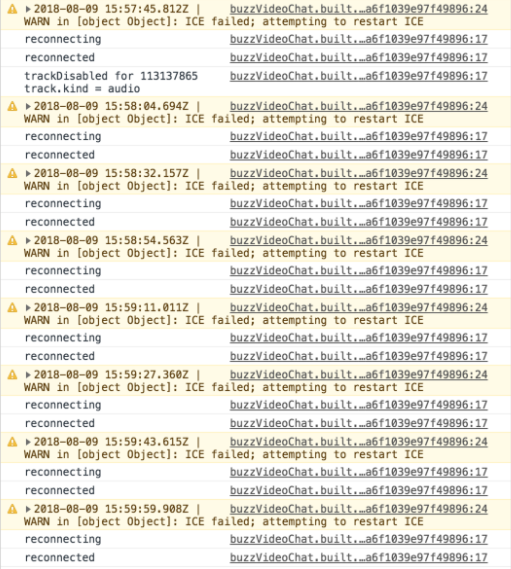
Is there an event I can listen to capture that?
I see that there's an upcoming networkQualityLevel API. Is there anything I can do to approximate that in the meantime?
Also, sometimes a single participant's video stream will freeze. I'd like to show a loader or something over that video in the event that happens. How can I do that? I see that the room stats object has packetsLost and packetsSent properties. Is there something I could do with those?
Thanks!
 ccnokes
All 8 comments
Hi @ccnokes,
Is there an event I can listen to capture that?
Yes, there are events you can listen to! They are the "reconnecting" and "reconnected" events on the Room. Please use them like this:
room.on('reconnecting', error => {
  console.warn('You lost connectivity to the Room; attempting to reconnect:', error.message);
  // Do something in the UI, show a warning, etc.
});

room.on('reconnected', () => {
  console.log('You successfully reconnected to the Room');
  // Do something in the UI, clear the warning, etc.
});
These events were originally added in twilio-video.[email protected]. Please check out the release notes here.
I see that there's an upcoming
networkQualityLevelAPI. Is there anything I can do to approximate that in the meantime?
Sorry, not quite! But if you share your Account SID, @ktoraskartwilio can enable the feature for you.
Also, sometimes a single participant's video stream will freeze. I'd like to show a loader or something over that video in the event that happens. How can I do that? I see that the room stats object has
packetsLostandpacketsSentproperties. Is there something I could do with those?
I think that, for now, listening for spikes in packetsLost may be good for driving the UI in this way. The first release of the networkQualityLevel API will only report your LocalParticipant's Network Quality Level. A subsequent release will inform you about RemoteParticipant's Network Quality Level. If it went to zero or one, you'd then know to update the UI.
Please let me know if this helps,
Mark
 markandrus
on 9 Aug 2018
markandrus
on 9 Aug 2018
Thanks!
We'd love to have the networkQualityLevel API enabled. Are account SIDs safe to share here? Or is there an email I should send it to? Also, we have our own dominantSpeaker implementation based on polling room.getStats, so if that can be enabled too, we'd love to experiment with it.
Any guidance on how to implement listening on packetsLost? I was thinking of hooking into our room.getStats poll somehow and saying if packetsLost in this poll is N% greater than the last check, then this participant is having latency issues. I'm not sure if that's a good approach or what sort of range is within normal vs spiking for packetsLost.
ccnokes
on 9 Aug 2018
@ccnokes it's safe to share, but feel free to email [email protected]. We can also enable Dominant Speaker.
Any guidance on how to implement listening on packetsLost?
What you described sounds good. Unfortunately, it may take some experimentation to find suitable values. You might also consider looking at frameRate.
markandrus
on 9 Aug 2018
Here our are SIDs @ktoraskartwilio:
ACca1b924720850b819f65f65391b84d74
AC3795512c6339cb9cdd5c7368a130a412
Thanks @markandrus !
ccnokes
on 9 Aug 2018
@ccnokes great! I've enabled Dominant Speaker for your account (please us the latest 1.x twilio-video.js release). If you have any issues, feel free to open a bug. Please give us a little more time to enable Network Quality (expect a week or so)—we'll release both the necessary server- and client-side change (simply flipping a flag).
markandrus
on 9 Aug 2018
Hey @ccnokes (and anyone else with preview access to the Dominant Speaker and Network Quality APIs),
I wanted to give you a heads up: before this feature is released more widely, we're adding a dominantSpeaker and networkQuality flag to ConnectOptions so that customers opt-in to this feature, rather than get it by default. This change is coming in 1.14.0, which I plan on releasing today. Please set the following when you call connect:
connect(token, {
  dominantSpeaker: true,
  networkQuality: true
});
See here for more information.
markandrus
on 28 Aug 2018
@markandrus isn't networkQuality: true the default? Why does it have to be set?
 stueynet
on 20 Sep 2018
stueynet
on 20 Sep 2018
@stueynet it is not the default. You must opt-in to the feature. The reason we chose this is to allow for a more gradual rollout once the server-side feature is enabled generally.
markandrus
on 20 Sep 2018
Related issues
 himichaelroberts
·
3Comments
himichaelroberts
·
3Comments
 vsrboth
·
3Comments
vsrboth
·
3Comments
 tapannathvani
·
5Comments
tapannathvani
·
5Comments
 lmatheus
·
5Comments
lmatheus
·
5Comments
 altescape
·
3Comments
altescape
·
3Comments