Twilio-video.js: MediaNoSupportedCodecError H264 - Chrome browser
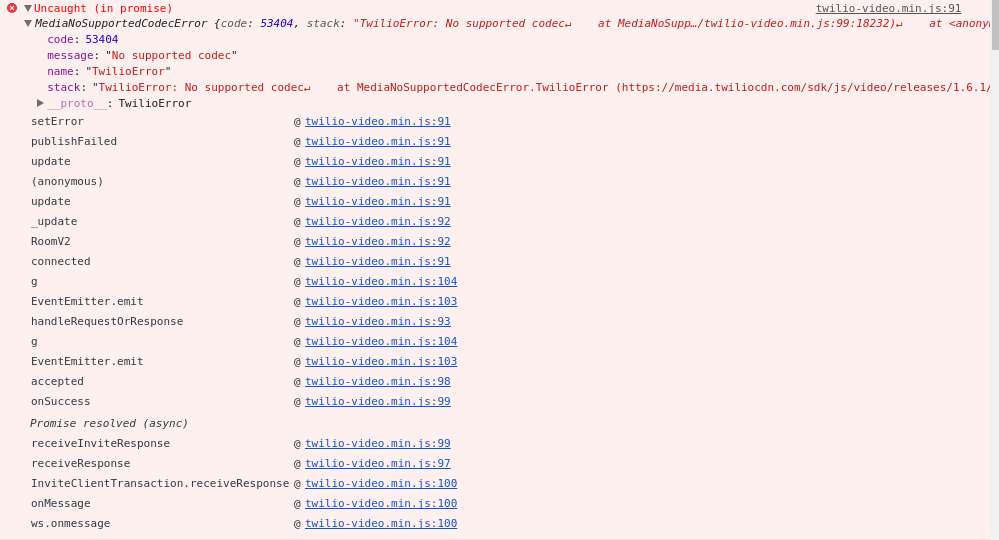
How to fix it. Plz help me
Software versions:
- [ ] Browser(s): Google chrome 60
- [ ] Operating System: Android
- [ ] twilio-video.js: 1.6.1
- [ ] Third-party libraries (e.g., Angular, React, etc.): Angularjs
 dung-nguyentien
All 9 comments
Hi @pekubu,
You'll get this error, if, for example, you try to publish a LocalVideoTrack to a Group Room when
- The Group Room requires H.264, but the Android device only supports VP8, or
- The Group Room requires VP8, but the Android device only support H.264.
If you share a Room SID with me, I can help you diagnose which case is happening.
 markandrus
on 13 Dec 2017
markandrus
on 13 Dec 2017
Hi @markandrus
I am having the same issue when trying to join a group room with H.264 video codecs specified from an android device using chrome browser.
the device is running android version 6.0.1 and chrome version 63.0.3...
the room SID is: RM8679459222bde3f83bed1af64b7ae0b2
 talifreedman
on 27 Dec 2017
talifreedman
on 27 Dec 2017
@talifreedman thanks very much for the Room SID. From examining the SDPs in our logs, I see that your Android device advertises support for H.264 with profile-level-id "42001f". Our media server advertises support for profile-level-id "42e01f". These aren't an exact match, and so our media server raises a publication error; however, it also appears that our media server produces an invalid SDP in a subsequent round of negotiation due to this. I have filed a bug against our media server, VMS-953, and will share some more information once we have it. Sorry about this.
markandrus
on 30 Dec 2017
@markandrus thank you. Please notify me when it is fixed.
Sorry for the delay for the reply.
dung-nguyentien
on 4 Jan 2018
@markandrus Hey Mark, I am having the same issue, any news about it?
Also am I supposed to do anything from my side?
Thank you!
 alielkhateeb
on 9 Jan 2018
alielkhateeb
on 9 Jan 2018
Hi! The media server team has patches ready. They are doing some more testing before releasing. Hope to update y'all soon. EDIT: @alielkhateeb sorry, there is nothing to do at this time :-(
markandrus
on 11 Jan 2018
The media server team has deployed a fix for the invalid SDP I described (VMS-953). We are also evaluating adding support for additional H.264 profile levels. That means, until we add support, devices that don't support profile-level-id "42e01f" may still generate "trackPublicationFailed" or "trackSubscribtionFailed" events; however, other media should continue to work.
markandrus
on 20 Jan 2018
Hello @markandrus I'm facing the same issue can you help me out too? room sid
RM8a2a1acdabe9b7ca5c9a82a1ed2917d6, from android xperia to chrome web browser. Thanks a lot
 markcadag
on 22 Jan 2018
markcadag
on 22 Jan 2018
@markcadag sorry, I missed your Room SID. It's been a while, but if you're still having trouble, please email [email protected].
I'm closing this issue. To be clear, the media server issue was fixed; however, Group Rooms still requires profile-level-id "42e01f".
markandrus
on 28 Aug 2018
Related issues
 HandsomeMedia
·
3Comments
HandsomeMedia
·
3Comments
 anand-io
·
3Comments
anand-io
·
3Comments
 av-k
·
3Comments
av-k
·
3Comments
 vincentwoo
·
4Comments
vincentwoo
·
4Comments
 himichaelroberts
·
3Comments
himichaelroberts
·
3Comments
Most helpful comment
@talifreedman thanks very much for the Room SID. From examining the SDPs in our logs, I see that your Android device advertises support for H.264 with
profile-level-id"42001f". Our media server advertises support forprofile-level-id"42e01f". These aren't an exact match, and so our media server raises a publication error; however, it also appears that our media server produces an invalid SDP in a subsequent round of negotiation due to this. I have filed a bug against our media server, VMS-953, and will share some more information once we have it. Sorry about this.