Twilio-video.js: Safari 11 Support
Now that Safari are releasing a modern browser with WebRTC support, when can we expect Twilio Video support to arrive?
I have tried the TP and as expected this fails. We are happy to help test when you're ready.
 jamesgraham
All 39 comments
My team and I are also eagerly awaiting this, as well as Edge support now that it also works with WebRTC.
 carterbryden
on 14 Jun 2017
carterbryden
on 14 Jun 2017
Support for both browsers is in the works. More info soon!
 rfbrazier
on 15 Jun 2017
rfbrazier
on 15 Jun 2017
We have a big product push we'd like to make available on iOS 11's launch day. Is there a timetable for safari support? We'd ideally like it to be supported in twilio by august so we have a little buffer to test for our stuff to launch with iOS 11 in a guessed at September launch. Is this realistic? (Without promising anything of course)
 randallb
on 30 Jun 2017
randallb
on 30 Jun 2017
On upcoming browser support:
- Microsoft Edge support should be available for both Peer-to-Peer and Group Rooms by end of July.
- Safari 11 support in the JavaScript SDK for Peer-to-Peer Rooms is targeted for August. Group Rooms support for Safari 11 in JS SDK ought to land around the same time, but there are some details we are still nailing down (namely, working through Safari's lack of support for VP8 codec).
Thanks all for your interest in seeing us add support for these browsers. We're incredibly excited about a world with WebRTC in every browser.
Keep your eyes on the repo for more in the coming weeks!
rfbrazier
on 1 Jul 2017
As the founder of an online talent/advice marketplace (Inzite), I'm also very keen to know the progress on iOS11 Safari & MacOS Safari 11 (High Sierra) webRTC support.
Apple's latest web browsers are finally getting decent results on html5test.com, especially in the webRTC/P2P section, which is most welcome! The latest iOS & macOS updates will be released to the public circa September 2017, so it would be great to start testing soon. Currently, only audio is streaming, although the camera does fire-up locally in the browser, which is a promising start. It's unclear whether this is a bug in Safari, or whether specific changes are required at Twilio's end.
My company is actively using Twilio to support our online Phone/Video Advice Marketplace & Platform, so we're eagerly awaiting an update here!
Great to know support is in the works though. Apple have been dragging their feet on webRTC support, but it's finally happening this year. Chrome is a battery killer on a Mac and iOS has no solution, bar the building of a native app via the Twilio iOS SDK.
 darrenmhill
on 13 Jul 2017
darrenmhill
on 13 Jul 2017
Any updates on this please? We're happy to help with the testing. iOS11 is now on its 4th beta.
Today a new Safari Technology Preview also dropped for macOS (457 on html5test.com).
darrenmhill
on 27 Jul 2017
We've been hard at work on Safari 11 support and are making good progress. We'll have an early release to share soon, and we'll update this Github issue once it's available.
Thank you for your interest and patience!
rfbrazier
on 27 Jul 2017
Changes to support Safari are being tracked on https://github.com/twilio/twilio-video.js/pull/135
 markandrus
on 27 Jul 2017
markandrus
on 27 Jul 2017
Excellent news, thank you. Great to see good progress is being made!
darrenmhill
on 27 Jul 2017
It looks complete... just waiting for the next release. Do you know when that will be?
randallb
on 14 Aug 2017
Thanks for your patience!
We've released twilio-video.[email protected] today with experimental support for Safari 11. We're calling this "experimental support" because, currently, Safari only supports the H.264 video codec and not VP8. This means most browser-based P2P Room applications should work fine, since most browsers ship H.264; however, you may have issues in P2P Rooms containing a mixture of browser- and mobile-based Participants. This is because Twilio's current iOS and Android Video SDKs aren't shipping H.264 yet (it's coming very soon). We also aren't advertising H.264 support in Group Rooms yet, so Safari-based Participants will not be able to share video in Group Rooms.
That being said, we are working to improve the codec situation (including the addition of client- and server-side codec controls). If you have questions about the server-side controls, please reach out to [email protected]. We'll be sharing more on this soon.
If you can, please test this release out with P2P Rooms and let us know how it works/if you hit any bugs.
markandrus
on 15 Aug 2017
In my implementation I've the problem that Safari on iPad will not send and receive any video-stream. Audio-stream is working fine.
From Chrome to Chrome it is working fine, both video and audio, but from Chrome to Safari I only receive an audio stream.
I've checked the payload of the VideoEvent and see that "videoTrackStats" is empty.
Safari has access to and is allowed to use the microphone and webcam. In Safari I see the preview of myself from the iPad webcam.
The version I use is 1.2.1
A snippet of my code:
Twilio.Video.connect(token, {name: roomName}).then(function (twilioRoom) {
    twilioRoom.localParticipant.videoTracks.forEach(track => {
        document.getElementById('preview').appendChild(track.attach());
    });

    twilioRoom.on('participantConnected', function (participant) {
        participant.tracks.forEach(track => addParticipantTrack(track));
        participant.on('trackAdded', track => addParticipantTrack(track));
    });

    twilioRoom.participants.forEach(participant => {
        participant.tracks.forEach(track => addParticipantTrack(track));
        participant.on('trackAdded', track => addParticipantTrack(track));
    });
});

addParticipantTrack = function(track) {
    document.getElementById('participants').appendChild(track.attach());
};
 bartbrouwer
on 17 Aug 2017
bartbrouwer
on 17 Aug 2017
I have the same issue as @bartbrouwer except I don't even get the preview, just no video at all on iOS. I haven't debugged much, I'm going to do that next, but I can confirm that just out of the box iOS Safari -> Chrome is audio only.
 treyrich
on 17 Aug 2017
treyrich
on 17 Aug 2017
I've done a bit more testing, and I cannot get Safari 11 (on macOS nor iOS) to display the remote video. iOS wasn't displaying the local video either however adding the playsinline muted autoplay attributes allowed the local video to play in iOS.
When Safari is connected remotely to another browser (Chrome/Firefox) the other browser also doesn't display the remote video. Chrome/Firefox work fine together though.
Is it possible to get some clarification from Twilio (@markandrus @rfbrazier) under what circumstances Safari is expected to be working? Perhaps if there was a demo of it working we might be able to work backwards from there to get our implementations working?
treyrich
on 18 Aug 2017
Hey @bartbrouwer @treyrich
Sorry y'all are having issues. Can you please confirm: are you testing P2P Rooms or Group Rooms? As I mentioned above, Safari-based Participants will not be able to share video in Group Rooms (at least initially). In Group Rooms, Safari will only be able to share audio with other Participants. P2P Rooms should work, however.
If you have Client-side Room creation enabled, you'll want to ensure you set the default to P2P in your Twilio Console in order to test this out. Go to Programmable Video → Room Settings, then set the Room Type to "Peer-to-peer". See the following screenshot for an example:
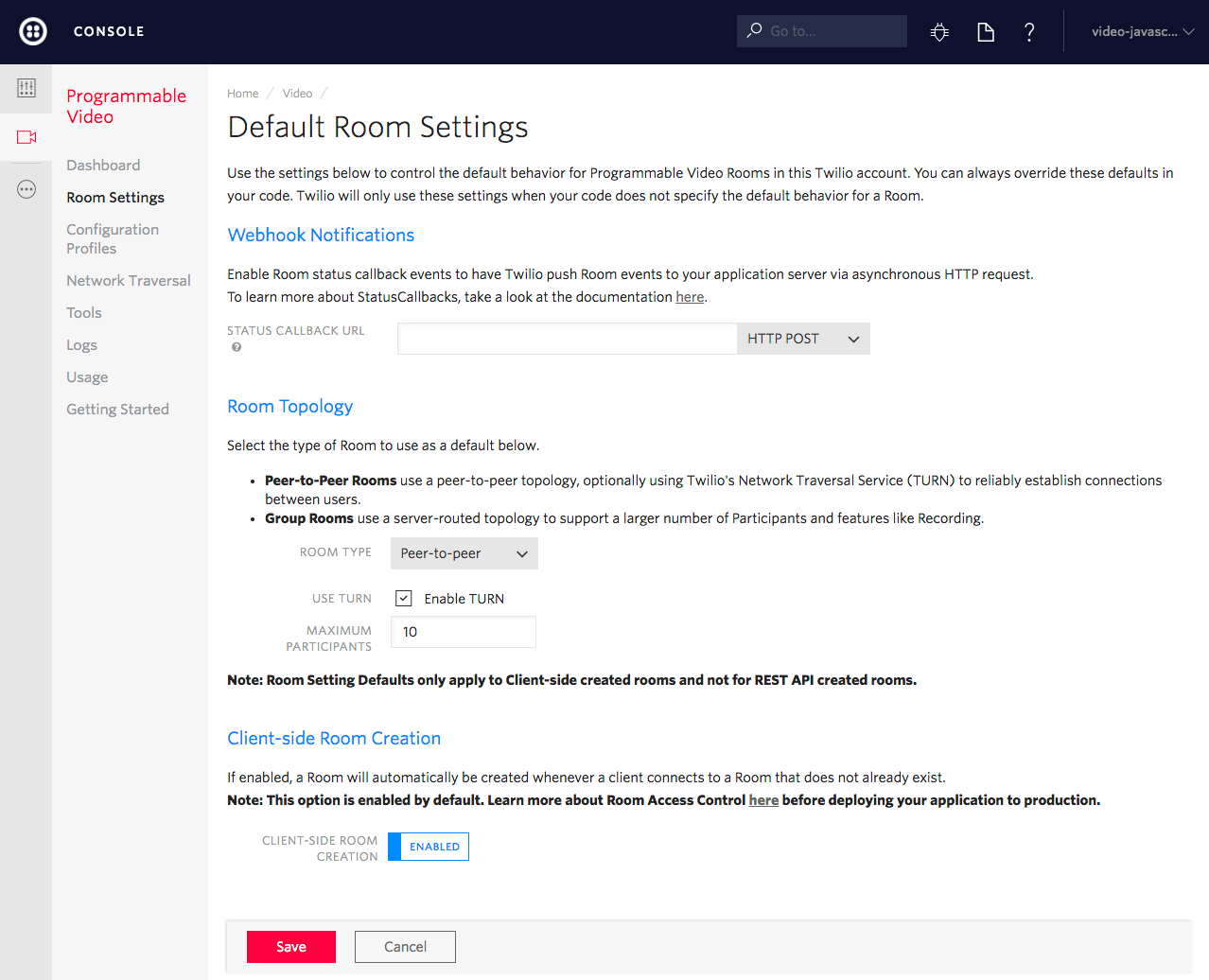
_Programmable Video → Room Settings_
Otherwise, if you are creating Rooms via the REST API, you'll want to set type to "peer-to-peer".
@treyrich, you asked,
Is it possible to get some clarification from Twilio (@markandrus @rfbrazier) under what circumstances Safari is expected to be working? Perhaps if there was a demo of it working we might be able to work backwards from there to get our implementations working?
Yes, sorry we could have been clearer here. Please first try pulling down the twilio-video.js quickstart project at twilio/video-quickstart-js. First, ensure that you can display your local video. Here, I am testing out with Safari Technology Preview Release 37 (Safari 11.1, WebKit 12605.1.2):
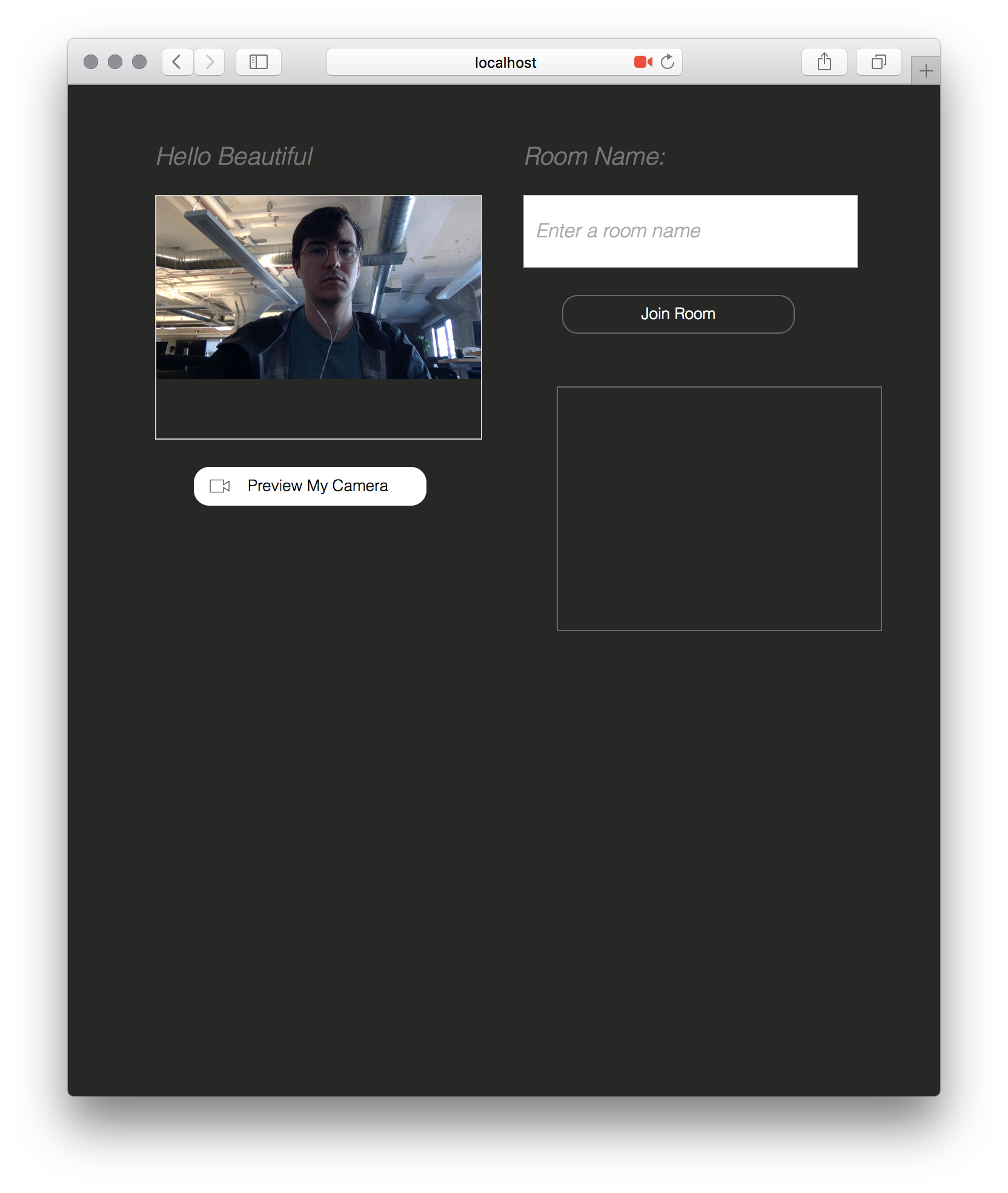
_Safari 11_
Something else to note: Safari will only allow one tab access to your microphone and webcam at a time (details here). So, for example, if you tried to open the quickstart in two Safari tabs and previewed your camera in both, you'd see the video in the first tab go black:
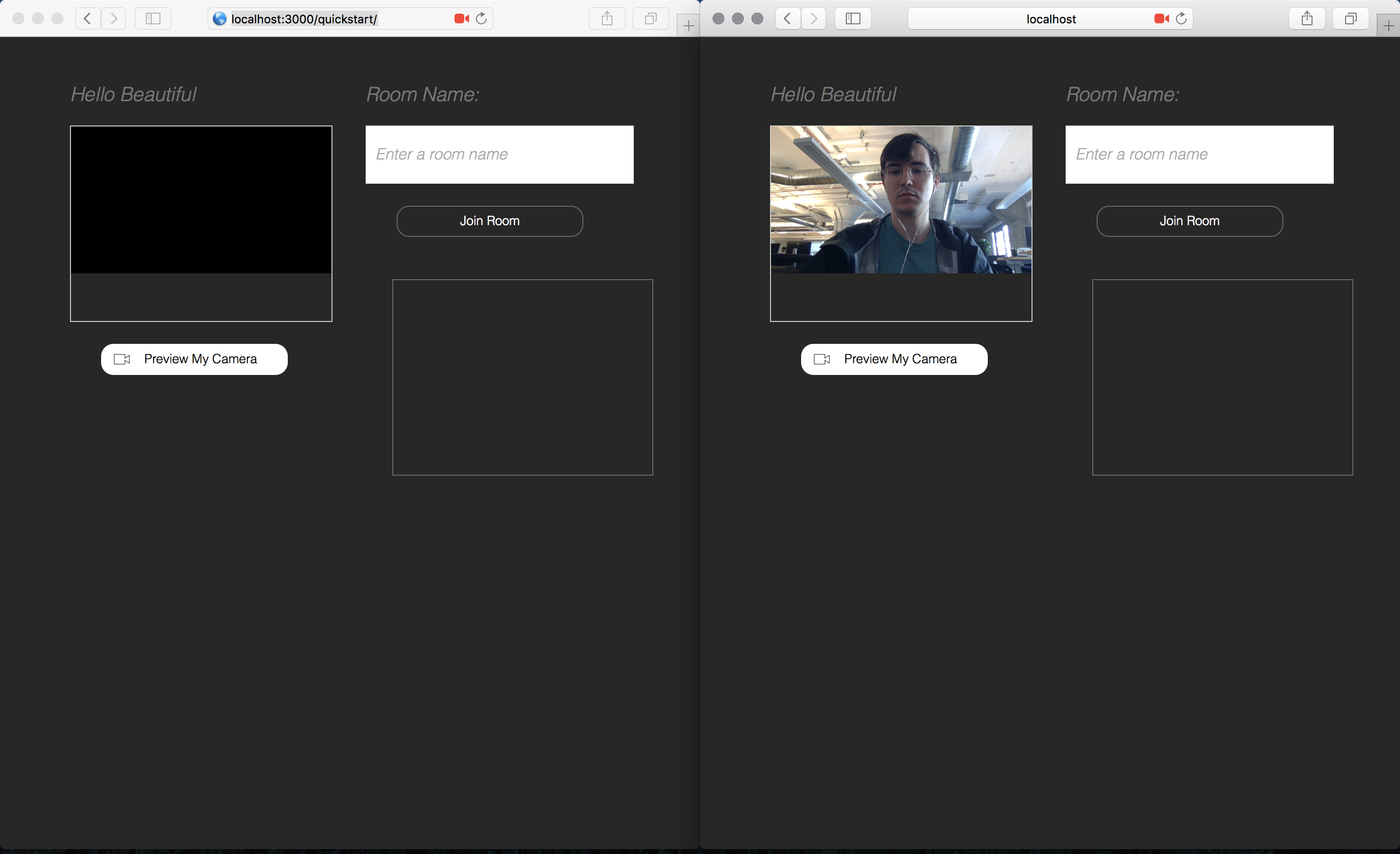
_Left: Safari 11; Right: Safari 11_
Anyway, I only share this as something to be aware of. Next, using the quickstart app, open up another participant in Chrome, and join the same Room (again, ensure your default Room Type is set to "Peer-to-peer" in the Twilio Console):
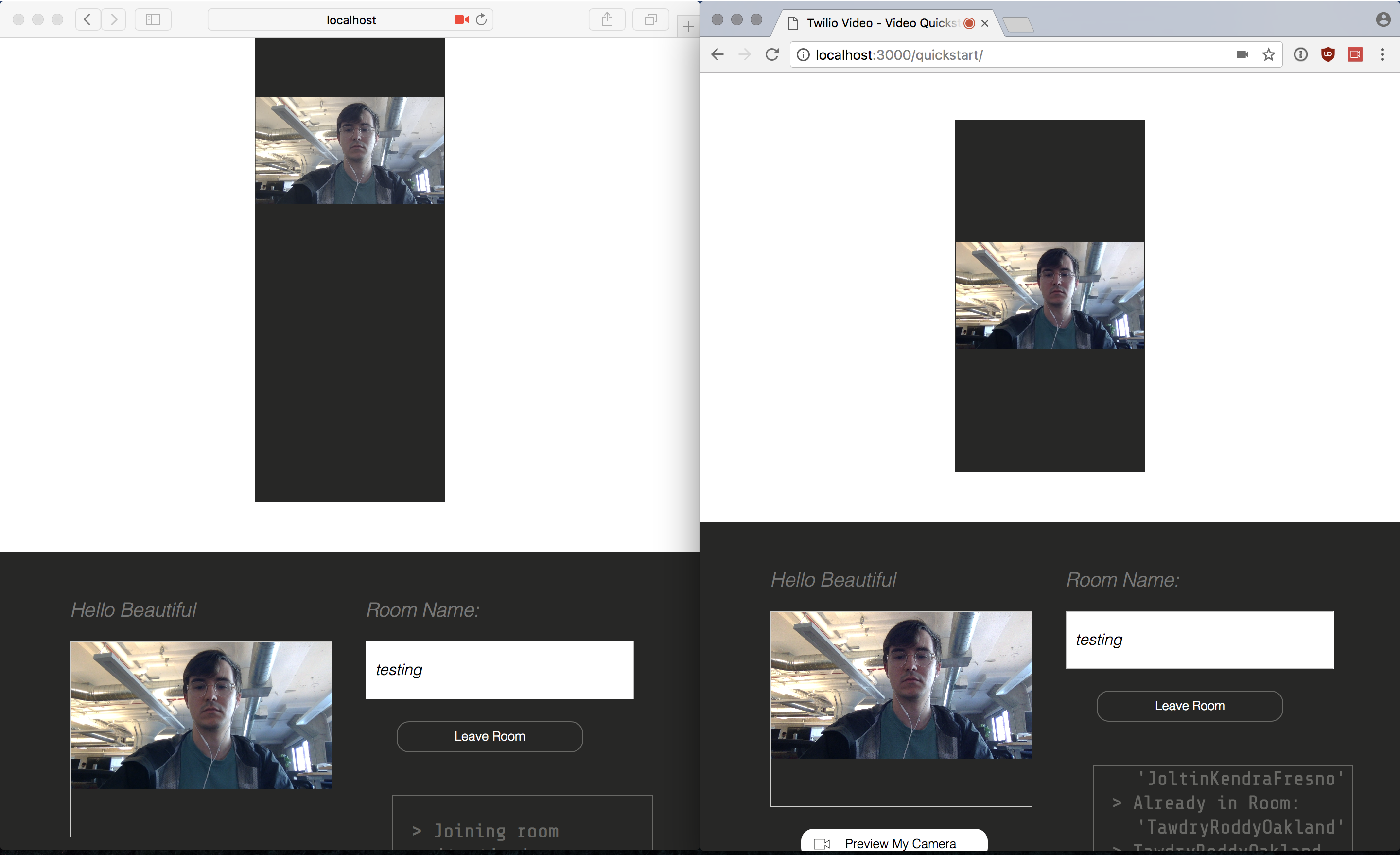
_Left: Safari 11; Right: Chrome_
Please forgive the poor CSS! Here is the same demo with a Firefox Participant:
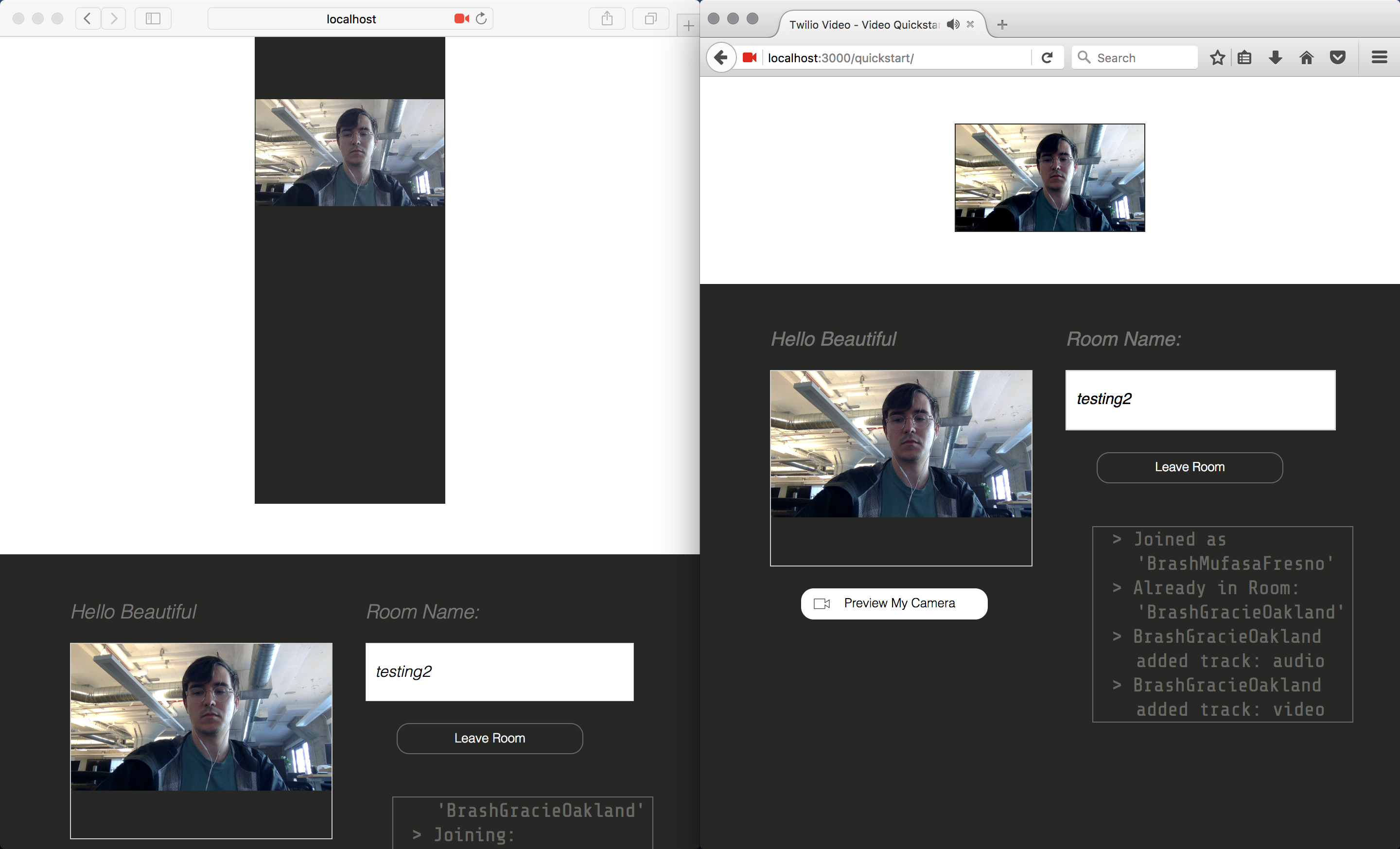
_Left: Safari 11; Right: Firefox_
Can you please try this out and report back if it works for you?
Thanks,
Mark
markandrus
on 18 Aug 2017
Hi @markandrus,
That fixed the problem. I've overlooked the sentence where you mentioned it.
Thanks,
Bart
bartbrouwer
on 18 Aug 2017
Great progress! We'll be testing this out on Inzite very soon. I'll report back if we discover any issues. Apple released a new Safari Technology Preview today for macOS, so might be worth retesting some of the above issues again.
darrenmhill
on 24 Aug 2017
Does the webrtc support for safari 11 mobile mean twilio voice will work on iphones and iPads?
 bobrichards
on 5 Sep 2017
bobrichards
on 5 Sep 2017
@bobrichards Yes. The Programmable Voice team is planning to release support for Safari 11 in their SDK soon.
If you have more questions about those plans, please contact Twilio support and they can help out. We'll keep the conversation on this Github issue focused on the Programmable Video product. Thanks!
rfbrazier
on 5 Sep 2017
So sorry to bother, but when the team has a moment, could they please provide a status update on support for group rooms in Safari? The last we heard was that effort was being done to support this.
 dannycohn
on 11 Sep 2017
dannycohn
on 11 Sep 2017
Hey @dannycohn, you'll see a post on our blog about this soon. Short answer: You'll be able to begin testing Safari w/ Group Rooms tomorrow morning. :-)
Let me know if you need anything else.
rfbrazier
on 11 Sep 2017
You just made my day, @rfbrazier. Thanks. Looking forward to that blog post
dannycohn
on 11 Sep 2017
I'm so so sorry to be a pain in the butt, but is there a secret blog I don't know about or some secondary blog for developers? The main blog on twilio.com/blog doesn't have anything, just wondering if I'm looking in the wrong place or if there's been a delay (which would be fine)
dannycohn
on 12 Sep 2017
@dannycohn No secrets, the blog just hadn't been published yet. :-)
Check it out here: https://www.twilio.com/blog/2017/09/safari-11-support-for-programmable-video-and-more.html
rfbrazier
on 12 Sep 2017
Testing the latest master, group rooms are still not working for us. Because the Safari 11 disclaimer is still printing in the console, I assume group room support hasn't been implemented yet. Is that accurate?
The behavior we are seeing is that the connect promise neither resolves nor fails, just hangs indefinitely. No other errors are shown in the console.
P2P rooms connect successfully on Safari 11.
 rsullivan00
on 28 Sep 2017
rsullivan00
on 28 Sep 2017
@Rsullivan00,
Did you check out the guide for developing on Safari 11 here?
https://www.twilio.com/docs/api/video/developing-safari-11
You'll need to make sure you set the Group Rooms codec to H.264, otherwise Safari will not be able to connect. Safari 11 only supports the H.264 codec.
rfbrazier
on 28 Sep 2017
No, I didn't see that guide. Thanks for pointing it out, I'll try forcing H.264 today.
Edit
Awesome, that did it!
rsullivan00
on 28 Sep 2017
Not sure if this is a bug, or I am misreading the Safari 11 guide. I interpreted it to mean that setting the video codec to H.264 in the Twilio Console Room Topology would allow Safari to participate with Chrome. It took me a little too long to realize that it was only if I used the rest api to pre-create an H.264 room that it would work. Tried with fresh rooms, tried with Safari joining first, the Room Topology Codec setting doesn't seem to register.
 acoolprogrammer123
on 6 Oct 2017
acoolprogrammer123
on 6 Oct 2017
Alex, can you send an example of the code you’re using to create the Room?
On Thu, Oct 5, 2017 at 21:48 Alex notifications@github.com wrote:
Not sure if this is a bug, or I am misreading the Safari 11 guide. I
interpreted it to mean that setting the video codec to H.264 in the Twilio
Console Room Topology would allow Safari to participate with Chrome. It
took me a little too long to realize that it was only if I used the rest
api to pre-create an H.264 room that it would work. Tried with fresh rooms,
tried with Safari joining first, the Room Topology Codec setting doesn't
seem to register.—
You are receiving this because you were mentioned.
Reply to this email directly, view it on GitHub
https://urldefense.proofpoint.com/v2/url?u=https-3A__github.com_twilio_twilio-2Dvideo.js_issues_122-23issuecomment-2D334657487&d=DwMFaQ&c=x_Y1Lz9GyeGp2OvBCa_eow&r=g4LA7GVMZvyLENPBWHHJ2ET2KVbQd9nR8P1BJI3ADJo&m=WNbo1jDqX0SOiQzAkEey3NYdgYiunuTT67px3933vik&s=1cca1qCekYbIDWbo2-EuhfniFB1YVky5SByYR4nE2RE&e=,
or mute the thread
https://urldefense.proofpoint.com/v2/url?u=https-3A__github.com_notifications_unsubscribe-2Dauth_AAHJj6mbFAK10sPhXqGAsrxIH4kCKh12ks5spbEogaJpZM4N5LoL&d=DwMFaQ&c=x_Y1Lz9GyeGp2OvBCa_eow&r=g4LA7GVMZvyLENPBWHHJ2ET2KVbQd9nR8P1BJI3ADJo&m=WNbo1jDqX0SOiQzAkEey3NYdgYiunuTT67px3933vik&s=uq_-0WLdgBSLp_dvEhV2eH1Nop9dOZ8syVKsfWfFhqo&e=
.>
Rob Brazier
Product Management, Twilio
m: (330) 419-0950
rfbrazier
on 6 Oct 2017
Using the quick start:
https://github.com/twilio/video-quickstart-js/tree/master/quickstart
Not using Node, so I swapped
var Video = require('twilio-video');
with this in the html
And using C# on the backend to generate the token:
var identity = Request.QueryString["identity"] ?? Guid.NewGuid().ToString();
var grant = new VideoGrant();
grant.Room = Request.QueryString["room"] ?? "myRoom";
var grants = new HashSet
var token = new Token(accountSid, apiKey, apiSecret, identity: identity, grants: grants);
That works great Chrome to Chrome but fails on the iOS side (just checked again just in case and my Room Topology is set to Group, H.264)
If I pre-fire a
            List<RoomResource.VideoCodecEnum> codecs = new List<RoomResource.VideoCodecEnum>();
            codecs.Add(RoomResource.VideoCodecEnum.H264);
            var room = RoomResource.Create(uniqueName: "myRoom", videoCodecs: codecs);
Then the iOS side connects.
Flipped the grant to use myRoom1, and didn't pre-fire the room create, iOS failed. Pre-fired a create myRoom1 and everything connected again.
acoolprogrammer123
on 6 Oct 2017
Thanks, Alex. Taking a look now.
Rob Brazier
Product Management, Twilio
m: (330) 419-0950
On Fri, Oct 6, 2017 at 6:53 AM, Alex notifications@github.com wrote:
Using the quick start:
https://github.com/twilio/video-quickstart-js/tree/master/quickstart
https://urldefense.proofpoint.com/v2/url?u=https-3A__github.com_twilio_video-2Dquickstart-2Djs_tree_master_quickstart&d=DwMFaQ&c=x_Y1Lz9GyeGp2OvBCa_eow&r=g4LA7GVMZvyLENPBWHHJ2ET2KVbQd9nR8P1BJI3ADJo&m=uf_u9TfVM7TPA3hvw1pjkN55DTsnVjpnQWdj2eLjzP8&s=JG_w3_zDpf4b2Q5FUJEOTWFWluyMlxW6yoxKImG6xlI&e=Not using Node, so I swapped
var Video = require('twilio-video');
with this in the htmlAnd using C# on the backend to generate the token:
var identity = Request.QueryString["identity"] ??
Guid.NewGuid().ToString();
var grant = new VideoGrant();
grant.Room = Request.QueryString["room"] ?? "myRoom";
var grants = new HashSet { grant };
var token = new Token(accountSid, apiKey, apiSecret, identity: identity,
grants: grants);That works great Chrome to Chrome but fails on the iOS side (just checked
again just in case and my Room Topology is set to Group, H.264)If I pre-fire a
        List<RoomResource.VideoCodecEnum> codecs = new List<RoomResource.VideoCodecEnum>();
        codecs.Add(RoomResource.VideoCodecEnum.H264);
        var room = RoomResource.Create(uniqueName: "myRoom", videoCodecs: codecs);
Then the iOS side connects.
Flipped the grant to use myRoom1, and didn't pre-fire the room create, iOS
failed. Pre-fired a create myRoom1 and everything connected again.—
You are receiving this because you were mentioned.
Reply to this email directly, view it on GitHub
https://urldefense.proofpoint.com/v2/url?u=https-3A__github.com_twilio_twilio-2Dvideo.js_issues_122-23issuecomment-2D334761236&d=DwMFaQ&c=x_Y1Lz9GyeGp2OvBCa_eow&r=g4LA7GVMZvyLENPBWHHJ2ET2KVbQd9nR8P1BJI3ADJo&m=uf_u9TfVM7TPA3hvw1pjkN55DTsnVjpnQWdj2eLjzP8&s=LBMyDjtz6A_zmDarnTAmtmmAX_ECbzc1qJJvGD64m2M&e=,
or mute the thread
https://urldefense.proofpoint.com/v2/url?u=https-3A__github.com_notifications_unsubscribe-2Dauth_AAHJjxxZZCtQqSAx39bedL0FzegXx-2DBmks5spjDIgaJpZM4N5LoL&d=DwMFaQ&c=x_Y1Lz9GyeGp2OvBCa_eow&r=g4LA7GVMZvyLENPBWHHJ2ET2KVbQd9nR8P1BJI3ADJo&m=uf_u9TfVM7TPA3hvw1pjkN55DTsnVjpnQWdj2eLjzP8&s=thaCBb47U4InisjC1srpqnLIsEwT2ou8opa_foGbUIk&e=
.
rfbrazier
on 6 Oct 2017
Thanks guys for adding in the IOS11 support. Have tested with creating the room with VideoCodecs = H264 and interoperability is now there with IOS11.
Just one thing though, on my Android Chrome device I'm having issues now connecting to the group room. If i create the room with VideoCodecs=VP8, the Android client can connect, with VideoCodecs=H264, Android Chrome can't connect. It looks like it sends a SIP invite out, but the SIP invite is never responded to.
The app has been working fine with Android and desktop clients for a while now and only exhibits this behaviour on Android devices so far. Have tested with two separate devices now, my smartphone and a tablet and both have this behaviour.
 sykesey
on 10 Oct 2017
sykesey
on 10 Oct 2017
@sykesey we are working on SDK releases and a server-side release that, instead of hanging like you describe, will actually bubble up a message, explaining what is happening. I have a feeling the Android Chrome client you have lacks H.264 support, so it tries to connect to the H.264-only Room, but fails.
markandrus
on 13 Oct 2017
@markandrus That would be good. I'm not sure if its a matter of the chrome client I have not supporting H.264 though. We're using Chrome 61 which should support H264 for webRTC. I turned on debug logging and can see the H264 stream being offered in the SDP reported by the Twilio console (I can provide the whole thing if you want)
a=rtpmap:96 VP8/90000
a=rtcp-fb:96 ccm fir
a=rtcp-fb:96 nack
a=rtcp-fb:96 nack pli
a=rtcp-fb:96 goog-remb
a=rtcp-fb:96 transport-cc
a=rtpmap:98 VP9/90000
a=rtcp-fb:98 ccm fir
a=rtcp-fb:98 nack
a=rtcp-fb:98 nack pli
a=rtcp-fb:98 goog-remb
a=rtcp-fb:98 transport-cc
a=rtpmap:100 red/90000
a=rtpmap:102 ulpfec/90000
a=rtpmap:127 H264/90000
a=rtcp-fb:127 ccm fir
a=rtcp-fb:127 nack
a=rtcp-fb:127 nack pli
a=rtcp-fb:127 goog-remb
a=rtcp-fb:127 transport-cc
It seems to send the invite SDP and then receive no reply at all.
I'll set up a JSFiddle for this with the same code as we are using to try to reproduce.
sykesey
on 13 Oct 2017
Thanks @sykesey — this is very useful. Do you mind providing me with a Room SID?
markandrus
on 13 Oct 2017
@markandrus Sure, an example is RMf7395fed2f971c3c3611950c5920650f
sykesey
on 13 Oct 2017
Dear all,
again thank you for sharing the details - could you elaborate a little more about the "no media tracks" problem on iOS?
Video of iOS in remote Chrome works fine 👍
iOS: shows own video 👍
iOS and Safari does not show video of others ( participant.tracks = > empty Map ) :(
Problem:
participant.tracks stays empty and participant.on('trackAdded',..) does not get fired on Safari and iOS.
I checked:
- rooms are peer to peer
- code h264 (I added preferred code)
- Chrome to Chrome works fine
let options = {
preferredVideoCodecs:['H264']
}
Setup
Twilio Video 1.6.0
Safari 11.0
 sfakir
on 6 Nov 2017
sfakir
on 6 Nov 2017
Hey @sykesey,
I believe this hanging problem may be fixed now. Are you still experiencing it? If so, please email me at [email protected] where we can discuss further.
Newer versions of twilio-video.js (and our server) now handle codec mismatches gracefully. connect should succeed, regardless of any codec mismatches, and codec mismatches will be communicated via a new event, "trackPublicationFailed". For example,
connect(token).then(room => {
  room.localParticipant.on('trackPublicationFailed', (error, localTrack) => {
    console.log('Failed to publish LocalTrack %s:', localTrack.id)
    console.log(error.message)
    // => Failed to publish LocalTrack XXX:
    // => No supported codec
  })
})
Hi @sfakir,
Are you saying you have P2P Rooms enabled as your default Room settings (and you are not creating Rooms via the REST API), but that even then you may not receive RemoteTracks from Chrome in iOS? If so, can you please reach out to me at [email protected] with a Room SID and/or client-side logs?
Best,
Mark
markandrus
on 20 Nov 2017
I'm closing this issue, since, although there are still some rough edges in Safari, and although lack of VP8 support causes issues, it can still be used.
markandrus
on 15 Jun 2018
Related issues
 joakimriedel
·
5Comments
joakimriedel
·
5Comments
 gregoryjjb
·
3Comments
gregoryjjb
·
3Comments
 paulbrie
·
3Comments
paulbrie
·
3Comments
 anand-io
·
3Comments
anand-io
·
3Comments
 av-k
·
3Comments
av-k
·
3Comments
Most helpful comment
Support for both browsers is in the works. More info soon!