Tuya-convert: Resending SmartConfig Packets
Hi,
I can't flash my smart socket (SS1002). First, I tried to flash from Ubuntu 16.04 and didn't even have any logs in the 'scripts' folder that you normally ask for. Next, I upgraded ubuntu to 18.04 and openssl fresh from latest sources. Logs started to appear and I attach them here as well as below. However, the process still stucks at "Resending SmartConfig Packets". I've never connected the socket to the Internet and/or Tuya app. I've also checked the button and can clearly differentiate beween slow and fast blink modes.
smarthack-mqtt.log
smarthack-psk.log
smarthack-udp.log
smarthack-web.log
smarthack-wifi.log
screenlog.log
The whole process looks as follows:
root@ubuntu:~/tuya-convert# ./start_flash.sh
Checking for network interface wlan0... Found.
Checking UDP port 53... Available.
Checking UDP port 67... Available.
Checking TCP port 80... Available.
Checking TCP port 443... Available.
Checking UDP port 6666... Available.
Checking UDP port 6667... Available.
Checking TCP port 1883... Available.
Checking TCP port 8886... Available.
======================================================
  Starting AP in a screen
  Starting web server in a screen
  Starting Mosquitto in a screen
  Starting PSK frontend in a screen
  Starting Tuya Discovery in a screen

======================================================

IMPORTANT
1. Connect any other device (a smartphone or something) to the WIFI vtrust-flash
   This step is IMPORTANT otherwise the smartconfig may not work!
2. Put your IoT device in autoconfig/smartconfig/pairing mode (LED will blink fast). This is usually done by pressing and holding the primary button of the device
   Make sure nothing else is plugged into your IoT device while attempting to flash.
3. Press ENTER to continue


======================================================
Starting smart config pairing procedure
Waiting for the device to install the intermediate firmware
Put device in EZ config mode (blinking fast)
Sending SSID                  vtrust-flash
Sending wifiPassword
Sending token                 00000000
Sending secret                0101
................
SmartConfig complete.
Resending SmartConfig Packets
................
SmartConfig complete.
Resending SmartConfig Packets
................
SmartConfig complete.
Resending SmartConfig Packets
................
SmartConfig complete.
Resending SmartConfig Packets
................
SmartConfig complete.
Resending SmartConfig Packets
................
SmartConfig complete.
Resending SmartConfig Packets
.................
SmartConfig complete.
Resending SmartConfig Packets
................
SmartConfig complete.
Resending SmartConfig Packets
................
SmartConfig complete.
Resending SmartConfig Packets
................
SmartConfig complete.
Resending SmartConfig Packets
.............................
Device did not appear with the intermediate firmware
Openssl:
root@ubuntu:~/tuya-convert/scripts# openssl version -a
OpenSSL 1.1.1c  28 May 2019
built on: Fri Dec 13 19:39:50 2019 UTC
platform: linux-x86_64
options:  bn(64,64) rc4(16x,int) des(int) idea(int) blowfish(ptr)
compiler: gcc -fPIC -pthread -m64 -Wa,--noexecstack -Wall -O3 -DOPENSSL_USE_NODELETE -DL_ENDIAN -DOPENSSL_PIC -DOPENSSL_CPUID_OBJ -DOPENSSL_IA32_SSE2 -DOPENSSL_BN_ASM_MONT -DOPENSSL_BN_ASM_MONT5 -DOPENSSL_BN_ASM_GF2m -DSHA1_ASM -DSHA256_ASM -DSHA512_ASM -DKECCAK1600_ASM -DRC4_ASM -DMD5_ASM -DAES_ASM -DVPAES_ASM -DBSAES_ASM -DGHASH_ASM -DECP_NISTZ256_ASM -DX25519_ASM -DPOLY1305_ASM -DNDEBUG
OPENSSLDIR: "/opt/openssl/ssl"
ENGINESDIR: "/opt/openssl/lib/engines-1.1"
Seeding source: os-specific
Second run of the prerequisites script:
root@ubuntu:~/tuya-convert# ./install_prereq.sh
Get:1 http://security.ubuntu.com/ubuntu bionic-security InRelease [88.7 kB]
Hit:2 http://us.archive.ubuntu.com/ubuntu bionic InRelease
Get:3 http://us.archive.ubuntu.com/ubuntu bionic-updates InRelease [88.7 kB]
Get:4 http://us.archive.ubuntu.com/ubuntu bionic-backports InRelease [74.6 kB]
Fetched 252 kB in 1s (235 kB/s)
Reading package lists... Done
Reading package lists... Done
Building dependency tree
Reading state information... Done
build-essential is already the newest version (12.4ubuntu1).
iw is already the newest version (4.14-0.1).
net-tools is already the newest version (1.60+git20161116.90da8a0-1ubuntu1).
python-dev is already the newest version (2.7.15~rc1-1).
python-setuptools is already the newest version (39.0.1-2).
python3-setuptools is already the newest version (39.0.1-2).
dnsmasq is already the newest version (2.79-1).
haveged is already the newest version (1.9.1-6).
python-wheel is already the newest version (0.30.0-0.2).
python3-wheel is already the newest version (0.30.0-0.2).
curl is already the newest version (7.58.0-2ubuntu3.8).
git is already the newest version (1:2.17.1-1ubuntu0.5).
libssl-dev is already the newest version (1.1.1-1ubuntu2.1~18.04.5).
python3-dev is already the newest version (3.6.7-1~18.04).
screen is already the newest version (4.6.2-1ubuntu1).
hostapd is already the newest version (2:2.6-15ubuntu2.5).
mosquitto is already the newest version (1.4.15-2ubuntu0.18.04.3).
python-pip is already the newest version (9.0.1-2.3~ubuntu1.18.04.1).
python3-pip is already the newest version (9.0.1-2.3~ubuntu1.18.04.1).
0 upgraded, 0 newly installed, 0 to remove and 0 not upgraded.
Collecting git+https://github.com/M4dmartig4n/sslpsk.git
  Cloning https://github.com/M4dmartig4n/sslpsk.git to /tmp/pip-wu4dv1eg-build
  Requirement already satisfied (use --upgrade to upgrade): sslpsk==1.0.0 from git+https://github.com/M4dmartig4n/sslpsk.git in /usr/local/lib/python3.6/dist-packages
Requirement already satisfied: paho-mqtt in /usr/local/lib/python3.6/dist-packages
Requirement already satisfied: pyaes in /usr/local/lib/python3.6/dist-packages
Requirement already satisfied: tornado in /usr/local/lib/python3.6/dist-packages
Requirement already satisfied: pycrypto in /usr/lib/python3/dist-packages
DEPRECATION: Python 2.7 will reach the end of its life on January 1st, 2020. Please upgrade your Python as Python 2.7 won't be maintained after that date. A future version of pip will drop support for Python 2.7. More details about Python 2 support in pip, can be found at https://pip.pypa.io/en/latest/development/release-process/#python-2-support
Collecting git+https://github.com/M4dmartig4n/sslpsk.git
  Cloning https://github.com/M4dmartig4n/sslpsk.git to /tmp/pip-req-build-_HIyLD
  Running command git clone -q https://github.com/M4dmartig4n/sslpsk.git /tmp/pip-req-build-_HIyLD
Requirement already satisfied (use --upgrade to upgrade): sslpsk==1.0.0 from git+https://github.com/M4dmartig4n/sslpsk.git in /usr/local/lib/python2.7/dist-packages
Requirement already satisfied: pycrypto in /usr/local/lib/python2.7/dist-packages (2.6.1)
Building wheels for collected packages: sslpsk
  Building wheel for sslpsk (setup.py) ... done
  Created wheel for sslpsk: filename=sslpsk-1.0.0-cp27-cp27mu-linux_x86_64.whl size=23938 sha256=9c78e05f5281a8c809a14448c7675f1d7f5f1e5284f6733542877324731cedfc
  Stored in directory: /tmp/pip-ephem-wheel-cache-KD4K_T/wheels/c8/51/1e/5094f34953a89ff37e7a2b3a6327fc9364e532ccb8be3bf39c
Successfully built sslpsk
Ready to start upgrade
 lustyffh
All 7 comments
Is this your socket? 28:6d:cd:2d:48:77
 kueblc
on 14 Dec 2019
kueblc
on 14 Dec 2019
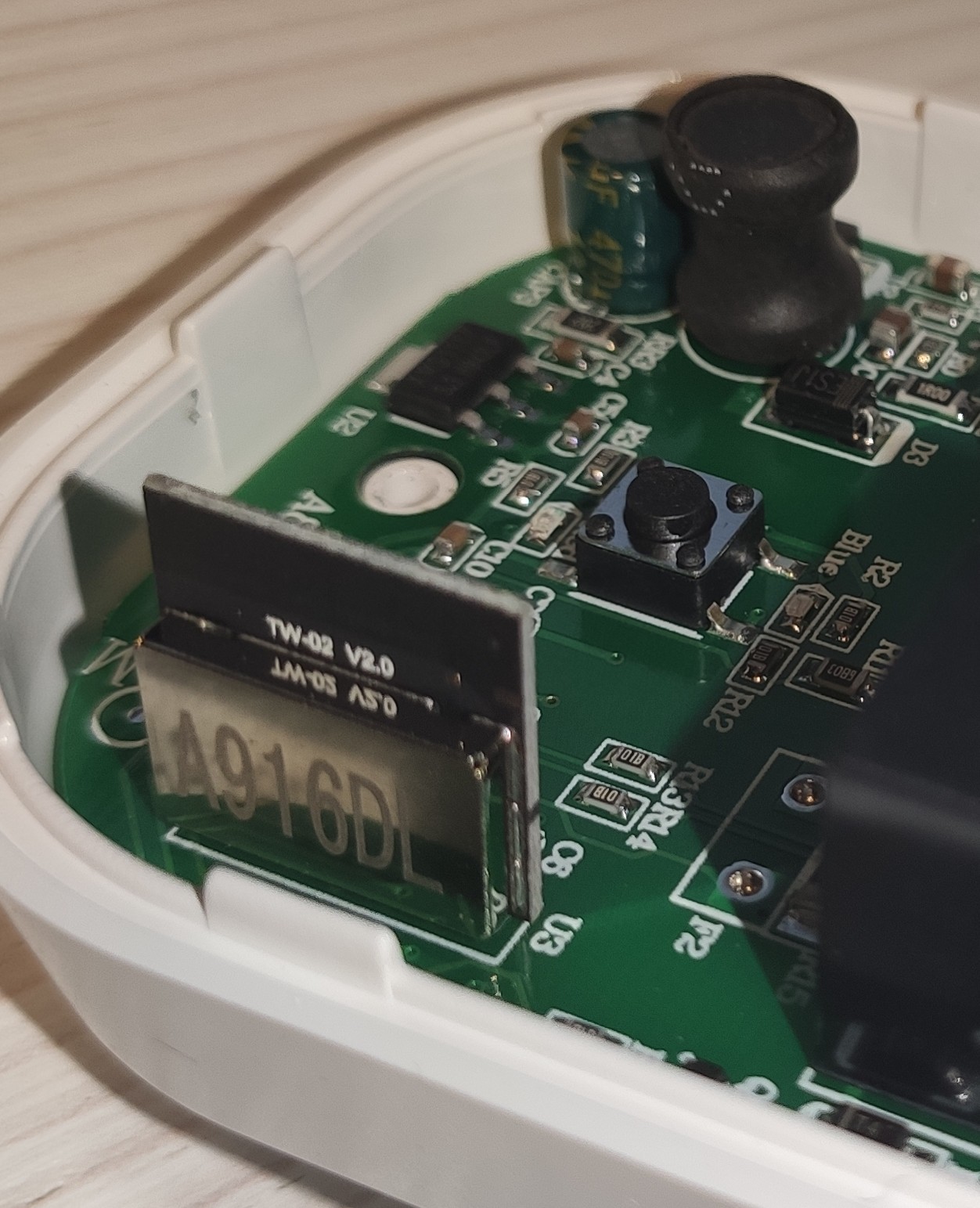
If so, it is a Winner SoC which is unfortunately not supported. We can only install ESP82xx firmware.
kueblc
on 14 Dec 2019
If so, it is a Winner SoC which is unfortunately not supported. We can only install ESP82xx firmware.
Thank you! Indeed, it's my socket. What a pity! =(
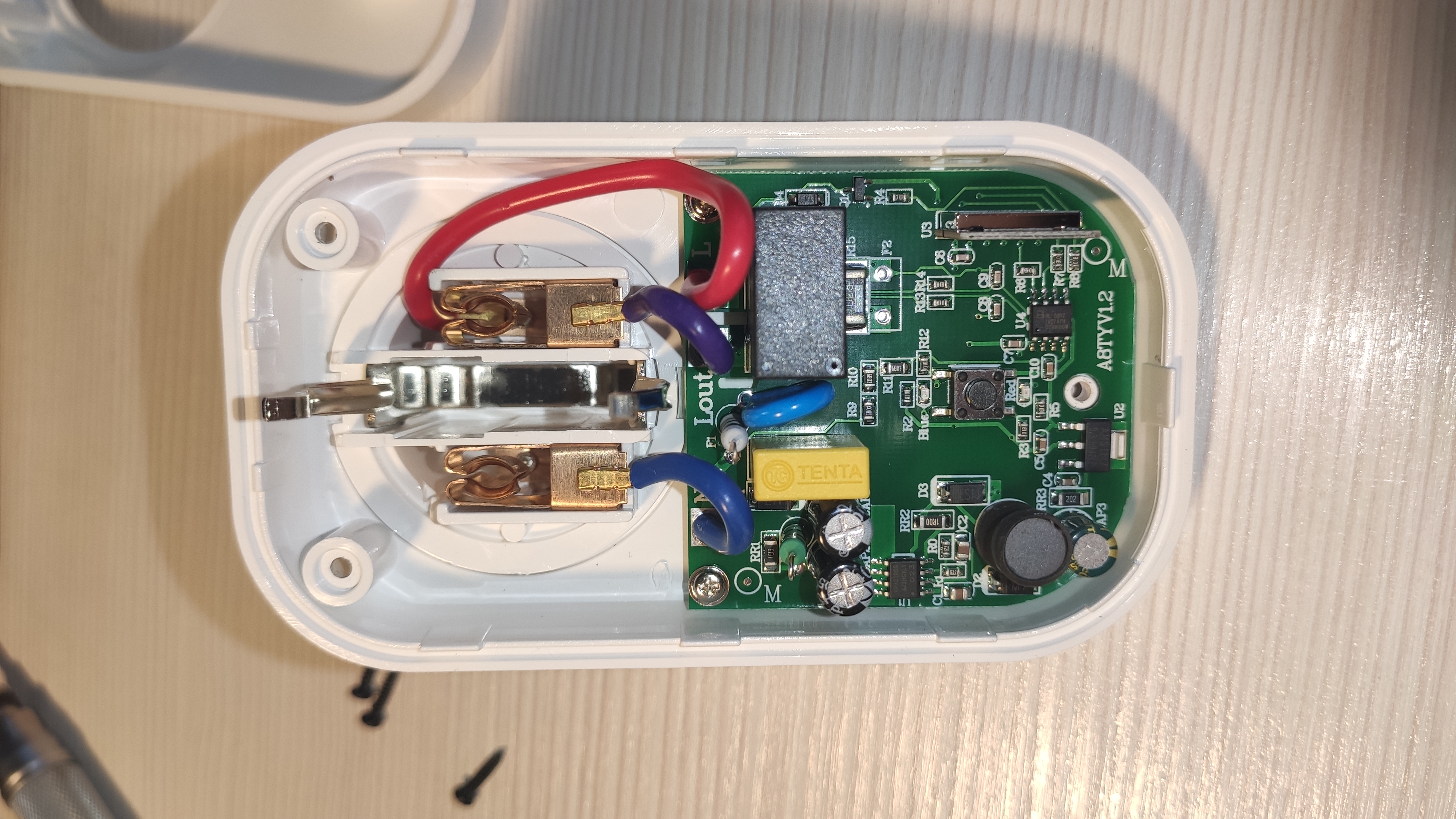
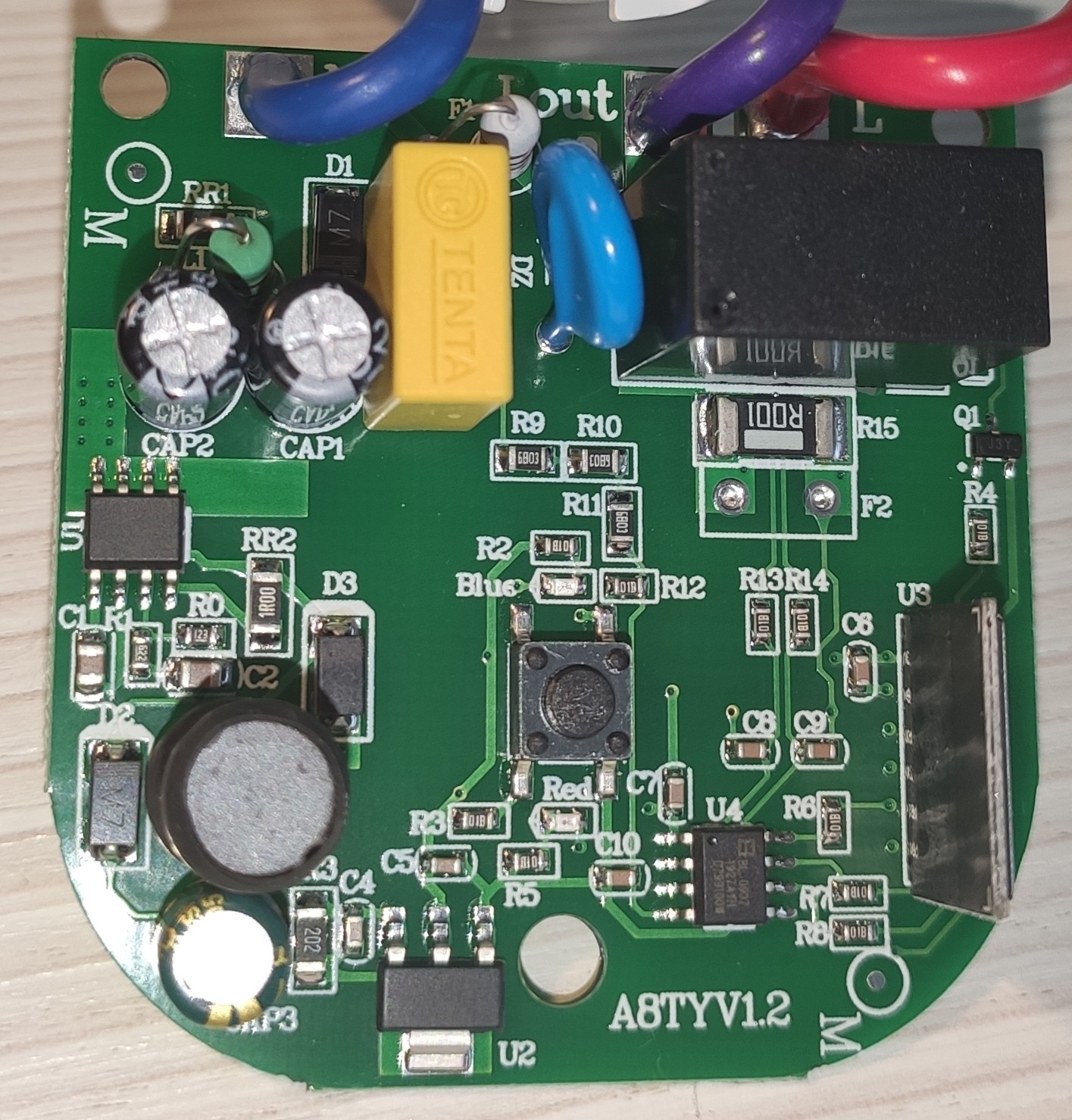
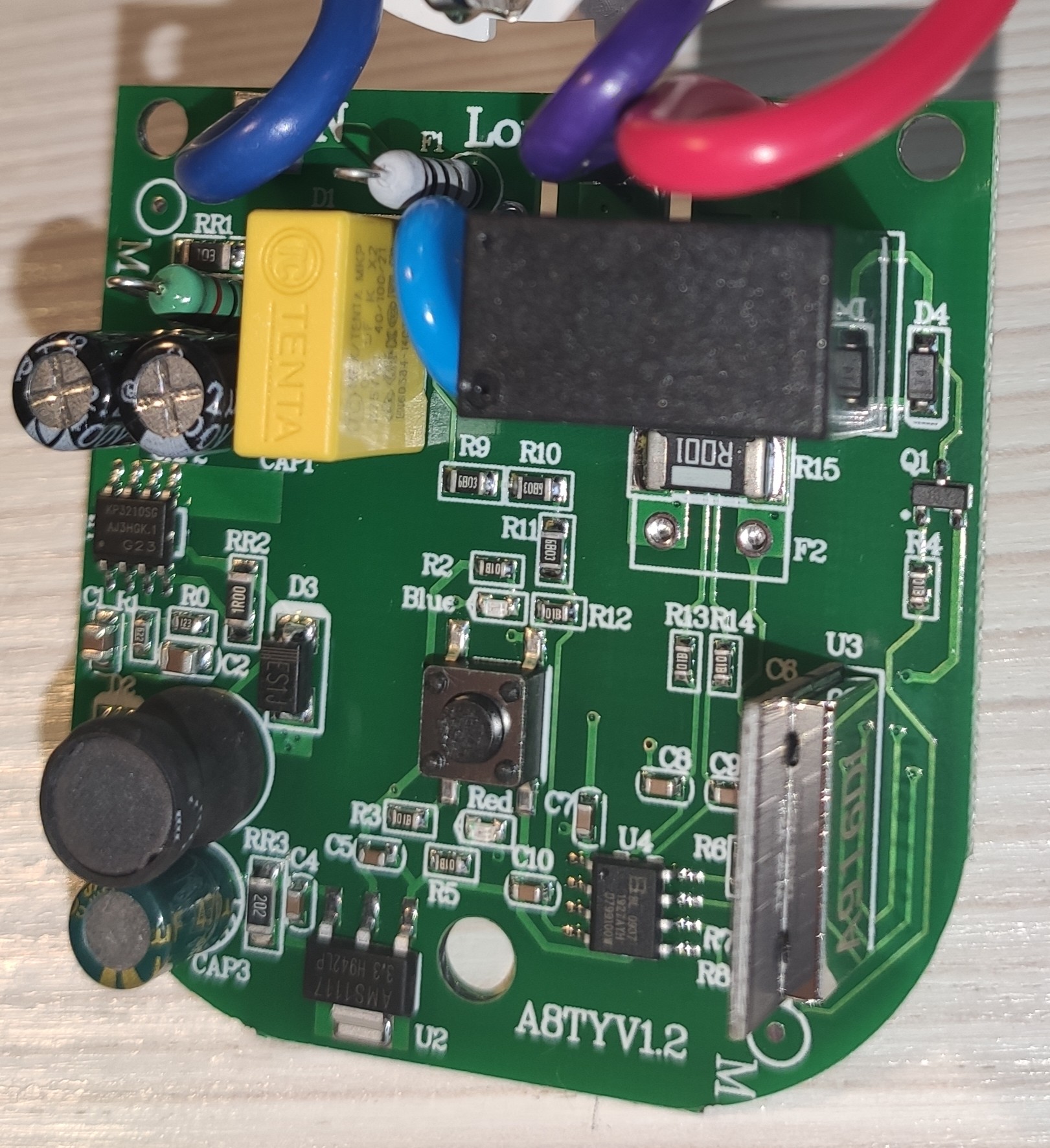
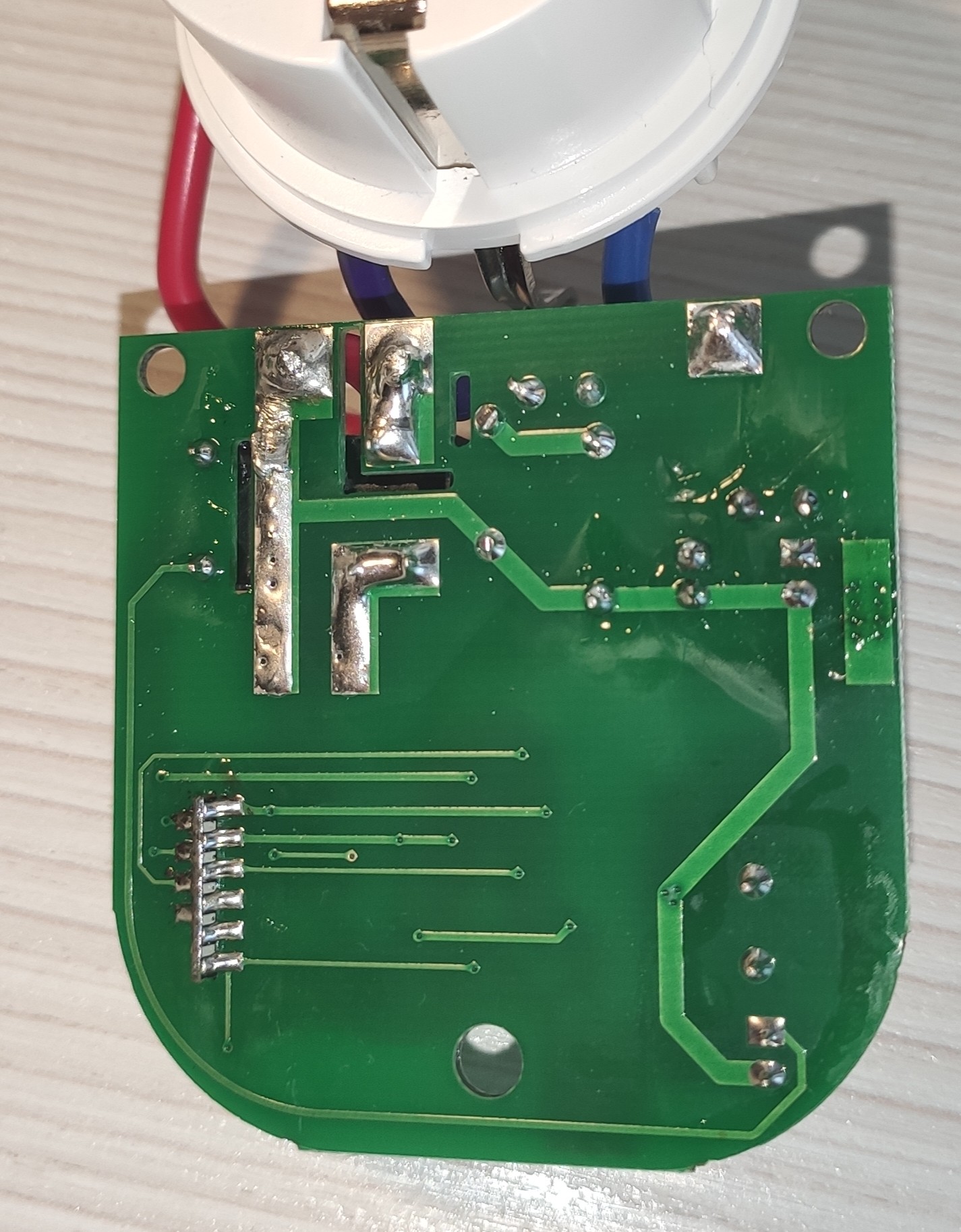
Here are some photos for the reference. Lonsonho SS1002. It's Tuya TW-02 v2.0. I can't even swap it with ESP-01M because the pinout is different.
lustyffh
on 14 Dec 2019
Just got one of those, it arrived today. There's something to make it work locally only?
 carmolim
on 13 Jan 2020
carmolim
on 13 Jan 2020
You could try tuyapi
kueblc
on 13 Jan 2020
But using the API the plug will still be connected to the cloud. Is there any other way that doesn't depend on the cloud?
carmolim
on 13 Jan 2020
tuyapi controls your device over LAN, not the cloud. You can take it a step further and block the device from contacting the cloud via network isolation.
kueblc
on 13 Jan 2020
Related issues
 kylow-may
·
7Comments
kylow-may
·
7Comments
 loglux
·
10Comments
loglux
·
10Comments
 YARA-CODER
·
11Comments
YARA-CODER
·
11Comments
 waltner
·
10Comments
waltner
·
10Comments
 SynAckFin
·
9Comments
SynAckFin
·
9Comments