Tutanota: Unread email counter is invalid
Bug in web app
Describe the bug
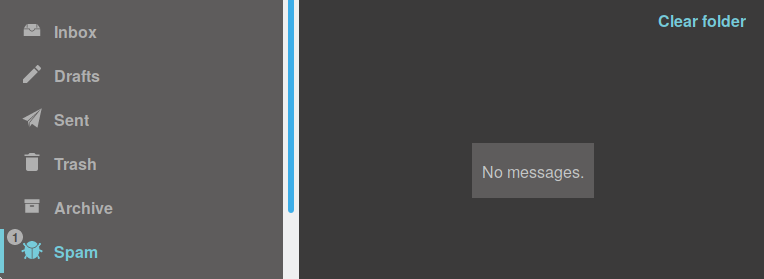
Spam folder is empty, but the icon says there is 1 new message, see the screenshot.
To Reproduce
I do not know how to reproduce the behavior
Expected behavior
it should be nothing next to Spam folder on the left
Screenshots
If applicable, add screenshots to help explain your problem.
Desktop (please complete the following information):
mozilla 66.0.4 (64-bit)
Additional context
Add any other context about the problem here.
 anton-petrunin
All 15 comments
Hi, thanks for reporting.
Please send an email to support or to the [email protected] so that they can execute counting for your mailbox.
 charlag
on 13 May 2019
charlag
on 13 May 2019
I did
anton-petrunin
on 14 May 2019
Closing this issue because it should be solved by our support.
 armhub
on 20 May 2019
armhub
on 20 May 2019
I also have this issue... But shouldn't it be a valid bug? This shouldn't happen and need a fix.
 guoyunhe
on 24 Oct 2019
guoyunhe
on 24 Oct 2019
@guoyunhe it shouldn't happen but it's not clear exactly if it's a bug or delayed/lost write of counter or anything else. It doesn't seem to be a bug in the client at least.
charlag
on 24 Oct 2019
But we don't have a place to report and track server bugs... Other users may open duplicated issues if they have the same problems. This issue can be a place for us to talk and help each other. Could you reopen it?
guoyunhe
on 24 Oct 2019
Yes, it makes sense, we will open it so people can see that there's a problem
charlag
on 24 Oct 2019
I contacted [email protected] and they said they reset the counter. But in my mailboxes, the counter is still wrong.

guoyunhe
on 28 Oct 2019
I have this issue frequently.
Logout then login again, or browser switch, don't resolve it. I need to write to Tutanota support team to reset my counters.
I've noticed that reading emails while server is answering timeout can create the counter discrepancy.
Indeed, the user is not disconnected when popup "Server too long to answer" appears. Then (s)he can still read some emails which are not taken into account by the counter systematically.
But it's probably not the unique scenario/reason...
 l0f4r0
on 17 Nov 2019
l0f4r0
on 17 Nov 2019
@guoyunhe there are multiple things which can be applied. Please write again.
@l0f4r0 please don't mix temporary miscounting (on the client) with permanent one (on the server)
We know about the problem and we hear about it a lot, we have couple of ideas on how to solve/ease it. Thanks for the patience.
charlag
on 18 Nov 2019
@l0f4r0 please don't mix temporary miscounting (on the client) with permanent one (on the server)
I don't want to "mix" anything but Bernd told me to post new information here about the issue to help
l0f4r0
on 18 Nov 2019
If you see a wrong unread mail counter in one of your mail folders, please scroll that mail list down to the last mail. The counter will automatically be fixed then. If you can't scroll though all of them because you have too many emails in that folder, please write to our support and we will fix it for you.
armhub
on 29 Dec 2019
What causes this problem?
 rgb-one
on 30 Dec 2019
rgb-one
on 30 Dec 2019
For technical reasons, the unread mail counter is maintained separately from the actual state of the emails. Counter updates may get lost in case of database request timeouts. This is a technical limitation currently and we are looking into how to solve this. The automatic counter correction we implemented is our workaround for now.
armhub
on 21 Jan 2020
If you see a wrong unread mail counter in one of your mail folders, please scroll that mail list down to the last mail. The counter will automatically be fixed then. If you can't scroll though all of them because you have too many emails in that folder, please write to our support and we will fix it for you.
I wish they would.... I have raised this issue at least four times and they only tell me to scroll through the list of thousands of emails.
 stelord
on 28 Jan 2020
stelord
on 28 Jan 2020
Related issues
 mpfau
·
3Comments
mpfau
·
3Comments
 EliasGabrielsson
·
4Comments
EliasGabrielsson
·
4Comments
 leo-lb
·
6Comments
leo-lb
·
6Comments
 x80486
·
7Comments
armhub
·
3Comments
x80486
·
7Comments
armhub
·
3Comments