Turicreate: pip install -U turicreate Showing Error (using python3 and windows 10)
Collecting turicreate
Using cached turicreate-6.0.tar.gz (1.9 kB)
Building wheels for collected packages: turicreate
Building wheel for turicreate (setup.py) ... error
ERROR: Command errored out with exit status 1:
command: 'C:UsersHridoyAnaconda3envsvirtual_environment_namepython.exe' -u -c 'import sys, setuptools, tokenize; sys.argv[0] = '"'"'C:\Users\Hridoy\AppData\Local\Temp\pip-install-yglwdhwi\turicreate\setup.py'"'"'; __file__='"'"'C:\Users\Hridoy\AppData\Local\Temp\pip-install-yglwdhwi\turicreate\setup.py'"'"';f=getattr(tokenize, '"'"'open'"'"', open)(__file__);code=f.read().replace('"'"'rn'"'"', '"'"'n'"'"');f.close();exec(compile(code, __file__, '"'"'exec'"'"'))' bdist_wheel -d 'C:UsersHridoyAppDataLocalTemppip-wheel-yqhedwiv'
cwd: C:UsersHridoyAppDataLocalTemppip-install-yglwdhwituricreate
Complete output (31 lines):
running bdist_wheel
running build
installing to buildbdist.win-amd64wheel
running install
      ==================================================================================
      TURICREATE ERROR

      If you see this message, pip install did not find an available binary package
      for your system.

      Supported Platforms:
          * macOS 10.12+ x86_64.
          * Linux x86_64 (including WSL on Windows 10).

      Support Python Versions:
          * 2.7
          * 3.5
          * 3.6
          * 3.7


      Another possible cause of this error is an outdated pip version. Try:
          `pip install -U pip`

      ==================================================================================
ERROR: Failed building wheel for turicreate
Running setup.py clean for turicreate
Failed to build turicreate
Installing collected packages: turicreate
Running setup.py install for turicreate ... error
ERROR: Command errored out with exit status 1:
command: 'C:UsersHridoyAnaconda3envsvirtual_environment_namepython.exe' -u -c 'import sys, setuptools, tokenize; sys.argv[0] = '"'"'C:\Users\Hridoy\AppData\Local\Temp\pip-install-yglwdhwi\turicreate\setup.py'"'"'; __file__='"'"'C:\Users\Hridoy\AppData\Local\Temp\pip-install-yglwdhwi\turicreate\setup.py'"'"';f=getattr(tokenize, '"'"'open'"'"', open)(__file__);code=f.read().replace('"'"'rn'"'"', '"'"'n'"'"');f.close();exec(compile(code, __file__, '"'"'exec'"'"'))' install --record 'C:UsersHridoyAppDataLocalTemppip-record-d_6jd0afinstall-record.txt' --single-version-externally-managed --compile --install-headers 'C:UsersHridoyAnaconda3envsvirtual_environment_nameIncludeturicreate'
cwd: C:UsersHridoyAppDataLocalTemppip-install-yglwdhwituricreate
Complete output (28 lines):
running install
        ==================================================================================
        TURICREATE ERROR

        If you see this message, pip install did not find an available binary package
        for your system.

        Supported Platforms:
            * macOS 10.12+ x86_64.
            * Linux x86_64 (including WSL on Windows 10).

        Support Python Versions:
            * 2.7
            * 3.5
            * 3.6
            * 3.7


        Another possible cause of this error is an outdated pip version. Try:
            `pip install -U pip`

        ==================================================================================


----------------------------------------
ERROR: Command errored out with exit status 1: 'C:UsersHridoyAnaconda3envsvirtual_environment_namepython.exe' -u -c 'import sys, setuptools, tokenize; sys.argv[0] = '"'"'C:\Users\Hridoy\AppData\Local\Temp\pip-install-yglwdhwi\turicreate\setup.py'"'"'; __file__='"'"'C:\Users\Hridoy\AppData\Local\Temp\pip-install-yglwdhwi\turicreate\setup.py'"'"';f=getattr(tokenize, '"'"'open'"'"', open)(__file__);code=f.read().replace('"'"'rn'"'"', '"'"'n'"'"');f.close();exec(compile(code, __file__, '"'"'exec'"'"'))' install --record 'C:UsersHridoyAppDataLocalTemppip-record-d_6jd0afinstall-record.txt' --single-version-externally-managed --compile --install-headers 'C:UsersHridoyAnaconda3envsvirtual_environment_nameIncludeturicreate' Check the logs for full command output.
 hridoy100
All 37 comments
What version of Python 3 are you using? I suspect you are using Python 3.8 which we don't support yet (see #3099).
 TobyRoseman
on 28 Apr 2020
TobyRoseman
on 28 Apr 2020
use wsl ,turicreate is not supported in windows
 ABHISHEK-T-S
on 29 Apr 2020
ABHISHEK-T-S
on 29 Apr 2020
I have also got the same error. I have even reinstalled the windows. Installed Python 3.7 first. Then, I have installed the WSL and then tried to install turicreate. Someone please help me to install turicreate in my Windows PC

 tssrao
on 15 May 2020
tssrao
on 15 May 2020
I have got the same problem ,i am using ubuntu(20.16) and python 3.8.
after scrolling allot over the internet i finally find nothing helpful , please help
 Nishit-KKPandit
on 29 May 2020
Nishit-KKPandit
on 29 May 2020
it is not supported in python 3.8 yet
ABHISHEK-T-S
on 29 May 2020
After scrolling through many discussions and forums, I have found the solution.
Use UBUNTU 18.04 and python 3.7
Any higher versions of both will not support .
This will definitely solve the problem.
tssrao
on 3 Jun 2020
@tssrao did it work for you?
 bhaviiii2623
on 14 Jun 2020
bhaviiii2623
on 14 Jun 2020
@bhavi-san, It is working absolutely fine.
tssrao
on 14 Jun 2020
alright thanks
bhaviiii2623
on 14 Jun 2020
Thanks @tssrao it totally works
 Manish-Akkapalli
on 14 Jun 2020
Manish-Akkapalli
on 14 Jun 2020
@bhavi-san, It is working absolutely fine.
What was the command used to install turicreate in virtualenv? I am getting the error
 Madhu296
on 20 Jun 2020
Madhu296
on 20 Jun 2020
@Madhu296, share the screenshot of your error.
tssrao
on 21 Jun 2020
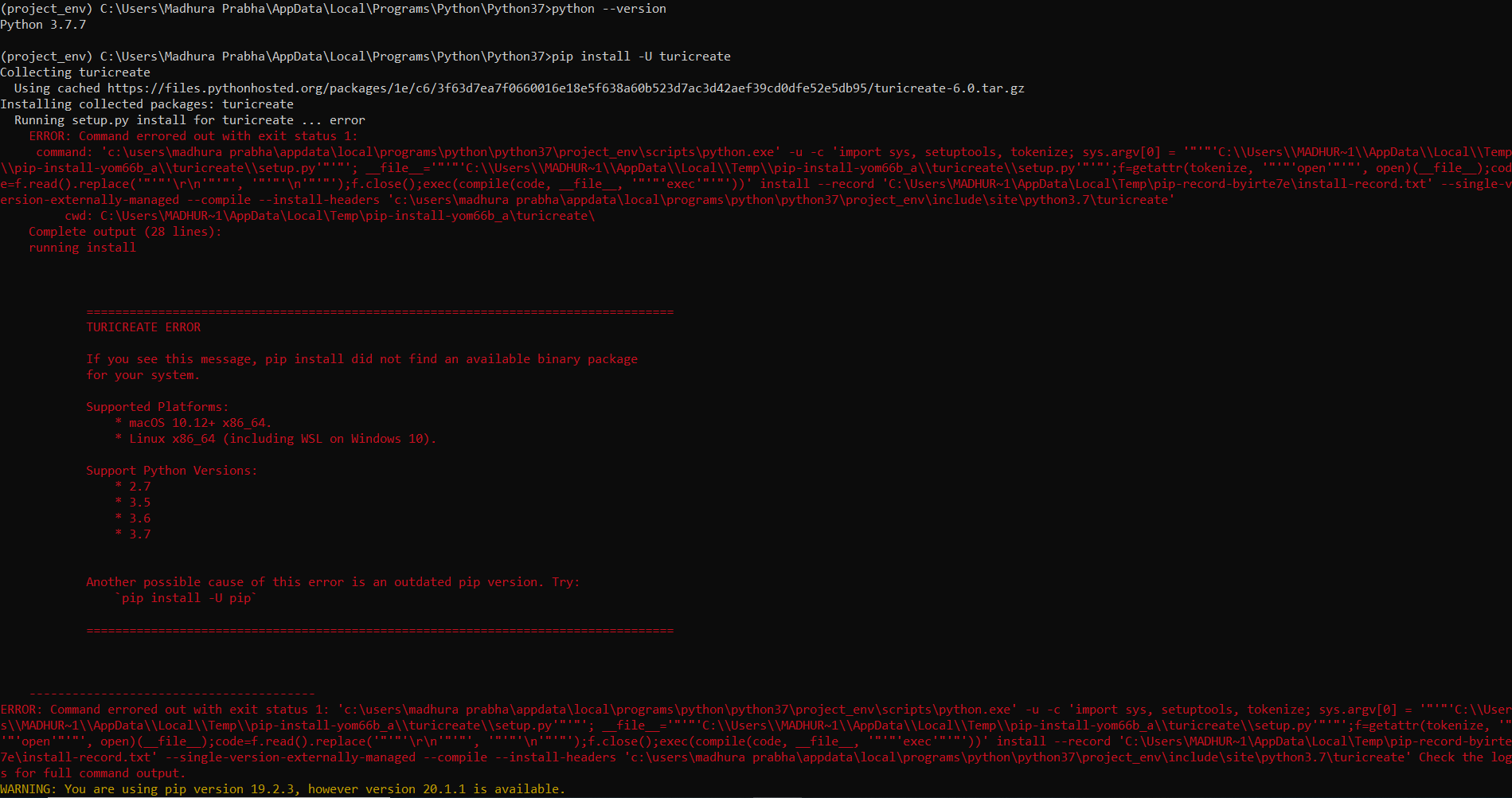
Madhu296
on 21 Jun 2020
Which version of Ubuntu you are using?
tssrao
on 21 Jun 2020
ubuntu 18.04 LTS
Madhu296
on 21 Jun 2020
I am using python version 3.7 and ubuntu 18.04 LTS version. But I am still getting the same error.Can anyone please help??
 Jahnavi34
on 25 Jun 2020
Jahnavi34
on 25 Jun 2020
@Jahnavi34, error screenshot?
tssrao
on 25 Jun 2020
i am getting a tensor flow error while installing turicreate. Could anyone
help..
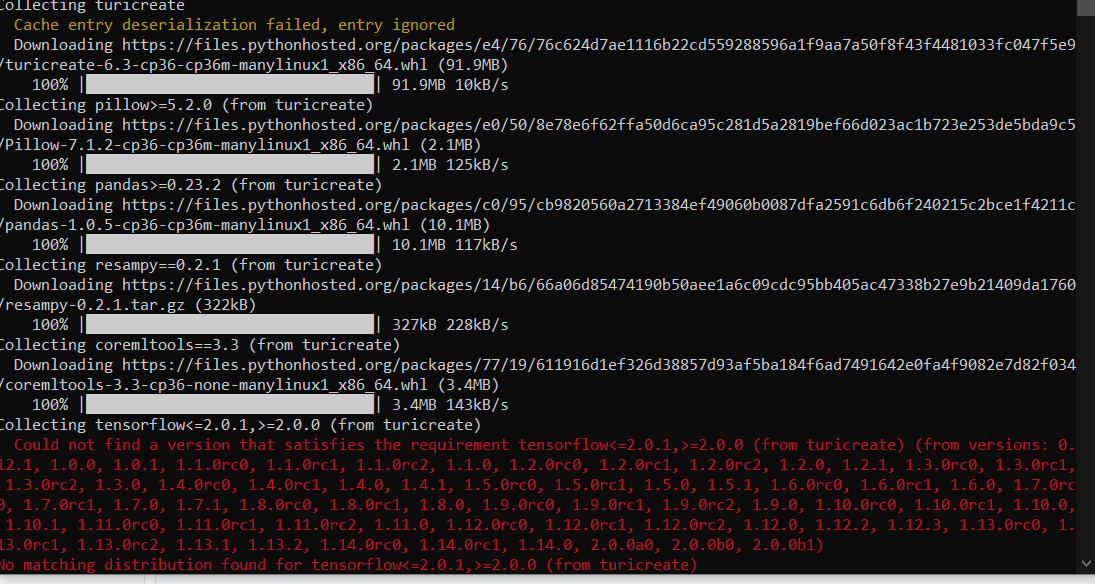
 amitnandan
on 25 Jun 2020
amitnandan
on 25 Jun 2020
@amitnandan - try upgrading your version of pip. You can do this by running: pip install -U pip. Please try that, then try to install TuriCreate again.
TobyRoseman
on 25 Jun 2020
@Jahnavi34, error screenshot?
I am actually trying to install Turicreate using Ubuntu 18.04 LTS and i have installed it using pip3 in virtual environment.
Then when i am trying to import turicreate in Jupyter notebook it is showing an error stating module not found
please help me
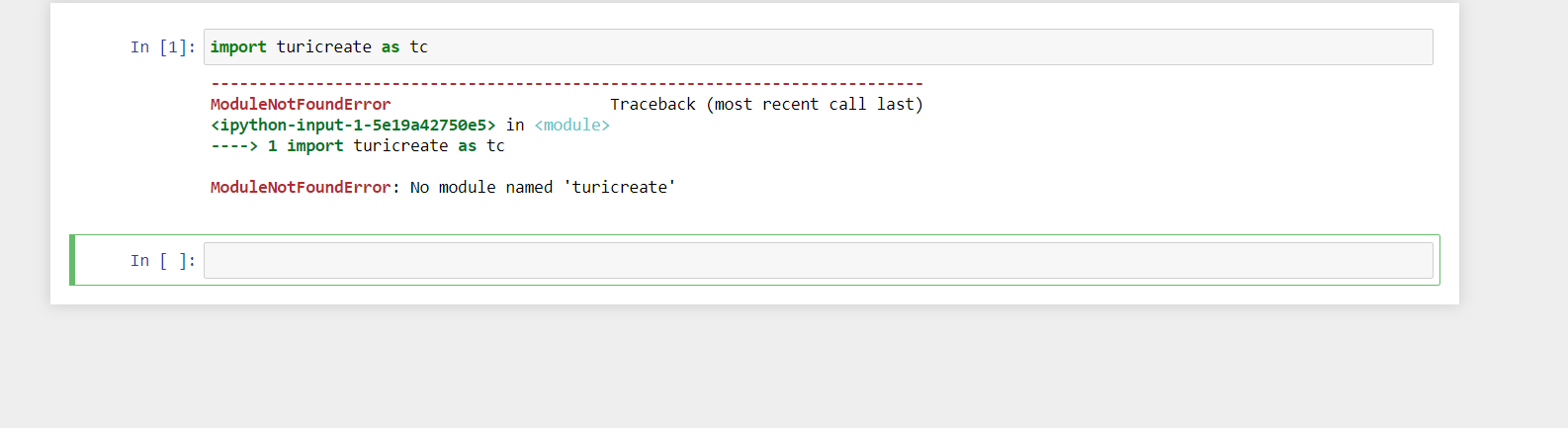
Jahnavi34
on 26 Jun 2020
@Jahnavi34, error screenshot?
I am actually trying to install Turicreate using Ubuntu 18.04 LTS and i have installed it using pip3 in virtual environment.
Then when i am trying to import turicreate in Jupyter notebook it is showing an error stating module not found
please help me
looks like your pip and your jupyter notebook are using different python environments.
ABHISHEK-T-S
on 26 Jun 2020
used pip:
Collecting turicreate
Could not fetch URL https://pypi.python.org/simple/turicreate/: There was a problem confirming the ssl certificate: [SSL: TLSV1_ALERT_PROTOCOL_VERSION] tlsv1 alert protocol version (_ssl.c:661) - skipping
Could not find a version that satisfies the requirement turicreate (from versions: )
No matching distribution found for turicreate
used pip3:
Collecting turicreate
Using cached turicreate-6.0.tar.gz (1.9 kB)
Using legacy setup.py install for turicreate, since package 'wheel' is not installed.
Installing collected packages: turicreate
Running setup.py install for turicreate ... error
ERROR: Command errored out with exit status 1:
command: /Library/Frameworks/Python.framework/Versions/3.8/bin/python3.8 -u -c 'import sys, setuptools, tokenize; sys.argv[0] = '"'"'/private/var/folders/_9/lbklj4n517bdkh5z68w7fd100000gn/T/pip-install-b232jirz/turicreate/setup.py'"'"'; __file__='"'"'/private/var/folders/_9/lbklj4n517bdkh5z68w7fd100000gn/T/pip-install-b232jirz/turicreate/setup.py'"'"';f=getattr(tokenize, '"'"'open'"'"', open)(__file__);code=f.read().replace('"'"'rn'"'"', '"'"'n'"'"');f.close();exec(compile(code, __file__, '"'"'exec'"'"'))' install --record /private/var/folders/_9/lbklj4n517bdkh5z68w7fd100000gn/T/pip-record-tr4i1z28/install-record.txt --single-version-externally-managed --compile --install-headers /Library/Frameworks/Python.framework/Versions/3.8/include/python3.8/turicreate
cwd: /private/var/folders/_9/lbklj4n517bdkh5z68w7fd100000gn/T/pip-install-b232jirz/turicreate/
Complete output (28 lines):
running install
        ==================================================================================
        TURICREATE ERROR

        If you see this message, pip install did not find an available binary package
        for your system.

        Supported Platforms:
            * macOS 10.12+ x86_64.
            * Linux x86_64 (including WSL on Windows 10).

        Support Python Versions:
            * 2.7
            * 3.5
            * 3.6
            * 3.7


        Another possible cause of this error is an outdated pip version. Try:
            `pip install -U pip`

        ==================================================================================


----------------------------------------
ERROR: Command errored out with exit status 1: /Library/Frameworks/Python.framework/Versions/3.8/bin/python3.8 -u -c 'import sys, setuptools, tokenize; sys.argv[0] = '"'"'/private/var/folders/_9/lbklj4n517bdkh5z68w7fd100000gn/T/pip-install-b232jirz/turicreate/setup.py'"'"'; __file__='"'"'/private/var/folders/_9/lbklj4n517bdkh5z68w7fd100000gn/T/pip-install-b232jirz/turicreate/setup.py'"'"';f=getattr(tokenize, '"'"'open'"'"', open)(__file__);code=f.read().replace('"'"'rn'"'"', '"'"'n'"'"');f.close();exec(compile(code, __file__, '"'"'exec'"'"'))' install --record /private/var/folders/_9/lbklj4n517bdkh5z68w7fd100000gn/T/pip-record-tr4i1z28/install-record.txt --single-version-externally-managed --compile --install-headers /Library/Frameworks/Python.framework/Versions/3.8/include/python3.8/turicreate Check the logs for full command output.
I am getting this error too. I tried to install in macOS 10.15.2 and python version Python 2.7.14
 Jenithareddy
on 28 Jun 2020
Jenithareddy
on 28 Jun 2020
@Jenithareddy - Looking at the output you gave, the path to your Python executable is /Library/Frameworks/Python.framework/Versions/3.8/bin/python3.8. That means you are using Python 3.8 not Python 2.7. TuriCreate does not yet support Python 3.8 (we're tracking this in #3099). If you use python 2.7 with macOS 10.15, it should work.
TobyRoseman
on 30 Jun 2020
If you see this message, pip install did not find an available binary package
for your system.
      Supported Platforms:
          * macOS 10.12+ x86_64.
          * Linux x86_64 (including WSL on Windows 10).

      Support Python Versions:
          * 2.7
          * 3.5
          * 3.6
          * 3.7
iam getting error like this my python version is 3.7 not 3.8 and i also enabled my windows via wsl even then it is not getting installed
 priyanka3598
on 20 Jul 2020
priyanka3598
on 20 Jul 2020
can you please help me with this!!
priyanka3598
on 20 Jul 2020
@priyanka3598
I have seen many users facing problems while installing turicreate. I have spent two days to get it done.I thought that it will be my last try to install turicreate and if I still fail to install it, I will give up the course. I got it after several ways of trying. Read the below instructions to get turicreate into your Windows PC.
Before starting the installation of turicreate, read all the instructions first, and then start the installing process ensure the following:
Your PC is running on Windows 10
Uninstall Python3.8/any newer versions.
Install Python 3.7
While Installing Python 3.7, make sure that you click the add to path checkbox.
Now its time to install turicreate.
Follow each step one by one in this link: https://medium.com/@pam.thumbela/installing-turicreate-on-windows-10-534e147a4792
While going through the steps in the above link, make sure that:
You open the Windows Powershell as an administrator at step-1.
At step-3, install Ubuntu 18.04 LTS from Microsoft store. Don't install Ubuntu 20.04 LTS. This is where most people do mistake and find it difficult to install because in the last step it will throw an error if you use Ubuntu 20.04 LTS.
Remember that whenever you want to work with turicreate, you should always open jupyter notebook from ubuntu itslef in the venv(virtual environment). Don't open jupyter notebook from command prompt.
If you are still facing issues, reply to this with the screenshot of the error you are getting. I will try to help you.
If you still face issues regarding this, write to [email protected]. I will try to answer your issues.
tssrao
on 20 Jul 2020
@priyanka3598 ,
ubuntu 18.04 LTS should be always running in the background while running jupyter notebbok and it should be in the virtual environment(venv).
tssrao
on 20 Jul 2020
Thankyou for your reply. Will try it
On Mon, 20 Jul, 2020, 2:53 PM Takkallapally Sai Shodhan Rao, <
[email protected]> wrote:
@priyanka3598 https://github.com/priyanka3598 ,
ubuntu 18.04 LTS should be always running in the background while running
jupyter notebbok and it should be in the virtual environment(venv).—
You are receiving this because you were mentioned.
Reply to this email directly, view it on GitHub
https://github.com/apple/turicreate/issues/3149#issuecomment-660911930,
or unsubscribe
https://github.com/notifications/unsubscribe-auth/AQK4FSQPQQCQ6Y5T2RGKDRDR4QEJ3ANCNFSM4MSVMLHQ
.
priyanka3598
on 20 Jul 2020
I was not able to install turicreate ,i tried graph lab also. im getting no module found. can anyone help me
 Gnaneswri
on 21 Jul 2020
Gnaneswri
on 21 Jul 2020
I have also got the same error. I have even reinstalled the windows. Installed Python 3.7 first. Then, I have installed the WSL and then tried to install turicreate. Someone please help me to install turicreate in my Windows PC
I am also getting exactly same error. Yes, I have installed and set python version 3.7 and I am trying in WSL
 jaswantcoder
on 28 Jul 2020
jaswantcoder
on 28 Jul 2020
Try with anaconda3
On Wed, 29 Jul 2020, 2:01 am Jaswant Arya, notifications@github.com wrote:
I have also got the same error. I have even reinstalled the windows.
Installed Python 3.7 first. Then, I have installed the WSL and then tried
to install turicreate. Someone please help me to install turicreate in my
Windows PC
[image: Screenshot (6)]
https://user-images.githubusercontent.com/64457083/82073368-c6d21780-96f6-11ea-947f-a5c249cc6371.pngI am also getting exactly same error. Yes, I have installed and set python
version 3.7 and I am trying in WSL—
You are receiving this because you commented.
Reply to this email directly, view it on GitHub
https://github.com/apple/turicreate/issues/3149#issuecomment-665267322,
or unsubscribe
https://github.com/notifications/unsubscribe-auth/APYICV5XHS4Z7CERXB65ZSTR54YR7ANCNFSM4MSVMLHQ
.
Nishit-KKPandit
on 29 Jul 2020
@Gnaneswri , @jaswantcoder ,
Please attach screenshots of your errors...
and please make sure that you are using Python 3.7 and Ubuntu 18.04LTS
tssrao
on 29 Jul 2020
So this package is NOT compatible with Windows 10?
 Krejdom
on 5 Aug 2020
Krejdom
on 5 Aug 2020
So this package is NOT compatible with Windows 10?
It should be compatible with Windows 10, if you use WSL Ubuntu 18, not Ubuntu 20.
TobyRoseman
on 5 Aug 2020
Getting below error while installing Turicreate, I have installed Python 3.8 and Anaconda 3:-
ERROR: Failed building wheel for turicreate
Running setup.py clean for turicreate
Failed to build turicreate
Installing collected packages: turicreate
Running setup.py install for turicreate ... error
ERROR: Command errored out with exit status 1:
command: 'C:UsersAbhishekanaconda3envsvirtual_environment_namepython.exe' -u -c 'import sys, setuptools, tokenize; sys.argv[0] = '"'"'C:UsersAbhishekAppDataLocalTemppip-install-qhqi5ieeturicreatesetup.py'"'"'; file='"'"'C:UsersAbhishekAppDataLocalTemppip-install-qhqi5ieeturicreatesetup.py'"'"';f=getattr(tokenize, '"'"'open'"'"', open)(file);code=f.read().replace('"'"'rn'"'"', '"'"'n'"'"');f.close();exec(compile(code, file, '"'"'exec'"'"'))' install --record 'C:UsersAbhishekAppDataLocalTemppip-record-92_w9hxxinstall-record.txt' --single-version-externally-managed --compile --install-headers 'C:UsersAbhishekanaconda3envsvirtual_environment_nameIncludeturicreate'
cwd: C:UsersAbhishekAppDataLocalTemppip-install-qhqi5ieeturicreate
Complete output (28 lines):
running install
    ==================================================================================
    TURICREATE ERROR

    If you see this message, pip install did not find an available binary package
    for your system.

    Supported Platforms:
        * macOS 10.12+ x86_64.
        * Linux x86_64 (including WSL on Windows 10).

    Support Python Versions:
        * 2.7
        * 3.5
        * 3.6
        * 3.7
        * 3.8

    Another possible cause of this error is an outdated pip version. Try:
        `pip install -U pip`

    ==================================================================================
ERROR: Command errored out with exit status 1: 'C:UsersAbhishekanaconda3envsvirtual_environment_namepython.exe' -u -c 'import sys, setuptools, tokenize; sys.argv[0] = '"'"'C:UsersAbhishekAppDataLocalTemppip-install-qhqi5ieeturicreatesetup.py'"'"'; file='"'"'C:UsersAbhishekAppDataLocalTemppip-install-qhqi5ieeturicreatesetup.py'"'"';f=getattr(tokenize, '"'"'open'"'"', open)(file);code=f.read().replace('"'"'rn'"'"', '"'"'n'"'"');f.close();exec(compile(code, file, '"'"'exec'"'"'))' install --record 'C:UsersAbhishekAppDataLocalTemppip-record-92_w9hxxinstall-record.txt' --single-version-externally-managed --compile --install-headers 'C:UsersAbhishekanaconda3envsvirtual_environment_nameIncludeturicreate' Check the logs for full command output.
 ankur290109
on 2 Sep 2020
ankur290109
on 2 Sep 2020
@ankur290109 - rather than posting the same message in three different existing issue, please open a new issue. Also please include a lot more details, such as your operating system, what Linux distro you are using with WSL, etc.
TobyRoseman
on 2 Sep 2020
It is now clear to me that the original issue reported by @hridoy100 was the result of trying to install TuriCreate on Window outside of WSL. It was not a Python 3.8 issue as I originally thought. We are already tracking native Windows support in #533. So the original issue here is a duplicate.
There has been a large amount of correspondence in this issue. Other people may have gotten this error message mentioned here for a different reason. If you got this error message on Windows and used WSL, please open a new issue.
I'm going to close this issue as a duplicate.
Thank you @ABHISHEK-T-S and @tssrao for your help with this issue.
TobyRoseman
on 25 Sep 2020
Related issues
 johnyquest7
·
3Comments
johnyquest7
·
3Comments
 HelloWorldYyx
·
3Comments
TobyRoseman
·
3Comments
HelloWorldYyx
·
3Comments
TobyRoseman
·
3Comments
 hoytak
·
3Comments
hoytak
·
3Comments
 fbomb111
·
3Comments
fbomb111
·
3Comments
Most helpful comment
After scrolling through many discussions and forums, I have found the solution.
Use UBUNTU 18.04 and python 3.7
Any higher versions of both will not support .
This will definitely solve the problem.