Turicreate: Error in install turicreate
I couldn't install turicreate
please help
The pip version is 19.0.3
Python version is 2.7
C:Usersasus>pip install -U turicreate
DEPRECATION: Python 2.7 will reach the end of its life on January 1st, 2020. Please upgrade your Python as Python 2.7 won't be maintained after that date. A future version of pip will drop support for Python 2.7.
Collecting turicreate
Using cached https://files.pythonhosted.org/packages/db/54/167837569bcb816b3fe68f003f18d07ab9d5ac31b2b12b8f9b07b1ccc7a4/turicreate-4.2.tar.gz
Building wheels for collected packages: turicreate
Building wheel for turicreate (setup.py) ... error
Complete output from command C:UsersasusAnaconda3envsvenvpython.exe -u -c "import setuptools, tokenize;__file__='c:\users\asus\appdata\local\temp\pip-install-xjkuwu\turicreate\setup.py';f=getattr(tokenize, 'open', open)(__file__);code=f.read().replace('rn', 'n');f.close();exec(compile(code, __file__, 'exec'))" bdist_wheel -d c:usersasusappdatalocaltemppip-wheel-95kjt0 --python-tag cp27:
running bdist_wheel
running build
installing to buildbdist.win-amd64wheel
running install
      ==================================================================================
      ERROR

      If you see this message, pip install did not find an available binary package
      for your system. Supported platforms are:

      * Linux x86_64 (including WSL on Windows 10).
      * macOS 10.12+ x86_64.
      * Python 2.7, 3.5, or 3.6.

      Other possible causes of this error are:

      * Outdated pip version (try `pip install -U pip`).

      ==================================================================================
Failed building wheel for turicreate
Running setup.py clean for turicreate
Failed to build turicreate
Installing collected packages: turicreate
Running setup.py install for turicreate ... error
Complete output from command C:UsersasusAnaconda3envsvenvpython.exe -u -c "import setuptools, tokenize;__file__='c:\users\asus\appdata\local\temp\pip-install-xjkuwu\turicreate\setup.py';f=getattr(tokenize, 'open', open)(__file__);code=f.read().replace('rn', 'n');f.close();exec(compile(code, __file__, 'exec'))" install --record c:usersasusappdatalocaltemppip-record-qvsorzinstall-record.txt --single-version-externally-managed --compile:
running install
        ==================================================================================
        ERROR

        If you see this message, pip install did not find an available binary package
        for your system. Supported platforms are:

        * Linux x86_64 (including WSL on Windows 10).
        * macOS 10.12+ x86_64.
        * Python 2.7, 3.5, or 3.6.

        Other possible causes of this error are:

        * Outdated pip version (try `pip install -U pip`).

        ==================================================================================


----------------------------------------
Command "C:UsersasusAnaconda3envsvenvpython.exe -u -c "import setuptools, tokenize;__file__='c:\users\asus\appdata\local\temp\pip-install-xjkuwu\turicreate\setup.py';f=getattr(tokenize, 'open', open)(__file__);code=f.read().replace('rn', 'n');f.close();exec(compile(code, __file__, 'exec'))" install --record c:usersasusappdatalocaltemppip-record-qvsorzinstall-record.txt --single-version-externally-managed --compile" failed with error code 1 in c:usersasusappdatalocaltemppip-install-xjkuwuturicreate
 Meshael-S
All 18 comments
It looks like your operating system is Windows. We don't support windows. We do however work on Windows 10 using WSL.
 TobyRoseman
on 9 Apr 2019
TobyRoseman
on 9 Apr 2019
I have WSL on Windows 10 but I don’t know how to use it to install turicreate. It doesn’t accept the Pip command
Meshael-S
on 10 Apr 2019
You probably first need to install pip in your WSL.
TobyRoseman
on 10 Apr 2019
I am also facing the same issue. I am using python 3.7.7.
Please help me to fix this.
 tssrao
on 15 May 2020
tssrao
on 15 May 2020
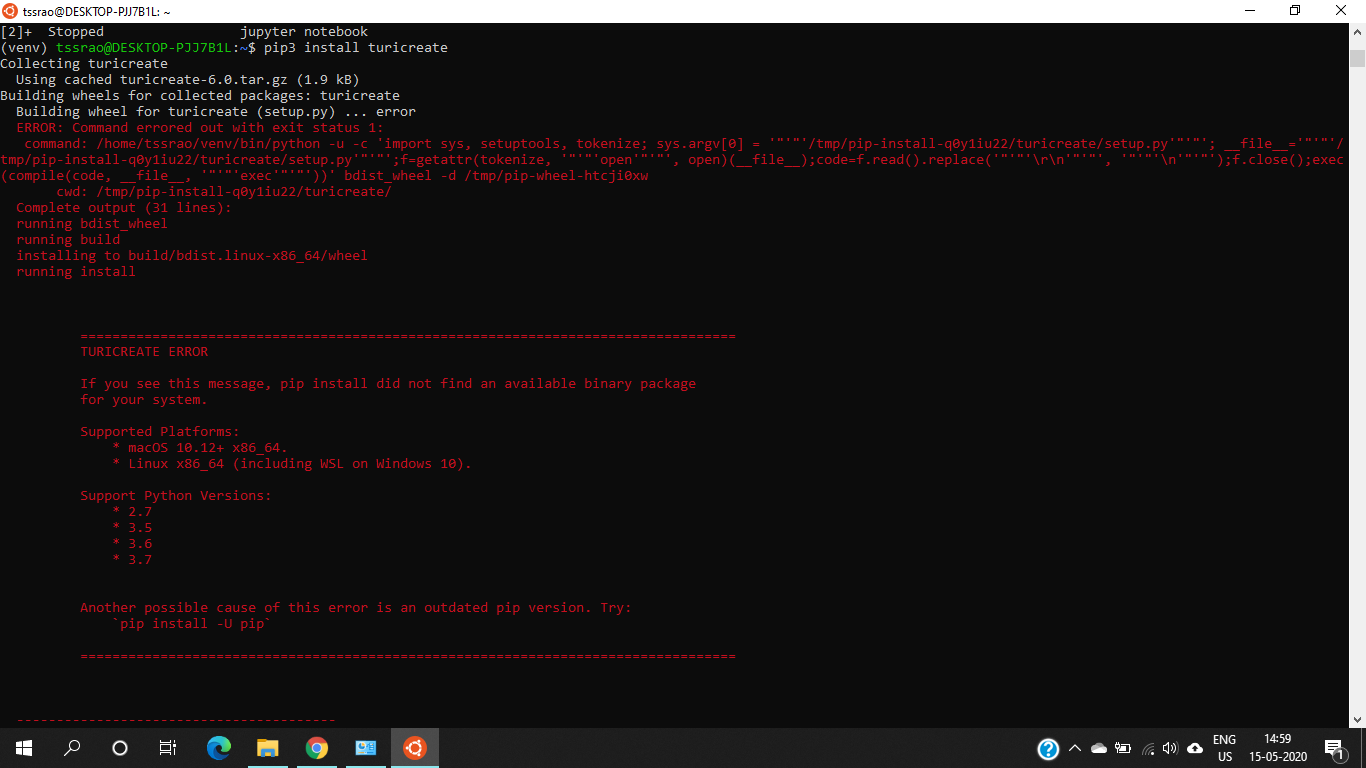
I have used WSL in Windows 10 Pro.
I have successfully created a virtual environment.
I am unable to install turicreate.
I am using python 3.7.7
Please help me with this
tssrao
on 15 May 2020
same here.
 murli1998
on 25 May 2020
murli1998
on 25 May 2020
@tssrao - When you are in that virtual environment, what's the output of pip -V?
TobyRoseman
on 27 May 2020
19.3.1
 Akumar132232
on 1 Jun 2020
Akumar132232
on 1 Jun 2020
@Akumar132232 I faced the same issue by default I had python 3.8 in Ubuntu-20 , I did an altinstall of Python 3.6.9 and tried installing with it and it worked.
https://towardsdatascience.com/building-python-from-source-on-ubuntu-20-04-2ed29eec152b
I hope this helps
 Prax7-7
on 3 Jun 2020
Prax7-7
on 3 Jun 2020
In the meantime, I have found solution for installing turicreate on Windows.
turicreate works only with UBUNTU 18.04 and python 3.7 (also works with few older versions).
It does not work with UBUNTU 20.04 or Python 3.8 or any higher versions.
So, if you are using any versions higher than UBUNTU 18.04 or Python 3.7, firstly uninstall both of them and install UBUNTU 18.04 and Python 3.7. Now turicreate will work fine.
I Hope, this may help.
tssrao
on 3 Jun 2020
Even I am having the same issue .I used WSL in windows 10. Every thing is perfect but when I install turicreate I get the same error.Please try giving any solution
 Sherlock5220
on 28 Jul 2020
Sherlock5220
on 28 Jul 2020
@vishnu5220 which version of UBUNTU you are using?
tssrao
on 28 Jul 2020
@vishnu5220 which version of UBUNTU you are using?
Ubuntu 18.04 LTS
Sherlock5220
on 28 Jul 2020
@vishnu5220 , python version?
tssrao
on 28 Jul 2020
@vishnu5220 , python version?
version 3.7
Sherlock5220
on 28 Jul 2020
E
@vishnu5220 , python version?
Before this I even tried with python 3.6 and normal ubuntu app from microsoft store(not ubuntu 18.04 LTS just the normal one).But that didn't work.I am struggling from 1 week but didn't get any solution
Sherlock5220
on 28 Jul 2020
@vishnu5220 , Can you send a screenshot of your UBUNTU 18.04 LTS?
tssrao
on 28 Jul 2020
@vishnu5220 , Can you send a screenshot of your UBUNTU 18.04 LTS?
Definetly sir I am reinstalling .Give me some time
Sherlock5220
on 28 Jul 2020
Related issues
 kld123509945
·
5Comments
kld123509945
·
5Comments
 alelordelo
·
5Comments
alelordelo
·
5Comments
 HincaTseng
·
6Comments
HincaTseng
·
6Comments
 johnyquest7
·
5Comments
johnyquest7
·
5Comments
 junyafang
·
5Comments
junyafang
·
5Comments