Turicreate: Can't use eGPU in Image Classification
Hi,
The eGPU doesn't seems to be used on my MacBook Pro using an Image Classification model.
During the training of an Object Detection model the GPU is used correctly.
 FedeGens
All 13 comments
I believe this should work. @FedeGens are you sure the GPU is not getting used at all while creating an image classifier model?
If you don't have many images you may not even notice the GPU getting used while creating an image classifier model. An image classifier gets created in three stages, see the "tranfer learning" section of this doc. Only the second stage will use the GPU. Creating an object detection model will utilize the GPU much more.
 TobyRoseman
on 25 Jul 2018
TobyRoseman
on 25 Jul 2018
Thank you for your reply.
The problem is that only the internal GPU is used for the work, when I expected to see the external GPU working on it.

As you can see from the image, the AMD Radeon Pro 560 (the internal one) is doing all the work, when the RX Vega 64 (the external) is sleeping.
That's the behaviour while creating an image classification model.
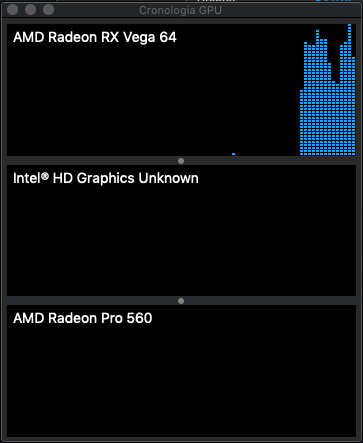
This is what happens when I try to create an object detection model.
I'd like to have the same behaviour with image classification models.
Is there a way to decide which GPU must be used?
I already tried with:
turicreate.config.set_num_gpus(-1)
but there's only 1 GPU working at time.
Thanks.
FedeGens
on 25 Jul 2018
We've found that this issue relates to another team within Apple - we've reported it to them through our internal tracking system, and are closing the issue here. Thanks for your patience.
 afranklin
on 17 Aug 2018
afranklin
on 17 Aug 2018
Thanks.
How can I know when this will be fixed?
FedeGens
on 20 Aug 2018
Re-opening it. We will close this when it lands in CoreML.
 srikris
on 20 Aug 2018
srikris
on 20 Aug 2018
Thanks again for your support.
FedeGens
on 21 Aug 2018
Hi,
How did you get it to work with the internal AMD Pro 560? In my case the Turicreate select the Intel UHD graphic when I train a image classification model with 30 000 pictures. I have a MacBook Pro 15" 2018, Mojave beta 10 and Xcode-beta 6. I use Jupyter to run my python code. I have tried to use a eGPU also. Same results as you but internal Intel GPU is running. If I use PlaidML as backend to Keras or Apples Create ML it will use the internal AMD card or eGPU without any problem.
 aicts
on 5 Sep 2018
aicts
on 5 Sep 2018
@aicts Your issue seems to be a different issue from the one in this post. We seem to be picking the wrong GPU card. I've made a separate issue for this #1063. We should be picking the AMD Pro 560 card.
srikris
on 5 Sep 2018
I am having the exact same issue as FedeGens. In image classification, Turi will prefer my 2018 13" Pro's internal Iris graphics over the RX 580 eGPU.
I'm not very well versed on GitHub Issue tracking etiquette, so I apologize if this comment is redundant. I just wanted to make it clear that the issue was not isolated.
 soooch
on 18 Dec 2018
soooch
on 18 Dec 2018
Yes, for image classification specifically, Turi Create relies on the Core ML framework in macOS to perform a neural-net-based feature extraction. Core ML doesn't support eGPU in this case. We'll update/close this issue when the situation is resolved.
 nickjong
on 4 Jan 2019
nickjong
on 4 Jan 2019
MacOS 10.15 Catalina now has API allowing us to specify the eGPU here:
https://developer.apple.com/documentation/coreml/mlmodelconfiguration/3222915-preferredmetaldevice?language=objc
nickjong
on 21 Jun 2019
Looking for the same function. Still cant use eGPU for image classification training.
 legolasW
on 18 Nov 2019
legolasW
on 18 Nov 2019
Here is a demo repo to recreate the eGPU preference: https://github.com/noahgift/amd-tensorflow-osx. It does appear that while yes, an eGPU can be used it is preferred. So if you have a higher-end Mac Pro, and an eGPU also plugged in, you will need to unplug it to get it to prefer the better GPU.
 noahgift
on 5 Oct 2020
noahgift
on 5 Oct 2020
Related issues
 jchuter
·
3Comments
jchuter
·
3Comments
 johnyquest7
·
3Comments
srikris
·
4Comments
johnyquest7
·
3Comments
srikris
·
4Comments
 alelordelo
·
5Comments
alelordelo
·
5Comments
 HincaTseng
·
6Comments
HincaTseng
·
6Comments
Most helpful comment
Re-opening it. We will close this when it lands in CoreML.