Turicreate: tc.object_detector.create doesn't create VNRecognizedObjectObservation ?
I'm using the boiler-plate code:
import turicreate as tc
Load the data
data = tc.SFrame('annotations.sframe')
# Make a train-test split
train_data, test_data = data.random_split(0.8)

# Create a model
model = tc.object_detector.create(train_data, feature='image', max_iterations=100, model='darknet-yolo')

# Save predictions to an SArray
predictions = model.predict(test_data)

# Evaluate the model and save the results into a dictionary
metrics = model.evaluate(test_data)

# Save the model for later use in Turi Create
model.save('mymodel.model')

# Export for use in Core ML
model.export_coreml('MyCustomObjectDetector.mlmodel')
to train a model and the out-of-the-box project: https://developer.apple.com/documentation/vision/recognizing_objects_in_live_capture
to try and have my objects detected in live capture. It seems like the code produces a classification object and not a VNRecognizedObjectObservation, since no box is being drawn on the mobile screen.
By looking at the info on the .mlmodel, I can see that the outputs arrays of confidence and coordinates are multiarray of (Double 2535x1) and (Double 2535 x 4) respectively as opposed to (Double 0 x 0) for the ObjectDetector model that comes with the project.
I'm using Version: 4.0
 amiraeitan
All 32 comments
@amiraeitan Can you try turicreate 5.0. That should fix your issue.
pip install turicreate==5.0b2
 srikris
on 22 Jul 2018
srikris
on 22 Jul 2018
This didn't fix the problem.
Training:
model = tc.object_detector.create(train_data, feature='image', max_iterations=100, model='darknet-yolo')
Exporting:
model.export_coreml('MyCustomObjectDetector2.mlmodel', include_non_maximum_suppression=False)
This is a summary of the printed model:
Class : ObjectDetector
Schema
Model : darknet-yolo
Number of classes : 1
Non-maximum suppression threshold : 0.45
Input image shape : (3, 416, 416)
amiraeitan
on 22 Jul 2018
I have the same issue. (TC 5.0b2).
I am testing the model with iOS 12 and Xcode10 on MacOS 10.13.6.
Any help?
 cianiandreadev
on 26 Jul 2018
cianiandreadev
on 26 Jul 2018
@amiraeitan If you do include_non_maximum_suppression=False, then you will not be able to do predictions through Core Vision. You can still do predictions through Core ML, but you will have to do some post-processing yourself.
@cianiandreadev Are you sure you are targeting iOS 12? Is it possible that you are targeting iOS 11 (but executing on iOS 12)? Since you are on macOS 10.13, this seems like a possible cause.
 gustavla
on 28 Jul 2018
gustavla
on 28 Jul 2018
@gustavla , in another issue that I opened here https://github.com/apple/turicreate/issues/701
@znation suggested to use include_non_maximum_suppression=False since I had problems exporting to coreml. What kind of post-processing are you referring to?
amiraeitan
on 28 Jul 2018
@gustavla : Honestly this is one of the first setting I checked, and it seems to be right.
Can I have some more informations regarding the include_non_maximum_suppression=False?
Why this should make any difference?


@amiraeitan , I'm not sure, but I think the post-processing he's referring to are the ones to convert the output multi-array to bb. See here for example.
cianiandreadev
on 28 Jul 2018
@cianiandreadev , where in the pipeline should I run this and how? - I'm not sure.
amiraeitan
on 28 Jul 2018
Well, theoretically we should not need that. This should be done by the Vision framework using the VNRecognizedObjectObservation but somehow this object is not returned.
I’m using the default value for include_non_maximum_suppression (true) but even in this case I still do not have any VNRecognizedObjectObservation unfortunately.
cianiandreadev
on 29 Jul 2018
@gustavla any other suggestions I should check? I still don't have any VNRecognizedObjectObservation. Could it be a lack of training set or something like that?
cianiandreadev
on 30 Jul 2018
@cianiandreadev @amiraeitan Including the post-processing actually does two things, the first the obvious and the second less obvious:
- It removes duplicate predictions over a single object, an artifact of the underlying algorithm. See this image for an example. The output format is the same with
include_non_maximum_suppression, but the suppression of such duplicates is built in. - It also makes the output recognizable by the Vision framework. If we don't have the post-processing included, the Vision framework will not recognize the output as bounding box output. In this case, we have to interpret the output manually, which is described in the user guide that I linked to.
So, I wouldn't expect to get a VNRecognizedObjectObservation if the post-processing is not included in the mlmodel. We'll work on reproducing this and see what we can do on our end to handle these failure cases better!
gustavla
on 30 Jul 2018
@gustavla, I'm confused about which part of the user guide I should be looking at for post processing? is this something I should do before exporting the model file or after? is it within the xcode project code or before? - it's not very clear.
amiraeitan
on 30 Jul 2018
@gustavla to clarify, does include_non_maximum_suppression mean the same thing as "post-processing included in the model"? So when include_non_maximum_suppression=True, the resulting model should work with VNRecognizedObjectObservation?
 znation
on 30 Jul 2018
znation
on 30 Jul 2018
@znation Yes, when include_non_maximum_suppression=True, then the model should work with VNRecognizedObjectObservation. However, if it is False, it will not work.
@amiraeitan The section on non-maximum suppression explains how to do this manually if include_non_maximum_suppression=False.
gustavla
on 30 Jul 2018
@gustavla , I'm unclear if this should go inside the ObjectDetector.mlmodel or the ViewController file?
Again, I've downloaded the out-of-the-box objectDetector project from the developers' site and just swapped the mlmodel file with a one that I trained.
amiraeitan
on 2 Aug 2018
I'm getting the same issue, I'm running Mojave, and targeting iOS 12.
I do not get VNRecognizedObjectObservation, but I do get VNCoreMLFeatureValueObservation - which I don't want to work with.
I'm training my model and writing like so:
model = tc.object_detector.create(train_data, max_iterations=10)
model.save('mymodel.model')
model.export_coreml('MyCustomObjectDetector.mlmodel',include_non_maximum_suppression=True)
 nthState
on 6 Aug 2018
nthState
on 6 Aug 2018
Just tried with include_non_maximum_suppression=True and I'm not getting any results. Echo @nthState
amiraeitan
on 7 Aug 2018
@nthState @amiraeitan Thanks for confirming this. Can either of you confirm that the exported model does indeed include non-maximum suppression (NMS) by clicking the model in Xcode and seeing what "Type" the model is. It will be either "Neural Network" (without NMS) or "Pipeline" (with NMS):

This will narrow the search. The behavior that you are describing is expected (and I have reproduced that) if the model does not include NMS (since its presence is how Core Vision identifies it as object detection results). However, with NMS included, I am unable to reproduce this issue.
gustavla
on 7 Aug 2018
@gustavla , it reads 'pipeline' in my case.
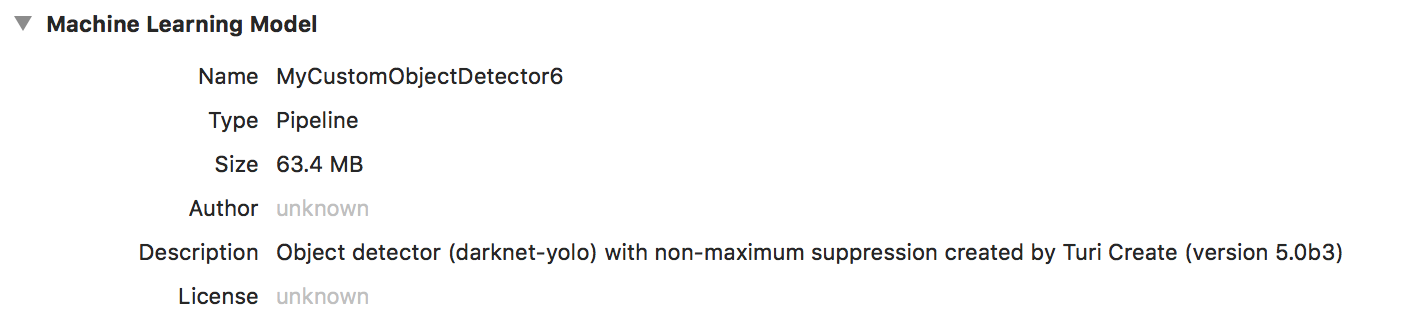
amiraeitan
on 7 Aug 2018
@amiraeitan Thanks! That narrows it down. And I take it that the only modification to the original Vision example project is that line 25 of VisionObjectRecognitionViewController.swift reflects the name MyCustomObjectDetector6?
Do you mind showing me what the output of the following command is for you?
xcodebuild -showsdks
Also, if you you run the example project 100% unchanged (with the exception of setting up code signing) with the original ObjectDetector.mlmodel, does it also reproduce this issue?
gustavla
on 7 Aug 2018
This is just an assumption and I may be completely wrong, but could it be a problem leaded by a not enough trained model? Both me and @nthState seems to train a model "just to try" (or at least this is what I assume reading max_iterations=10).
cianiandreadev
on 7 Aug 2018
@gustavla Here are the configurations of both files, the working, and non-working version.

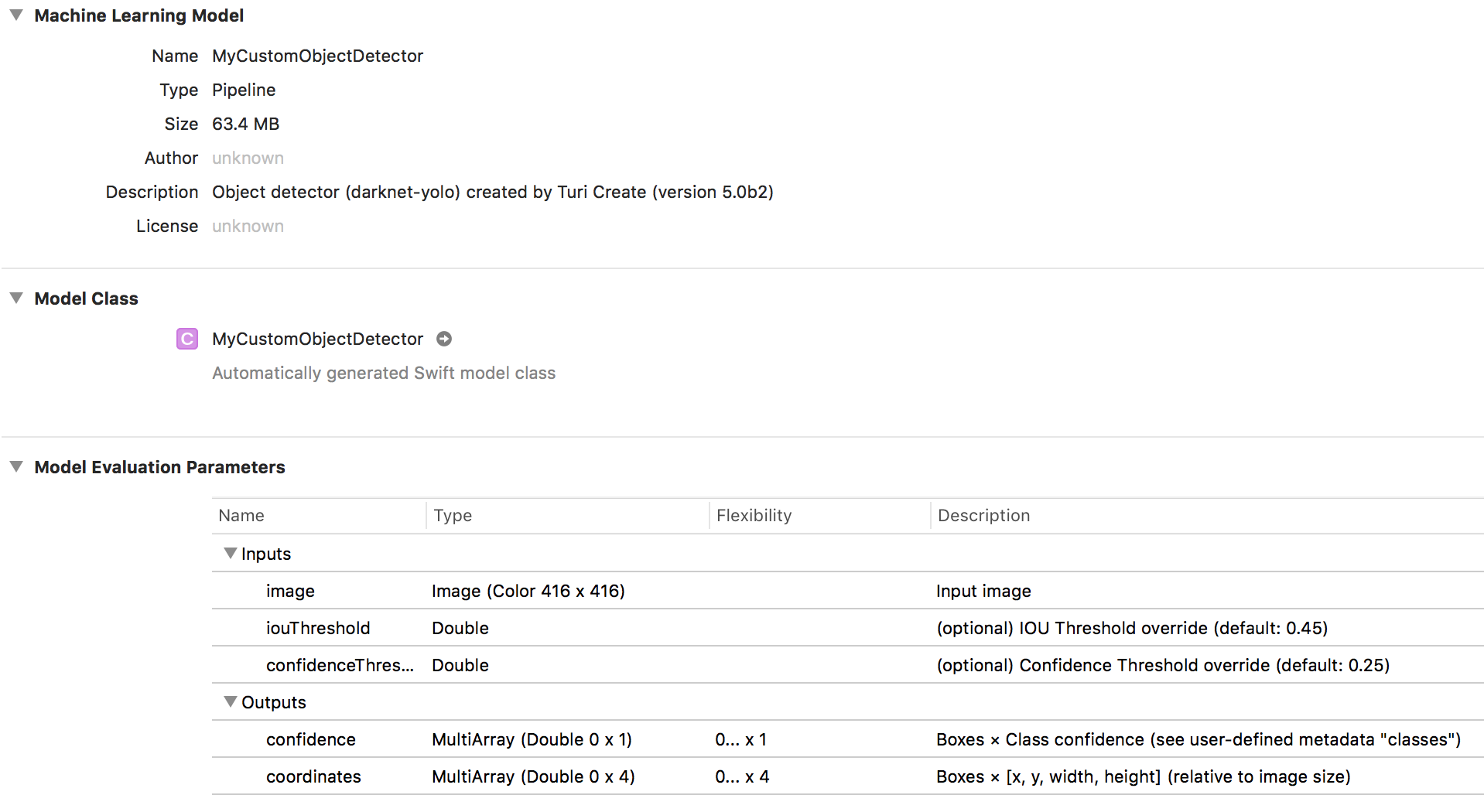
nthState
on 7 Aug 2018
@gustavla , this is the output for
xcodebuild -showsdks
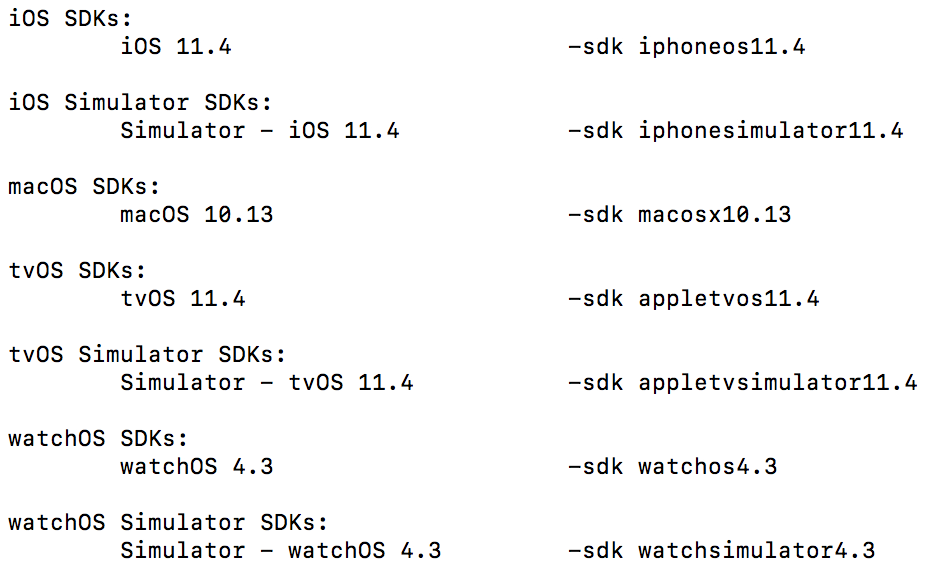
Yes, I only changed the name of the model and when I run it with the original ObjectDetector it works (printing boxes and everything...)
amiraeitan
on 7 Aug 2018
@cianiandreadev has a great point, so let me re-iterate the different scenarios and the expected behavior (which I have experimentally verified at least on my setup):
You have a model with NMS (type: Pipeline) and targeting iOS 12 that has been sufficiently trained and pointing at an object of interest: You should get an
VNRecognizedObjectObservationobject. If not, it could simply be a false negative (failure of the algorithm to detect the object), so try multiple objects (if you point it at a training sample, it should definitely fire).You have a model with NMS (type: Pipeline) and targeting iOS 12, but you did not sufficiently train the model. In this case, your result array will simply be empty. For instance, a model after only 10 iterations will always give no predictions whatsoever, since it hasn't gained enough confidence to do anything else. If you still want to do this for quick testing, make sure to set confidence threshold to 0, so that no predictions are eliminated due to low confidence. You should start seeing some
VNRecognizedObjectObservation, but they will not be good predictions.You have a model without NMS (type: Neural Network). Vision will return a
VNCoreMLFeatureValueObservationobject each iteration. This information need to be processed further to be interpreted as predictions. The BreakfastFinder app will unfortunately not give any indication that this is happening, but you can add something like this insidedrawVisionRequestResultsto check what is being returned:for observation in results { print("observation %s", observation) }You do not have iOS 12 (which is the only case I haven't experimentally verified yet), in which case I believe the results will be the same as point 3, regardless of the Core ML model.
Looking through a lot of the earlier comments in this issue, I think many of you have were hitting one of these expected behaviors. The problem is that between TurI Create and the BreakfastFinder app, we have done a really poor job communicating these subtle differences and what the expected outcome should be. That is something that we need to address through better documentation or changing the example code.
However, if there is someone that does not fall into these four cases, then that is definitely a bug and a separate issue. It sounds like this is what might be happening for @nthState and @amiraeitan, so let's dig further.
@nthState Does the BreakfastFinder app work when it is unchanged for you? Can you also confirm with xcodebuild -showsdks that Xcode is finding the iOS 12 SDK?
@amiraeitan You report that the default model works, so the difference must lie in the Core ML model. Have you confirmed that you are getting VNCoreMLFeatureValueObservation objects just like @nthState? If you are simply not getting any results at all, then that behavior falls into point 2 above. Also, I can't see iOS 12 SDK in your list of SDKs - are you sure you are successfully compiling against iOS 12?
Thanks both of you for being responsive to my follow-up questions. I really appreciate your help in tracking this down!
gustavla
on 7 Aug 2018
@gustavla - Thanks, When I plug in my Lacie with Mojave installed I'll run the -showsdks test. I'll try doing a more intensive training, as I'm running on a Macbook Pro, this may take some time :-(
nthState
on 7 Aug 2018
@nthState Thanks! I'm not sure that will work since you said you were getting VNCoreMLFeatureValueObservation objects. That should not happening and I don't think training longer will change that. How did you confirm that you were getting VNCoreMLFeatureValueObservation objects? Did you add a similar for loop to what I described above?
gustavla
on 7 Aug 2018
@gustavla
I just added code like this, just to see what I was getting back
func drawVisionRequestResults(_ results: [Any]) {
if let observations = results as? [VNCoreMLFeatureValueObservation] {
print("is VNCoreMLFeatureValueObservation")
}
for observation in results where observation is VNRecognizedObjectObservation {
guard let objectObservation = observation as? VNRecognizedObjectObservation else {
continue
}
}
}
nthState
on 7 Aug 2018
@nthState That is strange. Do you mind sharing the trained model with me? It can be a model that was trained for only 1 iteration, so it will have virtually no flavor of your training data. If you want to share it privately, you can email it to me at glarsson -at- apple.com. I just want to see if it's the model itself.
Also, have you tried the BreakfastFinder app unchanged? Does that also return VNCoreMLFeatureValueObservation objects?
gustavla
on 7 Aug 2018
@gustavla I just re-downloaded Breakfast Finder. If I modify drawVisionRequestResults, to the code above, they both fire...so I get VNCoreMLFeatureValueObservation and VNRecognizedObjectObservation firing....is that expected? Maybe I've just don't understand what's going on fully here...
nthState
on 7 Aug 2018
@nthState I think I understand what is going on. I don't think you are actually getting VNCoreMLFeatureValueObservation objects. If you use the following method of determining this:
if let observations = results as? [VNCoreMLFeatureValueObservation] {
print("is VNCoreMLFeatureValueObservation", observations)
}
What will happen is one of two things:
There is a detection and
resultsis for instance a[VNRecognizedObjectObservation]with one or more elements. In this case, yourif letstatement fails to convert to it to[VNCoreMLFeatureValueObservation]and nothing gets printed.There is no detection (which will be common when moving the camera around, or happen consistently for an under-trained model), so
resultsis an empty array and has no problem being converted to an empty array ofVNCoreMLFeatureValueObservation. You print "is VNCoreMLFeatureValueObservation" without actually having anyVNCoreMLFeatureValueObservationobjects. I experimentally confirmed this behavior.
So, please use the following code instead:
        for observation in results {
            print("observation %s", observation)
        }
I think you'll see that you do not get any VNCoreMLFeatureValueObservation objects when using a model with NMS. However, you may not get any VNRecognizedObjectObservation objects either, but that could be because the model is just not finding any objects. Longer training should help this.
gustavla
on 8 Aug 2018
@amiraeitan Your issue is the only remaining unknown, so I want to try to figure out what is happening. I think you might be having the same issue of an undertrained model (I would recommend a bare minimum of 1000 iterations, but preferably at least 5000. Leaving this parameter out will give you a recommended training time that you can calibrate against.). If that's not the case, then perhaps your SDK is too old (although that would not explain how the default BreakfastFinder app can work and just switching to your model does not).
Can you confirm that you are getting all empty observations and not VNCoreMLFeatureValueObservation objects with the code snippet that I showed above (but not the code snippet @nthState originally used).
gustavla
on 8 Aug 2018
@gustavla, I re-tested it and with your little code snippet it does seem to produce a few VNRecognizedObjectDetection objects. I guess my model is just undertrained and didn't give enough stable results to produce any long-lasting visual boxes. Sorry for wasting peoples' time here - thank you very much for looking into that!
amiraeitan
on 8 Aug 2018
I tried clarifying this on our end in the user guide. I have also suggested that changes be made to the Vision example app.
gustavla
on 8 Aug 2018
Related issues
 MaximBazarov
·
5Comments
MaximBazarov
·
5Comments
 jchuter
·
3Comments
jchuter
·
3Comments
 TobyRoseman
·
3Comments
TobyRoseman
·
3Comments
 hoytak
·
3Comments
hoytak
·
3Comments
 darknoon
·
5Comments
darknoon
·
5Comments