Turf: How to use center and lineArc to draw a curved line from PointA and PointB ?
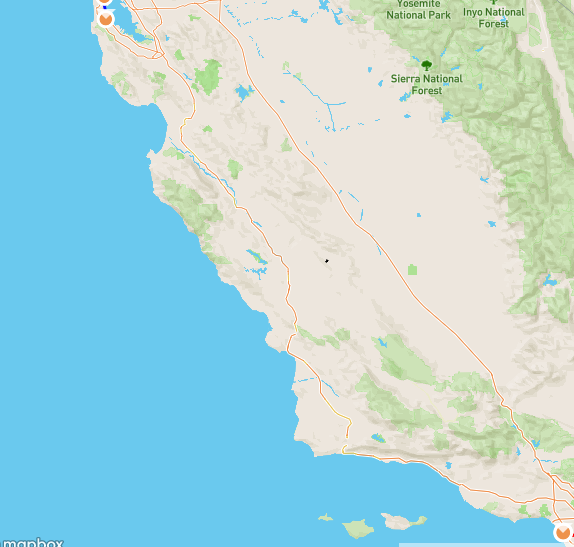
I'm using a Layer and a Feature from react-mapbox-gl to draw a line from point to point B` ( see screenshot 1)
My goal is to use line-arc and center from turf js in order to have a curved line between point A and point B
I managed to get a curved line, but it's not starting at Point A and it's not finishing at Point B... it is instead drawn in the middle of the map (see screenshot number 2)
Here is my code
     const features = turf.featureCollection([
       turf.point(this.state.startFlying),   // [-122.3811441, 37.6213129]
       turf.point(this.state.destinationFlying),  // [-118.4107187, 33.9415889]
     ]);

    const theCenter = turf.center(features);
    const arcRadius = 5;
    const bearing1 = 25;
    const bearing2 = 47;

    const arc = turf.lineArc(theCenter, arcRadius, bearing1, bearing2);
    const mappedCurvedFlyingCurve = arc.geometry.coordinates;


 aziz-boudi4
All 10 comments
If I understand correctly you basically want to create a curved line between your points, keeping the same start and end point. line-arc isn't really intended for this. You're probably better off trying to use great-circle - see http://turfjs.org/docs/#greatCircle
 rowanwins
on 8 Jan 2018
rowanwins
on 8 Jan 2018
@rowanwins Thanks, it's working. Do you know how to adjust the curvature of the Arc? Can we even do that with great-circle?
aziz-boudi4
on 9 Jan 2018
Unfortunately curvature can't be adjusted with great-circle, a great circle is fixed formula.
Another alternative approach might be to use turf/midpoint to calculate your midpoint of your existing points, as well as then get their bearing using turf/bearing. Then feed the midpoint and bearing into turf/destination, as well as your desired offset distance, this will you give you a point that represents the top of your curve. You could then use turf/bezier-spline to create a smooth line from your three points (eg start, end and offset midpoint).
It's a bit convoluted sorry but if you get it working feel free to bundle it up as a module and then we can include it in turf for others!
Hope that helps ;)
rowanwins
on 9 Jan 2018
@rowanwins Great answer! 👍 I think you're spot on with your explanation, @aziz-boudi4 I'd recommend using @rowanwins's last comment, that's how I would do it as well.
 DenisCarriere
on 9 Jan 2018
DenisCarriere
on 9 Jan 2018
@rowanwins Thanks for the detailed explanation. I will give it a try and I'll keep you posted on the progress. Good idea to bundle it up as a module so that others can use it. I'm sure it's a common use case
aziz-boudi4
on 9 Jan 2018
Hey @aziz-boudi4, I'm not sure if I have understood your need, but if you want to basically draw an arc between points you could also do something like this:
const p1 = turf.point([-122.3811441, 37.6213129]);
const p2 = turf.point([-118.4107187, 33.9415889]);
const bearingToCenter = turf.bearing(p1, p2) + 90;
const midPoint = turf.center(turf.featureCollection([p1, p2]));
const arcRadius = 1000;
const theCenter = turf.destination(midPoint, arcRadius, bearingToCenter);
const bearing1 = turf.bearing(p1, theCenter);
const bearing2 = turf.bearing(p2, theCenter);
const arc = turf.lineArc(theCenter, arcRadius, bearing1 +180, bearing2 +180);
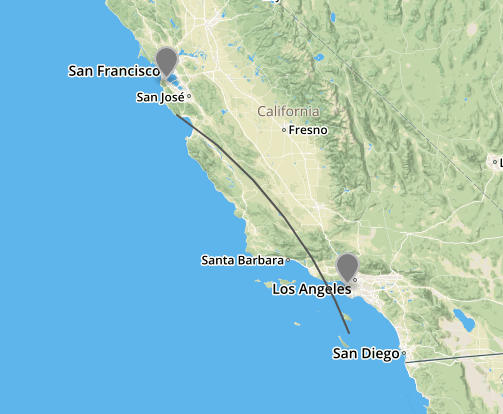
Clearly the code is not perfect, but it's just a quick draft to give you the gist.
It could actually be useful having this capability of using points instead of bearings to draw the arc.
 stebogit
on 11 Jan 2018
stebogit
on 11 Jan 2018
@stebogit thank you very much for taking the time to help out.
I got the big picture, but I can't seem to find how to make the line starts at pointA and finishes at pointB ?
aziz-boudi4
on 12 Jan 2018
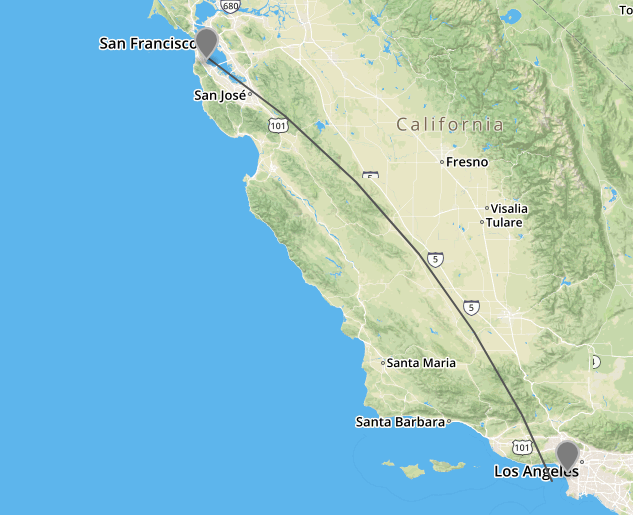
@aziz-boudi4 try using Rhumb modules instead and probably using angles instead of bearing (@turf/helpers.bearingToAzimuth) could make calculations easier.
Anyway, lineArc uses Turf functions on the spherical plain (namely destination and bearing), if would be useful to add a 'mercator' option to switch to Rhumb functions.
I tried here to draft the function here and it get closer, but I guess it requires some more work to make it right:
stebogit
on 20 Jan 2018
Here is how I did it:
drawArc(id: string, start: UniversalPlace, finish: UniversalPlace) {
    let route: LineString = {
      type: 'LineString',
      coordinates: [
        [start.longitude, start.latitude],
        [finish.longitude, finish.latitude]
      ]
    };
    route = projection.toWgs84(route);
    const lineD = lineDistance(route, {units: 'kilometers'});
    const mp = midpoint(route.coordinates[0], route.coordinates[1]);
    const center = destination(
      mp,
      lineD,
      bearing(route.coordinates[0], route.coordinates[1]) - 90
    );
    const lA = lineArc(
      center,
      distance(center, route.coordinates[0]),
      bearing(center, route.coordinates[1]),
      bearing(center, route.coordinates[0])
      );
    this.mapView.addLayer(
      {
        id,
        type: 'line',
        source: {
          type: 'geojson',
          data: projection.toMercator(lA)
        },
        paint: {
          'line-width': 4,
          'line-color': '#FCA526'
        }
      }
    );
  }
Example of the result:

 savy-91
on 28 Feb 2020
savy-91
on 28 Feb 2020
@savy-91 Thanks for this, did exactly what I needed it to. I can't believe how difficult this was to figure out.
 cdbusby
on 29 Jul 2020
cdbusby
on 29 Jul 2020
Related issues
 mnvx
·
3Comments
mnvx
·
3Comments
 tsemerad
·
4Comments
tsemerad
·
4Comments
 MichelBahl
·
4Comments
DenisCarriere
·
3Comments
stebogit
·
5Comments
MichelBahl
·
4Comments
DenisCarriere
·
3Comments
stebogit
·
5Comments
Most helpful comment
Here is how I did it:
Example of the result:
