Tui.editor: Preventing front matter and custom syntax from rendering in WYSIWYG mode
Summary
The Toast UI Editor is awesome and we've begun to use it at GitLab. I'm currently exploring options for how we can prevent certain portions of a source file from being edited in WYSIWYG mode. For example:
- Simple = raw markdown file (.md solved automatically)
- Complex = mixed languages (.html.md.erb example here)
Context
You can view additional context in this issue but I'm currently under the impression that a custom HTML renderer is the way to go.
Questions
- Do any approaches other than the custom HTML renderer come to mind?
- I'd imagine preventing frontmatter from being edited in the WYSIWYG mode would be a common expectation. Do you know of an existing solution or custom HTML renderer that prevents frontmatter from rendering in WYSIWYG mode?
- Can you point us to any existing open source custom HTML renderers that others have created? These would be great learning resources and/or jump-off points.
Thank you
Thank you in advance for any feedback and hopefully we can contribute back to Toast UI Editor as we make progress. For example if #2 above doesn't exist already, I'd imagine others would find such a custom renderer useful.
 derek-knox
All 13 comments
@derek-knox I checked the mail before this issue. 😅 I think you have already checked the contents of the mail, but I'll put it back together for issue management. Then I would be grateful if you could confirm the email or issue and reply. 🙏
We've checked your detail issue and summarized as below.
- Make specific contents uneditable in WYSIWYG.
- Header (Frontmatter)
- The specific contents of the body
However, we have two problems for solving the above issue.
The Frontmatter is not commonmark spec we follow. So the Frontmatter would be parsed in our markdown preview as heading node.
We think that this issue cannot be solved through our custom renderer. As long as we follow the commonmark, even if we prevent to render the Frontmatter through a custom renderer, it would not match the parsed result and side effects could occur.
=> _As Frontmatter is the meta information, we think that it's better not to show this information in both markdown preview and WYSIWYG. It should be displayed in only markdown editor. So, we need to make a plug-in for Frontmatter and discuss about more detail things._Currently, We don't have the efficient option or API for preventing the specific content in WYSIWYG.
=> _To solve this issue, we should discuss about providing other option and after then we can give you the exact answer and guide._And here is feedback for your question.
- Do any approaches other than the custom HTML renderer come to mind?
I'd imagine preventing frontmatter from being edited in the WYSIWYG mode would be a common expectation. Do you know of an existing solution or custom HTML renderer that prevents frontmatter from rendering in WYSIWYG mode?
=> _As mentioned above, Frontmatter needs to be handled through plug-in system due to not in commonmark spec. So we will make the plug-in and option for WYSIWYG._Can you point us to any existing open source custom HTML renderers that others have created? These would be great learning resources and/or jump-off points.
=> _Currently, the example code does not exist except our tutorial guide. I don't know if it helps, but here's the format we use internally._To solve the issue, we need the time for discussing and developing the feature.
 seonim-ryu
on 22 May 2020
seonim-ryu
on 22 May 2020
@seonim-ryu Let's keep the conversation here vs email. Thank you for responding and adding clarity, we really appreciate it!
My takeaways from your response are:
- > So, we need to make a plug-in for Frontmatter and discuss about more detail things.... So we will make the plug-in and option for WYSIWYG.
- Feel free to @ me as you make progress on the plugin approach as (for now due to time constraints) we'll be opting to pre-parse and manually remove the frontmatter from the WYSIWYG mode
- > To solve this issue, we should discuss about providing other option and after then we can give you the exact answer and guide.
- My takeaway from this response is that the custom HTML renderer approach (as there aren't any pre-existing) is the best approach, can you confirm?
- > Currently, the example code does not exist except our tutorial guide. I don't know if it helps, but here's the format we use internally.
- Thank you for sharing this as I'll be using both as guides.
derek-knox
on 26 May 2020
@derek-knox Thanks for the reply. I checked the issue again through your issue link. I've figured out what features and problems you solve, and I think the following two things.
1. Frontmatter Issue
I saw a discussion on this in the link above. Frontmatter can be handled by other parsers (e.g. gray-matter). I think it's a good idea and the TOAST UI Editor will consider this method when creating the Editor's plugin. When I start creating the plugin, I'll share the progress on it.
2. Custom Renderer
At first, I misunderstood your issue. After all, the feature you want is that a node created using a custom renderer are inserted into specific body content (WYSIWYG) with contenteditabl="false". In order to handle it, the contenteditable attribute must be added to a specific node. However, currently the attribute in paragraph is not applied to WYSIWYG due to our internal code which is wrapping the paragraph in the div block. When this issue is fixed in the Editor, you can define the contenteditable attribute through a custom renderer as shown below.
const renderer = {
paragraph(node, { origin }) {
const regexp = /(<%.*%>)|({:toc.*})/;
const result = origin();
const { firstChild } = node;
if (regexp.test(firstChild.literal)) {
const { attributes = {} } = result;
attributes.contenteditable = false;
result.attributes = attributes;
}
return result;
}
}
const editor = new Editor({
// ...
customHTMLRenderer: renderer
})
In case of the second issue related to the custom renderer described above, I will try to resolve it as soon as possible. The next version of the Editor will be released in mid-June, and we are going to fix this issue. Is there any problem with your schedule?
seonim-ryu
on 29 May 2020
@seonim-ryu
- > ...When I start creating the plugin, I'll share the progress on it.
Please do :) Currently we're solving by:
- Tracking and dynamically updating a
parsedSourceFileobject
- Which then delagates to
<toast-editor>'sinitial-valueprop - Where an
onModeChangelistener is our hook for knowing when to feed the aforementionedinitial-valuethe entirerawcontents (markdown mode) or just the parsed outbody(wysiwyg mode) - Lastly when we save, we ensure that any updates to the
bodymodel of theparsedSourceFileobject are reflected in theraw
- Which then delagates to
I initially thought we could just use v-model but it turns out that initial-value is instead used in the <toast-editor>. This made sense after I got into the code as the editor needs to internally manage the value model and cursor focus.
- If my understanding is incorrect and you know a better way, please share!
- If you have a rough pseudo-code implementation for how you plan to solve the removing front matter from WYSIWYG problem then please share as well
- > When this issue is fixed in the Editor, you can define the contenteditable attribute through a custom renderer as shown below.
Are you saying that until the mid-June release (awesome by the way :)) a custom renderer cannot properly update a node's attributes to contenteditable = false? It looks as though this is currently possible https://github.com/nhn/tui.editor/blob/master/apps/editor/docs/custom-html-renderer.md#opentag. Assuming it is currently possible, could you please explain which issue exactly you're referring to in your "When this issue is fixed in the Editor" comment?
@seonim-ryu Regarding customHTMLRenderer:
Can you confirm this option works for you or can you share a link to a working example of using the Was a result of needing to update to the latest version 😅 customHTMLRenderer? I've followed https://github.com/nhn/tui.editor/blob/master/apps/editor/docs/custom-html-renderer.md#custom-html-renderer, but none of the convertor functions actually run. Is there some other setting/flag I need to set to true or something?
derek-knox
on 3 Jun 2020
@derek-knox
- ...
I initially thought we could just usev-modelbut it turns out thatinitial-valueis instead used in the<toast-editor>. This made sense after I got into the code as the editor needs to internally manage the value model and cursor focus.
- If my understanding is incorrect and you know a better way, please share!
- If you have a rough pseudo-code implementation for how you plan to solve the removing front matter from WYSIWYG problem then please share as well
I looked at the code review of the link you gave, and it seems to work fine the way you wrote it, and in the current situation, the way you write is correct. Consider using v-model in the Editor's Vue wrapper to manage data internally. And the pseudo-code related to frontmatter have not been specified yet, so I will share them after the Editor is released.
- ...
Assuming it is currently possible, could you please explain which issue exactly you're referring to in your "When this issue is fixed in the Editor" comment?
Currently, adding the contenteditable attribute in the custom renderer is fine. The problem is that the contenteditable attribute you set when you change from Markdown to WYSIWYG mode disappears. So we solved this problem in PR, and when this PR is merged, the element with contenteditable="false" works correctly in WYSIWYG.
seonim-ryu
on 8 Jun 2020
@derek-knox The Editor was released in version 2.2.0 yesterday. Now you can set the attribute to contenteditable="false" when using the custom renderer, and it has been modified to work properly when you switch to WYSIWYG mode. Check it out!
And plug-in development will start soon. When the schedule is confirmed, I will notify you again. 😃
seonim-ryu
on 17 Jun 2020
@seonim-ryu Thank you for the update. I'll look into the new release. I appreciate you keeping us in the loop 😄
derek-knox
on 17 Jun 2020
@seonim-ryu
I think it's a good idea and the TOAST UI Editor will consider this method when creating the Editor's plugin. When I start creating the plugin, I'll share the progress on it.
- Do you have an update on this?
- Do you mind sharing the rough approach you plan for this? I ask, as we may be able to do this work assuming our end goals for such a feature align. For context, we want:
- Frontmatter to be present in markdown mode editing
- Be hidden from WYSIWYG mode editing and instead have a dedicated UI component/form (with input fields, checkboxes, etc). Some rough context on this here https://gitlab.com/gitlab-org/gitlab/-/issues/231725#note_388328042
derek-knox
on 3 Aug 2020
@derek-knox I checked the issue details you shared. Although the exact completion date has not been determined, development of the plugin for frontmatter is scheduled to begin in mid-August. I think we can plan the development schedule in detail if we need to accurately calculate features. I'll organize this and share it within this month. Is there anything else you need in addition to the above 2?
- Frontmatter to be present in markdown mode editing
- Be hidden from WYSIWYG mode editing and instead have a dedicated UI component/form (with input fields, checkboxes, etc). Some rough context on this here https://gitlab.com/gitlab-org/gitlab/-/issues/231725#note_388328042
seonim-ryu
on 7 Aug 2020
@seonim-ryu Those two bullet points above are the core UX needs, but you can learn more here: https://gitlab.com/groups/gitlab-org/-/epics/4119#acceptance-criteria.
Regarding my previous "Do you mind sharing the rough approach you plan for this?" ask can you share your rough high-level technical plan?
derek-knox
on 20 Aug 2020
@derek-knox
Sorry for late replying.
We are planning to develop our front-matter plugin or option and start to develop today as below.
- Create the option for parser that can be injected from outside in our markdown parser(
toastmark).
- This is necessary for not only the front-matters but also for other custom syntax(markdown), so we will review and add this option. It is an important part of our next major update.
- Using node(front-matter) created through custom parser, control rendering of WYSIWYG, markdown preview.
- Currently, we think that front-matter should be hidden in WYSIWYG, markdown preview because it is unnecessary in WYSIWYG editor, preview.
- The issue is that front matter text cannot be stored in WYSIWYG mode so that we will save the raw front-matter text internally.(In next version, it can be stored in our WYSIWYG model.)
Additional, We consider only the yaml format as below.
---
title: title
---
Thank you!
 js87zz
on 25 Aug 2020
js87zz
on 25 Aug 2020
@derek-knox
We added frontMatter option(#1171) and release it in v2.4.0.
I will explain about a few things as below.
- The front matter is supported by configuring the option because there are a lot of related layer to make it hard to separate as plugin. Also, since it is not an official specification of commonmark, we decide that it is better to provide it as an option like
gfm. - The front matter is parsed into the paragraph with
customTypeprop using our custom parser. - It is hidden in the markdown preview or viewer mode.
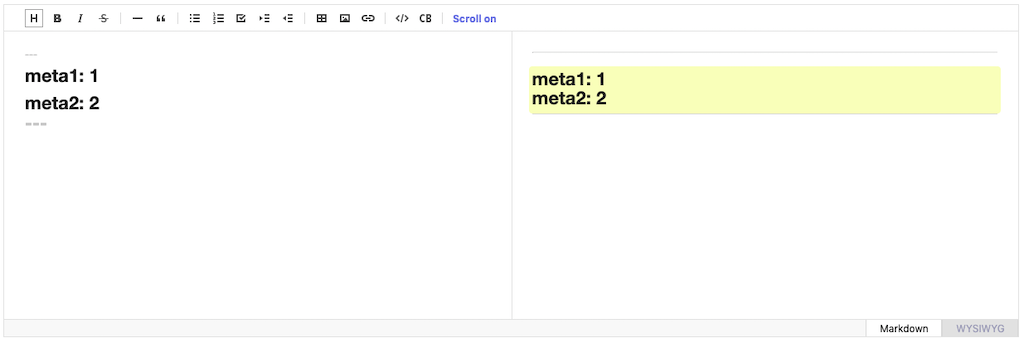
- We decided to show the front matter in WYSIWYG. This is different from what I said before, for the following reasons.
The purpose of our editor is the synchronization between Markdown and WYSIWYG. Therefore, if it is editable in Markdown, it should also be editable in WYSIWYG as below.

You can have a question that WYSIWYG should provide a different format for editing front matter, but we think it is something that needs to be planned and solved later. - What you wanted at first was to prevent to edit the front matters in WYSIWYG. This can be solved through the following example code.
const editor = new Editor({
  el: document.querySelector('#editor'),
  // ...
  // configure front matter option
  frontMatter: true,
  customHTMLRenderer: {
    paragraph(node, { origin, options }) {
      const { customProp = {} } = options;
      const showFrontMatter = customProp.showFrontMatter && node.customType;
      const attributes = {};

      // prevent to edit the front matter in WYSIWYG
      if (showFrontMatter) {
        attributes.contenteditable = false ;
      }
      return { ...origin(), attributes };
    },
  }
});
Additionally, there are some issues that cannot be implemented in our current structure such as markdown custom syntax and exact synchronization between WYSIWYG and Markdown. And front matter option needs supplement(syntax highlighting, internal logic for switching to WYSIWYG). To solve these problems, we are currently planning to rebuild the editor completely in the next major version and are already in progress. I will register the related information on next week, so if you are interested, please give me your opinion! Thank you :)
js87zz
on 10 Sep 2020
Hi,
Toast UI is supercool! We are trying to integrate it for our physicians at https://projectvikram.github.io
Which version should we use for the above fix ?
We are facing an issue importing GFM markdown with inline HTML! On encountering any HTML tag other than bold the entire content vanishes. Verified by switching between markdown and wysiwyg modes manually too.
      const Editor = toastui.Editor;
      const wysiwyg = new Editor({
        el: document.querySelector('#editor'),
        height: '500px',
        initialValue: 'Loading...',
        initialEditType: 'wysiwyg'
      });

       mycont = '# Head 1\\n### Head 3\\nPara       <b>Word</b>'; // works
       //mycont = '# Head 1\\n### Head 3\\nPara       <b>Word</b><br>'; //does not work - entire content vanishes
       wysiwyg.setMarkdown(mycont,0);
We are using toastui-editor.min.css with toastui-editor-all.min.js from "latest". Meanwhile I will experiment with the custom renderer example above.
Regards,
Abhishek
 obonac
on 22 Jun 2021
obonac
on 22 Jun 2021
Related issues
 oguera
·
3Comments
oguera
·
3Comments
 Rorke76753
·
4Comments
Rorke76753
·
4Comments
 nilhave
·
3Comments
nilhave
·
3Comments
 dioscuroi
·
3Comments
dioscuroi
·
3Comments
 aarangara
·
3Comments
aarangara
·
3Comments
Most helpful comment
@derek-knox
Sorry for late replying.
We are planning to develop our front-matter
pluginoroptionand start to develop today as below.toastmark).Additional, We consider only the
yamlformat as below.Thank you!