Tui.editor: HTML <mark> tag disappearing
Version
1.3.0
Development Environment
Windows and Mac: Chrome, Firefox, and edge.
Current Behavior
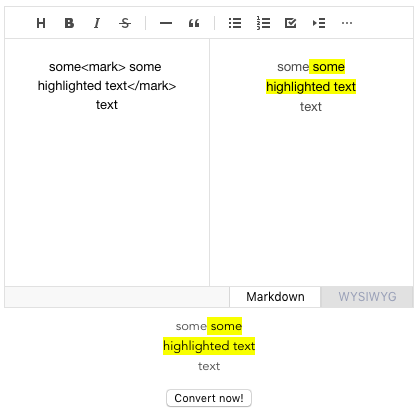
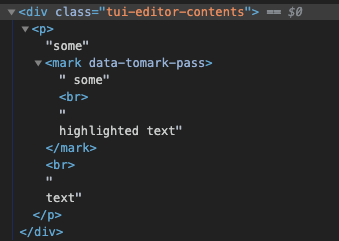
When a user puts a \ tag in the markdown tab it shows the text highlight correctly on the preview, but when the tab is switched to the wysiwyg the highlight disappears. The tag is no longer on the text when you go back to the markdown tab.
Expected Behavior
The mark tag stays in place like html tags or is a special type like italic and bold.
 jolrael-dev
All 7 comments
The mark tag is an HTML5 tag, but it's confusing my users that they can see it and then it goes away
https://www.w3schools.com/tags/tag_mark.asp

jolrael-dev
on 16 Dec 2019
I tried like you tried. However It is no problem. Can I see your code by codepen or jsbin etc?
I tried at Chrome and Safari.
 Seunghyum
on 18 Dec 2019
Seunghyum
on 18 Dec 2019
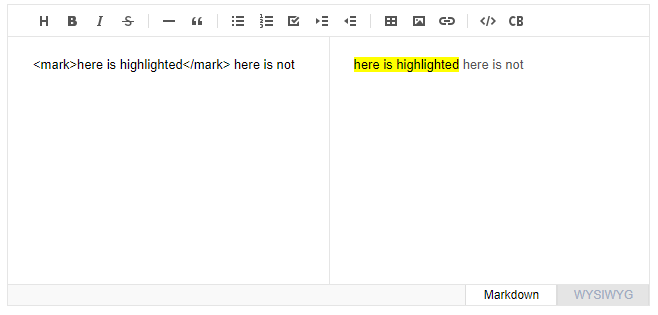
I'm able to reproduce it here https://nhn.github.io/tui.editor/latest/tutorial-example01-editor-basic
On Markdown tab:
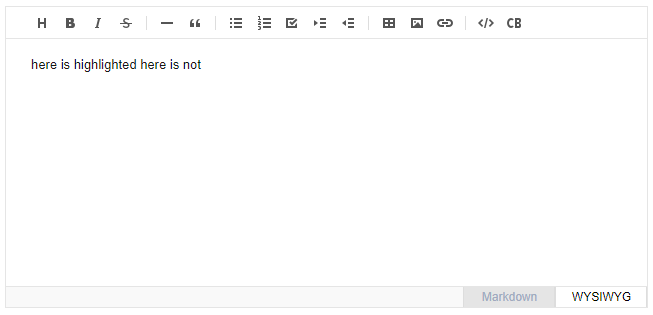
After changing to WYSIWYG tab:
jolrael-dev
on 18 Dec 2019
@jolrael-dev
Yes, you're right. Mark tag is now showing in WYSIWYG tab. also removed mark tag when back to Markdown tab
 jongfeel
on 19 Dec 2019
jongfeel
on 19 Dec 2019
This is a question related to the issue #705. Please check that issue first. Currently, And in WYSIWYG, the tags below and other tags are removed. The mark tag is the case here.
 seonim-ryu
on 19 Dec 2019
seonim-ryu
on 19 Dec 2019
The html5 tag mark does not carry over to the wysiwyg tab, not showing the literal text or displaying the highlight. To contrast the tag \ will still show the text as a subscript on the wysiwyg tab, and the html5 time tag stays when you return to the markdown tab.
1 markdown tab:

2 wysiwyg tab:
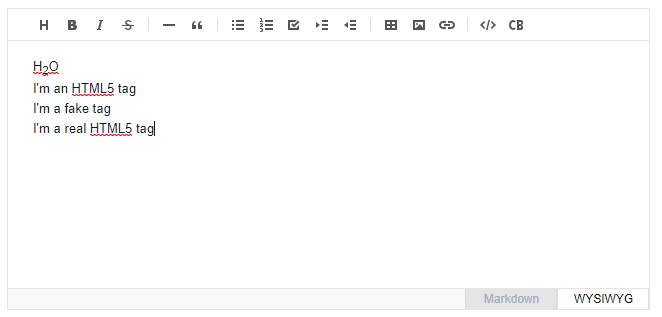
3 back to markdown tab:

As you can see the fake tag and the mark tag was removed, but time and sub were still there. Mark is an html5 tag and should stay.
jolrael-dev
on 19 Dec 2019
@jolrael-dev I got it.. It's because of the tag handling in Squire. However, what I said before was the processing of block elements. mark is an inline element, which is excluded from the logic of processing inline elements in Squire.
Simply adding mark to the code above won't solve the problem. I think this issue can be solved by specifying the specification of which tags should be allowed or not. I'll let you know when it's decided.
seonim-ryu
on 20 Dec 2019
Related issues
 cyberjacob
·
4Comments
cyberjacob
·
4Comments
 gincheong
·
4Comments
gincheong
·
4Comments
 kelvinkoko
·
3Comments
kelvinkoko
·
3Comments
 Yeongjae-Shin
·
3Comments
Yeongjae-Shin
·
3Comments
 mygyugyu
·
3Comments
mygyugyu
·
3Comments
Most helpful comment
The html5 tag mark does not carry over to the wysiwyg tab, not showing the literal text or displaying the highlight. To contrast the tag \ will still show the text as a subscript on the wysiwyg tab, and the html5 time tag stays when you return to the markdown tab.



1 markdown tab:
2 wysiwyg tab:
3 back to markdown tab:
As you can see the fake tag and the mark tag was removed, but time and sub were still there. Mark is an html5 tag and should stay.