Tui.editor: option height: 'auto' displays horizontal scrolling bar in textarea
Version
1.1.1
Test Environment
Windows 7 and Chrome 66
Current Behavior
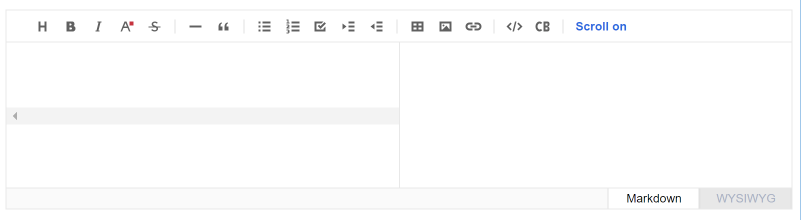
If you set the option height: 'auto' to the editor, you can see an horizontal scrolling bar in the middle of the textarea.
Expected Behavior
Hide the scrolling bar.
This can be done with something like this :
```css
.CodeMirror-scroll {
min-height: 166px;
}
````
 bricepepin
👍3
All 3 comments
 sohee-lee7
on 21 Feb 2019
sohee-lee7
on 21 Feb 2019
👍3
Might also be related to the editor not initializing correctly if starting in markdown mode.
I found something if its in an element with display: none theres initialization issues
Checkout https://github.com/codemirror/CodeMirror/issues/798
 gregroyal
on 20 Jun 2019
gregroyal
on 20 Jun 2019
I found cause of this issue.

min-height: 145px; should also apply to <div class="CodeMirror-scroll" ... />.


 ibocon
on 3 May 2021
ibocon
on 3 May 2021
Was this page helpful?
0 / 5 - 0 ratings
Related issues
 lovemine
·
4Comments
lovemine
·
4Comments
 Rorke76753
·
4Comments
Rorke76753
·
4Comments
 cyberjacob
·
4Comments
cyberjacob
·
4Comments
 dioscuroi
·
3Comments
dioscuroi
·
3Comments
 kelvinkoko
·
3Comments
kelvinkoko
·
3Comments
Most helpful comment