Tsparticles: Changing particle size without refreshing animation
Hi,
Apologies if this isn't the place for this, I couldn't figure out how else to contact.
Is your feature request related to a problem? Please describe.
I want to increase the size of particles on the fly. I'm using Svelte and have a function that increases particlesConfig.particles.size.value by X every time it runs. However, the increase refreshes the entire animation resulting in a very janky looking animation overall.
Describe the solution you'd like
I would like a way to make the particles grow in place without restarting animation. Alternatively, I'd like to be told that this is impossible so that I can stop trying. :D
Describe alternatives you've considered
I have tried increasing FPS to see if that makes the transition less jarring, but it didn't seem to help.
Additional context
Thank you for any response.
 6vx
6vx
All 9 comments
Issue-Label Bot is automatically applying the label feature_request to this issue, with a confidence of 0.63. Please mark this comment with :thumbsup: or :thumbsdown: to give our bot feedback!
Links: app homepage, dashboard and code for this bot.
![issue-label-bot[bot] picture](https://avatars2.githubusercontent.com/in/27079?v=4&s=40) issue-label-bot[bot]
on 18 Aug 2020
issue-label-bot[bot]
on 18 Aug 2020
Hi @6vx,
You can update the particles size value directly on the particles but it's a little bit tricky.
You need to retrieve the tsParticles Container instance. You can try using
const container = tsParticles.domItem(0);
for (const particle of container.particles.array) {
// you can update particle.size.value
}
This won't trigger the refresh
If this won't work, could you create a CodeSandbox with the issue? So I can support you much better
 matteobruni
on 18 Aug 2020
matteobruni
on 18 Aug 2020
I appreciate the reply. to be honest I may just not know enough generally to do what you said.
Also I've never made a code sandbox. o_O
But I added that const (even though I don't really know what a domItem is, sorry) , and then put your "for" into the function I was using, and I'm clearly missing something.
I did the same thing to the default svelte template and ended up with a bunch of errors, here is the result.
I recognize that not knowing enough about the dom may be my problem and nothing to do with your repo, so if this is too brain-consuming to explain to me, I don't mind if you just close this thread.
If you could point me towards a resource that might illuminate me I'd be thankful.
Also I should mention - great work on this thing. The examples made it easy to get it looking the way I wanted. :D
Edit: https://codesandbox.io/s/proud-shape-8uh98 is probably better than a zip file. :D I am now a codesandbox member.
6vx
on 19 Aug 2020
Thanks for the CodeSandbox, the error was what I’ve imagined.
I’ll fix it in 1.17.9 and release it later.
matteobruni
on 19 Aug 2020
I've released svelte-particles 1.0.10 with an event that returns you a Particles Container object where you can access particles property.
You can read here (https://www.npmjs.com/package/svelte-particles) how to implement it.
Referring that code you can add this at the end of the onParticlesLoaded function:
for (const particle of particlesContainer.particles.array) {
// you can update particle.size.value here
}
The domItem was a function of the tsParticles main object but in Svelte is not used.
This function will be called every time the particlesContainer is built, so if you'll update the component you'll get a new one.
matteobruni
on 19 Aug 2020
Wow. I got it working the way I wanted using your instructions. I'm thankful and delighted by the whole experience. Much gratitude.
6vx
on 21 Aug 2020
I'm using script lang="ts" in my projects script tags, svelte recently added that option.
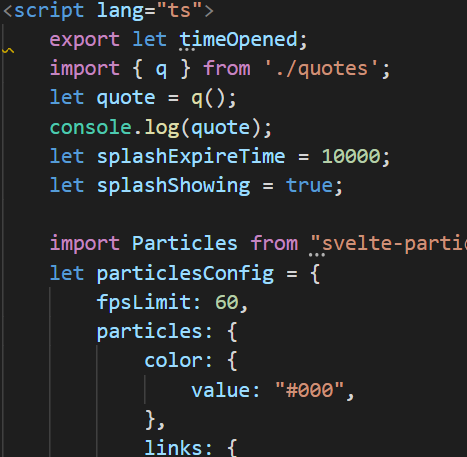
I don't know if that's relevant but I mention because the error I'm getting is related to an undeclared type.
Property '$on' does not exist on type 'unknown'. ts(2339)
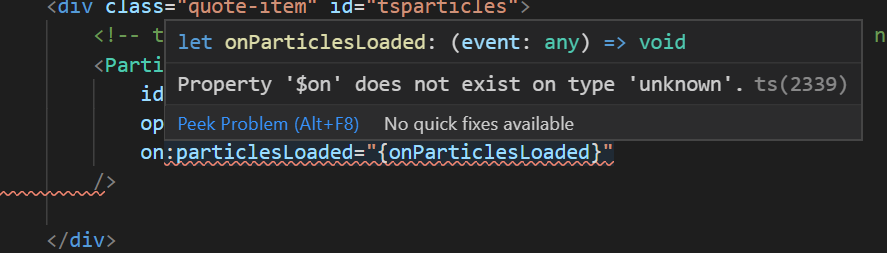
Doesn't affect what I want, as I'm able to change the size smoothly now, but the error is sitting there underlined.
Just wanted you to know. Thanks again.
6vx
on 21 Aug 2020
I tried remaking the component in a regular svelte app, without the script lang ts, and it did not have the squigglies. So. It is the typescript. I assume. Just wants to know something. I don't know how to declare this particular thing that it wants to know, though. Or what it wants to know. lmao.
6vx
on 21 Aug 2020
I converted the component in TypeScript in the next minor release, probably this will fix this issue
matteobruni
on 21 Aug 2020
Related issues
matteobruni
·
6Comments
 adammesa
·
4Comments
matteobruni
·
4Comments
matteobruni
·
5Comments
matteobruni
·
4Comments
adammesa
·
4Comments
matteobruni
·
4Comments
matteobruni
·
5Comments
matteobruni
·
4Comments
Most helpful comment
I've released
svelte-particles1.0.10 with an event that returns you a Particles Container object where you can accessparticlesproperty.You can read here (https://www.npmjs.com/package/svelte-particles) how to implement it.
Referring that code you can add this at the end of the
onParticlesLoadedfunction:The
domItemwas a function of thetsParticlesmain object but in Svelte is not used.This function will be called every time the
particlesContaineris built, so if you'll update the component you'll get a new one.