Tslint: Describe how to run tslint with type checking form the command line
Bug Report
- __TSLint version__: 5.4.3
- __TypeScript version__: 2.3.4
- __Running TSLint via__: CLI
How to run tslint with type checking? I simply don't understand the documentation in docs/usage/type-checking/index.md
- What is this program snippet shown in the docu used for?
- Where to put it?
- How run
tslintwith--projectform the command line?
When I run it
tslint --project admin/tslint.json "project/**/*.ts{,x}"
I get
Invalid source file: project/main.ts. Ensure that the files supplied to lint
have a .ts, .tsx, .d.ts, .js or .jsx extension.
 scharf
All 6 comments
--project needs to point to your tsconfig.json.
Try tslint --project admin/tsconfig.json
You also don't need to specify the files to lint. It will automatically include all files in the project.
Note to myself: we definitely need to report errors when loading tsconfig.json fails.
 ajafff
on 7 Jul 2017
ajafff
on 7 Jul 2017
But how doestslint know which files belong to the project?
The documentation of --project says:
The location of a tsconfig.json file that will be used to determine which files will be linted.
What is a tsling project? How to create a project? I cannot find anything talking relevant about the concept of tslint projects.
scharf
on 8 Jul 2017
Ah! Looking into files of PR #2688 I understand that by project you mean the tsconfig.json file!
scharf
on 8 Jul 2017
I am slightly dyslexic and I confused tslint.json with tsconfig.json! Maybe a full example would help
tslint --config admin/tslint.json --project proj/tsconfig.json
@scharf that's fair; a full example of using --project would certainly be helpful in the documentation.
 adidahiya
on 8 Jul 2017
adidahiya
on 8 Jul 2017
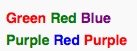
In particular because the --config flag does not take the file that contains the string config (tsconfig.json) which causes a kind of Stroop effect.
Say the COLOR, not the word:
scharf
on 9 Jul 2017
Related issues
 mrand01
·
3Comments
mrand01
·
3Comments
 cateyes99
·
3Comments
cateyes99
·
3Comments
 SwintDC
·
3Comments
SwintDC
·
3Comments
 mateiacd
·
3Comments
mateiacd
·
3Comments
 ghost
·
3Comments
ghost
·
3Comments
Most helpful comment
In particular because the
--configflag does not take the file that contains the stringconfig(tsconfig.json) which causes a kind of Stroop effect.Say the COLOR, not the word:
