Tskit: SVG IDs not unique and being cached by Jupyter
Hi everyone! I keep finding that when I use draw_svg several times in the same Jupyter notebook, I get odd (wrong) drawings that are always wrong in the same way. An example is below:
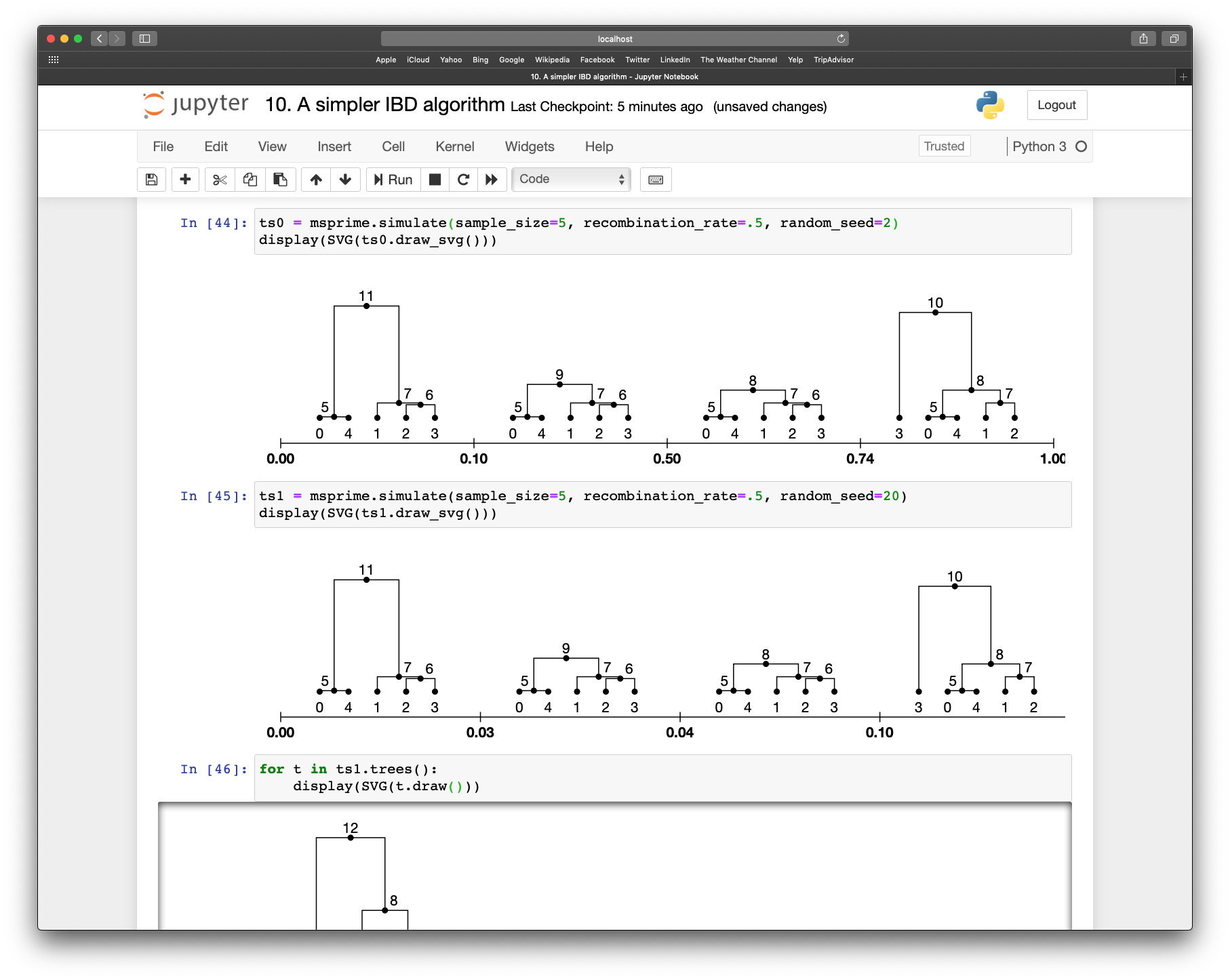
In the notebook shown above, I have two difference tree sequence objects, ts0 and ts1, that I wish to draw. Using draw_svg with ts0 first produces the correct output, but when I try to draw ts1 in the following cell, you can see that the first few trees are just copied over from ts0.
Without digging into it further I'm not totally sure what's going on, but I'm wondering whether draw_svg is inadvertently adding something to some global object each time it is called, without checking to see if it already exists beforehand and clearing it?
 gtsambos
All 14 comments
This is super weird! It must be something to do with the notebook environment, because when I save the SVGs to file, it all works as expected.
Here's what I think has happened. When we write out the SVGs, we give different parts of them IDs, like
    <g id="tree_1">
      <g fill="none" id="edges" stroke="black">
        <path d="M 52.49999999999999 139.0415820568835 V 107.12582507666866 H 84.375" id="edge_1_5"/>
I think it must be the case that the Jupyter environment is taking these SVG IDs to be global. I don't know if this is legitimate behaviour or not, but I guess we should change our IDs to be unique. I guess the simplest thing is to put the id(ts) as prefix to all the values.
Great spot, thanks @gtsambos!
 jeromekelleher
on 9 Mar 2020
jeromekelleher
on 9 Mar 2020
Generally in an HTML document IDs are assumed to be unique. https://www.w3.org/TR/html4/struct/global.html#h-7.5.2
 benjeffery
on 9 Mar 2020
benjeffery
on 9 Mar 2020
OK, we just need to add the object ID string to each of these IDs in the SVG then. That should be safe, I guess (but also make the IDs less useful, since they can't be predicted simply).
jeromekelleher
on 9 Mar 2020
I have this problem too, but didn't take the time to debug it, so thanks @gtsambos
 hyanwong
on 17 Mar 2020
hyanwong
on 17 Mar 2020
Presumably the reason we are adding ids is so that we can target them using css. If so, we should probably use classes instead, e.g.
    <g class="tree_1">
      <g fill="none" class="edges" stroke="black">
        <path d="M 52.49999999999999 139.0415820568835 V 107.12582507666866 H 84.375" class="edge_1_5"/>
Then, we should assign the object string to the id attribute of the whole SVG object, so that we can do, e.g.
#object_id .tree_1 .edges {color: blue}
or whatever
hyanwong
on 17 Mar 2020
Good idea. I know nothing about CSS, unfortunately. @benjeffery, any thoughts?
jeromekelleher
on 18 Mar 2020
I'm just starting to try to animate(!) some trees, and I'm going to hit this problem with IDs. For example, the edges are labelled like id="edge_0_13", but that assumes that there is only going to be one edge from 0 to 13, which might not be the case. So I think these should be changed to classes too. Do you want me to work up a PR that changes all IDs to classes (see https://stackoverflow.com/questions/37000385/multiple-svg-with-same-ids)?
hyanwong
on 24 Apr 2020
Yes please Yan, this is an annoying problem.
jeromekelleher
on 24 Apr 2020
@jeromekelleher I also wonder if we should remove the prefix edge_ from the class names, as it should be easy to target the edge currently labelled edge_0_3 using the fact that it is contained in a group called edges. Separating the parent from the child number would also be helpful, as then we could easily target e.g. all the edges with a particular parent or child. So (to save svg space), how about setting two class names for an edge, prefixed with a c for the child number and a p for the parent. That would look something like:
<g fill="none" class="edges" stroke="black">
  <path class="p13 c0" ...
And you could target it using css with
.tree_0 .edges .p13.c0 {stroke: blue}
or target all edges in this tree with parent 13 by
.tree_0 .edges .p13 {stroke: red}
Similarly, we could remove node_ as a suffix, and also the tree ID from the nodes. So instead of id="node_0_5" we could simply have class="n5", which would be targetted by
.tree_0 .nodes .n5 {size: 200%} /* or whatever */
I suspect @benjeffery might have useful things to say here.
hyanwong
on 24 Apr 2020
While I'm at it, I suspect it would also be useful to give each mutation a class, say m6 for mutation ID 6. We could also give them the site ID, which would be useful to colour all mutations for the same site in a give colour. So a mutation with id 6 at site 3 would have class="m6 s3"
hyanwong
on 24 Apr 2020
Sounds good to me @hyanwong - but I'll defer to @benjeffery here. How about working up your proposal as a PR?
jeromekelleher
on 24 Apr 2020
Sounds good. Just checking: have you checked that this will fix the problem? It'd be pretty easy to check by editing the html (maybe with your browser's inspector).
 petrelharp
on 24 Apr 2020
petrelharp
on 24 Apr 2020
Sounds good. Just checking: have you checked that this will fix the problem? It'd be pretty easy to check by editing the html (maybe with your browser's inspector).
There is a problem with displaying a whole tree sequence, as we need unique IDs to apply positioning. I think we should probably just generate these on-the-fly. Am working out a PR
hyanwong
on 24 Apr 2020
Confirmed that #555 fixes the Jupyter notebook problem (in particular, commit https://github.com/tskit-dev/tskit/pull/555/commits/1ac1e94181547cee4b893519ccf0bdecdb121704)
hyanwong
on 24 Apr 2020
Related issues
 bhaller
·
6Comments
jeromekelleher
·
7Comments
bhaller
·
5Comments
bhaller
·
4Comments
jeromekelleher
·
3Comments
bhaller
·
6Comments
jeromekelleher
·
7Comments
bhaller
·
5Comments
bhaller
·
4Comments
jeromekelleher
·
3Comments