Tsed: [QUESTION] Import BaseServer from package and use it with local controllers
Hi there!
Thanks for awesome lib!!!
My question:
We have multiple services and purpose is to make default application starter to make it easier for bootstraping new service.
Example:
@someLib/baseApp/server.ts
export class BaseServer extends ServerLoader implements IServerLifecycle {
  @Inject() public app: PlatformApplication;
  @Configuration() public settings: IApplicationSettings & Configuration;

  constructor(settings: Partial<IApplicationSettings> = { }) {
    super(settings);
  }

  public $beforeInit(): void {
    this.setQueryParser();
  }

  public $beforeRoutesInit(): void {
    this.setDefaultMiddlewares();
    this.setCors();
    this.setStatics();
  }

  public $afterRoutesInit(): void {
    this.setNotFoundHandler();
    this.setWebApps();
  }

  private setQueryParser(): void {
    let options = { strictNullHandling: true, comma: true };
    if (this.settings.qs) options = { ...options, ...this.settings.qs };
    this.set('query parser', (str: string) => parse(str, options));
  }

  private setDefaultMiddlewares(): void {
    this
      .use(GlobalAcceptMimesMiddleware)
      .use(json())
      .use(urlencoded({ extended: true }))
      .use(helmet())
      .use(parseRequest)
      .use(requestContext.attachContext);
  }

  private setCors(): void {
    let options: cors.CorsOptions = { credentials: true, origin: true };
    if (this.settings.cors) options = { ...options, ...this.settings.cors };
    this.use(cors(options));
  }

  private setStatics(): void {
    if (!this.settings.statics) return;
    if (Array.isArray(this.settings.statics)) {
      this.settings.statics.forEach((item) => this.use(express.static(item)));
    } else if (typeof this.settings.statics === 'object') {
      Object.entries(this.settings.statics).forEach(([key, value]) => this.use(express.static(key, value)));
    }
  }

  private setNotFoundHandler(): void {
    if (!this.settings.webApp) {
      this.use(NotFoundErrorHandler);
      return;
    }
    if (!this.settings.apiBase) return;
    if (typeof this.settings.apiBase === 'string') this.use(this.settings.apiBase, NotFoundErrorHandler);
    else this.settings.apiBase.forEach((item) => this.use(item, NotFoundErrorHandler));
  }

  private setWebApps(): void {
    if (!this.settings.webApp) return;

    if (typeof this.settings.webApp === 'string') this.serveWebApp(this.settings.webApp);
    else Object.entries(this.settings.webApp).forEach(([key, value]) => this.serveWebApp(value, key));
  }

  private serveWebApp(webAppPath: string, endPoint = '*'): void {
    if (!webAppPath) throw Error('Invalid webApp path provided');
    const { dir, index } = this.getWebAppMetadata(webAppPath);
    this.use(express.static(dir));
    this.use(endPoint, (_req: Request, res: Response) => res.sendFile(index));
  }

  private getWebAppMetadata(webAppPath: string): { dir: string; index: string } {
    if (!webAppPath) throw Error('Invalid webApp path provided');
    const reg = /index\.(html|php)$/;
    const dir = webAppPath.replace(reg, '');
    const index = webAppPath.match(reg) ? webAppPath : `${webAppPath}/index.html`;
    return { dir, index };
  }
}
@someLib/baseApp/application.ts
export class Application {
  private _settings: Partial<IApplicationSettings>;

  constructor(settings?: Partial<IApplicationSettings>) {
    this._settings = { ...DEFAULT_CONFIG, ...settings };
    this.setDefaultCtrls();
    this.setDefaultSwagger();
  }

  public addWebApp(webApp: string | Record<string, string>): void {
    if (!webApp) return;

    if (!this._settings.webApp || typeof this._settings.webApp === 'string') this._settings.webApp = webApp;
    else if (typeof this._settings.webApp === 'object') {
      if (typeof webApp === 'string') this._settings.webApp['*'] = webApp;
      else this._settings.webApp = { ...this._settings.webApp, ...webApp };
    }
  }

  public addControllers(controllers: IServerMountDirectories): void {
    if (!controllers) return;
    this._settings.mount = deepMerge(this._settings.mount, controllers);
  }

  /* eslint-disable-next-line */
  public addModules(mod: any): void {
    if (!this._settings.imports) this._settings.imports = [];
    this._settings.imports.push(mod);
  }

  public async start(): Promise<void> {
    if (!this._settings.port) throw Error('It is necessary to provide at least `port` settings option');

    try {
      const app = await PlatformExpress.bootstrap(BaseServer, this._settings);
      await app.listen();
      log.info(`Listen to port: ${this._settings.port}. Pid: ${process.pid}`);
    } catch (err) {
      log.error(err);
    }
  }

  private setDefaultSwagger(): void {
    if (this._settings.swagger) return;
    let { apiBase } = this._settings;
    if (!apiBase) apiBase = '/';

    const swagger: ISwaggerSettings[] = [];
    if (typeof apiBase === 'string') swagger.push({ path: this.getPath(apiBase, 'api-docs') });
    else if (apiBase && Array.isArray(apiBase)) apiBase.forEach((item) => { swagger.push({ path: this.getPath(item, 'api-docs') }); });
    this._settings.swagger = swagger;
  }

  private setDefaultCtrls(): void {
    let { apiBase } = this._settings;
    if (!apiBase) apiBase = '/';

    // const baseCtrls = [`${__dirname}/controllers/**/*.ts`]; // Doesn't work
    const baseCtrls = [HealthController, InfoController];
    const mount: IServerMountDirectories = { };
    if (typeof apiBase === 'string') mount[apiBase] = baseCtrls;
    else if (apiBase && Array.isArray(apiBase)) apiBase.forEach((item) => { mount[item] = baseCtrls; });
    this._settings.mount = deepMerge(this._settings.mount, mount);
  }

  private getPath(apiBase: string, defaultPath = ''): string {
    if (!apiBase) return apiBase;
    return `${apiBase && `${apiBase}/`}${defaultPath}`.replace(/\/{2,}/gi, '/').replace(/\/$/, '');
  }
}
And now in specific new application
someProject/src/index.ts
import { Application, IApplicationSettings } from '@someLib/baseApp'

const settings: IApplicationSettings = {
  port: 3000,
  mount: {
    '/api/v2': [`${__dirname}/api/controllers/**/*.ts`]
  }
}
const app = new Application();
app.start();
So everything works fine BUT controllers are not mounted.
I've tried to provide a list of Controllers like mount: { '/api/v2': [SomeController1, SomeController2, ...] }
Also tried to create module
@Module({
  mount: {
    '/api/v2': [`${__dirname}/api/controllers/**/*.ts`]
  }
})
class ApiModule {}

const app = new Application();
app.addModules(ApiModule); // or config.imports = [ApiModule];
app.start();
Still there is no result.
Are there any other solutions?
Thanks a lot
 mopcweb
All 11 comments
Hello @mopcweb,
The first point is, ServerLoader is deprecated in favor of pure class (without inheritance from ServerLoader).
This code is probably wrong:
export class BaseServer extends ServerLoader implements IServerLifecycle { // Remove ServerLoader
  @Inject() public app: PlatformApplication;
You mix Injection and ServerLoader API which is probably wrong or unstable. Your example is totally confusing for me ^^.
I created a repository example. It required the latest version of Ts.ED v5.61.4.
https://github.com/TypedProject/tsed-example-multi-apps
It use lerna/yarn workspace to create shared configuration and server. Mount option take correctly the initial configuration from base Server and the bootstrap function from App-1.
The example is not complete but it should give you some good points to solve your problem :)
See you
Romain
 Romakita
on 5 Aug 2020
Romakita
on 5 Aug 2020
Hello @Romakita,
Thanks a lot, i will look through your example)
mopcweb
on 6 Aug 2020
Hello @Romakita,
Thx for your example, but this one not exact case.
The problem becomes real when we have our BaseServer in @someAnotherPackage, not a symlink via tsconfig/paths.
Imagine that there is @someAnotherPackage which exposes BaseServer class + baseServerConfig, for example.
@someAnotherPackage/server.ts
@Configuration({
  ...
})
export class BaseServer {
  @Inject() public app: PlatformApplication;
  @Configuration() public settings: Configuration;

  public $beforeInit(): void {
    this.app.raw.set('query parser', (str: string) => str); // This one doesn't work - TypeError: this.app.raw.set is not a function
    ...
  }

  public $beforeRoutesInit(): void {
    function middleware(req: any, res: any, next: any): void {
      console.log('Middleware works');
      next();
    }
    this.app.raw.use(middleware); // Doesn't work
    this.app.use(middleware); // Also doesn't work
    ...
  }
}
@someAnotherPackage/config.ts
export const defaultConfig: Partial<Configuration> = {
  ...
}
@someAnotherPackage/index.ts
export * from './config';
export * from './server';
Now in another place (not inside files of @someAnotherPackage)
index.ts
import { BaseServer } from '@someAnotherPackage';
import { PlatformExpress } from '@tsed/platform-express';

async function start(): Promise<void> {
  const server = await PlatformExpress.bootstrap(BaseServer, { port: 3333 });
  await server.listen();
}

start();
There is also no possibility to extend that class to override super methods, or add some functionality.
import { BaseServer } from '@someAnotherPackage';
import { PlatformExpress } from '@tsed/platform-express';

class Server extends BaseServer {
  ...
}

async function start(): Promise<void> {
  const server = await PlatformExpress.bootstrap(BaseServer, { port: 3333 });
  await server.listen();
}

start();
The motivation of such @someAnotherPackage is in that i have a lot of small services, which need to be almost equal, but with ability to override.
Previously (before usage of your awesome package) i used to do next:
import { Application } from '@someAnotherPackage/application'

const app = new Application({ port: 3333, routers: { path: '/api/v1', `${__dirname}/controllers/**/*.ts` } });
app.addRoutes({ path: '/api/v2', `${__dirname}/controllersV2/**/*.ts` });
app.start();
And in ideal world im willing to do almost the same using @TsED and all of its other features )
mopcweb
on 8 Sep 2020
Ok I understand, I think the problem become your package.json.
If your run npm list @tsed/common on your project where you use @someAnotherPackage as dependencies, you'll get twice or more @tsed/common packages installed (probably one for @someAnotherPackage and one for the project).
If you have twice or more @tsed/common packages, to solve it, you have to change the @someAnotherPackage package.json:
{
  "dependencies" :{
     "@tsed/common": "5.x.x" // remove this and all @tsed dependencies  to devDependencies and peerDependencies
  },
  "devDependencies: {
     "@tsed/common": "5.x.x" // set here
  },
 "peerDependencies": {
    "@tsed/common": "5.x.x" // optional: set here to emit message for the project consummers when @tsed is missing or doesn't have the expected version.
  }
}
Then redeploy your package. Install the new @someAnotherPackage version and try npm dedup also (with yarn is not necessary).
It should solve also your issue #915 . I think it's probably related, because, the project execute two @tsed/common resolved module and metadata aren't located at the same place.
If nothing work, we can plan a session screen sharing in private ;)
See you
Romain
Romakita
on 9 Sep 2020
Hm, in my package json all @tsed/... packages were listed exactly under dev and peerDependencies )
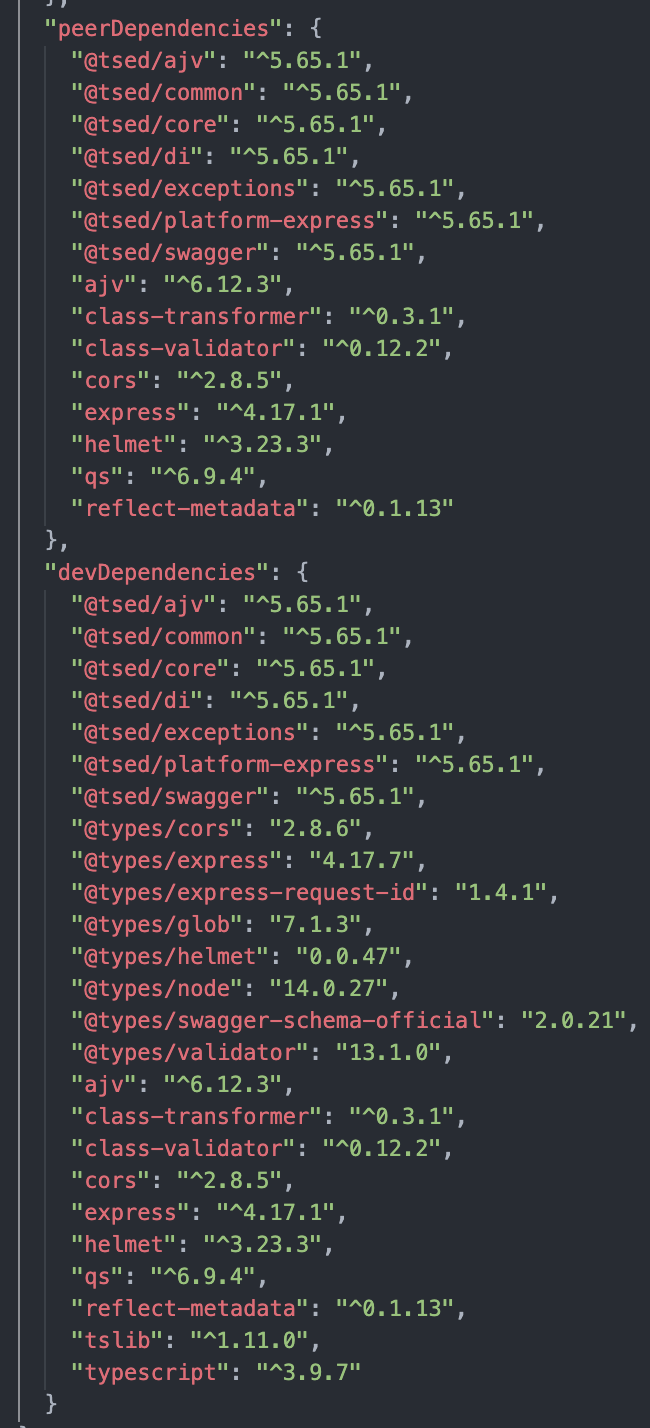
Also, running list cmd showed no conflicts

Maybe you have any other suggestions ?
Thanks
mopcweb
on 9 Sep 2020
No idea. I need to see your project. For me there is no reason to not work. The repository example previously works using yarn and it’s pretty the same thing as to deploy packages seperatly and install with npm.
Is it possible to see your project in private?
Romakita
on 9 Sep 2020
Hum can you run ´npm list reflect-metadata’ pls ?
Romakita
on 9 Sep 2020
Same as w/ @tsed/common

Here are 2 repos:
First one is an alternative of @someAnotherPackage from description above) Here i want to create some BaseServer.
Second one is example of @someAnotherPackage consumer, some external project.
In its readmes there are steps for running them locally - at first run someExamplePackage in watch mode and then tsedExampleProject in dev mode.
Also in tsedExampleProject there is copy of Server class from someExamplePackage, which works, while Server from someExamplePackage doesn't works
If any questions i'll be waiting for them. One more time - thanks !)
mopcweb
on 9 Sep 2020
Ok now, I see your problem. You use yarn workspaces accross two projects. This is not a good idea because, yarn create a sym link to the some-pkg but your files sources files are located under /some-pkg and not under node_modules/@some-pkg/tsed (symlink to somePackage).
This point is very important, because node.js resolve modules by considering the file location and doesn't take into account the simlink. For some-pkg the resolved modules for @tsed/* will be those under /some-pkg/node_modules` and for your project, it will be those under /some-project/node_modules (excepted for /node_modules/@some-pkg/tsed).
Your projects directories are something like that:
├── @some-pkg
│   ├── node_modules
│   │  └── @tsed   // TSED 1
│   ├── package.json
│   └── src
│      └──  shared
└──@some-project
    ├── node_modules
    │  ├── @some-pkg/shared (symlinb to some-pkg/src/shared)
    │  └── @tsed   // TSED 2
    ├── package.json
    └── src
I added in each node_modules/@tsed/common/lib/index.js a console.log('TSED1') / console.log('TSED2'). Then I started the server in some-project, too see how the modules are resolved (see capture).
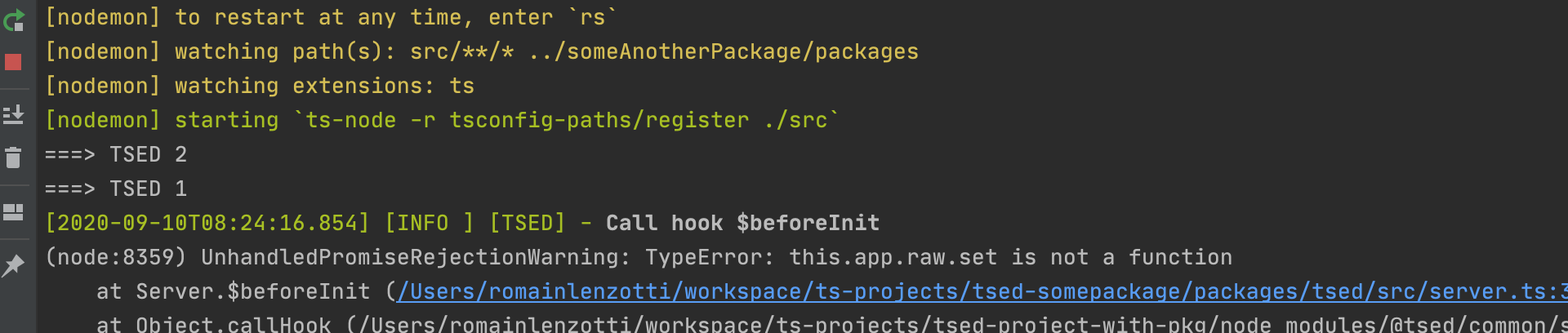
In this configuration and using yarn workspaces, @some-project/node_modules/@some-pkg/shared use tsed 1 packages while @some-project use TSED 2 packages. This is not a problem related to Ts.ED framework but it's related to your project architecture (in dev). There is almost no easy solution to get around this behavior (without a hack).
This problem occurs only when you are in dev mode. If you build and publish @some-pkg on registry then you install it with yarn, all will be works correctly because node.js/npm will resolve correctly your dependencies.
Maybe this example can help you (it's a hack) https://github.com/TypedProject/tsed-cli/blob/master/packages/cli-core/src/Cli.ts#L61)
See you
Romain
Romakita
on 10 Sep 2020
Hm, you're right!
I had doubts about using workspaces in consumer project, but that was the only way i could making dev locally without publishing package into registry and without using 'file:path/to/some-pgk/tsed' syntax, deligating everything to yarn.
My fault i see (
Thx for your example hack, i'll try it and then will leave here the result of it.
Thx man !)
mopcweb
on 10 Sep 2020
So, for those who also may be interested in such weird situation as mine i've ended up w/ next flow:
- In @some-pkg i left everything as it was, using yarn + lerna for local development and packages orchestration.
- In @some-project's package.json we have ability to link locally deveped packages via 2 protocols:
- "@some-pkg/tsed": "file:path/to/local/package"
- "@some-pkg/tsed": "link:path/to/local/package"
It should be noted, that there different behaviours using this protocols via npm and yarn.
If using file:./../ via npm running npm i will install packages, local packages and link local packages, which will result in same error for @some-pkg/tsed as @Romakita stated here.
But using file:./../ via yarn running yarn will install packages only, not linking them. So doing in that way i can leverage same @tsed/common instance and everything works even without pushing it to registry but locally.
The only limitation here is that after providing changes for such package (which is referenced via file:../../) it is necessary to update packages (for example via yarn upgrade @some-pkg/tsed).
On the other hand, for other local packages, which has no such limitation as with @some-pkg/tsed i can use link:./../ via yarn which will install + link packages.
I've push related changes into repos if some one would be interested.
One more time thanks to @Romakita for his help !)
mopcweb
on 10 Sep 2020
Related issues
Romakita
·
5Comments
 tomer-amir-vonage
·
7Comments
tomer-amir-vonage
·
7Comments
 yangukmo
·
6Comments
yangukmo
·
6Comments
 S0ulan
·
4Comments
S0ulan
·
4Comments
 Ionaru
·
5Comments
Ionaru
·
5Comments