Ts-node: SyntaxError: Cannot use import statement outside a module
I use nextjs
import koa from 'koa'
import next from 'next'
import clear from 'clear'
import body from 'koa-bodyparser'
import cors from 'koa-cors'
import logger from 'koa-logger'
import Api from './router'
const dev = process.env.NODE_ENV !== 'production'
const App = next({ dev })
const handle = App.getRequestHandler()
const PORT = parseInt(process.env.NODE_PORT) || 3000

App.prepare().then(() => {
  const Server = new koa()

  Server.use(body())
  Server.use(cors())
  Server.use(logger())

  Server
    .use(Api.routes())
    .use(Api.allowedMethods())

  Server.use(async ctx=> {
    // https://thecodebarbarian.com/building-a-nextjs-app-with-mongodb
    await handle(ctx.req, ctx.res)
    ctx.respond = false
  })

  Server.listen(PORT, () => {
    clear()
    const cowsay = require('cowsay-browser')
    const text = `Koa server listen in ${ PORT }`
    console.log(cowsay.say({ text }))
  })

})
use ts-node server.ts, BTW
➜  next git:(dev) ✗ ts-node server.ts
/home/d1y/cat/coface/code/next/server.ts:10
import koa from 'koa';
^^^^^^

SyntaxError: Cannot use import statement outside a module
    at Module._compile (internal/modules/cjs/loader.js:892:18)
    at Module.m._compile (/usr/node/node-v12.13.0-linux-x64/lib/node_modules/ts-node/src/index.ts:536:23)
    at Module._extensions..js (internal/modules/cjs/loader.js:973:10)
    at Object.require.extensions.<computed> [as .ts] (/usr/node/node-v12.13.0-linux-x64/lib/node_modules/ts-node/src/index.ts:539:12)
    at Module.load (internal/modules/cjs/loader.js:812:32)
    at Function.Module._load (internal/modules/cjs/loader.js:724:14)
    at Function.Module.runMain (internal/modules/cjs/loader.js:1025:10)
    at main (/usr/node/node-v12.13.0-linux-x64/lib/node_modules/ts-node/src/bin.ts:212:14)
    at Object.<anonymous> (/usr/node/node-v12.13.0-linux-x64/lib/node_modules/ts-node/src/bin.ts:470:3)
    at Module._compile (internal/modules/cjs/loader.js:956:30)
my tsconfig.json file
{
  "compilerOptions": {
    "target": "es6",
    "lib": [
      "es6"
    ],
    "allowJs": true,
    "skipLibCheck": true,
    "strict": false,
    "forceConsistentCasingInFileNames": true,
    "noEmit": true,
    "esModuleInterop": true,
    "module": "es2015",
    "moduleResolution": "node",
    "resolveJsonModule": true,
    "isolatedModules": true,
    "jsx": "preserve",
    "noImplicitAny": true
  },
  "exclude": [
    "node_modules"
  ],
  "include": [
    "next-env.d.ts",
    "**/*.ts",
    "**/*.tsx"
  ]
}
Why is this?
 d1y
d1y
All 35 comments
@blakeembrey
d1y
on 3 Dec 2019
You’re trying to execute use it as an ES2015 module, but node.js currently understands CommonJS.
 blakeembrey
on 3 Dec 2019
blakeembrey
on 3 Dec 2019
Added documentation: https://github.com/TypeStrong/ts-node#syntaxerror.
blakeembrey
on 3 Dec 2019
Having the same problem even when using commonjs
    "compilerOptions": {
        /* Basic Options */
        "target": "es2016",
        /* Specify ECMAScript target version: 'ES3' (default),  'ES5',  'ES2015',   'ES2016',   'ES2017',   'ES2018' or 'ESNEXT'. */
        "module": "commonjs",
My project is an expo react-native project, but that shouldn't make a difference.
But the error does seem to come from a dependency:
.../node_modules/expo-constants/build/Constants.js:1
import { AppOwnership, UserInterfaceIdiom, } from './Constants.types';
^^^^^^

SyntaxError: Cannot use import statement outside a module
    at Module._compile (internal/modules/cjs/loader.js:895:18)
    at Object.Module._extensions..js (internal/modules/cjs/loader.js:995:10)
    at Module.load (internal/modules/cjs/loader.js:815:32)
    at Function.Module._load (internal/modules/cjs/loader.js:727:14)
    at Module.require (internal/modules/cjs/loader.js:852:19)
    at require (internal/modules/cjs/helpers.js:74:18)
 xerus2000
on 7 Jan 2020
xerus2000
on 7 Jan 2020
Update 3: Since Node 13, you can use either the .mjs extension or set "type": "module" in your package.json. You don't need to use the --experimental-modules flag.
Update 2: Since Node 12, you can use either the .mjs extension or set "type": "module" in your package.json. And you need to run node with the --experimental-modules flag.
Update: In Node 9, it is enabled behind a flag, and uses the .mjs extension.
node --experimental-modules my-app.mjs
https://stackoverflow.com/questions/39436322/node-js-syntaxerror-unexpected-token-import?rq=1
 Nditah
on 7 Jan 2020
Nditah
on 7 Jan 2020
Thanks, I got it fixed that way!
xerus2000
on 9 Jan 2020
I had the same problem when I started to used babel... But later, I had a solution... I haven't had the problem anymore so far... Currently, Node v12.14.1, "@babel/node": "^7.8.4", I use babel-node and nodemon to execute (node is fine as well..)
package.json:
"start": "nodemon --exec babel-node server.js
"debug": "babel-node debug server.js" !!note: server.js is my entry file, you can use yours.
launch.json:
When you debug, you also need to config your launch.json file
"runtimeExecutable": "${workspaceRoot}/node_modules/.bin/babel-node"
Of course, with babel-node, you also normally need and edit another file, such as babel.config.js/.babelrc file
 icemars123
on 13 Feb 2020
icemars123
on 13 Feb 2020
I had the same problem and somehow fixed it. I have written a post about this, hope this helps https://xperimentalhamid.com/how-do-i/fix-cannot-use-import-statement-outside-a-module/
 dimahali
on 3 Mar 2020
dimahali
on 3 Mar 2020
I had the same problem and somehow fixed it. I have written a post about this, hope this helps https://xperimentalhamid.com/how-do-i/fix-cannot-use-import-statement-outside-a-module/
.mjs extension worked for me, thank you!!
 mfahad24
on 19 Mar 2020
mfahad24
on 19 Mar 2020
i keep getting this error when i import react in node for some reason
in my project
``
import React from 'react'
^^^^^^
SyntaxError: Cannot use import statement outside a module
``
 haouarihk
on 24 Mar 2020
haouarihk
on 24 Mar 2020
Do u solve this?
 kaiyuan0708
on 2 Apr 2020
kaiyuan0708
on 2 Apr 2020
If its an express project make this the last line in your server.js or app.js file
module.exports = app;
where app is from declared earlier, this this can be any valid variable but here app is used.
const app = express();
 htolajide
on 13 Apr 2020
htolajide
on 13 Apr 2020
To load an ES module, set "type": "module" in the package.json or use the .mjs extension.
 webia1
on 14 Apr 2020
webia1
on 14 Apr 2020
"type": "module" works, but only works if you are using Node v13.9.0 or above.
 davidwoodward
on 19 Apr 2020
davidwoodward
on 19 Apr 2020
Add .babelrc to root folder
~/.babelrc
{
  "presets": ["env", "stage-0"]
}
my package.json
~/package.json
"scripts": {
    "watch": "nodemon --exec babel-node src/index.js"
  },
  "dependencies": {
    "dotenv": "^8.2.0",
  },
  "devDependencies": {
    "babel-cli": "^6.26.0",
    "babel-preset-env": "^1.7.0",
    "babel-preset-stage-0": "^6.24.1",
    "nodemon": "^2.0.3"
  }
 fuadnafiz98
on 30 Apr 2020
fuadnafiz98
on 30 Apr 2020
When using a tsconfig.json, you may override just the module setting like this:
$ npx ts-node -O '{"module":"commonjs"}' my-script.ts
 tokland
on 31 Jul 2020
tokland
on 31 Jul 2020
In case you stumble upon this and don't want to change the module option to commonjs because this will mess with your tree shaking in webpack. You can have more than one tsconfig.json. ts-loader supports a config entry named configFile. There is also a possibility for extending tsconfig.json files.
In my case I had a vue project and I wanted to test some parts of it with mocha/chai. I created a tsconfig.base.json with the common options. The tsconfig.json file extends the base file and is setup to run with mocha. It's module setting is set to commonjs. Additionally I created a tsconfig.webpack.json extending the base file that has its module config set to es2015 that is provided to configFile in the ts-loader options. I changed no other options anywhere else, so no type: "module" in package.json that was mentioned in this issue since this would interfere with webpack 4.x.
Also as additional info ts-node supports providing a different tsconfig.json via the -P or --project command line option.
 Dravere
on 13 Aug 2020
Dravere
on 13 Aug 2020
@Dravere we also support overriding compilerOptions inside the same tsconfig, which will only apply to ts-node. So you can keep it all in a single tsconfig file if you want.
{
  "ts-node": {
    // these options are overrides used only by ts-node
    // same as our --compilerOptions flag and our TS_NODE_COMPILER_OPTIONS environment variable
    "compilerOptions": {
      "module": "commonjs"
    }
  },
  "compilerOptions": {
    "module": "esnext"
  }
 cspotcode
on 13 Aug 2020
cspotcode
on 13 Aug 2020
@cspotcode Oh, that is amazing. Thanks for that hint. Learned a lot about Typescript and ts-node while trying to fix that problem.
Dravere
on 13 Aug 2020
I had the same problem with testing React. I've fixed that by including js files in ts-node:
   "transform": {
      "^.+\\.(ts|tsx|js|jsx)?$": "ts-jest"
    }
 mnajjarian
on 23 Sep 2020
mnajjarian
on 23 Sep 2020
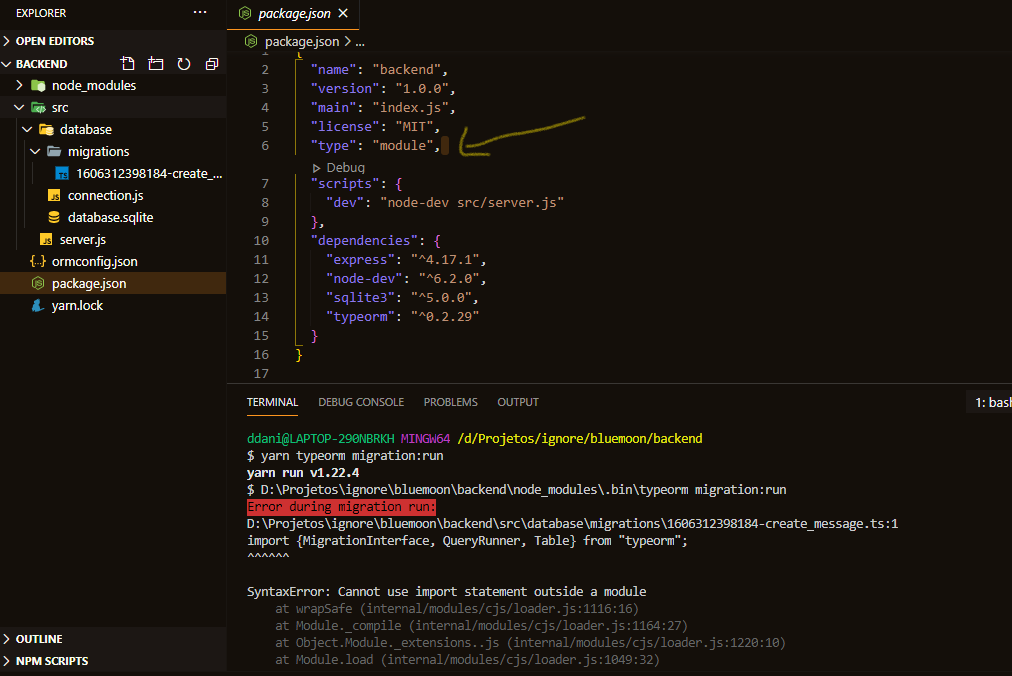
I'm a beginner in NodeJS, and well
After adding "type": "module" I still have this issue, my node version is v14.3.0 and all solutions above didn't work.
and I can't keep using require() because it's not so flexible.
Apparently, nothing happened after adding that:
 danielcnascimento
on 25 Nov 2020
danielcnascimento
on 25 Nov 2020
@danielcnascimento npm run typeorm:migration:run

 da440dil
on 28 Nov 2020
da440dil
on 28 Nov 2020
Thanks @cspotcode , I was using Threads.js that uses ts-node under the hood when it's installed and when I imported a .ts worker, was struggling for hours until adding that ts-node config to tsconfig. Now I can test typescript workers using jest.
 TheoXD
on 28 Nov 2020
TheoXD
on 28 Nov 2020
Having a similar error where I can't use imports in builds. Not sure how to fix it, tried a few things above and it didnt work.
{
  "name": "server",
  "version": "1.0.0",
  "description": "",
  "main": "index.js",
  "scripts": {
    "start": "node dist/app.js",
    "dev": "nodemon src/app.ts",
    "build": "tsc -p .",
    "migrate": "ts-node ./node_modules/typeorm/cli.js migration:run",
    "revert": "ts-node ./node_modules/typeorm/cli.js migration:revert",
    "initdb": "dropdb db_dev; createdb -E UTF8 db_dev",
    "test": "echo \"Error: no test specified\" && exit 1"
  },
  "keywords": [],
  "author": "Josh Bedo",
  "license": "ISC",
  "dependencies": {
    "@sendgrid/mail": "^7.4.0",
    "@types/express-serve-static-core": "^4.17.16",
    "@types/stripe": "^8.0.417",
    "bcryptjs": "^2.4.3",
    "cookie-parser": "^1.4.5",
    "cors": "^2.8.5",
    "dotenv": "^8.2.0",
    "express": "^4.17.1",
    "express-graphql": "^0.12.0",
    "graphql": "^15.4.0",
    "jsonwebtoken": "^8.5.1",
    "pg": "^8.5.1",
    "reflect-metadata": "^0.1.13",
    "stripe": "^8.129.0",
    "typeorm": "^0.2.29",
    "uuid": "^8.3.2"
  },
  "devDependencies": {
    "@types/bcryptjs": "^2.4.2",
    "@types/cookie-parser": "^1.4.2",
    "@types/cors": "^2.8.6",
    "@types/dotenv": "^8.2.0",
    "@types/express": "^4.17.9",
    "@types/express-graphql": "^0.9.0",
    "@types/graphql": "^14.5.0",
    "@types/jsonwebtoken": "^8.5.0",
    "@types/node": "^14.0.5",
    "@types/pg": "^7.14.3",
    "@types/uuid": "^8.0.0",
    "nodemon": "^2.0.4",
    "ts-node": "^8.10.1",
    "typescript": "^3.9.3"
  }
}
{
  "compilerOptions": {
    /* Visit https://aka.ms/tsconfig.json to read more about this file */

    /* Basic Options */
    // "incremental": true,                   /* Enable incremental compilation */
    "target": "es5",                          /* Specify ECMAScript target version: 'ES3' (default), 'ES5', 'ES2015', 'ES2016', 'ES2017', 'ES2018', 'ES2019', 'ES2020', or 'ESNEXT'. */
    "module": "commonjs",                     /* Specify module code generation: 'none', 'commonjs', 'amd', 'system', 'umd', 'es2015', 'es2020', or 'ESNext'. */
    // "lib": [],                             /* Specify library files to be included in the compilation. */
    // "allowJs": true,                       /* Allow javascript files to be compiled. */
    // "checkJs": true,                       /* Report errors in .js files. */
    // "jsx": "preserve",                     /* Specify JSX code generation: 'preserve', 'react-native', or 'react'. */
    // "declaration": true,                   /* Generates corresponding '.d.ts' file. */
    // "declarationMap": true,                /* Generates a sourcemap for each corresponding '.d.ts' file. */
    // "sourceMap": true,                     /* Generates corresponding '.map' file. */
    // "outFile": "./",                       /* Concatenate and emit output to single file. */
    "outDir": "./dist",                        /* Redirect output structure to the directory. */
    "rootDir": "./src",                       /* Specify the root directory of input files. Use to control the output directory structure with --outDir. */
    // "composite": true,                     /* Enable project compilation */
    // "tsBuildInfoFile": "./",               /* Specify file to store incremental compilation information */
    // "removeComments": true,                /* Do not emit comments to output. */
    // "noEmit": true,                        /* Do not emit outputs. */
    // "importHelpers": true,                 /* Import emit helpers from 'tslib'. */
    // "downlevelIteration": true,            /* Provide full support for iterables in 'for-of', spread, and destructuring when targeting 'ES5' or 'ES3'. */
    // "isolatedModules": true,               /* Transpile each file as a separate module (similar to 'ts.transpileModule'). */

    /* Strict Type-Checking Options */
    "strict": true,                           /* Enable all strict type-checking options. */
    // "noImplicitAny": true,                 /* Raise error on expressions and declarations with an implied 'any' type. */
    // "strictNullChecks": true,              /* Enable strict null checks. */
    // "strictFunctionTypes": true,           /* Enable strict checking of function types. */
    // "strictBindCallApply": true,           /* Enable strict 'bind', 'call', and 'apply' methods on functions. */
    // "strictPropertyInitialization": true,  /* Enable strict checking of property initialization in classes. */
    // "noImplicitThis": true,                /* Raise error on 'this' expressions with an implied 'any' type. */
    // "alwaysStrict": true,                  /* Parse in strict mode and emit "use strict" for each source file. */

    /* Additional Checks */
    // "noUnusedLocals": true,                /* Report errors on unused locals. */
    // "noUnusedParameters": true,            /* Report errors on unused parameters. */
    // "noImplicitReturns": true,             /* Report error when not all code paths in function return a value. */
    // "noFallthroughCasesInSwitch": true,    /* Report errors for fallthrough cases in switch statement. */
    // "noUncheckedIndexedAccess": true,      /* Include 'undefined' in index signature results */

    /* Module Resolution Options */
    "moduleResolution": "node",            /* Specify module resolution strategy: 'node' (Node.js) or 'classic' (TypeScript pre-1.6). */
    // "baseUrl": "./",                       /* Base directory to resolve non-absolute module names. */
    // "paths": {},                           /* A series of entries which re-map imports to lookup locations relative to the 'baseUrl'. */
    // "rootDirs": [],                        /* List of root folders whose combined content represents the structure of the project at runtime. */
    // "typeRoots": [],                       /* List of folders to include type definitions from. */
    // "types": [],                           /* Type declaration files to be included in compilation. */
    // "allowSyntheticDefaultImports": true,  /* Allow default imports from modules with no default export. This does not affect code emit, just typechecking. */
    "esModuleInterop": true,                  /* Enables emit interoperability between CommonJS and ES Modules via creation of namespace objects for all imports. Implies 'allowSyntheticDefaultImports'. */
    // "preserveSymlinks": true,              /* Do not resolve the real path of symlinks. */
    // "allowUmdGlobalAccess": true,          /* Allow accessing UMD globals from modules. */

    /* Source Map Options */
    // "sourceRoot": "",                      /* Specify the location where debugger should locate TypeScript files instead of source locations. */
    // "mapRoot": "",                         /* Specify the location where debugger should locate map files instead of generated locations. */
    // "inlineSourceMap": true,               /* Emit a single file with source maps instead of having a separate file. */
    // "inlineSources": true,                 /* Emit the source alongside the sourcemaps within a single file; requires '--inlineSourceMap' or '--sourceMap' to be set. */

    /* Experimental Options */
    "experimentalDecorators": true,        /* Enables experimental support for ES7 decorators. */
    "emitDecoratorMetadata": true,         /* Enables experimental support for emitting type metadata for decorators. */

    /* Advanced Options */
    "skipLibCheck": true,                     /* Skip type checking of declaration files. */
    "forceConsistentCasingInFileNames": true  /* Disallow inconsistently-cased references to the same file. */
  }
}
example file it throws error on
import Database from "../utils/db";
import Result from "../model/result";
import { hash, compare } from "bcryptjs";
import { v4 as uuidv4 } from "uuid";
import {
  Column,
  CreateDateColumn,
  DeleteDateColumn,
  Entity,
  Index,
  PrimaryGeneratedColumn,
  TableExclusion,
  UpdateDateColumn,
} from "typeorm";

@Entity("users")
export default class User {
  @PrimaryGeneratedColumn()
  id: number;

  @Index({ unique: true })
  @Column({ type: "uuid", unique: true, nullable: false })
  ukey: string;

  @Index({ unique: true })
  @Column({ nullable: false, unique: true })
  email: string;

  @Column({ name: 'first_name', nullable: false })
  firstName: string;
 joshbedo
on 20 Dec 2020
joshbedo
on 20 Dec 2020
Removing the option "module": "esnext" did the trick for me
 stefanoeb
on 11 Jan 2021
stefanoeb
on 11 Jan 2021
Now that we've got top level await as an unflagged feature for Node 14, and TS requires using module: "esnext" to utilize that, this bones anyone trying to use ts-node with that feature.
 shellscape
on 13 Jan 2021
shellscape
on 13 Jan 2021
@shellscape you are setting "module": "esnext", meaning you are asking node to parse and execute import / export syntax, right? Because TypeScript is emitting native import / export syntax?
If so, this requires you to do 2x things: properly configure node to execute your files as native ESM, and use an experimental feature of node: ESM loaders. An ESM loader is the only way that tool such as ts-node can compile in-process when node is executing the file as native ESM.
ts-node documentation is here: #1007
Node documentation is here: https://nodejs.org/api/esm.html#esm_loaders
cspotcode
on 13 Jan 2021
For those of you simply trying to run a typescript file using ts-node from the command line I got it to work by:
Solution
Changing my tsconfig.json to have this:
"module": "commonjs",
instead of this:
"module": "esnext",
fixed it.
Why
If you want to understand why this fixes it, here's a really good article on what module means and the difference between esnext and commonjs: https://www.tsmean.com/articles/learn-typescript/typescript-module-compiler-option/
Key point:
_So all in all this can be summarized as: Using TypeScript, node.js and the TypeScript compiler option "module": "esnext" together is next to impossible. So if you're building code that should be ran with node.js, in 2020, you should still choose "module": "commonjs"._
 rajuashok
on 22 Jan 2021
rajuashok
on 22 Jan 2021
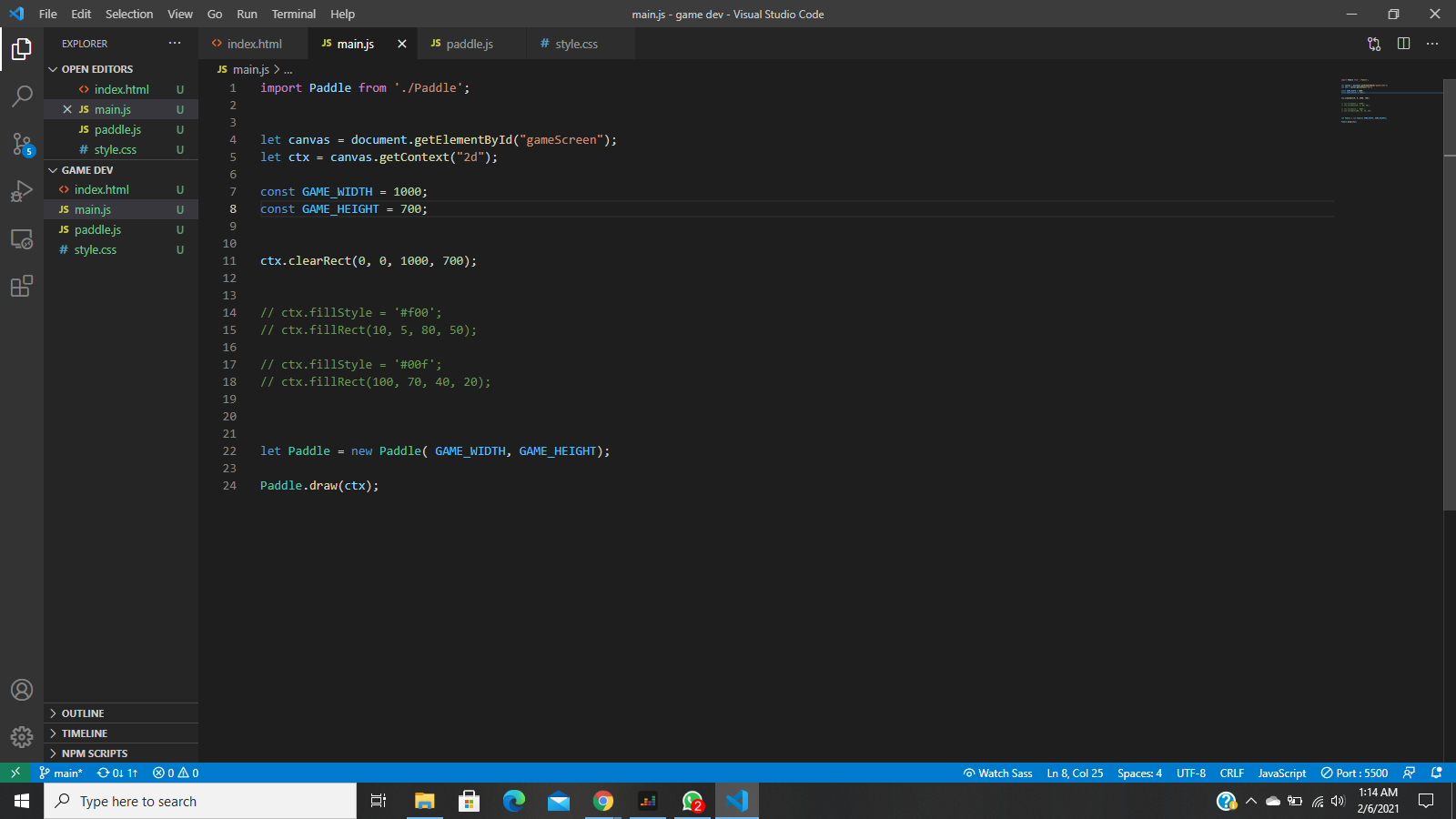
When I try importing the paddle it says "Uncaught SyntaxError: Cannot use import statement outside a module" Pls help
 Osomhe1
on 6 Feb 2021
Osomhe1
on 6 Feb 2021
I am experiencing this error when using a postinstall script in a node_module, I am under the impression that maybe ts-node call in package.json of node_module is picking up the tsconfig.json of the parent rather than it's local one?
The parent repo has module: es2020 in config because it is an AngularJS project, whereas the child is just a pure CommonJS style project.
C:\parentproject\node_modules\@myprojects\myproject\scripts\validateEnv.ts:2
import fs from 'fs';
^^^^^^

SyntaxError: Cannot use import statement outside a module
    at wrapSafe (internal/modules/cjs/loader.js:979:16)
    at Module._compile (internal/modules/cjs/loader.js:1027:27)
    at Module._extensions..js (internal/modules/cjs/loader.js:1092:10)
    at Object.require.extensions.<computed> [as .ts] (C:\parentproject\node_modules\ts-node\src\index.ts:431:14)
    at Module.load (internal/modules/cjs/loader.js:928:32)
    at Function.Module._load (internal/modules/cjs/loader.js:769:14)
    at Function.executeUserEntryPoint [as runMain] (internal/modules/run_main.js
:72:12)
    at Object.<anonymous> (C:\parentproject\node_modules\ts-node\src\bin.ts:157:12)
    at Module._compile (internal/modules/cjs/loader.js:1063:30)
    at Object.Module._extensions..js (internal/modules/cjs/loader.js:1092:10)
Any ideas about what might be going on here?
 netpoetica
on 12 Mar 2021
netpoetica
on 12 Mar 2021
We'll need to see the postinstall script.
cspotcode
on 12 Mar 2021
@netpoetica also please move this to our discussion forum since it looks like it's not a bug report or a feature request. Answers given in the discussion forum are more discoverable, meaning it is more likely that the next person with this issue will benefit from the answer as well. This saves work on the whole.
cspotcode
on 12 Mar 2021
For me setting _esModuleInterop_ to true was the fix.
{
  "compilerOptions": {
    "esModuleInterop": true
  }
}
 birhanuh
on 13 Mar 2021
birhanuh
on 13 Mar 2021
I have the same problem
 iltonbarbosa
on 22 Mar 2021
iltonbarbosa
on 22 Mar 2021
I am experiencing this error when using a postinstall script in a node_module, I am under the impression that maybe ts-node call in package.json of node_module is picking up the tsconfig.json of the parent rather than it's local one?
The parent repo has module: es2020 in config because it is an AngularJS project, whereas the child is just a pure CommonJS style project.
Estou com este mesmo problema no nodejs. Alguém pode me ajudar, por favor?
iltonbarbosa
on 24 Mar 2021
Related issues
 KiaraGrouwstra
·
3Comments
KiaraGrouwstra
·
3Comments
 nehalist
·
3Comments
nehalist
·
3Comments
 OliverJAsh
·
3Comments
OliverJAsh
·
3Comments
 dakom
·
3Comments
dakom
·
3Comments
 sanex3339
·
4Comments
sanex3339
·
4Comments
Most helpful comment
Update 3: Since Node 13, you can use either the .mjs extension or set "type": "module" in your package.json. You don't need to use the
--experimental-modulesflag.Update 2: Since Node 12, you can use either the .mjs extension or set "type": "module" in your package.json. And you need to run node with the
--experimental-modulesflag.Update: In Node 9, it is enabled behind a flag, and uses the .mjs extension.
node --experimental-modules my-app.mjshttps://stackoverflow.com/questions/39436322/node-js-syntaxerror-unexpected-token-import?rq=1