Ts-node: `npx`-invoked application that utilizes `ts-node` fails with `SyntaxError: Unexpected identifier`.
I've got a tricky one.
I'm trying to make a npx-invokable TypeScript application that launches a web server.
At first I tried to see if there was a way to have npx provide a way to invoke a package script, but the jury's still out on whether that's doable.
So instead I made a bin script that just contains:
#!/usr/bin/env node

require("ts-node").register();

require("../server");
With the following tsconfig.json:
{
    "compilerOptions": {
        "allowJs": true,
        "allowSyntheticDefaultImports": true,
        "alwaysStrict": true,
        "esModuleInterop": true,
        "experimentalDecorators": true,
        "moduleResolution": "Node",
        "target": "ES2015"
    }
}
and if I run my script:
$ ./script
It works just fine.
But if I npx git+https://my-module.git, I get:
$ npx git+https://my-module.git
~/.npm/_npx/12274/lib/node_modules/my-module/server.ts:1
import express from "express";
       ^^^^^^^

SyntaxError: Unexpected identifier
(Same result with --node-arg=--experimental-modules, which was my leading suspicion.)
And if I peek in ~/.npm/_npx/:
~/.npm/_npx/
├── 19646
├── 35009
└── 41526
    ├── bin
    │   └── my-module -> ../lib/node_modules/my-module/bin/my-module
    └── lib
        └── node_modules
            └── my-module
                ├── README.md
                ├── bin
                │   └── my-module
                ├── config.ts
                ├── node_modules
                │   └── ...
                ├── package.json
                ├── public
                ├── router
                ├── server.ts
                ├── tsconfig.json
                ├── utilities.ts
                └── views
Everything looks pretty standard.
I know this seems mostly like an npx problem, but I was hoping to get some input from people who are more familiar with the quirks of TypeScript project configuration.
Any ideas?
 brianjenkins94
All 14 comments
I'm going to guess that it's related to the .register() call. I suspect it's using the either the symlinked path or cwd so it doesn't actually find your tsconfig.json file (and maybe finds another one?). Can you try with console.log(process.cwd())? Specifically the issue is in https://github.com/TypeStrong/ts-node/blob/629525474fb548fddb7a90a48ab795a9199b1997/src/index.ts#L212. While you're at it, can you check __dirname? If that's correct, but cwd isn't, we should be able to enable .register({ cwd: __dirname }) for it to work.
 blakeembrey
on 19 Jul 2019
blakeembrey
on 19 Jul 2019
When run from the bin directory:
process.cwd(): /Users/user/Developer/my-module/bin
__dirname: /Users/user/Developer/my-module/bin
When run from npx:
process.cwd(): /Users/user/Desktop/temp
__dirname: /Users/user/.npm/_npx/4630/lib/node_modules/my-module/bin
Setting:
require("ts-node").register({ "cwd": __dirname });
Seems like the correct solution to this problem. Want me to submit an MR?
brianjenkins94
on 19 Jul 2019
Hmm, those two changes don't appear to have fixed it.
import express from "express";
^^^^^^^
SyntaxError: Unexpected identifier
at Module._compile (internal/modules/cjs/loader.js:760:23)
at Module._extensions..js (internal/modules/cjs/loader.js:827:10)
...
@brianjenkins94 I see, I wonder if that's because your tsconfig.json is still within the ../lib structure and __dirname is actually a symlink to the other location so tsconfig.json can't be found. I'm surprised it works normally - are you having the same issue if you run it from ./bin/my-module normally (without NPX)? I might have to reconstruct this and play around with the solution - it'll probably end up either specifying the execution directory or location of tsconfig.json since it currently only searches from wherever you're running.
blakeembrey
on 21 Jul 2019
$ node ~/.npm/_npx/12274/bin/my-module
and
cd ~/.npm/_npx/12274/lib/node_modules/my_module/
node ./bin/my-module
Yield the same error as above. So it doesn't actually work at all from under the ~/.npm/_npx/ folder.
I'll see if I can help you with a minimal reproducible sample.
Update: This should help: https://gist.github.com/brianjenkins94/8ca182b682610242ab35df36d4238e99
brianjenkins94
on 21 Jul 2019
brianjenkins94
on 25 Jul 2019
https://github.com/TypeStrong/ts-node/issues/617#issuecomment-401406834
npx installs your package in .../node_modules/, and TS Node does not compile files in node_modules by default.
So, try to change your code from
require("ts-node").register();
to
require('ts-node').register(
Object.assign(
{
ignore: [/\.js/],
},
require('./tsconfig.json'),
),
);
 Broltes
on 13 Aug 2019
Broltes
on 13 Aug 2019
Interesting. I won't have a chance to look into this for a bit but a new error message is definitely progress.
$ npx https://gist.github.com/brianjenkins94/8ca182b682610242ab35df36d4238e99
npx: installed 60 in 4.756s
process.cwd(): /Users/user
__dirname: /Users/user/.npm/_npx/51989/lib/node_modules/sampleThatReproducesTheIssue
⨯ Unable to compile TypeScript:
.npm/_npx/51989/lib/node_modules/sampleThatReproducesTheIssue/server.ts:2:23 - error TS2307: Cannot find module 'path'.
2 import * as path from "path";
~~~~~~
.npm/_npx/51989/lib/node_modules/sampleThatReproducesTheIssue/server.ts:6:34 - error TS2304: Cannot find name '__dirname'.
6 app.use(express.static(path.join(__dirname, "public")));
~~~~~~~~~
Try to add
/// <reference types="node" />
to the top of server.ts.
Broltes
on 13 Aug 2019
Weird. I wonder why it needs an explicit triple-slash reference. But that does make it work.
I'm going to do a little more research on if there's a way to do it without the triple-slash reference and then probably close this later today.
brianjenkins94
on 14 Aug 2019
Removing types from the tsconfig.json fixed it. No triple-slash reference necessary.
Thanks a bunch guys!
@Broltes there's $10 for you at that BountySource link. Let me know if you run into any issues.
brianjenkins94
on 14 Aug 2019
Weirdly this issue has come back up for me again. Investigating...
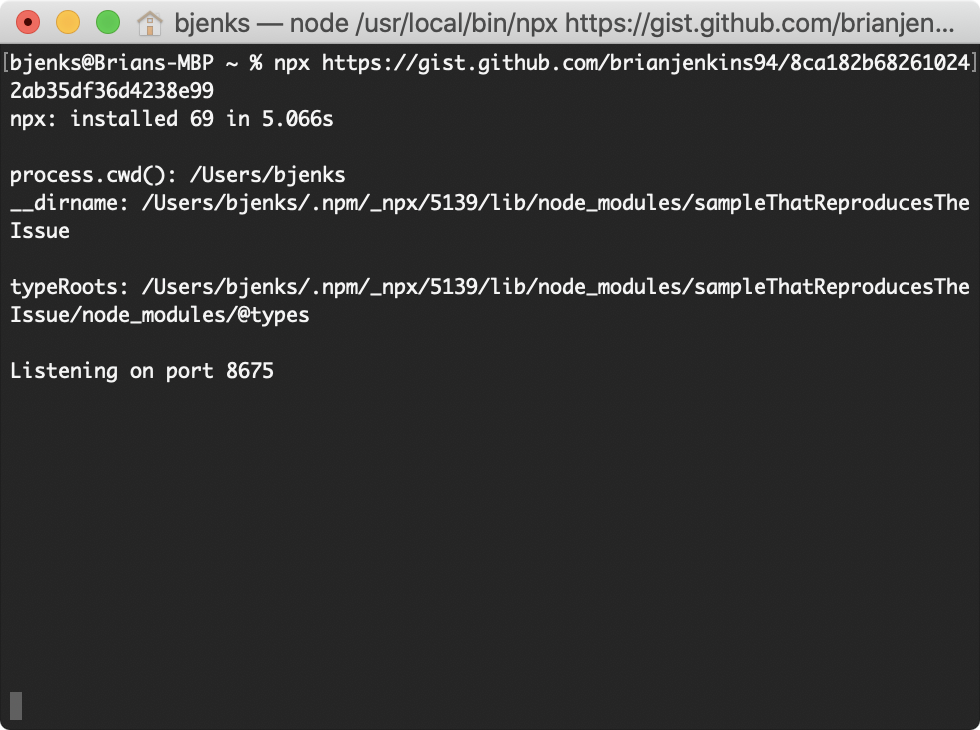
This works fine:
npx https://gist.github.com/brianjenkins94/8ca182b682610242ab35df36d4238e99
This does not:
npx cireneirbo/airwinfi
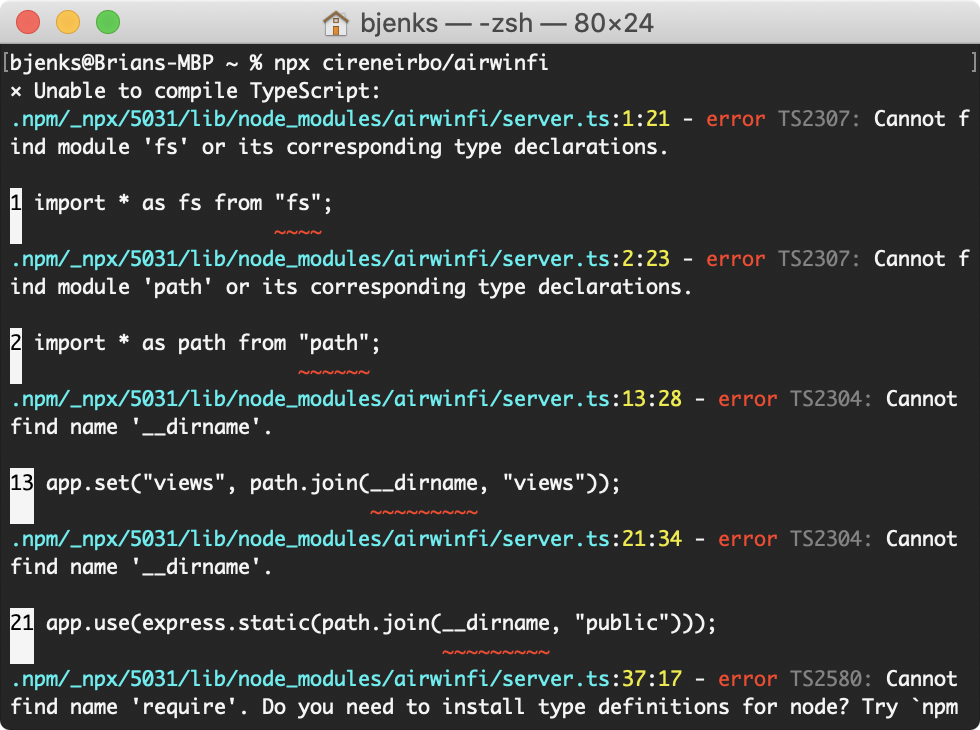
Code looks identical...
brianjenkins94
on 20 Jun 2020
This works again. No idea why.
brianjenkins94
on 9 Sep 2020
This looks to be all that's necessary with the latest version:
require("ts-node").register({
    "dir": __dirname,
});

require("../process");
Related issues
 lukashavrlant
·
153Comments
lukashavrlant
·
153Comments
 SethDavenport
·
34Comments
blakeembrey
·
49Comments
SethDavenport
·
34Comments
blakeembrey
·
49Comments
 michalchochol
·
30Comments
michalchochol
·
30Comments
 DustinJSilk
·
27Comments
DustinJSilk
·
27Comments
Most helpful comment
This looks to be all that's necessary with the latest version: