Ts-node-dev: Random errors during typescript compilation
Hello guys!
I was using [email protected] with node v12.13.0 and random errors appeared at compilation time. (I've tried different versions of [email protected].)
Examples:
- XY is not a contstructor. (XY is never the same)
- Can not read property of undefined (e.g. enums, functions, etc. )
I've been looking for a solution, I found out that @1.0.0-pre.44 work perfectly, but other versions failed to compile the project. When using @1.0.0-pre.54 version, pressing Ctrl+S on the root file (index.ts), it starts to recompile then fails maximum 1 or 2 times and works after that. If I restart with npm start then it fails always at first.
My start script:
"start": "set debug=* && tsnd --respawn --ignore-watch node_modules --debug --transpile-only src/index.ts"
I am using Windows 10 with WSL enabled.
Moreover, this is not a "random behaviour" 4 computers (windows 10) reproduce it, but on linux works fine.
Any idea what's going on?
Thanks in advance.
PS.: If you need any info, just let me know.
 FL45H97
All 57 comments
@FL45H97
I have the same issue too. Everything works fine upto pre.44 and anything after that things started to break and we need to recompile couple of times for the app to be up. I know that after version 44, file watcher has been replaced with chokidar which for some reason does not handle classes (files) with circular dependencies.
Changed made in post 44
lib/index.js
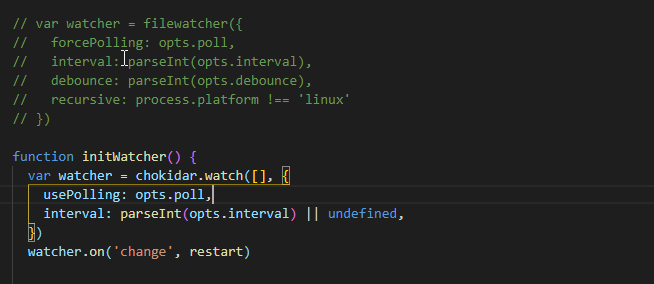
Please see error below.

 saachinsiva
on 24 Jul 2020
saachinsiva
on 24 Jul 2020
Hm, almost not using ts-node-dev on windows. Can you try using --poll flag? Don't get what can be the issue yet.
 wclr
on 24 Jul 2020
wclr
on 24 Jul 2020
looks like @saachinsiva may not be using windows - although not clear -- @saachinsiva can you specify your OS?
 bradennapier
on 24 Jul 2020
bradennapier
on 24 Jul 2020
I have exactly the same issue as initially described (on MacOS), since an upgrade. I may have to launch tsnd between 1 and, say, 5 times to make it work.
 Javarome
on 24 Jul 2020
Javarome
on 24 Jul 2020
This is really strange, I don't think that it is relates to filewatcher => chokidar migration. There is some repro example neded.
wclr
on 24 Jul 2020
I just upgraded and not seeing the issue. I did find mention of this error though and it seems related to circular references.
Based on this https://stackoverflow.com/a/57838835/3827338 - it seems it may be in some way resolved during actual typescript compilation but exposed in ts-node
Perhaps try running with transpileOnly, compiler host, and perhaps script mode (the latter simply because ts-node is likely to make that default in future)? ts-node-dev -s -H -T
I just tried out the recommended madge and it works well - found circular deps in my project easily which is huge - and created a crazy little graph for me :-P, although i still do not have failures even when editing those files
bradennapier
on 24 Jul 2020
I also installed madge and it detected no circular dependencies. Which makes sense, as if it was the problem in my case it would occur all the time (whereas it occurs randomly accross multiple tsnd runs without changing sources).
Javarome
on 24 Jul 2020
I can also confirm that going back to ~44~ 43 workarounds the problem.
Javarome
on 24 Jul 2020
Well, a repro would be helpful for sure - will keep an eye out for it happening on our project -- which is a pretty big repo with lots of complex links so if i run into it i'll def try to submit a PR / fix.
bradennapier
on 24 Jul 2020
I usually use currenlty while dev: ts-node-dev -H -T
wclr
on 25 Jul 2020
@bradennapier
We are running our app on Alpine WSL on Windows 10. Our application is written in NestJS and have lot classes having circular dependencies. I just installed latest version of ts-node-dev(pre-56) and can run the application successfully from Windows command prompt but I still get the issue on Linux terminal(alpine wsl).
saachinsiva
on 25 Jul 2020
So yesterday I've installed pre.44 GLOBALLY&locally in 2 different projects. Today i've installed pre.54 both locally and globally (but only in 1 project). I could not reproduce the error. However, since I've removed the pre.44 from the last project LOCALLY, I can reproduce the error in both project ._. I don't understand what's going on....
As @whitecolor suggested I've tried the --poll flag, it didn't helped, moreover I could not start the project...
I can confirm that running madge --circular --extensions ts,tsx ./index.ts find 44 circular dependencies and 6 warnings (skipped packages).
FL45H97
on 25 Jul 2020
I'm having the same problem, I'm using the ubuntu subsystem on windows.
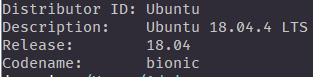
TypeScript version:

Let me know if anyone here has gotten any possible solution.
 JuanFelix88
on 15 Aug 2020
JuanFelix88
on 15 Aug 2020
I have narrowed it down to this commit, but I don't see how it's related. Everything works fine at the commit before.
https://github.com/whitecolor/ts-node-dev/commit/49cddc0c278b58357704b16d4d25c02983a74c92
I have also removed all circular dependencies and the problem still occurs. Build works fine with ts-node. Unfortunately, I don't have code I can share.
 jrosspaperless
on 19 Aug 2020
jrosspaperless
on 19 Aug 2020
@jrosspaperless didn't you try to rever the code of this commit (just fix it in your global node_modules) and see how it works for the current version?
wclr
on 19 Aug 2020
@whitecolor Thanks for the quick response! I hadn't attempted that, but I also linked to the wrong commit ID. I updated my comment to link to the correct one.
I reverted lib/compile.js in my local node_modules to https://github.com/whitecolor/ts-node-dev/blob/4c4dc29e686b3e2dba17eb01f43268e3725e75e8/lib/compiler.js and it succeeds every time.
Reverting only the changes in that commit wasn't feasible because there are other changes that are built on top of that.
I suspect this might not help very much, but I can spent some time playing with this a bit and seeing if I can figure out the root cause in lib/compile.js. It will take me a while to understand what the code in that file is doing.
jrosspaperless
on 19 Aug 2020
It appears that after registering ts-node, the code then overwrites the methods assigned to require.extensions['.ts'] and require.extensions['.tsx'] with the original method designed for use with javascript.
I'm still a bit confused, but this fixes the issues.
https://github.com/whitecolor/ts-node-dev/pull/196
FYI, I'm willing to help out with this if you have some more guidance on what's going on. Like, if I missed something or if what I removed is necessary to achieve something else.
jrosspaperless
on 20 Aug 2020
Those who have such errors check out the latest published.
wclr
on 20 Aug 2020
@whitecolor Thanks for publishing. Unfortunately, it looks like you missed removing these 3 lines, which is the primary cause of the issue:
https://github.com/whitecolor/ts-node-dev/commit/d9de063c7f528c683b5c80ab8882328747ed16e6#diff-ee97c5091b89979aace94674818996baL201-L203
I don't understand what that block of code is attempting to do. .ts and .tsx are undefined before being explicitly set to the empty function. If the intension is to set the original require.extensions, the only handler that existed was the one for .js. I still think I'm missing something, but explicitly setting ts and tsx extensions to the originalJSHandler before processing is the root cause of the issue I am seeing.
I've rebased my PR against your current master: #196
jrosspaperless
on 20 Aug 2020
I don't understand what that block of code is attempting to do. .ts and .tsx are undefined before being explicitly set to the empty function.
After an error occurs there is a need to re-register ts-node, because it doesn't handle changes in files with errors otherwise. So there is need to revert back handlers. ts/tsx could be set to undefined, but js should be set to originalHandler. Try to run test (yarn test-dev) with proposed changes. Test with error won't pass.
wclr
on 20 Aug 2020
We're also seeing random issues with all versions _after_ pre.44. We don't get any errors but sometimes the compilation will hang and never complete. If you enable debug you can see it progressing and then stop but not always on the same file.
pre.44 works ok. pre.45 doesn't but if I revert the changes to index.js to use filewatcher instead of chokidar then that also works consistently.
This is on MacOS, ts-node version 9.0.0, typescript version 3.9.5
 mlev
on 28 Aug 2020
mlev
on 28 Aug 2020
@mlev if you revert back the code to watcher you probably could debug what prevents ts-node-dev to work properly with chokidar?
wclr
on 28 Aug 2020
I've tried but can't track it down so far. I've been unable to consistently reproduce it. Sometimes it hangs 3 times in a row - other times it works 5 times and then hangs.
mlev
on 2 Sep 2020
@mlev If you have time, I created this PR to solve the problem I'm experiencing (https://github.com/whitecolor/ts-node-dev/pull/196), but it breaks the It allows to use custom TS Transformers unit test. Maybe it would solve your problem, too? Somehow, there's a difference in the environments when ts-node-dev launches ts-node and when ts-node is launched directly.
jrosspaperless
on 2 Sep 2020
Hello,
It's not really a random error at transpilation but with version > .pre43, that repository https://github.com/LucasBrazi06/ev-server trigger ts-node-dev wrong compilation issue:
I339261@C02C18NBMD6T ev-server-git (master-qa|✚2…) % npm run start:dev

> [email protected] start:dev /Users/I339261/Sources/ev-server-git
> npm run components:export && cross-env NODE_ENV=development ts-node-dev --max-old-space-size=4096 -- src/start.ts


> [email protected] components:export /Users/I339261/Sources/ev-server-git
> node src/componentsExport.js

ts-node-dev ver. 1.0.0-pre.62 (using ts-node ver. 8.10.2, typescript ver. 4.0.2)
Compilation error in /Users/I339261/Sources/ev-server-git/src/server/rest/CentralRestServerAuthentication.ts
[ERROR] 23:19:55 ⨯ Unable to compile TypeScript:
src/server/rest/CentralRestServerAuthentication.ts:28:39 - error TS2339: Property 'tenantID' does not exist on type 'User'.

28       } else if (req.user && req.user.tenantID) {
                                         ~~~~~~~~
src/server/rest/CentralRestServerAuthentication.ts:29:29 - error TS2339: Property 'tenantID' does not exist on type 'User'.

29         tenantID = req.user.tenantID;
You can clone that fork https://github.com/jerome-benoit/ev-server to reproduce the issue.
 jerome-benoit
on 2 Sep 2020
jerome-benoit
on 2 Sep 2020
@jerome-benoit seem like a normal TS error with missing types, read this https://github.com/TypeStrong/ts-node#help-my-types-are-missing You can test it adding --files option, which is not recommended because can slow down the process drastically on a large project.
wclr
on 3 Sep 2020
@jerome-benoit seem like a normal TS error with missing types, read this TypeStrong/ts-node#help-my-types-are-missing You can test it adding
--filesoption, which is not recommended because can slow down the process drastically on a large project.
The TS configuration is correct, the type definition also and the error is reporting a missing type that does not exist only when ts-node-dev > .pre43 is used. Using tsc for transpilation for example is successful.
jerome-benoit
on 3 Sep 2020
@jerome-benoit try to run with --files flag, was true by default prior pre43., tsc uses a little bit different approach to compilation, if you compare try to run with just ts-node.
wclr
on 3 Sep 2020
@jerome-benoit try to run with
--filesflag, was true by default prior pre43.,tscuses a little bit different approach to compilation, if you compare try to run with justts-node.
It fixed the misreported compilation error.
Thanks.
jerome-benoit
on 3 Sep 2020
@jerome-benoit as I said you better avoid using --files option, as it includes in complication all the source files that are probably not needed for running and it slows down ts-node-dev start at least. To make your extra typings visible, you need to use typeRoots in tsconfig, or place typings in some standard folder like @types.
wclr
on 3 Sep 2020
My compilations are also crashing with:
I used Madge to find and fix a single circular reference in my program, but i still keep receiving random compiling errors
Compilation Error
Error: UNKNOWN: unknown error, open 'C:\Users\...
Pre44 worked for me,
 thadeucity
on 5 Sep 2020
thadeucity
on 5 Sep 2020
Instead of using Pre 44 I started Using TS-Node with Nodemon, and worked for me. Any idea on what is causing this problem with chokidar for TS-Node-Dev?
thadeucity
on 16 Sep 2020
I don't think that it is chokidar the cause, there were some other changes in this version.
@thadeucity does the error happen on any project on the machine? Or only on a certain one?
wclr
on 16 Sep 2020
@whitecolor I can confirm that these errors occured in several projects at different locations. In my opinion, something wrong with the circular reference resolver. When you run it first it stuck. When you ran again a different error occurs, which means (i think) it could resolve the previous one.
Let me know if you have any idea what's going on. We are using pre44 which is operating perfectly.
@whitecolor do you have a repo in which you can reproduce? If you don't have one, I will create one sooon.
FL45H97
on 17 Sep 2020
@FL45H97 create one that can reproduce, please
wclr
on 17 Sep 2020
@whitecolor It happens on Random projects with or without circular references. It is not predictable when it will occur, now I'm having the issue with just private projects. If I find this during the development of any public project of mine, I will share it here.
thadeucity
on 18 Sep 2020
Also have the same problem. It seems to only happen on Windows and Mac, since on Linux it does not happen for me (but I'd say mostly on Mac since previous versions seem to have no problem for me on Windows).
To me it looks like it's running ts-node before the _initial_ typescript compilation is finished, meaning not all files are available to it, therefore it's throwing errors like:
- Cannot find _x_ module
- Cannot read property _x_ of undefined
- foo.bar is not a function
Now, since it seems to be the initial compilation, after you save a file 2-4 times (usually the index.ts or w.e entrypoint you have, since other files haven't been compiled), the errors stop appearing since missing files probably already got compiled (that is, until you exit the process and run the script again). Sometimes only the necessary files to boot the project get compiled, but eventually you call a function (like on an Express route or something) and it will then throw the error, so no way to be sure.
I tried things mentioned in #209 like the --debug flag (this doesn't return anything for me, even less errors with than without) and the --cache-directory (which, if you re-run the script, still throws the errors, so it's the same without). Also the --files flag mentioned here didn't work for me.
 Maikuh
on 7 Oct 2020
Maikuh
on 7 Oct 2020
it looks like it's running ts-node before the initial typescript compilation is finished
Files are required and compiled synchronously and sequentially. --debug shows which files are required and compiled. I wonder why it not possible for those to whom it happens to figure out what is going on and what goes wrong while compilation.
wclr
on 7 Oct 2020
Ok I got something for you @whitecolor.
There seems to be a race issue in the compiled names of the files.
Example 1: This generated the infamous something.default is not a function. Interestingly the index was problematic in the files and not the actual invoice file that exports the default.


Example 2: This one ran fine but got some weird duplicate files with a postfix that belongs to another file name.


At first I thought it might be an issue because I run two instances of the code in parallel with different entrypoint and (correct me if I am wrong) they use the same compiled temp folder. So I gave them a different cache directory and it seemed to improve but you still get weird stuff like example 2. In example 1, I kinda looked for trouble because I can the same program twice with the same cache.
So the issues seems to be in the writing or generation of the names of the compiled code. The actual content of the files is correct and is the output you would expect from TS compiler.
 Sytten
on 12 Nov 2020
Sytten
on 12 Nov 2020
Digging deeper I added a console.log in the writeCompiled function (https://github.com/whitecolor/ts-node-dev/blob/master/src/compiler.ts#L235) and I saw a lot of writes to the same name with the occasional weirdness in the name. This is for a single instance of ts-node-dev. We see that the file is written correctly twice and incorrectly twice.

It seems fairly consistent but never with the same files.
Sytten
on 12 Nov 2020
A bit of progress, the compile function is called only once even though writeCompiled is called twice. The bad file is another compilation name though. The double write and the bad file name seem like two separate issues. Not sure yet what triggers those compilations, continuing digging.

The Image shows the unique ID ( generated at the beginning of the compile function https://github.com/whitecolor/ts-node-dev/blob/master/src/compiler.ts#L231), is the same for both write but different for the second bad filename compilation.
Sytten
on 12 Nov 2020
Reading the code of ts-dev, I found that they actually call the callback themselves: https://github.com/TypeStrong/ts-node/blob/f848983623308d1688bef82287c993095315f1c3/src/index.ts#L1044
So I removed the duplicate call: https://github.com/whitecolor/ts-node-dev/blob/master/src/compiler.ts#L251
That fixed the issue of duplicate write and it helped reduce the number of bad file names. I still see some when I run parallel ts-node-dev even without sharing a cache directory.
Sytten
on 13 Nov 2020
More debugging and I think I found the the root issue is really concurrent write to compiled files. I was wrong earlier when I said they share a cache, they only do if you force it via the cache-directory parameter. And then you get problems because each run wipes the directory. This probably creates another problem where the temp folder is getting filled with every run of the software but thats a problem for another day.
So my fix is to use a lock to prevent concurrent writes to the same file. We don't even have to retry because we can assume that if a file is being written it will have the proper code. No sure why it sometimes compile the file twice and I hope it won't fuck up reload if two compilation message are processed back to back. Anyway a PR will be out shortly.
Sytten
on 13 Nov 2020
@Sytten Amazing work! Thanks for taking the time to investigate this! I got as far as seeing what appeared to be the duplicate compilation, but was going down some other path that resulted in a dead end and I had to give up and work on something else.
I see your PR. I'll pull your branch and test it and follow up. Thanks again!
jrosspaperless
on 13 Nov 2020
@Sytten Unfortunately, for whatever reason, this didn't solve the problem my project is suffering from. Hopefully, this will help others, though.
For others, to test the PR, you can replace ts-node-dev in your package.json with "ts-node-dev": "github:Sytten/ts-node-dev#fix/concurrent-file-write".
jrosspaperless
on 16 Nov 2020
Hum that is weird, maybe there is another bug then. You still get something.default is not defined? Did you check the content of the cache folder? What is your OS?
Sytten
on 16 Nov 2020
Hum that is weird, maybe there is another bug then. You still get something.default is not defined? Did you check the content of the cache folder? What is your OS?
I am using MacOS Big Sur and I have cleared yarn cache. The error messages I get vary across a number of different types of failures. I have verified there are no circular dependencies.
For example:
[ERROR] 11:05:00 Error: Expected {} to be a GraphQL type.
[ERROR] 11:06:40 Error: One of the provided types for building the Schema is missing a name.
(node:32459) UnhandledPromiseRejectionWarning: Error: The type of Query.default must be Output Type but got: undefined.
[ERROR] 11:07:44 TypeError: Cannot read property 'web' of undefined
[ERROR] 11:08:01 Error: Expected {} to be a GraphQL nullable type.
I have the same issue, I'm using Windows 10.
I tried installing fix/concurrent-file-write but I'm getting 'ts-node-dev' is not recognized as an internal or external command. (I'm using yarn)
It does seem that it's a concurrency issue tho, the error that I get is random, it seems that it depends on what it executes first
 brunolm
on 9 Dec 2020
brunolm
on 9 Dec 2020
I have the same issue, I'm using Windows 10.
I tried installing
fix/concurrent-file-writebut I'm getting'ts-node-dev' is not recognized as an internal or external command. (I'm using yarn)It does seem that it's a concurrency issue tho, the error that I get is random, it seems that it depends on what it executes first
Me too. I did this and it works: https://github.com/whitecolor/ts-node-dev/issues/185#issuecomment-728138335
 rattkin
on 9 Dec 2020
rattkin
on 9 Dec 2020
Yeah I am trying to get it merged but @whitecolor doesn't seem to be able to reproduce so it lingers. I actually published my fork on npm if you want to use it directly https://www.npmjs.com/package/@sytten/ts-node-dev
I am still having some issues that are core to the way this was built with pipes and shared files, I am tempted by a rewrite but I don't think I have the time to finish it.
Sytten
on 9 Dec 2020
I encountered this issue when loading files with require('./something/some.js') where I would have an export const { name: 'somename' } and I would randomly get the 'name' undefined error. It stop at random files, sometimes modifying the file helped. Using the transpile-only flag would cause it to sometimes load more but still crash with the error.
Just switched to @Sytten fork mentioned above and now able to load just fine.
Also the error was only happening on my traditional windows machine in PowerShell. It would run fine on my Windows machine with WSL Ubuntu 20.04 (Using VS-code remote extension to run it on bash).
Also to note using ts-node 9.1.1 and typescript 4.1.2.
 foestauf
on 9 Dec 2020
foestauf
on 9 Dec 2020
I encountered this issue fairly recently when a dev I work with couldn't get the app running, but it worked after a reformat (bit extreme). I pulled in @Sytten's fork and it worked for me.
 seiyria
on 9 Dec 2020
seiyria
on 9 Dec 2020
Check if the latest published works for you.
wclr
on 10 Dec 2020
@whitecolor I still need to run some more tests and have other team members try, but the 1.0.0 release seems to have cleared up the issues I've been experiencing.
jrosspaperless
on 10 Dec 2020
The 1.1.1 release should work now, I will run more tests on my end too to make sure it doesn't fail on larger codebases. I also found a another bug with prisma that I need to investigate.
Sytten
on 10 Dec 2020
So far 1.1.1 does seem to fix the issue for me! :+1:
Update: it's being working perfectly for over a week!
brunolm
on 10 Dec 2020
I can also attest that the latest versions have been working without issue. Thank you! ⚡
jrosspaperless
on 1 Apr 2021
Related issues
 Derya
·
6Comments
Derya
·
6Comments
 maxpain
·
6Comments
maxpain
·
6Comments
 danielpza
·
5Comments
danielpza
·
5Comments
 n1ru4l
·
3Comments
n1ru4l
·
3Comments
 JaLe29
·
9Comments
JaLe29
·
9Comments
Most helpful comment
More debugging and I think I found the the root issue is really concurrent write to compiled files. I was wrong earlier when I said they share a cache, they only do if you force it via the cache-directory parameter. And then you get problems because each run wipes the directory. This probably creates another problem where the temp folder is getting filled with every run of the software but thats a problem for another day.
So my fix is to use a lock to prevent concurrent writes to the same file. We don't even have to retry because we can assume that if a file is being written it will have the proper code. No sure why it sometimes compile the file twice and I hope it won't fuck up reload if two compilation message are processed back to back. Anyway a PR will be out shortly.